HubSpot: สร้างหรืออัปเดตผู้ติดต่อ
ใช้ HubSpot: สร้างหรืออัปเดตผู้ติดต่อ เพื่อ upsert ผู้ติดต่อ HubSpot หนึ่งรายทางอีเมลจากขั้นตอน Journey: โดยจะสร้างผู้ติดต่อใหม่เมื่อไม่พบอีเมล หรืออัปเดตคุณสมบัติที่ระบุไว้เมื่อพบ จุดนี้จะรับรองความถูกต้องด้วย HubSpot private app token ของตัวเอง มันไม่ได้ใช้การผสานรวม HubSpot ระดับบัญชีใดๆ ที่กำหนดค่าไว้ที่อื่นใน Settings
การใช้งานทั่วไป:
- ซิงค์กิจกรรม Journey เข้าสู่ CRM: สร้างหรืออัปเดตผู้ติดต่อเพื่อให้ฝ่ายขายเห็นความคืบหน้าของ Journey โดยไม่ต้องตรวจสอบ Pushwoosh
- เพิ่มข้อมูลผู้ติดต่อ: ตั้งค่าคุณสมบัติ เช่น แผน หรือการซื้อล่าสุด เมื่อ Tag ของผู้เดินทางอัปเดตตลอด Journey
- ทริกเกอร์เวิร์กโฟลว์ HubSpot: อัปเดตคุณสมบัติที่เวิร์กโฟลว์ HubSpot เฝ้าดูจากภายใน Pushwoosh Journey
กำหนดค่าจุด
Anchor link to- ลาก HubSpot: สร้างหรืออัปเดตผู้ติดต่อ จากส่วน Integrations ของแผงด้านซ้ายไปยัง canvas
- ดับเบิลคลิกที่จุดและป้อน Step Name
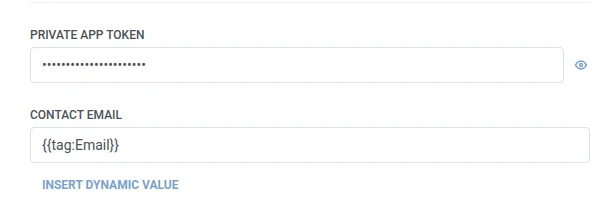
- ใน Private app token ให้ป้อน HubSpot private app token ที่มีสิทธิ์ในการเขียนผู้ติดต่อ ข้อมูลจะถูกจัดเก็บในรูปแบบมาสก์ เหมือนกับ webhook secret header
- ใน Contact email ให้ป้อนอีเมลที่ HubSpot ใช้เพื่อค้นหาผู้ติดต่อที่มีอยู่ มันใช้มาโครเดียวกันกับ Properties เช่น
{{tag:Email}}ดังนั้นผู้เดินทางแต่ละคนจะ upsert ผู้ติดต่อของตนเองแทนที่จะชนกันที่ที่อยู่คงที่เดียว อย่าทำซ้ำใน Properties
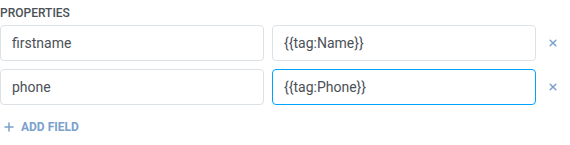
- ใน Properties ให้เพิ่มหนึ่งแถวต่อหนึ่งคุณสมบัติ HubSpot ที่จะตั้งค่า ป้อนชื่อคุณสมบัติภายในของ HubSpot (เช่น
firstname,phone) และค่า ชื่อต้องไม่ว่างเปล่าและไม่ซ้ำกัน ค่าอาจเป็นข้อความคงที่หรือมาโครของผู้เดินทาง เช่น{{tag:Name}}ซึ่งเป็นมาโครเดียวกันกับในเนื้อหา Webhook หรือคลิก Insert Dynamic Value เพื่อเลือกแอตทริบิวต์ที่ขั้นตอนก่อนหน้าใน Journey นี้สร้างขึ้น เช่น การตอบสนองของ LLM หรือค่า Webhook ที่แมปไว้
- คลิก Save
การตอบสนอง
Anchor link toผู้เดินทางจะเดินทางต่อไปยังขั้นตอนใดก็ตามที่คุณเชื่อมต่อถัดไปบน canvas
แอตทริบิวต์หลังจากขั้นตอนทำงาน
Anchor link to| แอตทริบิวต์ | สิ่งที่เก็บ |
|---|---|
hubspot_contact_id | ID ของผู้ติดต่อ HubSpot |
วิธีใช้ในขั้นตอนถัดไป
Anchor link toผู้เดินทางได้เดินทางต่อไปยังขั้นตอนถัดไปแล้วโดยไม่คำนึงถึงแอตทริบิวต์นี้ บันทึกไว้ใน Tag ด้วย Update user profile หากคุณต้องการเชื่อมโยงกลับไปยังผู้ติดต่อนี้ในภายหลัง เช่น ผ่าน API ของ HubSpot เอง
ความล้มเหลวและการตอบสนองที่ไม่คาดคิด
Anchor link toคำขอที่ล้มเหลวจะทำให้ผู้เดินทางออกจาก Journey ดู Errors and failed requests
สถานการณ์ตัวอย่าง: การซิงค์การลงทะเบียนใหม่เข้าสู่ HubSpot
Anchor link toทีมต้องการให้ทุกการลงทะเบียนใหม่มีอยู่ในฐานะผู้ติดต่อ HubSpot โดยไม่ต้องมีขั้นตอนการนำเข้าแยกต่างหาก
- เพิ่มองค์ประกอบ Trigger-based entry และตั้งค่าให้ทำงานเมื่อมีอีเวนต์
SignupCompleted - เพิ่ม HubSpot: สร้างหรืออัปเดตผู้ติดต่อ ต่อจากนั้นทันที ตั้งค่า Contact email เป็น
{{tag:Email}}ใน Properties ตั้งค่าfirstnameเป็น{{tag:Name}} - คลิก Save
เมื่อขั้นตอนนี้ทำงาน ทุกการลงทะเบียนใหม่จะถูกสร้างเป็นผู้ติดต่อ HubSpot โดยสร้างหรืออัปเดตทางอีเมล ดังนั้นการลงทะเบียนซ้ำจะไม่สร้างรายการที่ซ้ำซ้อน