เซกเมนต์ภายนอก
External segments ช่วยให้คุณสามารถกำหนดเป้าหมายผู้ใช้ที่จัดเก็บไว้ในฐานข้อมูลของคุณเอง เช่น CRM หรือ data warehouse ของคุณ แทนที่จะต้องส่งออกเป็นไฟล์ CSV แล้วอัปโหลดใหม่ทุกครั้งที่รายการมีการเปลี่ยนแปลง สำหรับฐานข้อมูล คุณเพียงแค่ให้ SQL query กับ Pushwoosh ที่จะส่งคืน User ID ที่ถูกต้อง และ Pushwoosh จะรัน query นั้นซ้ำๆ เพื่อให้เซกเมนต์เป็นปัจจุบันอยู่เสมอ คุณยังสามารถใช้กลุ่มเป้าหมายของ Google Analytics 4 ได้ ซึ่งไม่ต้องใช้ query เมื่อตั้งค่าเสร็จแล้ว คุณสามารถใช้ผู้ใช้เหล่านี้ได้เหมือนกับเซกเมนต์อื่นๆ
การตั้งค่าการเชื่อมต่อจะเกี่ยวข้องกับฐานข้อมูล production ของคุณ ก่อนที่คุณจะเริ่ม ให้นักพัฒนาหรือผู้ดูแลฐานข้อมูลของคุณ:
- เตรียมผู้ใช้แบบ read-only (หรือสำหรับ BigQuery ให้ใช้ service account แบบ read-only)
- ยืนยัน query ที่คุณวางแผนจะใช้
- หากฐานข้อมูลอยู่หลัง firewall ให้สอบถามฝ่ายสนับสนุนของ Pushwoosh ว่าต้องอนุญาต IP address ใดบ้าง
สร้างเซกเมนต์ภายนอก
Anchor link toตั้งชื่อเซกเมนต์และเลือกฐานข้อมูล
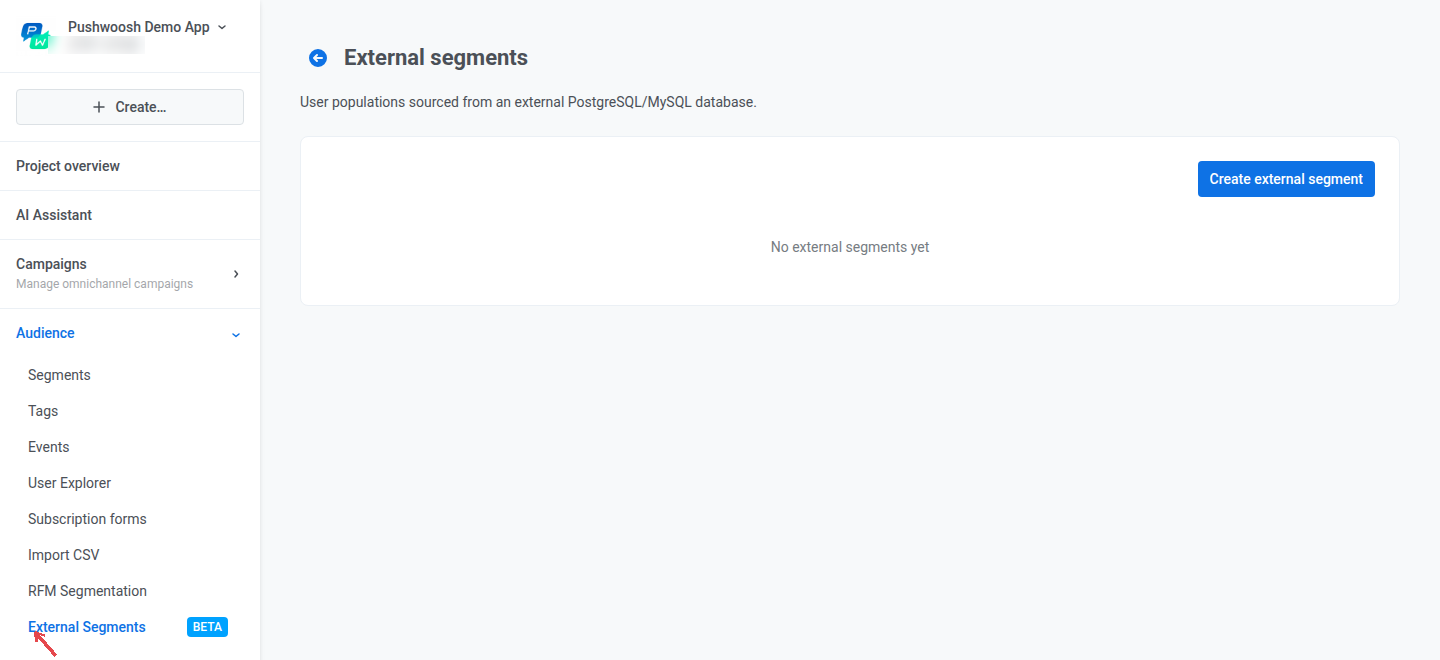
Anchor link to- ไปที่ กลุ่มเป้าหมาย → เซกเมนต์ภายนอก
- คลิก สร้างเซกเมนต์ภายนอก
- ป้อน ชื่อ สำหรับเซกเมนต์ (สูงสุด 100 ตัวอักษร)
- เลือก ประเภทฐานข้อมูล: PostgreSQL, MySQL, Google BigQuery, Microsoft SQL Server / Fabric หรือ Google Analytics 4 audience

กรอกข้อมูลในช่องการเชื่อมต่อ
Anchor link toPostgreSQL และ MySQL
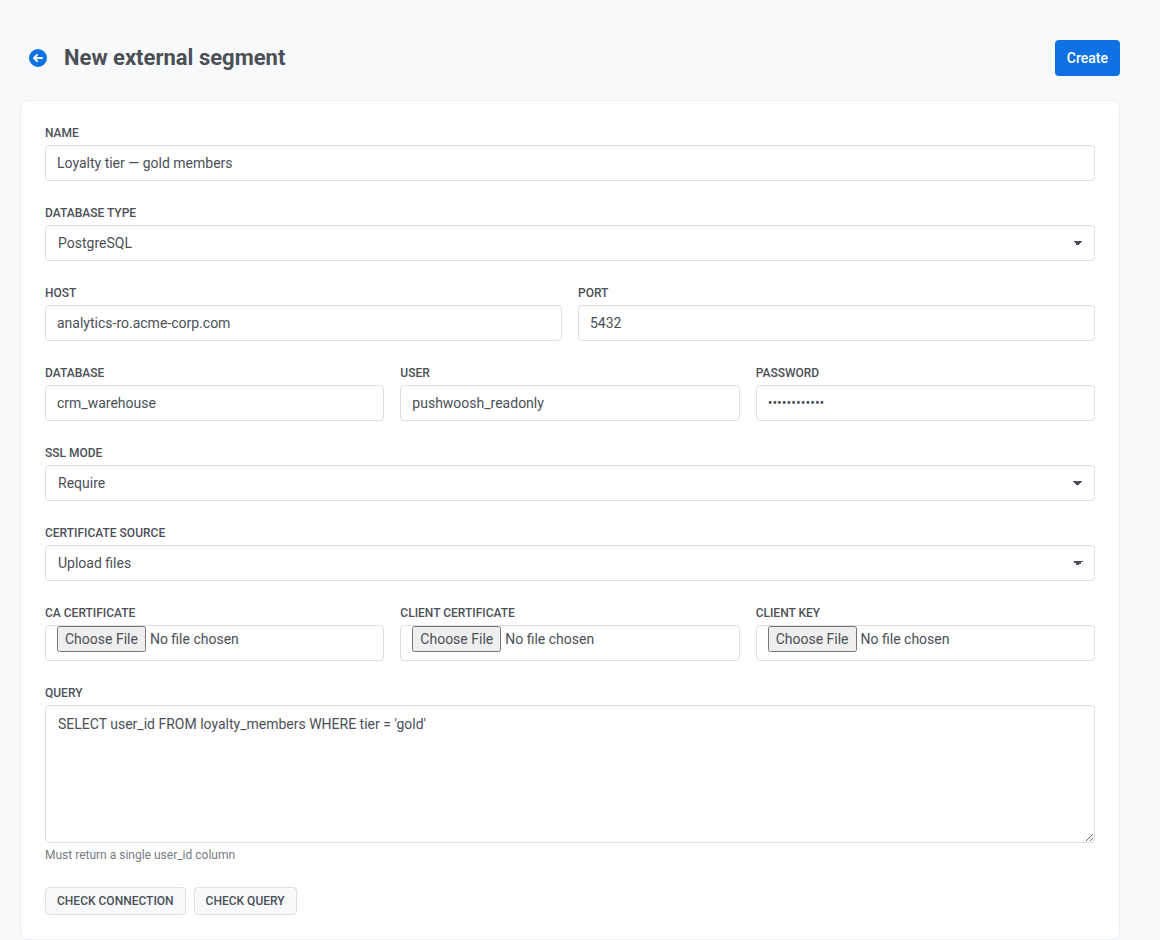
Anchor link toสำหรับ PostgreSQL และ MySQL ให้กรอกข้อมูลต่อไปนี้:
- โฮสต์ และ พอร์ต: ที่อยู่ของเซิร์ฟเวอร์ฐานข้อมูลของคุณ Pushwoosh ต้องการ host ที่สามารถเข้าถึงได้แบบสาธารณะ และจะปฏิเสธที่อยู่ที่เป็น private, internal หรือ loopback เมื่อคุณตรวจสอบการเชื่อมต่อหรือบันทึกเซกเมนต์
- ฐานข้อมูล: ชื่อฐานข้อมูล
- ผู้ใช้ และ รหัสผ่าน: ข้อมูลประจำตัวสำหรับบัญชีแบบ read-only
- โหมด SSL (สำหรับ PostgreSQL เท่านั้น เนื่องจาก MySQL connections ไม่ใช้ TLS) กำหนดวิธีการใช้ SSL/TLS ซึ่งเป็นโปรโตคอลที่เข้ารหัสการเชื่อมต่อกับฐานข้อมูลของคุณ สอบถามผู้ดูแลฐานข้อมูลของคุณว่าควรใช้โหมดใด:
- ปิดใช้งาน: ไม่มีการเข้ารหัส
- จำเป็น: เข้ารหัสการเชื่อมต่อ แต่ไม่ตรวจสอบตัวตนของเซิร์ฟเวอร์ฐานข้อมูล
- ตรวจสอบ CA: เข้ารหัสการเชื่อมต่อและตรวจสอบว่าใบรับรองของเซิร์ฟเวอร์ออกโดย certificate authority (CA) ที่เชื่อถือได้
- ตรวจสอบเต็มรูปแบบ: เหมือนกับ ตรวจสอบ CA และยังตรวจสอบว่าใบรับรองตรงกับ hostname ของฐานข้อมูลของคุณ เป็นตัวเลือกที่ปลอดภัยที่สุด
- สำหรับโหมดอื่นที่ไม่ใช่ ปิดใช้งาน ให้ระบุ ใบรับรอง CA ใต้ แหล่งที่มาของใบรับรอง (อัปโหลดไฟล์ หรือ วาง PEM) พร้อมด้วย ใบรับรองไคลเอนต์ และ คีย์ไคลเอนต์ หากฐานข้อมูลของคุณต้องการ
BigQuery
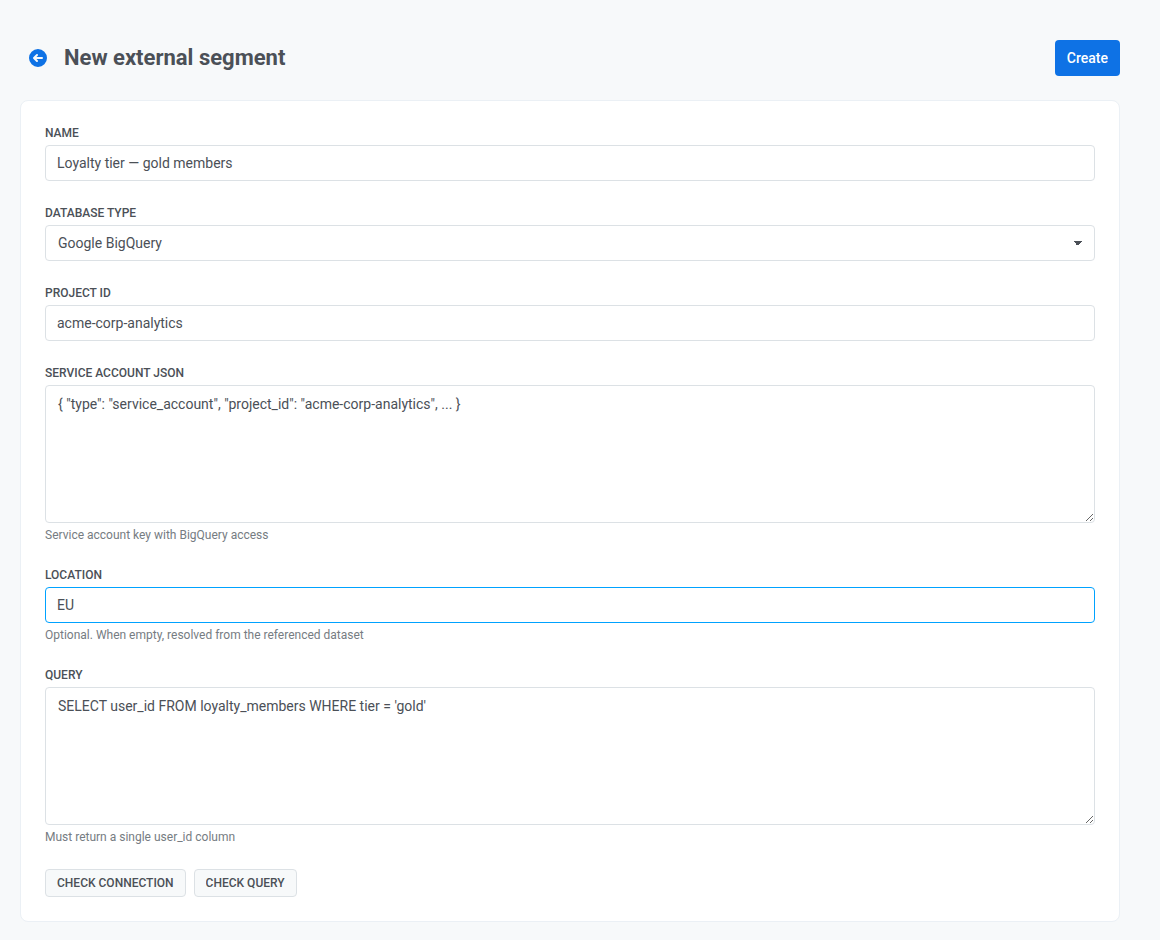
Anchor link toสำหรับ Google BigQuery ให้กรอกข้อมูลต่อไปนี้:
- Project ID: GCP project ที่เก็บ dataset ของคุณ
- Service account JSON: คีย์สำหรับ service account ที่มีสิทธิ์อ่าน BigQuery
- ตำแหน่งที่ตั้ง: ภูมิภาคของ dataset (ตัวอย่างเช่น
EU,USหรือeurope-west3) เว้นว่างไว้เพื่อให้ระบบค้นหาตำแหน่งจาก dataset โดยอัตโนมัติ
SQL Server / Fabric
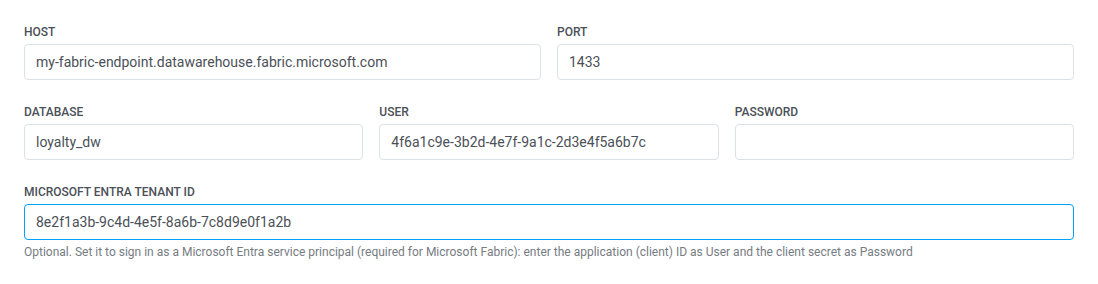
Anchor link toสำหรับ Microsoft SQL Server / Fabric ให้กรอกข้อมูลต่อไปนี้:
- โฮสต์ และ พอร์ต: ที่อยู่ของเซิร์ฟเวอร์ฐานข้อมูลของคุณ หรือ Fabric SQL analytics endpoint ของคุณ Pushwoosh ต้องการ host ที่สามารถเข้าถึงได้แบบสาธารณะ และจะปฏิเสธที่อยู่ที่เป็น private, internal หรือ loopback เมื่อคุณตรวจสอบการเชื่อมต่อหรือบันทึกเซกเมนต์
- ฐานข้อมูล: ชื่อฐานข้อมูล
- ผู้ใช้ และ รหัสผ่าน: ข้อมูลประจำตัวสำหรับบัญชีแบบ read-only
- Microsoft Entra tenant ID: ไม่จำเป็น เว้นว่างไว้สำหรับการล็อกอิน SQL Server สำหรับ Microsoft Fabric ซึ่ง SQL analytics endpoint ไม่มี SQL logins ให้ตั้งค่าเพื่อลงชื่อเข้าใช้เป็น service principal แทน ป้อน application (client) ID เป็น ผู้ใช้ และ client secret เป็น รหัสผ่าน
Google Analytics 4 audience
Anchor link toเซกเมนต์ Google Analytics 4 audience จะดึงผู้ใช้มาจากกลุ่มเป้าหมายที่คุณสร้างไว้ใน Google Analytics จึงไม่มี query ให้กรอกข้อมูลต่อไปนี้:
- รหัสพร็อพเพอร์ตี GA4: ID ของพร็อพเพอร์ตี Google Analytics ซึ่งแสดงอยู่ใน Google Analytics ภายใต้ Admin → Property details
- Service account JSON: คีย์ของ service account ที่มีบทบาท Viewer ในพร็อพเพอร์ตีนั้น มอบบทบาทใน Google Analytics ภายใต้ Admin → Property access management และเปิดใช้งาน Google Analytics Data API และ Admin API ในโปรเจกต์ Google Cloud ของ service account
- กลุ่มเป้าหมาย: คลิก โหลดกลุ่มเป้าหมาย จากนั้นเลือกกลุ่มเป้าหมาย หากรายการว่างเปล่า ให้สร้างกลุ่มเป้าหมายใน Google Analytics ก่อน
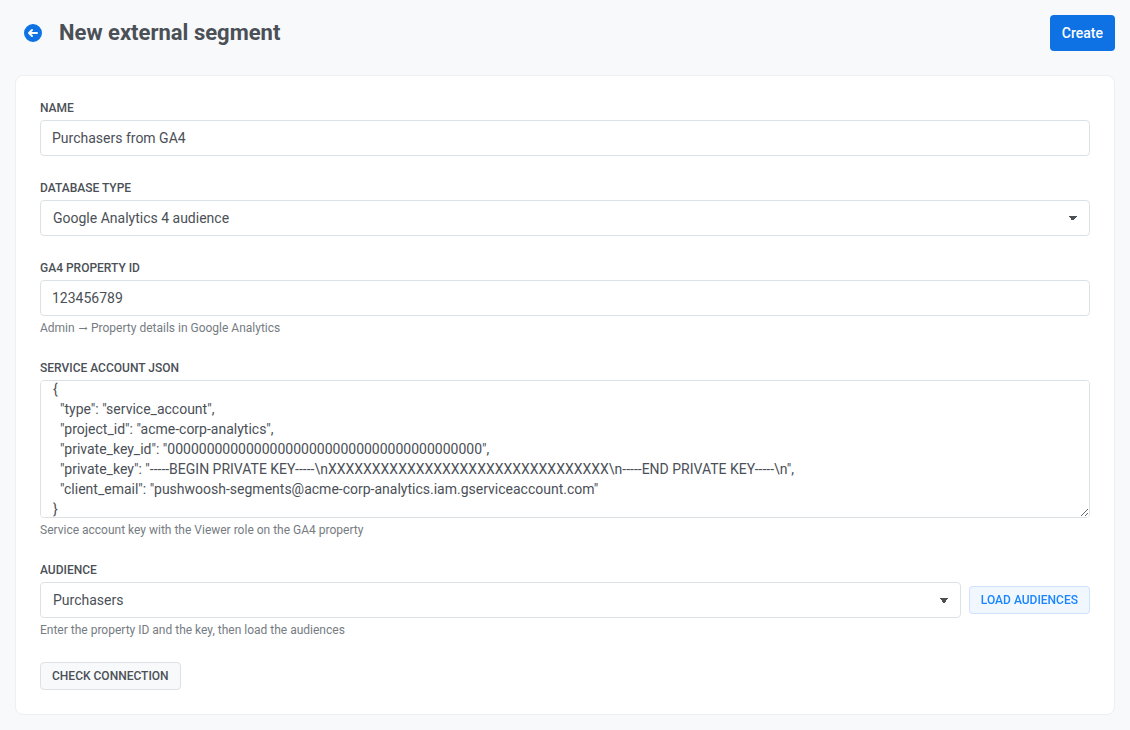
สำหรับการตั้งค่าฝั่ง Google Analytics โปรดดู การผสานรวมกับ Google Analytics จากนั้นคลิก ตรวจสอบการเชื่อมต่อ เมื่อการตรวจสอบสำเร็จ ให้คลิก สร้าง
ป้อน query
Anchor link toสำหรับฐานข้อมูลทุกประเภท ยกเว้น Google Analytics 4 audience:
- ป้อน คิวรี ซึ่งต้องส่งคืนคอลัมน์เดียวชื่อ
user_idโดยมีหนึ่งแถวต่อผู้ใช้ที่คุณต้องการให้อยู่ในเซกเมนต์ ตัวอย่างเช่น:
SELECT user_id FROM loyalty_members WHERE tier = 'gold'- คลิก ตรวจสอบการเชื่อมต่อ เพื่อยืนยันว่า Pushwoosh สามารถเข้าถึงฐานข้อมูลได้ (หมดเวลาหลังจาก 30 วินาที)
- คลิก ตรวจสอบคำสั่ง เพื่อยืนยันว่า query ทำงานและส่งคืนคอลัมน์ที่ถูกต้อง (หมดเวลาหลังจาก 30 วินาทีเช่นกัน)
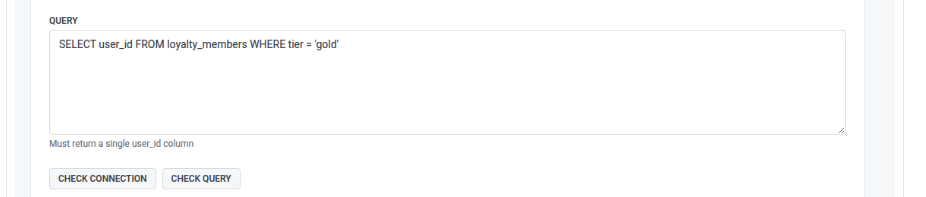
ตรวจสอบและสร้าง
Anchor link toเมื่อการตรวจสอบทั้งสองสำเร็จ ให้คลิก สร้าง Pushwoosh จะบันทึกเซกเมนต์และเพิ่มลงในรายการ เซกเมนต์ภายนอก ทันที
วิธีการทำให้เซกเมนต์เป็นปัจจุบันอยู่เสมอ
Anchor link toPushwoosh ไม่ได้รัน query ของคุณตามกำหนดเวลาที่แน่นอน แต่จะรีเฟรชเซกเมนต์ตามความล่าสุดของการใช้งาน:
- หากข้อมูลของเซกเมนต์มีอายุไม่ถึงหนึ่งชั่วโมง Pushwoosh จะใช้ข้อมูลปัจจุบันตามที่เป็นอยู่
- หากมีอายุมากกว่าหนึ่งชั่วโมง Pushwoosh จะยังคงใช้ข้อมูลปัจจุบันในขณะที่รีเฟรชในเบื้องหลัง
- หากมีอายุมากกว่าสามชั่วโมง Pushwoosh จะรอการรีเฟรชใหม่ก่อนที่จะใช้เซกเมนต์
เซกเมนต์ Google Analytics 4 audience ใช้กฎเดียวกัน โดยใช้ 24 ชั่วโมงและ 72 ชั่วโมงแทนหนึ่งชั่วโมงและสามชั่วโมง Google Analytics อัปเดตสมาชิกของกลุ่มเป้าหมายประมาณวันละครั้ง
ในทางปฏิบัติ นี่หมายความว่าเซกเมนต์ที่คุณใช้เป็นประจำ (ตัวอย่างเช่น ใน journey ที่เกิดซ้ำ) จะยังคงเป็นปัจจุบัน ในขณะที่เซกเมนต์ที่คุณไม่ค่อยได้ใช้อาจใช้เวลาสักครู่ในการรีเฟรชในครั้งแรกที่คุณกลับมาใช้
หากการรีเฟรชล้มเหลว (ตัวอย่างเช่น ไม่สามารถเข้าถึงฐานข้อมูลได้ หรือ query เริ่มมีข้อผิดพลาด) Pushwoosh จะบันทึกข้อผิดพลาด แต่สถานะของเซกเมนต์ในรายการ เซกเมนต์ภายนอก จะไม่เปลี่ยนแปลงด้วยตัวเอง หลังจากที่คุณแก้ไขปัญหาที่ฝั่งของคุณแล้ว ให้เปิดเซกเมนต์และคลิก ตรวจสอบการเชื่อมต่อ เพื่อยืนยันการแก้ไข ข้อผิดพลาดจะถูกล้างโดยอัตโนมัติในครั้งถัดไปที่ข้อมูลของเซกเมนต์รีเฟรชสำเร็จ
การใช้เซกเมนต์ภายนอก
Anchor link toเมื่อคุณสร้างแล้ว เซกเมนต์ภายนอกจะปรากฏโดยอัตโนมัติใน กลุ่มเป้าหมาย → เซ็กเมนต์ ภายใต้ชื่อเดียวกัน พร้อมใช้งานเหมือนกับเซกเมนต์อื่นๆ เช่น เป็นกลุ่มเป้าหมายของแคมเปญหรือ journey
หากต้องการรวมกับเงื่อนไขอื่นๆ ให้เพิ่มเป็นตัวกรอง:
- ไปที่ กลุ่มเป้าหมาย → เซ็กเมนต์ → สร้างเซกเมนต์
- คลิก เพิ่มตัวกรองตาม: → เซกเมนต์
- เลือกเซกเมนต์ภายนอกของคุณตามชื่อ
ตัวกรอง เซกเมนต์ เดียวกันนี้มีให้ใช้งานใน compound filters และเมื่อคุณเลือกกลุ่มเป้าหมายใน Audience-based entry สำหรับข้อมูลเพิ่มเติมเกี่ยวกับการรวมเซกเมนต์ โปรดดูที่ สร้างเซกเมนต์จากเซกเมนต์ที่มีอยู่
ตรวจสอบจำนวนคนในเซกเมนต์
Anchor link toรายการ เซกเมนต์ภายนอก ไม่แสดงจำนวนสมาชิก เปิด wrapper ของเซกเมนต์ใน กลุ่มเป้าหมาย → เซ็กเมนต์ (ดู การใช้เซกเมนต์ภายนอก) และ คำนวณขนาด ที่นั่น
จัดการเซกเมนต์ภายนอก
Anchor link toในรายการ เซกเมนต์ภายนอก แต่ละแถวจะแสดง:
- ชื่อของเซกเมนต์
- รหัส: ตัวระบุที่ใช้อ้างอิงเซกเมนต์ในการเรียก API
- ประเภทฐานข้อมูล
- host หรือพร็อพเพอร์ตีสำหรับ Google Analytics 4 audience
- สถานะ ใช้งานได้ หรือ ใช้งานไม่ได้
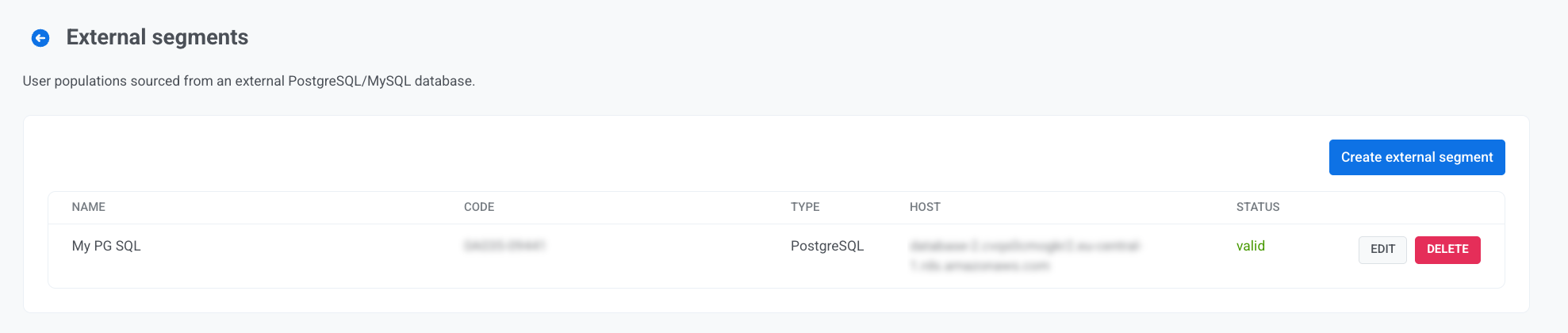
- คลิก แก้ไข เพื่อเปลี่ยนการเชื่อมต่อหรือ query ไม่สามารถเปลี่ยนประเภทฐานข้อมูลได้หลังจากการสร้าง ให้สร้างเซกเมนต์ใหม่แทน
- คลิก ลบ เพื่อลบเซกเมนต์ Pushwoosh จะบล็อกการลบในขณะที่เซกเมนต์ถูกใช้งานโดยแคมเปญ, journey, ตัวกรอง หรือฟอร์มป๊อปอัป ให้ลบการอ้างอิงเหล่านั้นออกก่อน แล้วจึงลบเซกเมนต์ การกระทำนี้ไม่สามารถยกเลิกได้