สร้างเซกเมนต์ตามแท็ก
แท็กคือคุณสมบัติที่คุณสามารถกำหนดให้กับผู้ใช้เพื่อจัดเก็บข้อมูลเพิ่มเติมเกี่ยวกับความชอบ พฤติกรรม หรือข้อมูลโปรไฟล์ของพวกเขา สร้างเซกเมนต์โดยใช้ตัวกรองแท็กเพื่อกำหนดเป้าหมายผู้ใช้ตามคุณสมบัติหรือข้อมูลเฉพาะที่กำหนดให้กับอุปกรณ์และ User ID ของพวกเขา
วิธีสร้างเซกเมนต์ตามแท็ก
Anchor link toในการสร้างเซกเมนต์ตามแท็ก ให้ทำดังนี้:
- ในหน้า Create Segment คลิก Add filter by
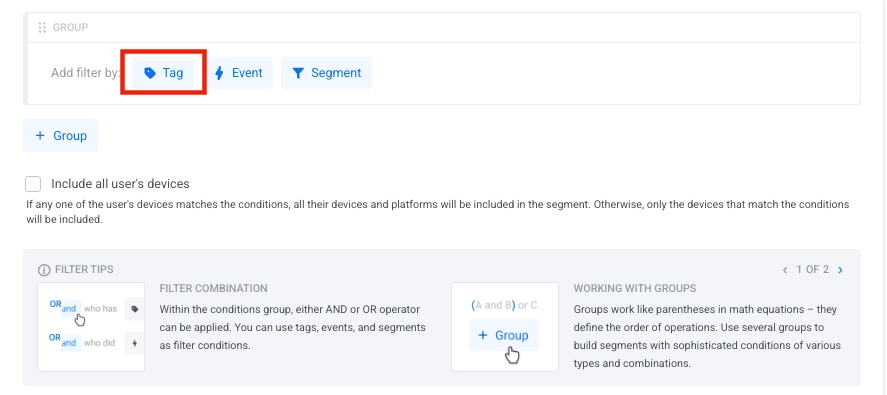
- เลือกแท็กจากรายการดรอปดาวน์ Tag เริ่มพิมพ์เพื่อค้นหาแท็กเฉพาะหากคุณมีแท็กจำนวนมาก
- คลิก Add value เพื่อระบุเงื่อนไขของแท็กและเลือกค่าจากดรอปดาวน์หรือเริ่มพิมพ์เพื่อค้นหา
- เลือกโอเปอเรเตอร์ที่เหมาะสมสำหรับเงื่อนไขของคุณ เรียนรู้เพิ่มเติม
ตั้งค่าโอเปอเรเตอร์สำหรับหลายเงื่อนไข
Anchor link toโอเปอเรเตอร์เชิงตรรกะ
Anchor link toเมื่อคุณเพิ่มเงื่อนไขแท็กหลายรายการในเซกเมนต์ของคุณ คุณสามารถใช้โอเปอเรเตอร์เชิงตรรกะเพื่อรวมเงื่อนไขเหล่านั้นได้:
- AND: รวมผู้ใช้ที่ตรงกับค่าแท็กที่ระบุทั้งหมด
- OR: รวมผู้ใช้ที่ตรงกับค่าแท็กที่ระบุอย่างน้อยหนึ่งค่า
กลุ่มตัวกรอง
Anchor link toเมื่อคุณเพิ่มตัวกรองหลายตัวในเซกเมนต์ ตัวกรองเหล่านั้นจะสร้างเป็น Filter Group ตัวกรองทั้งหมดภายในกลุ่มเดียวกันจะใช้โอเปอเรเตอร์เชิงตรรกะเดียวกัน (AND หรือ OR)
ในการเปลี่ยนโอเปอเรเตอร์สำหรับทั้งกลุ่มตัวกรอง:
- คลิกที่โอเปอเรเตอร์ปัจจุบัน (AND/OR) ในส่วนหัวของกลุ่มตัวกรอง
- เลือกโอเปอเรเตอร์ใหม่จากดรอปดาวน์
รวมอุปกรณ์ทั้งหมดของผู้ใช้
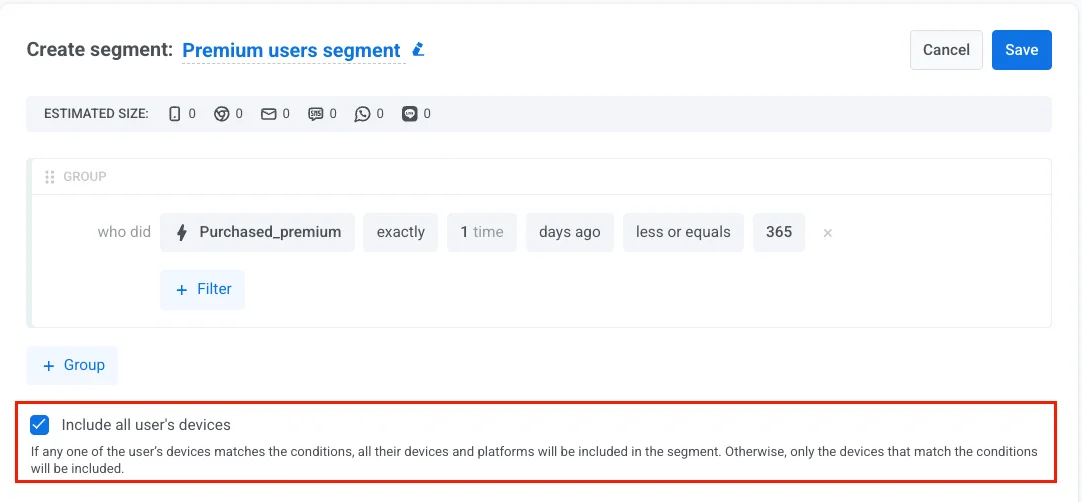
Anchor link toเปิดใช้งานตัวเลือกนี้เพื่อกำหนดเป้าหมายผู้ใช้ในทุกอุปกรณ์ของพวกเขา ไม่ใช่แค่อุปกรณ์ที่ตรงกับเงื่อนไขของเซกเมนต์เท่านั้น สิ่งนี้จะช่วยให้แน่ใจว่าพวกเขาได้รับข้อความของคุณในทุกแพลตฟอร์มที่พวกเขาใช้
-
เปิดใช้งาน: หากอุปกรณ์ใดๆ ของผู้ใช้ตรงตามเงื่อนไข (เช่น event การซื้อ, แท็ก, พฤติกรรม) อุปกรณ์ทั้งหมดของพวกเขาในทุกแพลตฟอร์มจะถูกรวมอยู่ในเซกเมนต์
-
ปิดใช้งาน: เฉพาะอุปกรณ์ที่ตรงตามเงื่อนไขเท่านั้นที่จะถูกรวมอยู่ในเซกเมนต์
โอเปอเรเตอร์ของแท็กตามประเภท
Anchor link toโอเปอเรเตอร์ที่ใช้ได้จะขึ้นอยู่กับประเภทของแท็กที่คุณกำลังใช้งาน ด้านล่างนี้คือโอเปอเรเตอร์สำหรับแต่ละประเภทของแท็ก
โอเปอเรเตอร์ของแท็กประเภท String
Anchor link toแท็กประเภท String จัดเก็บค่าที่เป็นข้อความ เช่น ชื่อผู้ใช้, ที่อยู่อีเมล, ชื่อผลิตภัณฑ์ หรือตัวระบุ ใช้แท็กเหล่านี้เพื่อแบ่งกลุ่มผู้ใช้ตามหมวดหมู่, ความชอบ หรือข้อมูลที่เป็นข้อความที่คุณกำหนดเอง
| โอเปอเรเตอร์ | คำอธิบาย | ตัวอย่าง |
|---|---|---|
| is | ค่าของแท็กเท่ากับค่าที่ระบุ | FavoriteColor is "Blue" |
| is not | ค่าของแท็กไม่เท่ากับค่าที่ระบุ | Country is not "Canada" |
| starts with | ค่าของแท็กขึ้นต้นด้วยสตริงที่ระบุ | ProductName starts with "Pro" |
| ends with | ค่าของแท็กลงท้ายด้วยสตริงที่ระบุ | Email ends with "@gmail.com" |
| contains | ค่าของแท็กมีสตริงที่ระบุอยู่ | Description contains "premium" |
| in | ค่าของแท็กตรงกับค่าใดๆ ในรายการที่ให้ไว้ | Category in ["Sports", "News"] |
| not in | ค่าของแท็กไม่ตรงกับค่าใดๆ ในรายการที่ให้ไว้ | Status not in ["Banned", "Suspended"] |
| not set | แท็กไม่มีการกำหนดค่า | Nickname not set |
| any | แท็กมีค่าใดๆ | Username any |
โอเปอเรเตอร์ของแท็กประเภท Integer
Anchor link toแท็กประเภท Integer จัดเก็บค่าที่เป็นจำนวนเต็ม เช่น อายุ, ระดับ, คะแนน หรือจำนวนการซื้อ เหมาะสำหรับการกำหนดเป้าหมายตามข้อมูลประชากรและการแบ่งกลุ่มตามพฤติกรรมโดยใช้การเปรียบเทียบตัวเลข
| โอเปอเรเตอร์ | คำอธิบาย | ตัวอย่าง |
|---|---|---|
| is | ค่าของแท็กเท่ากับตัวเลขที่ระบุ | Age is 30 |
| is not | ค่าของแท็กไม่เท่ากับตัวเลขที่ระบุ | Level is not 1 |
| greater or equals | ค่าของแท็กมากกว่าหรือเท่ากับตัวเลขที่ระบุ | Score greater or equals 100 |
| less or equals | ค่าของแท็กน้อยกว่าหรือเท่ากับตัวเลขที่ระบุ | PurchaseCount less or equals 5 |
| between | ค่าของแท็กอยู่ภายในช่วงที่ระบุ (รวมค่าขอบ) | Age between 18 and 65 |
| in | ค่าของแท็กตรงกับค่าใดๆ ในรายการ | Level in [5, 10, 15] |
| not in | ค่าของแท็กไม่ตรงกับค่าใดๆ ในรายการ | Streak not in [0, 1] |
| not set | แท็กไม่มีการกำหนดค่า | Score not set |
| any | แท็กมีค่าใดๆ ที่ถูกกำหนด | Level any |
โอเปอเรเตอร์ของแท็กประเภท List
Anchor link toแท็กประเภท List อนุญาตให้มีหลายค่าต่อผู้ใช้ในเวลาเดียวกัน เหมาะสำหรับความชอบ, ความสนใจ หรือการสมัครสมาชิกที่ผู้ใช้สามารถเลือกได้หลายตัวเลือก (เช่น หมวดหมู่ข่าว, ความสนใจในผลิตภัณฑ์)
| โอเปอเรเตอร์ | คำอธิบาย | ตัวอย่าง |
|---|---|---|
| in | แท็กมีค่าอย่างน้อยหนึ่งค่าจากค่าที่ระบุ | Interests in ["Sports", "Technology"] |
| not in | แท็กไม่มีค่าใดๆ จากค่าที่ระบุ | Categories not in ["Spam", "Promotions"] |
| not set | แท็กไม่มีการกำหนดค่า | Preferences not set |
| any | แท็กมีค่าใดๆ ที่ถูกกำหนด | Subscriptions any |
โอเปอเรเตอร์ของแท็กประเภท Boolean
Anchor link toแท็กประเภท Boolean จัดเก็บค่าเป็น true หรือ false เท่านั้น ใช้สำหรับสถานะที่เป็นไบนารี เช่น การยืนยันอีเมล, สถานะการสมัครสมาชิก หรือ feature flags
| โอเปอเรเตอร์ | คำอธิบาย | ตัวอย่าง |
|---|---|---|
| is true | ค่าของแท็กเป็น true | EmailVerified is true |
| is false | ค่าของแท็กเป็น false | PushEnabled is false |
| not set | แท็กไม่เคยถูกกำหนดค่า | SMSConsent not set |
| any | แท็กมีค่าใดๆ ที่ถูกกำหนด (true หรือ false) | AccountActive any |
โอเปอเรเตอร์ของแท็กประเภท Date
Anchor link toแท็กประเภท Date จัดเก็บวันที่ในปฏิทิน ใช้เพื่อแบ่งกลุ่มผู้ใช้ตามวันที่สมัคร, กิจกรรมล่าสุด, วันเกิด หรือ event ใดๆ ที่เกี่ยวข้องกับเวลา โดยมีการเปรียบเทียบวันที่แบบสัมพัทธ์และแบบสัมบูรณ์ที่ยืดหยุ่น
วันที่แบบสัมพัทธ์
Anchor link toโอเปอเรเตอร์เหล่านี้เปรียบเทียบวันที่โดยอ้างอิงกับวันนี้ ทำให้สามารถแบ่งกลุ่มตามเวลาแบบไดนามิกที่อัปเดตอัตโนมัติทุกวัน
| โอเปอเรเตอร์ | คำอธิบาย | ตัวอย่าง |
|---|---|---|
| during the last N days | วันที่อยู่ภายใน N วันที่ผ่านมา | LastOpen during the last 30 days |
| exactly N days ago | วันที่ตรงกับ N วันที่แล้วพอดี | LastLogin exactly 7 days ago |
| N or more days ago | วันที่เก่ากว่าหรือเท่ากับ N วัน | LastPurchase 90 or more days ago |
| between N and M days ago | วันที่อยู่ระหว่างสองช่วงวันที่ | Signup between 7 and 30 days ago |
| between N and M days ahead | วันที่อยู่ในช่วง N ถึง M วันข้างหน้า โดย 0 หมายถึงวันนี้, 1 หมายถึงพรุ่งนี้ และต่อไปเรื่อยๆ รวมทั้ง N และ M | RenewalDate between 0 and 30 days ahead |
วันครบรอบ
Anchor link toโอเปอเรเตอร์เหล่านี้จะจับคู่วันที่ในปฏิทินที่เกิดขึ้นซ้ำ (เดือนและวันเดียวกันทุกปี) โดยไม่สนใจปี เหมาะสำหรับแคมเปญวันเกิดและวันครบรอบ
| โอเปอเรเตอร์ | คำอธิบาย | ตัวอย่าง |
|---|---|---|
| is today | วันครบรอบเกิดขึ้นในวันนี้ | Birthday is today |
| is in N days | วันครบรอบจะมาถึงในอีก N วัน | Birthday is in 3 days |
| is N days past | วันครบรอบผ่านไปแล้ว N วัน | Birthday is 5 days past |
วันที่ที่ระบุ
Anchor link toโอเปอเรเตอร์เหล่านี้เปรียบเทียบกับวันที่ในปฏิทินที่กำหนดไว้ ใช้สำหรับแคมเปญที่จัดครั้งเดียวหรือการวิเคราะห์ข้อมูลย้อนหลัง
| โอเปอเรเตอร์ | คำอธิบาย | ตัวอย่าง |
|---|---|---|
| on a specific date | ตรงกับวันที่ที่ระบุพอดี | LastLogin on "2023-01-15" |
| on or after a specific date | วันที่ตรงกับหรือหลังจากวันที่ที่ระบุ | LastPurchase on or after "2023-01-01" |
| on or before a specific date | วันที่ตรงกับหรือก่อนวันที่ที่ระบุ | AccountCreated on or before "2022-12-31" |
| between dates | ระหว่างสองวันที่ในปฏิทิน | LastOpen between "2022-02-28" and "2022-03-02" |
การมีอยู่
Anchor link toโอเปอเรเตอร์เหล่านี้จะตรวจสอบเพียงว่าแท็กวันที่ถูกกำหนดค่าแล้วหรือไม่ โดยไม่ประเมินค่าวันที่จริง
| โอเปอเรเตอร์ | คำอธิบาย | ตัวอย่าง |
|---|---|---|
| not set | แท็กไม่มีค่า | TrialEndDate not set |
| any | แท็กมีค่าใดๆ | LastLogin any |
โอเปอเรเตอร์ของแท็กประเภท Price
Anchor link toแท็กประเภท Price จัดเก็บค่าเงินที่มีทศนิยมในรูปแบบสกุลเงิน (X.XX) เหมาะสำหรับการแบ่งกลุ่มผู้ใช้ตามจำนวนเงินที่ซื้อ, ระดับการสมัครสมาชิก, มูลค่าในตะกร้าสินค้า หรือพฤติกรรมการใช้จ่ายสำหรับแคมเปญที่เน้นรายได้
| โอเปอเรเตอร์ | คำอธิบาย | ตัวอย่าง |
|---|---|---|
| is | ราคาเท่ากับค่าที่ระบุ | InAppPurchase is 9.99 |
| is not | ราคาไม่เท่ากับค่าที่ระบุ | LastPurchase is not 0 |
| greater or equals | ราคามากกว่าหรือเท่ากับค่าที่ระบุ | TotalSpent greater or equals 100 |
| less or equals | ราคาน้อยกว่าหรือเท่ากับค่าที่ระบุ | CartValue less or equals 50 |
| between | ราคาอยู่ภายในช่วงที่ระบุ (รวมค่าขอบ) | OrderValue between 25 and 100 |
| in | ราคาตรงกับค่าใดๆ ในรายการ | SubscriptionPrice in [9.99, 14.99, 19.99] |
| not in | ราคาไม่ตรงกับค่าใดๆ ในรายการ | RefundAmount not in [0, 5] |
| not set | แท็กไม่มีการกำหนดค่า | LastPurchaseAmount not set |
| any | แท็กมีค่าใดๆ ที่ถูกกำหนด | PurchaseHistory any |
โอเปอเรเตอร์ของแท็กประเภท Version
Anchor link toแท็กประเภท Version จัดเก็บหมายเลขเวอร์ชันในรูปแบบ w.x.y.z (Major.Minor.Patch.Build) สำหรับเวอร์ชันของแอป, OS หรือ SDK เหมาะสำหรับการกำหนดเป้าหมายผู้ใช้ในเวอร์ชันเฉพาะสำหรับการอัปเดต, การส่งข้อความเกี่ยวกับความเข้ากันได้ หรือการเปิดตัวฟีเจอร์ใหม่
| โอเปอเรเตอร์ | คำอธิบาย | ตัวอย่าง |
|---|---|---|
| is | เวอร์ชันเท่ากับค่าที่ระบุ | AppVersion is "2.5.0" |
| is not | เวอร์ชันไม่เท่ากับค่าที่ระบุ | AppVersion is not "1.0.0" |
| greater or equals | เวอร์ชันมากกว่าหรือเท่ากับเวอร์ชันที่ระบุ | AppVersion greater or equals "2.0.0" |
| less or equals | เวอร์ชันน้อยกว่าหรือเท่ากับเวอร์ชันที่ระบุ | AppVersion less or equals "3.0.0" |
| between | เวอร์ชันอยู่ภายในช่วงเวอร์ชันที่ระบุ | AppVersion between "2.0.0" and "3.0.0" |
| in | เวอร์ชันเท่ากับค่าใดๆ ในรายการที่ระบุ | AppVersion in ["2.1.0", "2.2.0", "2.3.0"] |
| not in | เวอร์ชันไม่เท่ากับค่าใดๆ ในรายการที่ระบุ | OSVersion not in ["10.0", "11.0"] |
| not set | แท็กไม่มีการกำหนดเวอร์ชัน | SDKVersion not set |
| any | แท็กมีเวอร์ชันใดๆ ที่ถูกกำหนด | AppVersion any |
ตัวอย่างการแบ่งกลุ่มตามแท็ก
Anchor link toด้านล่างนี้คือสถานการณ์จริงที่แสดงวิธีการใช้ตัวกรองแท็กเพื่อสร้างเซกเมนต์กลุ่มเป้าหมาย
สมาชิกระดับพรีเมียม
Anchor link toเป้าหมาย: กำหนดเป้าหมายผู้ใช้ที่มีการสมัครสมาชิกระดับพรีเมียมที่ยังใช้งานอยู่
วิธีการตั้งค่า:
- ประเภทแท็ก: String
- แท็ก:
subscription_type - โอเปอเรเตอร์: is
- ค่า:
premium
กรณีการใช้งาน: ส่งเนื้อหาพิเศษ, การเข้าถึงฟีเจอร์ก่อนใคร หรือข้อเสนอพิเศษสำหรับสมาชิกระดับพรีเมียมเท่านั้น เพื่อสร้างความผูกพันกับผู้ใช้ที่จ่ายเงิน
แคมเปญที่กำหนดเป้าหมายตามอายุ
Anchor link toเป้าหมาย: กำหนดเป้าหมายผู้ใช้ในช่วงอายุที่ระบุ
วิธีการตั้งค่า:
- ประเภทแท็ก: Integer
- แท็ก:
Age - โอเปอเรเตอร์: greater or equals
- ค่า:
25
AND
- แท็ก:
Age - โอเปอเรเตอร์: less or equals
- ค่า:
35
กรณีการใช้งาน: ส่งมอบเนื้อหา, ผลิตภัณฑ์ หรือบริการที่เหมาะสมกับวัย ซึ่งปรับให้เข้ากับข้อมูลประชากรเฉพาะกลุ่ม
ผู้ใช้ตามความสนใจ
Anchor link toเป้าหมาย: กำหนดเป้าหมายผู้ใช้ที่เลือกความสนใจหรือหมวดหมู่ที่ระบุ
วิธีการตั้งค่า:
- ประเภทแท็ก: List
- แท็ก:
Interests - โอเปอเรเตอร์: in
- ค่า:
["Sports", "Technology"]
กรณีการใช้งาน: ส่งเนื้อหาที่ปรับให้เหมาะกับความสนใจของผู้ใช้, แนะนำผลิตภัณฑ์ที่เกี่ยวข้อง หรือสร้างแคมเปญตามความสนใจ
ผู้ใช้ที่ยืนยันอีเมลแล้ว
Anchor link toเป้าหมาย: กำหนดเป้าหมายผู้ใช้ที่ยืนยันที่อยู่อีเมลของตนแล้ว
วิธีการตั้งค่า:
- ประเภทแท็ก: Boolean
- แท็ก:
EmailVerified - โอเปอเรเตอร์: is true
- ค่า:
true
กรณีการใช้งาน: ส่งข้อความถึงผู้ใช้ที่ยืนยันแล้วเท่านั้น เพื่อปรับปรุงความสามารถในการส่งมอบสำหรับการสื่อสารที่สำคัญ
ผู้สมัครใหม่ล่าสุด
Anchor link toเป้าหมาย: กำหนดเป้าหมายผู้ใช้ที่สมัครภายใน 30 วันที่ผ่านมา
วิธีการตั้งค่า:
- ประเภทแท็ก: Date
- แท็ก:
SignupDate - โอเปอเรเตอร์: during the last N days
- ค่า:
30
กรณีการใช้งาน: แนะนำผู้ใช้ใหม่ด้วยข้อความต้อนรับ, บทแนะนำ หรือข้อเสนอพิเศษสำหรับลูกค้าครั้งแรก
ผู้ซื้อที่มีมูลค่าสูง
Anchor link toเป้าหมาย: กำหนดเป้าหมายผู้ใช้ที่ทำการซื้อเกินจำนวนที่กำหนด
วิธีการตั้งค่า:
- ประเภทแท็ก: Price
- แท็ก:
TotalSpent - โอเปอเรเตอร์: greater or equals
- ค่า:
100.00
กรณีการใช้งาน: เสนอข้อเสนอพิเศษให้กับผู้ใช้จ่ายสูง, เชิญเข้าร่วมโปรแกรม VIP หรือส่งคำแนะนำผลิตภัณฑ์ระดับพรีเมียม
การกำหนดเป้าหมายตามเวอร์ชันของแอป
Anchor link toเป้าหมาย: กำหนดเป้าหมายผู้ใช้ในเวอร์ชันแอปที่ระบุสำหรับแคมเปญการอัปเดต
วิธีการตั้งค่า:
- ประเภทแท็ก: Version
- แท็ก:
AppVersion - โอเปอเรเตอร์: less or equals
- ค่า:
2.0.0
กรณีการใช้งาน: แจ้งเตือนผู้ใช้เกี่ยวกับการอัปเดตที่สำคัญ, โปรโมตฟีเจอร์ใหม่ที่มีในเวอร์ชันใหม่กว่า หรือแก้ไขปัญหาความเข้ากันได้
เคล็ดลับสำหรับการแบ่งกลุ่มตามแท็ก
Anchor link to- สร้างแบบแผนการตั้งชื่อแท็กที่ชัดเจนและสอดคล้องกันทั่วทั้งโปรเจกต์ของคุณ เพื่อให้การสร้างและบำรุงรักษาเซกเมนต์ง่ายขึ้น
- ใช้เงื่อนไขแท็กหลายรายการร่วมกับโอเปอเรเตอร์ AND/OR เพื่อสร้างคำจำกัดความของกลุ่มเป้าหมายที่แม่นยำ
- รวมตัวกรองแท็กกับ events หรือ เซกเมนต์ที่มีอยู่ เพื่อสร้างแคมเปญที่กำหนดเป้าหมายได้ดียิ่งขึ้น
- ตรวจสอบและอัปเดตค่าแท็กอย่างสม่ำเสมอเพื่อให้แน่ใจว่าเซกเมนต์ของคุณยังคงถูกต้องเมื่อข้อมูลผู้ใช้เปลี่ยนแปลงไป