Amplitude: ตั้งค่าคุณสมบัติผู้ใช้
ใช้ Amplitude: set user properties เพื่ออัปเดตโปรไฟล์ผู้ใช้ Amplitude ของผู้เดินทางจากขั้นตอนของ journey ผ่านการดำเนินการ $identify ของ HTTP API V2 เพื่อให้การแบ่งกลุ่มและ cohorts ในฝั่ง Amplitude เห็นข้อมูลเดียวกันกับ Pushwoosh
Pushwoosh จะตั้งค่า insert_id ของ Amplitude ให้คุณจากผู้เดินทางและขั้นตอนนี้ ซึ่งหมายความว่าผู้เดินทางคนเดียวกันที่ผ่านจุดนี้สองครั้ง เช่น ในรอบที่สองของ journey ที่วนซ้ำ จะอัปเดตโปรไฟล์ Amplitude เดียวกันแทนที่จะเขียน identify event ที่ซ้ำซ้อน
การใช้งานทั่วไป:
- ซิงค์แท็กเข้ากับกลุ่มของ Amplitude: ส่งระดับแผน สถานะการทดลองใช้ หรือแท็กอื่น ๆ ไปยังโปรไฟล์ Amplitude เพื่อให้ cohorts ของ Amplitude ตรงกับกลุ่มเป้าหมายของ Pushwoosh
- ทำให้โปรไฟล์เป็นปัจจุบันโดยไม่ต้องมีงานซิงค์แยกต่างหาก: อัปเดตโปรไฟล์ในขั้นตอนของ journey ที่แท็กมีการเปลี่ยนแปลงทันที
- หลีกเลี่ยงการเรียก identify ที่ซ้ำซ้อนในการวนซ้ำ: การขจัดข้อมูลซ้ำซ้อนในตัวหมายความว่าการผ่านจุดนี้ซ้ำ ๆ จะอัปเดตโปรไฟล์เดียวกันแทนที่จะเขียนสองครั้ง
กำหนดค่าจุด
Anchor link to- ลาก Amplitude: set user properties จากส่วน Integrations ไปยัง canvas
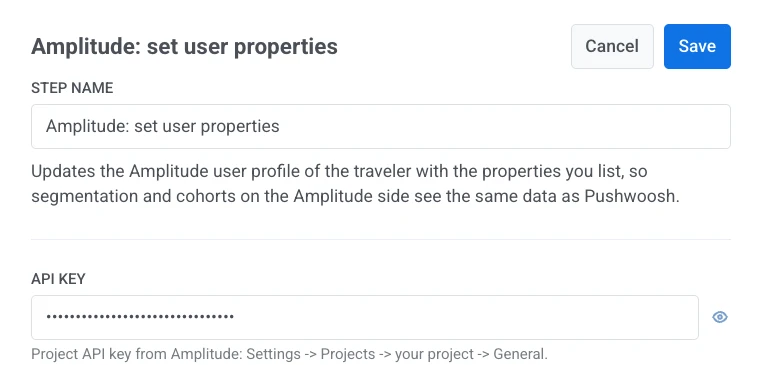
- ดับเบิลคลิกที่จุดและป้อน Step Name
- ใน API key ให้ป้อน project API key จาก Amplitude: Settings > Projects > your project > General ข้อมูลนี้จะถูกจัดเก็บแบบปิดบัง เหมือนกับ secret header ของ webhook Pushwoosh จะไม่แสดงหรือส่งคืนข้อมูลนี้เมื่อบันทึกแล้ว และจะไม่ปรากฏในคำขอที่จัดเก็บของจุดหรือใน Calls log
- ใน Amplitude endpoint ให้เลือกภูมิภาคที่โปรเจกต์ Amplitude ถูกสร้างขึ้น:
api2.amplitude.comสำหรับโปรเจกต์ในสหรัฐอเมริกาapi.eu.amplitude.comสำหรับโปรเจกต์ในสหภาพยุโรป คีย์จากภูมิภาคหนึ่งจะถูกปฏิเสธโดยอีกภูมิภาคหนึ่ง

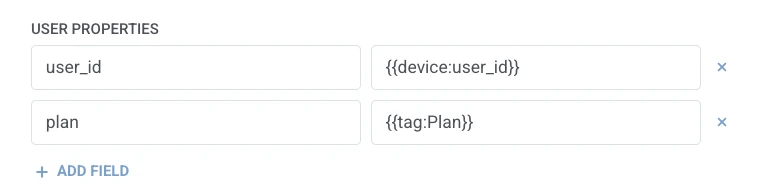
- ใน User properties ให้เพิ่มหนึ่งแถวต่อหนึ่งคุณสมบัติที่จะตั้งค่าบนโปรไฟล์ Amplitude ป้อนชื่อคุณสมบัติและค่า ชื่อต้องไม่ว่างเปล่าและไม่ซ้ำกัน ค่าที่เป็นมาโครของผู้เดินทางเพียงอย่างเดียวจะคงประเภทของตัวเองไว้ใน Amplitude (
{{tag:Age}}จะมาถึงเป็นตัวเลข{{tag:Trial Ends}}เป็นวันที่) ข้อความอื่น ๆ จะถูกส่งเป็นสตริง มาโครใช้ไวยากรณ์เดียวกับเนื้อหาของ Webhook หรือคลิก Insert Dynamic Value เพื่อเลือก attribute ที่ขั้นตอนก่อนหน้าใน journey นี้สร้างขึ้น เช่น การตอบสนองของ LLM หรือค่า Webhook ที่แมปไว้
- คลิก Save
การตอบสนอง
Anchor link toผู้เดินทางจะเดินทางต่อไปยังขั้นตอนใดก็ตามที่คุณเชื่อมต่อถัดไปบน canvas
Attributes หลังจากขั้นตอนทำงาน
Anchor link to| Attribute | เก็บข้อมูลอะไร |
|---|---|
amplitude_events_ingested | จำนวน event ที่ Amplitude รับเข้าไป |
วิธีใช้ในขั้นตอนถัดไป
Anchor link toผู้เดินทางได้เดินทางต่อไปยังขั้นตอนถัดไปแล้วโดยไม่คำนึงถึง attribute นี้ บันทึกเป็น Tag ด้วย Update user profile หากคุณต้องการยืนยันว่าการอัปเดตถูกรับเข้าไปแล้วหรือสร้างเงื่อนไขแยกด้วย Condition split
ความล้มเหลวและการตอบสนองที่ไม่คาดคิด
Anchor link toคำขอที่ล้มเหลวจะทำให้ผู้เดินทางออกจาก journey ดูที่ Errors and failed requests
สถานการณ์ตัวอย่าง: การทำให้โปรไฟล์ Amplitude ของผู้สมัครสมาชิกซิงค์กันอยู่เสมอ
Anchor link toทีมงานต้องการให้อัปเดตระดับแผนของผู้เดินทางบนโปรไฟล์ Amplitude ของพวกเขาทันทีที่มีการเปลี่ยนแปลงใน Pushwoosh
- เพิ่ม Amplitude: set user properties ทันทีหลังจากขั้นตอนที่มีการเปลี่ยนแปลงระดับแผน ใน User properties ตั้งค่า
planเป็น{{tag:Plan}} - คลิก Save
เมื่อขั้นตอนนี้ทำงาน โปรไฟล์ Amplitude จะสะท้อนการเปลี่ยนแปลงแผนโดยไม่ต้องมีงานซิงค์แยกต่างหาก