Mattermost: publicar mensaje
Usa Mattermost: publicar mensaje para notificar a tu equipo en Mattermost desde un paso de un journey, en tu propia instancia de Mattermost o en la de Pushwoosh. Este punto se autentica con su propio token de bot. No utiliza ninguna integración a nivel de cuenta configurada en otro lugar en los Ajustes.
Usos típicos:
- Alertar sobre conversiones de alto valor: publica cuando un viajero completa una compra o alcanza un objetivo, para que el equipo lo vea en tiempo real.
- Marcar un paso que necesita un humano: notifica a soporte o ventas cuando un viajero llega a un punto que un bot no puede finalizar.
- Seguir la salud del journey: publica una línea cada vez que una cohorte termina una rama, sin construir un panel de control.
Configurar el punto
Anchor link to- Arrastra Mattermost: publicar mensaje desde la sección de Integraciones del panel izquierdo al lienzo.
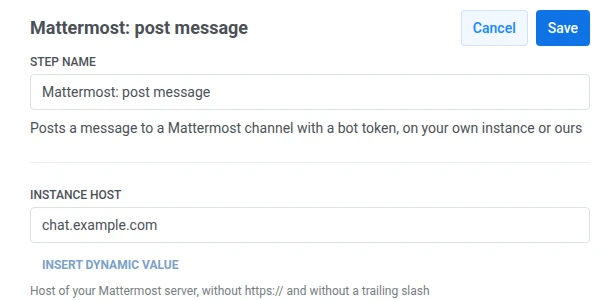
- Haz doble clic en el punto e introduce un Nombre del paso.
- En Host de la instancia, introduce el host de tu servidor de Mattermost, por ejemplo
chat.example.com. No incluyashttps://ni una barra inclinada al final. Pushwoosh añadehttps://y la ruta de la API por sí mismo.
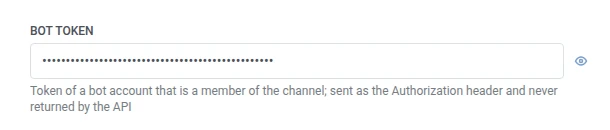
- En Token del bot, introduce el token de una cuenta de bot que sea miembro del canal de destino. Se almacena enmascarado, como una cabecera secreta de webhook, y Mattermost nunca lo devuelve a Pushwoosh.
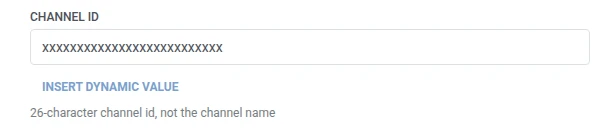
- En ID del canal, introduce el ID de 26 caracteres del canal, no su nombre.
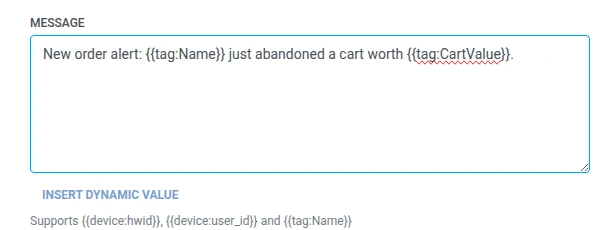
- En Mensaje, introduce el texto a publicar. Acepta las mismas macros que cualquier cuerpo de Webhook:
{{device:hwid}},{{device:user_id}},{{tag:Name}}.
- Haz clic en Guardar.
Respuesta
Anchor link toEl viajero continúa hacia el paso que conectes a continuación en el lienzo.
Atributos después de que se ejecute el paso
Anchor link to| Atributo | Lo que contiene |
|---|---|
mattermost_post_id | El ID de la publicación creada |
Cómo usarlo en pasos posteriores
Anchor link toEl viajero ya ha continuado al siguiente paso independientemente de este atributo. Guárdalo en un Tag con Actualizar perfil de usuario si necesitas hacer referencia a esta publicación específica más tarde, por ejemplo, al solucionar problemas de entrega.
Fallos y respuestas inesperadas
Anchor link toUna solicitud fallida elimina al viajero del journey. Consulta Errores y solicitudes fallidas.
Escenario de ejemplo: Alertar al equipo de éxito sobre un suscriptor con riesgo de abandono
Anchor link toUna aplicación de suscripción quiere que su equipo de éxito del cliente sea notificado en Mattermost cuando el plan de un suscriptor de alto valor esté a punto de caducar, para que alguien pueda contactarlo antes de que abandone.
- Añade un elemento de Entrada basada en disparador y configúralo para que se active con un evento
SubscriptionExpiringSoon. - Añade Mattermost: publicar mensaje justo después, publicando en el canal del equipo de éxito con
{{tag:Name}} ({{tag:Plan}}) se renueva el {{tag:Renewal Date}}. - Haz clic en Guardar.
Una vez que esto se ejecute, el equipo de éxito recibirá una publicación en Mattermost en el momento en que un suscriptor de alto valor esté en riesgo, con suficiente detalle para poder contactarlo.