Telegram
Das Telegram-Element sendet reine Textnachrichten über Telegram an Benutzer, die Ihren Bot gestartet und eine Customer Journey begonnen haben.
Konfigurieren des Telegram-Elements
Anchor link to- Fügen Sie das Telegram-Element zur Journey-Canvas hinzu.
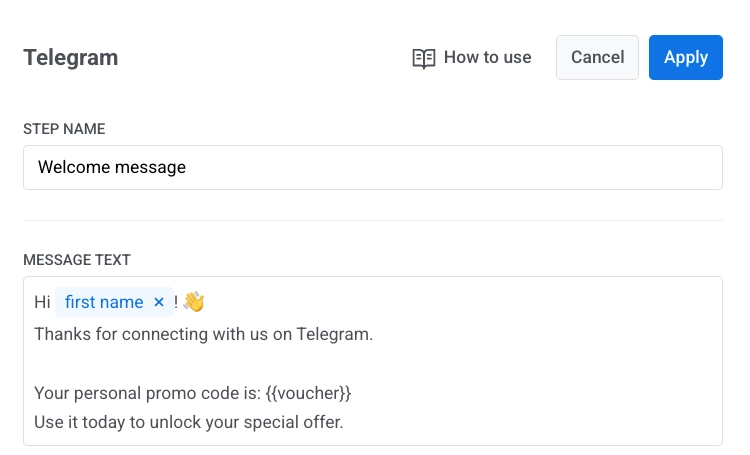
- Geben Sie im Feld Nachrichtentext den Nachrichtentext ein.
- Halten Sie den Nachrichtentext rein textbasiert und innerhalb von 4096 Zeichen.
Personalisieren des Nachrichteninhalts
Anchor link toSie können Telegram-Nachrichten mit Tags und Liquid-Platzhaltern personalisieren. Erfahren Sie mehr
Verwenden von Gutscheinen
Anchor link toUm Gutscheincodes einzufügen:
- Aktivieren Sie Gutscheine verwenden.
- Wählen Sie den Gutschein-Pool aus.
- Optional. Legen Sie Tag zuweisen fest.
- Fügen Sie
{{voucher}}zum Nachrichtentext hinzu, wo der Code erscheinen soll.
Erfahren Sie mehr über Gutscheine
Sobald Sie das Element konfiguriert haben, klicken Sie auf Anwenden.
Erreichbarkeit und Statistiken
Anchor link toWenn das Senden aufgrund eines vorübergehenden Netzwerkproblems fehlschlägt, versucht Pushwoosh es automatisch erneut.
Wenn Telegram bot blocked oder chat not found zurückgibt, markiert Pushwoosh den Benutzer als für Telegram nicht erreichbar:
bot blockederscheint in den Statistiken als Übersprungen, wer den Bot blockiert hat.chat not founderscheint in den Statistiken als Übersprungen für diejenigen, deren Chat nicht gefunden wurde.
Eine vollständige Einrichtungsanleitung finden Sie unter Senden von Telegram-Nachrichten in Customer Journey.