Slack: Nachricht posten
Verwenden Sie Slack: Nachricht posten, um Ihr Team in Slack von einem Journey-Schritt aus zu benachrichtigen. Dieser Punkt authentifiziert sich mit seinem eigenen Bot-Token. Er verwendet keine auf Kontoebene konfigurierte Integration, die an anderer Stelle in den Einstellungen eingerichtet wurde.
Typische Anwendungsfälle:
- Benachrichtigung bei hochwertigen Conversions: Posten Sie, wenn ein Teilnehmer einen Kauf abschließt oder ein Ziel erreicht, damit das Team es in Echtzeit sieht.
- Kennzeichnen eines Schritts, der menschliches Eingreifen erfordert: Benachrichtigen Sie den Support oder Vertrieb, wenn ein Teilnehmer einen Punkt erreicht, den ein Bot nicht abschließen kann.
- Verfolgen des Journey-Zustands: Posten Sie jedes Mal eine Zeile, wenn eine Kohorte einen Zweig abschließt, ohne ein Dashboard erstellen zu müssen.
Konfigurieren des Punkts
Anchor link to- Ziehen Sie Slack: Nachricht posten aus dem Bereich Integrationen im linken Panel auf die Arbeitsfläche.
- Doppelklicken Sie auf den Punkt und geben Sie einen Schrittnamen ein.
- Geben Sie unter Bot-Token das
xoxb-Bot-Token Ihrer Slack-App ein. Es wird maskiert gespeichert, wie ein geheimer Webhook-Header, und Slack gibt es niemals an Pushwoosh zurück.
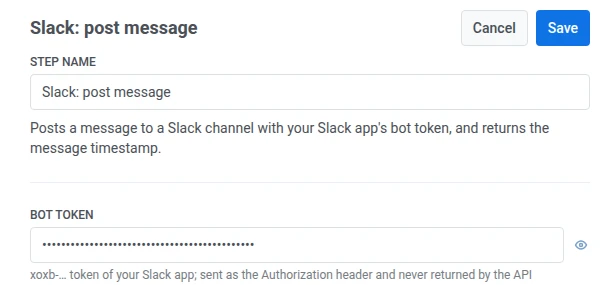
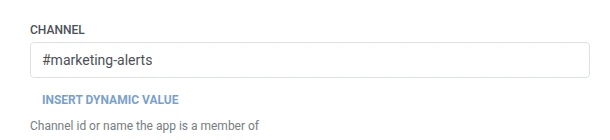
- Geben Sie unter Kanal die Kanal-ID oder den Namen ein, in dem Ihre App Mitglied ist.
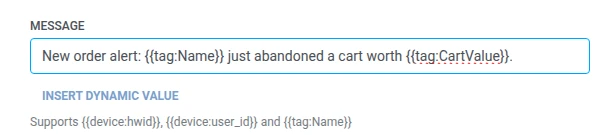
- Geben Sie unter Nachricht den zu postenden Text ein. Es werden dieselben Makros wie in jedem Webhook-Body verwendet:
{{device:hwid}},{{device:user_id}},{{tag:Name}}.
- Klicken Sie auf Speichern.
Antwort
Anchor link toDer Teilnehmer fährt mit dem nächsten Schritt fort, den Sie auf der Arbeitsfläche verbinden.
Attribute nach Ausführung des Schritts
Anchor link to| Attribut | Was es enthält |
|---|---|
slack_message_ts | Der Zeitstempel der geposteten Nachricht |
Wie man es in späteren Schritten verwendet
Anchor link toDer Teilnehmer ist bereits unabhängig von diesem Attribut zum nächsten Schritt übergegangen. Speichern Sie es in einem Tag mit Benutzerprofil aktualisieren, wenn Sie diese spezifische Nachricht später referenzieren müssen, zum Beispiel bei der Fehlerbehebung der Zustellung.
Fehler und unerwartete Antworten
Anchor link toEine fehlgeschlagene Anfrage entfernt den Teilnehmer aus der Journey. Siehe Fehler und fehlgeschlagene Anfragen.
Beispielszenario: Benachrichtigung des Teams über eine hochwertige Bestellung
Anchor link toEin Team möchte eine Slack-Benachrichtigung in dem Moment erhalten, in dem eine hochwertige Bestellung eingeht, ohne Pushwoosh direkt zu beobachten.
- Fügen Sie ein Trigger-basierter Eintritt-Element hinzu und stellen Sie es so ein, dass es bei einem
HighValueOrderPlaced-Ereignis ausgelöst wird. - Fügen Sie direkt danach Slack: Nachricht posten hinzu. Posten Sie in
#order-alertsmit{{tag:Name}} hat gerade eine Bestellung im Wert von {{tag:Order Value}} aufgegeben. - Klicken Sie auf Speichern.
Sobald dies ausgeführt wird, sieht das Team in dem Moment, in dem eine hochwertige Bestellung eingeht, eine Slack-Nachricht in #order-alerts.