Rebonds et erreurs de distribution
Utilisez l’onglet Erreurs pour voir pourquoi cet e-mail a échoué pour certains destinataires. Le badge rouge sur l’onglet indique le total des envois rejetés plus les Erreurs de traitement. Pour y accéder, ouvrez les statistiques détaillées d’un e-mail et cliquez sur Erreurs. Cette page couvre ce qui est propre à l’e-mail. Pour les groupes d’erreurs communs à tous les canaux, consultez Comment lire l’onglet Errors.
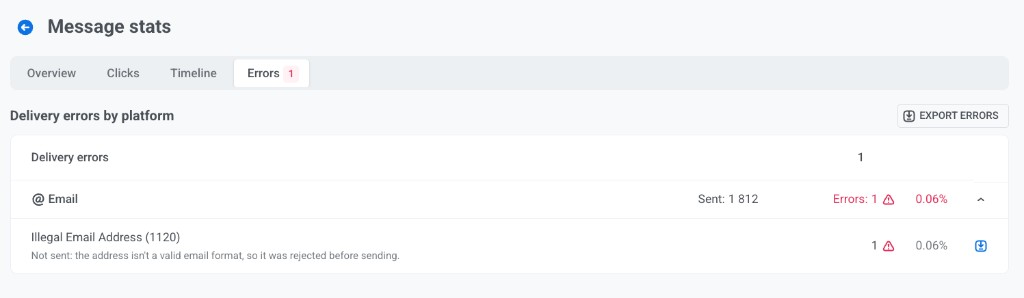
Erreurs de distribution par plateforme
Anchor link toErreurs de distribution par plateforme montre chaque plateforme (pour l’e-mail, @ Email) avec le nombre d’envois, le nombre d’échecs et le taux d’erreur.
- Développez une plateforme pour voir chaque code d’erreur, une courte description et le nombre.
- Cliquez sur Exporter les erreurs pour télécharger la liste complète, ou utilisez l’icône de téléchargement sur une ligne d’erreur. Les deux exportations nécessitent l’autorisation Personal data dans votre rôle.
- Pour l’e-mail, le fichier Exporter les erreurs liste aussi les adresses ayant rebondi, une ligne par adresse avec son dernier rebond sur cet e-mail. Pour ces lignes,
reasoncontient la raison du rebond, et les colonnesbounce_type(hardousoft),smtp_codeetproviderà la fin du fichier sont renseignées. Le bouton est disponible même lorsque l’e-mail a des rebonds mais aucune erreur d’envoi. Le fichier d’une seule ligne d’erreur n’inclut pas les rebonds.
Rebonds par raison
Anchor link toLe bloc Rebonds regroupe les adresses qui ont rebondi sur cet e-mail selon la raison donnée par le serveur de messagerie du destinataire. Les rebonds durs et doux sont listés séparément, la raison la plus fréquente en premier. Le bloc n’apparaît que si l’e-mail a au moins un rebond avec une raison. Si le bloc est absent, vérifiez les lignes d’erreur ci-dessus.
Le bloc affiche ces colonnes :
| Colonne | Ce qu’elle montre |
|---|---|
| Raison | La raison du rebond. |
| Adresses | Combien d’adresses ont reçu cette raison. Chaque adresse est comptée une fois, selon son dernier rebond sur cet e-mail. |
| Principaux codes SMTP | Jusqu’à trois codes SMTP à l’origine de cette raison (codes d’état renvoyés par le serveur de messagerie du destinataire, comme 5.1.1), le plus fréquent en premier, avec le nombre d’adresses pour chacun. |
| Fournisseur | Le service qui a renvoyé la réponse affichée dans Réponse du fournisseur. |
| Réponse du fournisseur | La réponse reçue par la plupart de ces adresses. Survolez-la pour lire le texte complet. Les adresses des destinataires qu’elle contient sont masquées. |
Le tableau ci-dessous explique chaque raison et ce qu’il faut faire.
| Raison | Ce qu’elle signifie | Que faire |
|---|---|---|
| L’adresse n’existe pas | Le serveur de messagerie du destinataire indique que l’adresse n’existe pas. | Retirez-la de votre liste. La réactiver n’aidera pas. |
| Boîte aux lettres inactive | La boîte aux lettres est désactivée. | Retirez-la de votre liste. |
| Boîte aux lettres pleine | La boîte aux lettres a dépassé son quota. C’est généralement temporaire. | Rien. L’adresse peut fonctionner à nouveau plus tard. |
| Bloqué : réputation de l’expéditeur | Le fournisseur limite votre domaine d’envoi ou votre adresse IP. | Réduisez le volume d’envoi, vérifiez votre taux de plaintes et vérifiez SPF, DKIM et DMARC pour votre domaine d’envoi. |
| Rejeté comme spam | Le fournisseur a rejeté l’e-mail comme spam. | Vérifiez le contenu et les liens. |
| Échec de la distribution | La distribution a expiré car le serveur du destinataire était injoignable, par exemple à cause d’un problème de connexion ou de DNS. | Surveillez les échecs répétés. |
| Autre | Pushwoosh n’a pas pu classer la réponse du fournisseur. | Vérifiez le code SMTP et la réponse du fournisseur. |
Une même raison peut apparaître dans les deux groupes. Par exemple, une boîte aux lettres pleine peut renvoyer un rebond dur ou un rebond doux, selon le fournisseur. La suppression de l’adresse par Pushwoosh dépend du type de rebond, et non de la raison. Voir Types d’erreurs d’e-mail que vous pourriez voir.
Types d’erreurs d’e-mail que vous pourriez voir
Anchor link toLes tableaux ci-dessous expliquent les noms de rebond, de plainte et de suppression qui peuvent apparaître lorsque vous développez @ Email. Pour les codes d’expéditeur et SMTP, voir Erreurs d’e-mail.
Pushwoosh a envoyé l’e-mail, mais le serveur de messagerie du destinataire l’a refusé : un rebond dur, un rebond doux, une plainte pour spam ou un rebond indéterminé. Pour les rebonds durs et les plaintes, Pushwoosh supprime automatiquement l’adresse afin qu’elle ne reçoive plus d’e-mails. Les rebonds doux et les rebonds indéterminés ne suppriment pas l’adresse.
| Erreur | Description | Ce qui se passe ensuite |
|---|---|---|
| Hard Bounce General | Rejeté de manière permanente sans raison spécifique. | Pushwoosh ajoute l’adresse à votre liste de suppression. Elle ne recevra plus d’e-mails. Si le taux de rebond dur dépasse la limite de taux de rebond dur de votre forfait, 5 % par défaut, Pushwoosh met en pause l’envoi d’e-mails dans le projet et vérifie votre base de données d’e-mails. |
| Hard Bounce Mailbox Full | La boîte de réception a dépassé son quota et le serveur l’a rejetée de manière permanente. | Pushwoosh ajoute l’adresse à votre liste de suppression. |
| Hard Bounce Inactive Mailbox | La boîte aux lettres est fermée ou abandonnée. | Pushwoosh ajoute l’adresse à votre liste de suppression. |
| Hard Bounce Suppressed | Le fournisseur destinataire a déjà cette adresse supprimée après des échecs permanents antérieurs. | Pushwoosh l’ajoute également à votre liste de suppression. |
| Hard Bounce Undetermined | Rejeté de manière permanente pour une raison inconnue. | Pushwoosh ajoute l’adresse à votre liste de suppression. |
| Soft Bounce General | Rejeté temporairement sans raison spécifique. | Rien n’est supprimé. Pushwoosh réessaie lors du prochain envoi. |
| Soft Bounce Attachment Rejected | Le serveur du destinataire a bloqué l’e-mail en raison de restrictions sur les pièces jointes. | Rien n’est supprimé. Essayez d’envoyer sans la pièce jointe. |
| Soft Bounce Spam | Le serveur du destinataire a signalé l’e-mail comme spam. | Rien n’est supprimé. Révisez votre contenu et l’authentification de l’expéditeur. |
| Soft Bounce Message Too Large | L’e-mail a dépassé la limite de taille du destinataire. | Rien n’est supprimé. Réduisez la taille des images ou simplifiez le modèle. |
| Soft Bounce Content Rejected | Le serveur du destinataire a rejeté le contenu du message. | Rien n’est supprimé. Révisez l’e-mail pour les déclencheurs de spam et les violations de politique. |
| Soft Bounce Mailbox Full | La boîte de réception du destinataire est pleine en ce moment. | Rien n’est supprimé. La distribution peut réussir une fois que de l’espace est libéré. |
| Soft Bounce Undetermined | Rejeté temporairement pour une raison inconnue. | Rien n’est supprimé. Surveillez les échecs répétés. |
| Soft Bounce Timeout | Le serveur du destinataire a mis trop de temps à répondre. | Rien n’est supprimé. Pushwoosh réessaie lors du prochain envoi. |
| Complaint General | Une plainte a été signalée pour cette adresse. | Pushwoosh désabonne le destinataire et supprime définitivement l’adresse. |
| Complaint Abuse | Le destinataire a marqué l’e-mail comme spam. | Pushwoosh désabonne le destinataire et supprime définitivement l’adresse. Les plaintes nuisent le plus à la réputation de l’expéditeur. Maintenez le taux de plainte en dessous de 0,1 % des e-mails envoyés, le niveau attendu par les fournisseurs de messagerie tels que Gmail. S’il atteint la limite de taux de plainte de votre forfait, 1 % par défaut, Pushwoosh met en pause l’envoi d’e-mails dans le projet et vous demande de vérifier le contenu des e-mails. |
| Bounce Undetermined | Le serveur a accepté l’e-mail mais n’a jamais confirmé la distribution. Le résultat est inconnu. | Aucune adresse n’est supprimée. Surveillez les occurrences répétées. |
Pushwoosh n’a pas du tout envoyé ces e-mails. L’adresse était déjà sur votre liste de suppression suite à un rebond, une plainte ou un désabonnement antérieur, ou l’adresse elle-même est invalide.
| Erreur | Description |
|---|---|
| Illegal email address | L’adresse n’est pas un format d’e-mail valide, elle a donc été rejetée avant l’envoi. |
| Email is bounced | L’adresse est supprimée après un rebond permanent antérieur. |
| Email complaint | L’adresse est supprimée après une plainte pour spam antérieure. |
| Email is unsubscribed | Le destinataire s’est désinscrit des e-mails marketing. Les e-mails transactionnels sont toujours livrés à cette adresse. |
Pour savoir comment prévenir ces problèmes et améliorer la délivrabilité, voir les Meilleures pratiques de délivrabilité des e-mails.