Pushwoosh ManyMoney AI
ManyMoney AI est un copilote marketing autonome qui optimise votre compte Pushwoosh pour la croissance des revenus, et pas seulement pour les métriques d’engagement.
Il analyse les données spécifiques de votre projet, y compris le comportement des utilisateurs, les schémas de conversion et les événements de revenus, pour créer automatiquement des campagnes, ajuster le ciblage, arrêter les initiatives peu performantes et développer ce qui génère des revenus. Toutes les décisions sont adaptées à votre modèle économique et aux données réelles des utilisateurs, et non à des recommandations génériques.
Que pouvez-vous faire avec ManyMoney AI ?
Anchor link toRécupération d’informations et documentation
- Recherchez dans la documentation Pushwoosh pour trouver rapidement des informations spécifiques, des guides et des bonnes pratiques.
Gestion des applications
- Créez, configurez et gérez des applications et des paramètres de plateforme (iOS, Android, Web, etc.).
Gestion des campagnes et des messages
- Envoyez, gérez et analysez des messages sur tous les canaux pris en charge, y compris les notifications push, les e-mails, les SMS, WhatsApp, etc.
Données utilisateur et segmentation
- Gérez les profils utilisateur, la segmentation et les informations sur les appareils.
- Créez et suivez des attributs et des événements utilisateur personnalisés.
Création et gestion de contenu
- Créez et gérez des préréglages pour les messages push, e-mail, SMS et LINE.
- Créez des messages in-app interactifs et du contenu rich media.
Parcours client
- Créez, mettez à jour et contrôlez les parcours utilisateur automatisés.
- Accédez à des statistiques détaillées sur les parcours et aux données de flux d’utilisateurs.
- Organisez et gérez les flux de travail des parcours.
Analyses et rapports
- Consultez des statistiques détaillées sur les messages et les rapports de livraison.
- Créez et gérez des tableaux de bord d’analyse personnalisés.
- Exportez les données des messages et les statistiques des campagnes.
- Analysez les segments d’utilisateurs et le comportement d’engagement.
Dépannage
- Identifiez et résolvez les problèmes potentiels dans les campagnes avant leur lancement.
- Traitez les dysfonctionnements des parcours client.
- Dépannez les problèmes de livraison de messages.
- Résolvez les problèmes d’intégration et de SDK.
Astuce : Pour savoir comment obtenir un diagnostic plus rapide avec des prompts structurés, consultez Dépannage avec ManyMoney AI.
Configuration avancée
- Gérez les utilisateurs, les groupes et les autorisations d’accès.
- Configurez les certificats push, les clés FCM et les domaines de messagerie.
- Configurez les intégrations avec des services tiers (par exemple, webhooks, Piano, Segment).
- Contrôlez les taux et les limites de livraison des messages.
Outils pour les développeurs
- Enregistrez des appareils pour les tests de campagne.
- Définissez des règles complexes de ciblage des utilisateurs.
- Configurez la messagerie basée sur la localisation.
- Gérez les codes promotionnels et les récompenses.
Fonctionnalités d’entreprise
- Gérez l’accès et les autorisations de l’équipe.
- Organisez et basculez entre plusieurs applications.
- Surveillez l’utilisation et les limites du compte.
- Configurez et gérez des domaines de messagerie personnalisés et des configurations d’envoi.
Quelles données ManyMoney AI peut-il collecter et traiter ?
Anchor link toPour fournir la meilleure assistance possible, ManyMoney AI collecte et traite des types de données spécifiques. Lorsque vous sélectionnez Automatisation complète dans les paramètres de ManyMoney AI, vous consentez à ce que ces données soient traitées par des sous-traitants autorisés.
Ce qui est traité
Anchor link to| Vos questions et prompts | Les messages que vous envoyez à ManyMoney AI pour demander des informations, effectuer des tâches ou résoudre des problèmes. |
| Paramètres d’appel d’outils | Les données que vous fournissez lorsque ManyMoney AI doit appeler les API de Pushwoosh en votre nom (par exemple, ID utilisateur, ID de campagne). |
| Réponses de l’API | Les résultats renvoyés par les services Pushwoosh que ManyMoney AI utilise pour générer des réponses précises et pertinentes. |
| Contexte de votre session | Des informations telles que le code de votre application, l’URL de la page actuelle et l’historique de la conversation qui aident à personnaliser et à contextualiser les réponses. |
Ce qui n’est PAS collecté
Anchor link to| Données personnelles des utilisateurs de vos applications Pushwoosh | ManyMoney AI ne collecte ni ne stocke les informations de vos utilisateurs finaux, mais il peut y accéder temporairement pour répondre à vos demandes. Ces informations restent privées et sécurisées. |
| Identifiants sensibles | Les jetons d’API et les mots de passe sont gérés séparément par Pushwoosh et ne sont pas exposés à ManyMoney AI. |
| Informations de facturation | Les détails de paiement et les données financières sont traités de manière sécurisée et ne sont pas accessibles par ManyMoney AI. |
| Votre historique de navigation | Seule l’URL actuelle du Panneau de Contrôle Pushwoosh est utilisée pour la compréhension contextuelle ; aucun historique complet n’est suivi. |
Comment vos données sont traitées
Anchor link toCertaines données peuvent être conservées dans le cadre de la journalisation système standard, conformément aux politiques de conservation des données de Pushwoosh.
Vos données sont traitées conformément aux règles du RGPD et sont protégées lors du transfert par chiffrement. L’accès à vos données est contrôlé, ce qui signifie que seuls vous et les systèmes autorisés pouvez y accéder.
Vos données ne sont jamais vendues ou partagées avec des tiers. Vous gardez le contrôle et pouvez retirer votre consentement à tout moment dans les paramètres de ManyMoney AI.
Commencer à travailler avec ManyMoney AI
Anchor link toConcepts clés
Anchor link toComprendre quelques termes clés vous aidera à obtenir de meilleurs résultats lors de l’utilisation de ManyMoney AI.
| Chat ManyMoney AI | L’interface principale pour interagir avec ManyMoney AI. Utilisez-la pour poser des questions, demander de l’aide ou effectuer des actions au sein de votre projet. |
| Contexte | Informations pertinentes que ManyMoney AI utilise pour interpréter votre demande. |
| Prompt | Toute entrée que vous fournissez (question, instruction ou commande) pour démarrer une conversation ou demander des informations. La qualité du prompt affecte la précision de la réponse. |
Étape 1. Donner son consentement
Anchor link toPour commencer à utiliser ManyMoney AI, vous devez d’abord donner votre consentement dans vos paramètres. Cela permet à ManyMoney AI de traiter vos entrées et d’effectuer des actions en votre nom.
Pour donner votre consentement :
-
Connectez-vous à votre compte Pushwoosh.
-
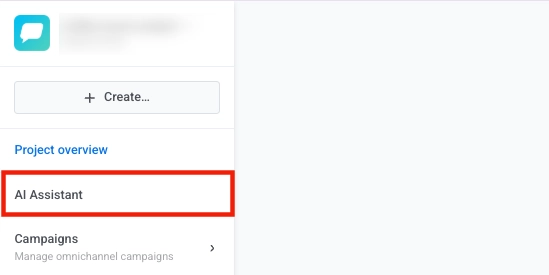
Cliquez sur le bouton AI Assistant.
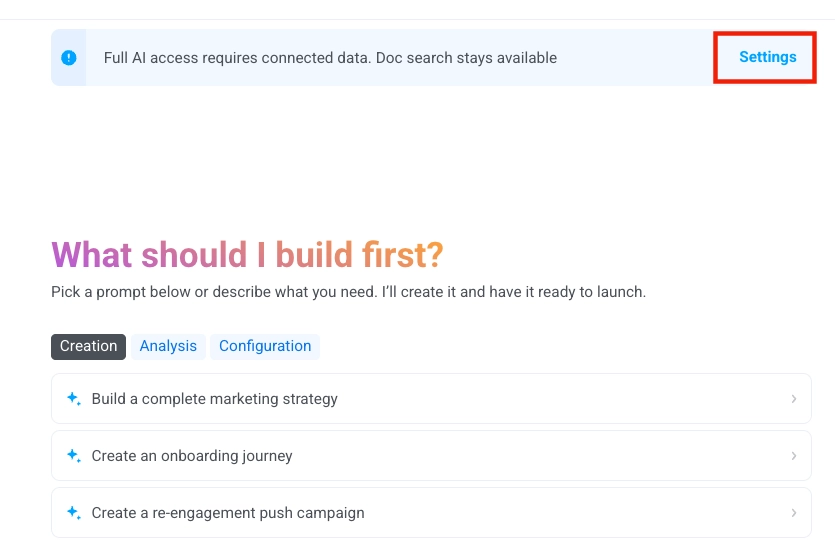
- En haut de la fenêtre de chat, cliquez sur Settings.
- Dans la fenêtre de consentement au traitement des données, sélectionnez Full Automation, puis cliquez sur Apply.
Donner son consentement permet à Pushwoosh d’utiliser des fournisseurs de services d’IA autorisés (sous-traitants) pour :
-
Traiter vos requêtes en langage naturel.
-
Générer des réponses, des suggestions et des exemples de code.
-
Exécuter des appels d’outils via les API de Pushwoosh.

Étape 2. Démarrer la conversation
Anchor link toPour commencer une nouvelle interaction avec ManyMoney AI :
-
Cliquez sur le nom du chat en haut de la fenêtre de ManyMoney AI.
-
Sélectionnez New conversation dans le menu déroulant.

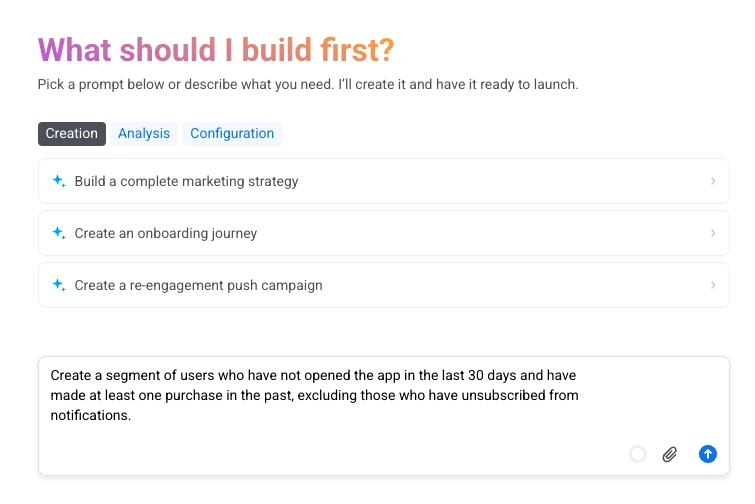
Dans le champ de saisie du chat, entrez un prompt clair et spécifique décrivant ce que vous voulez que ManyMoney AI fasse.
Étape 3. Vérifier et valider les résultats.
Anchor link toAprès que ManyMoney AI a terminé une action ou fourni une réponse, examinez les résultats pour vous assurer qu’ils répondent à vos exigences. Confirmez que les modifications, configurations ou contenus générés sont exacts et conformes à votre intention.
Si le résultat n’est pas celui attendu ou nécessite des ajustements, vous pouvez demander à ManyMoney AI de le modifier. Fournissez des détails supplémentaires ou clarifiez votre demande pour guider ManyMoney AI dans la génération d’un résultat plus précis.
Gérer les conversations
Anchor link toLe menu Conversations vous permet de créer, de basculer entre et de gérer vos sessions de chat actives. Chaque conversation peut représenter un sujet ou un contexte de campagne différent, vous aidant à garder votre communication organisée.
Créer une nouvelle conversation
Anchor link to-
Cliquez sur le menu déroulant Conversations en haut de la fenêtre de chat.
-
Sélectionnez New conversation.

- Un chat vide s’ouvre où vous pouvez commencer une nouvelle requête ou un nouveau flux de travail.
Basculer entre les conversations
Anchor link to-
Ouvrez le menu déroulant Conversations.
-
Cliquez sur le nom d’une conversation existante pour y basculer. Le nom de la conversation actuelle est affiché dans la barre de titre du menu déroulant.

Supprimer une conversation
Anchor link to-
Ouvrez le menu déroulant Conversations.
-
Passez la souris sur la conversation que vous souhaitez supprimer.
-
Cliquez sur l’icône de la corbeille pour la supprimer.
Stratégies de prompting et bonnes pratiques pour travailler avec ManyMoney AI
Anchor link toRédiger des prompts clairs et spécifiques aide ManyMoney AI à fournir des réponses précises, pertinentes et exploitables. Utilisez les stratégies suivantes pour améliorer vos interactions et vos résultats.
Soyez spécifique dans votre demande
Anchor link toÉvitez les entrées vagues. Des demandes claires et ciblées permettent à ManyMoney AI de répondre efficacement.
| Prompt efficace | Prompt moins efficace |
|---|---|
| « Crée un segment pour les utilisateurs qui ont abandonné leur panier au cours des 7 derniers jours. » | « Répare mes notifications push. » |
| « Montre-moi les statistiques des notifications push pour la campagne ‘Soldes d’été’ du 1er au 15 juin. » | « Montre-moi les stats. » |
| « Aide-moi à déboguer pourquoi mes notifications push iOS ne sont pas livrées. » | « Quelque chose ne va pas. » |
Fournissez du contexte et des identifiants
Anchor link toIncluez des identifiants clés (tels que les codes d’application, les noms de campagne, les UUID de parcours et les noms de segment) lorsque vous faites référence à des ressources spécifiques pour aider ManyMoney AI à interpréter votre demande avec précision.
| Prompt efficace | Prompt moins efficace |
|---|---|
| « Le parcours ‘Flux de Bienvenue’ (UUID : abc-123) a cessé d’envoyer des e-mails hier à 15h. » | « Mon parcours ne fonctionne pas. » |
Rédigez des prompts détaillés
Anchor link toDécrivez clairement ce que vous essayez d’accomplir. Incluez des informations de base pertinentes, le résultat souhaité et tous les paramètres ou contraintes spécifiques qui pourraient affecter la réponse.
| Prompt efficace | Prompt moins efficace |
|---|---|
| « Crée un segment pour les utilisateurs qui ont consulté un produit mais n’ont pas acheté au cours des 14 derniers jours. L’objectif est de les cibler avec un e-mail de suivi. » | « Aide-moi à cibler les utilisateurs. » |
Utilisez une dénomination cohérente
Anchor link toOrganisez votre espace de travail Pushwoosh avec des noms clairs et cohérents pour les événements, les parcours, les tags et les campagnes afin d’éviter toute confusion.
Ajoutez des descriptions claires
Anchor link toFournissez des étiquettes et des notes descriptives pour les événements personnalisés, les segments d’utilisateurs et les tags afin que ManyMoney AI puisse les interpréter correctement.
Vérifiez toujours les résultats
Anchor link toAprès avoir reçu une réponse ou vu une action effectuée, vérifiez le résultat pour vous assurer qu’il est exact et qu’il répond à vos exigences. Examinez les tableaux de bord, les paramètres ou les journaux si nécessaire.
Comprendre les schémas de flux de travail
Anchor link toCertaines actions nécessitent plusieurs étapes pour être complétées. Lisez chaque étape fournie par ManyMoney AI et laissez le processus se terminer avant de continuer. Si l’action apporte des modifications permanentes (comme la suppression de données), examinez attentivement avant de confirmer.
Fournissez une confirmation explicite pour les opérations destructrices
Anchor link toPour les actions à fort impact (par exemple, la suppression de données ou la modification de campagnes en direct), ManyMoney AI nécessite une phrase de confirmation exacte.
Exemple :
Si vous êtes invité à confirmer avec « DELETE_CAMPAIGN_ABC123 », vous devez taper cette phrase exactement. Les réponses comme « Oui, supprime-la » seront rejetées.
Exemples de prompts et de réponses
Anchor link toParcours client
Anchor link toPrompt
Anchor link toCrée un parcours qui commence lorsqu’un client ajoute des chaussures à son panier et part sans effectuer d’achat
Attends 1 heure pour vérifier si un achat a lieu — si c’est le cas, envoie un message de remerciement et quitte le parcours. Sinon, envoie un premier rappel et attends 23 heures de plus.
Si le client finalise l’achat pendant cette période, envoie un message de remerciement et quitte. S’il n’a toujours pas acheté, envoie un deuxième rappel avec une réduction, attends encore 1 heure, puis quitte le parcours.
Exemple de résultat de ManyMoney AI
Anchor link to
Données utilisateur & segmentation
Anchor link toPrompt
Anchor link toCrée un segment d’utilisateurs qui n’ont pas ouvert l’application au cours des 30 derniers jours et qui ont effectué au moins un achat par le passé, à l’exclusion de ceux qui se sont désabonnés des notifications.
Exemple de résultat de ManyMoney AI
Anchor link to
Contenu
Anchor link toPrompt
Anchor link toCrée un contenu d’e-mail pour une boutique en ligne visant à réactiver d’anciens acheteurs en offrant des incitations spéciales telles que des réductions ou des offres exclusives. L’objectif est d’encourager les achats répétés et de réengager les clients qui n’ont pas fait d’achats récemment. Concentre-toi sur un message clair et convaincant qui met en valeur l’offre et inclut un appel à l’action fort.
Exemple de résultat de ManyMoney AI
Anchor link to
Analyses & rapports
Anchor link toPrompt
Anchor link toGénère un rapport complet des taux de livraison, des taux d’ouverture et des taux de clics pour toutes les campagnes de notifications push lancées dans cette application, segmenté par type de campagne et contenu du message.
Lectures complémentaires
Anchor link toDécouvrez comment des entreprises de la fintech et de la livraison de repas ont atteint une croissance de revenus de plus de 40 % en 90 jours en utilisant ManyMoney AI.