Configuration de la plateforme Facebook Messenger
Pushwoosh vous permet d’envoyer et de recevoir des messages Facebook Messenger dans le cadre de vos campagnes omnicanales. Connectez votre Page Facebook à Pushwoosh pour utiliser Facebook Messenger dans Customer Journey et les messages uniques.
Prérequis
Anchor link toAvant de configurer Facebook Messenger, assurez-vous que les exigences suivantes sont remplies :
- Page Facebook : la Page à partir de laquelle vous souhaitez envoyer des messages aux clients.
- App Meta : une App Meta avec le produit Messenger ajouté, connectée à votre Page Facebook.
- ID de Page et Jeton d’accès de la Page : générés pour votre Page dans le tableau de bord de l’App Meta.
Vous saisirez ces valeurs dans Pushwoosh dans les étapes ci-dessous. Pour la création de l’App Meta et du jeton, partagez cette page et la documentation Messenger de Meta avec l’équipe de développement.
Configurer les paramètres de Facebook Messenger
Anchor link toPour configurer les paramètres de Facebook Messenger, suivez ces étapes :
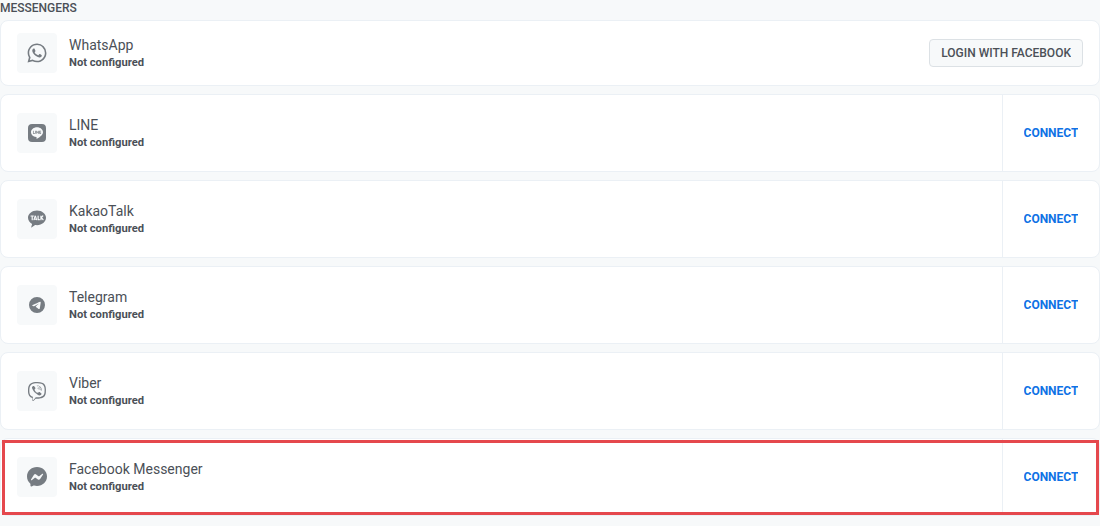
- Allez dans Settings → Configure platforms. Sous Messengers, cliquez sur Connect sur Facebook Messenger.
- Sur la page Facebook Messenger Configuration, saisissez votre ID de Page et votre Jeton d’accès de la Page depuis le tableau de bord de l’App Meta.
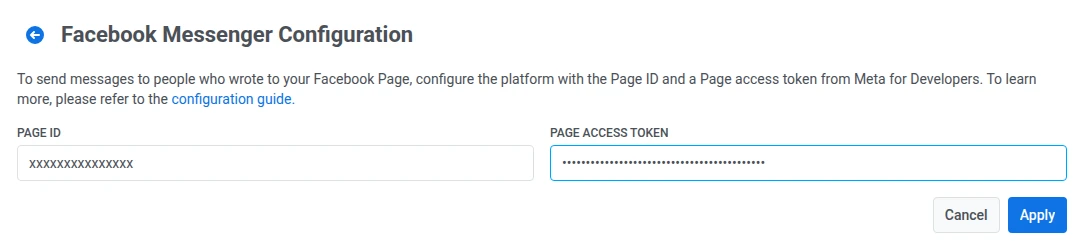
- Cliquez sur Apply pour enregistrer votre configuration. Pour annuler les modifications, cliquez sur Cancel.
Après avoir cliqué sur Apply, Pushwoosh enregistre automatiquement auprès de Meta les événements entrants dont il a besoin (messages, messaging_postbacks, messaging_optins, messaging_referrals, message_deliveries, message_reads). Vous n’avez pas besoin de choisir vous-même ces types d’événements dans Pushwoosh.
Définir l’URL du Webhook dans Meta
Anchor link toPour permettre à Meta d’envoyer des messages et des événements entrants à Pushwoosh, configurez une URL de webhook dans le tableau de bord de votre App Meta.
Suivez ces étapes pour la configurer :
- Dans le tableau de bord de votre App Meta, allez à la page Messenger > Settings.
- Dans la section Webhook, saisissez l’URL de rappel suivante :
https://tw-callback.svc-nue.pushwoosh.com/api/v1/fbMessengerCallback- Saisissez le jeton de vérification que vous avez configuré pour cette Page, puis cliquez sur Verify and Save.
- Abonnez le webhook à votre Page connectée dans Meta (la même Page que vous avez connectée dans Pushwoosh). Ceci est distinct des champs d’événements entrants que Pushwoosh enregistre après avoir cliqué sur Apply.
Prochaines étapes
Anchor link toAprès la configuration, vous pouvez envoyer des messages Facebook Messenger dans les Customer Journeys et les messages uniques.