Microsoft Fabric: добавление строки
Используйте элемент Microsoft Fabric: ingest row, чтобы передавать по одной строке в таблицу Eventhouse (KQL) на шаге Journey через Fabric ingest API. В отличие от других точек интеграции, которые используют собственный токен, эта точка аутентифицируется через приложение Entra ID, подключенное один раз для всей учетной записи. В самом элементе нет поля для токена.
Типичные сценарии использования:
- Заполнение таблицы отчетов: вставка строки для каждого достигнутого шага Journey для последующего использования в дашборде или запланированном запросе.
- Логирование событий в реальном времени: потоковая передача необработанных данных Journey в Eventhouse без ожидания пакетной обработки.
- Объединение с существующими данными: вставка значения устройства или тега, по которому таблицы Fabric смогут объединяться с вашими собственными наборами данных.
Перед началом работы
Anchor link toПодключите приложение Entra ID в разделе Settings > 3rd-party integrations > Microsoft Azure:
- Зарегистрируйте приложение в вашем каталоге Entra ID и создайте для него секрет клиента.
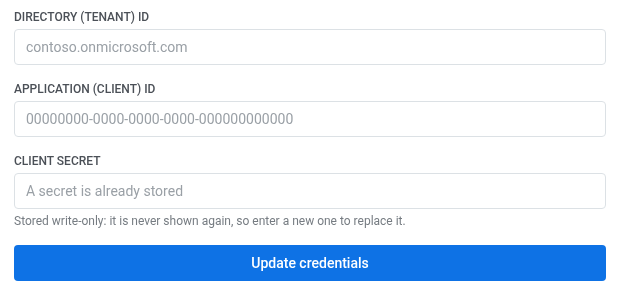
- В поле Directory (tenant) ID введите ваш тенант, например
contoso.onmicrosoft.com. - В поле Application (client) ID введите ID клиента зарегистрированного приложения.
- В поле Client secret вставьте секрет. Он сохраняется в режиме «только для записи»: Pushwoosh больше никогда его не покажет, поэтому для замены вставьте новый.
- Нажмите Connect Azure.
После подключения Azure установите интеграцию, чтобы элемент появился в конструкторе Journey.
Также на стороне Eventhouse должны быть выполнены три условия, иначе запрос завершится ошибкой:
- Целевая таблица должна иметь сопоставление для приема данных в формате JSON — потоковый прием JSON без него не работает.
- Регистрация приложения должна иметь роль
ingestorв Eventhouse. В пользовательском интерфейсе Fabric для этого нет кнопки — предоставьте роль, выполнив следующую команду в окне запросов Eventhouse:.add database ['<database name>'] ingestors ('aadapp=<Application (client) ID>;<Directory (tenant) ID>') - В базе данных KQL должна быть включена политика потокового приема данных. Выполните следующую команду в том же окне запросов:
.alter database ['<database name>'] policy streamingingestion enable
Сохраняйте ['...'] вокруг имени базы данных в этих командах, если оно содержит дефис — имя с дефисом без кавычек не будет обработано.
Настройка элемента
Anchor link to- Перетащите Microsoft Fabric: ingest row из раздела Integrations на левой панели на холст.
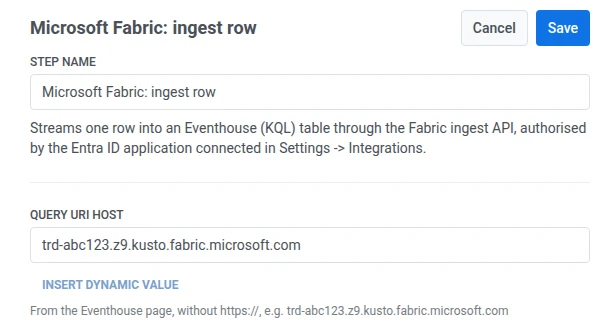
- Дважды щелкните элемент и введите Step Name.
- В поле Query URI host введите хост вашего Eventhouse из его Query URI на странице System overview. Не включайте
https://, напримерtrd-abc123.z9.kusto.fabric.microsoft.com.
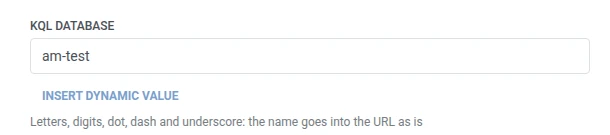
- В поле KQL database введите имя целевой базы данных.
- В поле Table введите имя целевой таблицы.

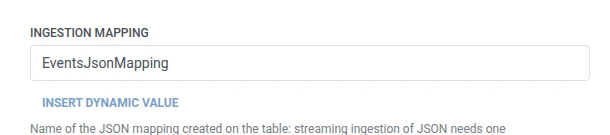
- В поле Ingestion mapping введите имя сопоставления JSON, созданного для этой таблицы.
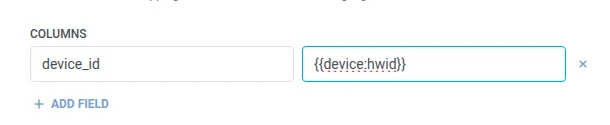
- В разделе Columns добавьте по одной строке для каждого столбца Eventhouse, в который нужно записать данные. Введите имя столбца и значение. Имена не должны быть пустыми и должны быть уникальными. Значением может быть фиксированный текст или макрос, например
{{tag:Name}}— те же макросы, что и в теле Webhook. Или нажмите Insert Dynamic Value, чтобы выбрать атрибут, полученный на предыдущем шаге этого Journey, например ответ LLM или сопоставленное значение Webhook.
- Нажмите Save.
Ответ
Anchor link toПользователь переходит к следующему шагу, который вы подключите на холсте.
Атрибуты после выполнения шага
Anchor link toЭтот элемент не сопоставляет никакие данные из ответа обратно в Journey.
Сбои и непредвиденные ответы
Anchor link toОткройте журнал вызовов в настройках элемента и проверьте ответ:
- 401 или 403 — неверные или отсутствующие учетные данные подключенного приложения Entra ID или его роль
ingestor. - 520 с ошибкой
StreamingIngestionException: Failed to initialize cursor tracker...— не включена политика потокового приема данных в базе данных KQL. Флагpermanent: falseв самой ошибке означает «повторить позже», но повторная попытка не решит проблему. Выполните команду.alter database ['<database name>'] policy streamingingestion enableв окне запросов Eventhouse (см. раздел Перед началом работы).
Неудачный запрос удаляет пользователя из Journey. См. раздел Ошибки и неудачные запросы.
Пример: потоковая передача активности Journey в дашборд Fabric
Anchor link toКоманда хочет иметь дашборд в реальном времени, отображающий каждый достигнутый шаг в активном Journey, без ожидания пакетного экспорта.
- Добавьте Microsoft Fabric: ingest row сразу после шага, который вы хотите отслеживать. Установите для KQL database значение
am-test, для Table —Events, а для Ingestion mapping —EventsJsonMapping. В разделе Columns установите дляdevice_idзначение{{device:hwid}}. - Нажмите Save.
После запуска каждый пользователь, достигший этого шага, появится в таблице Eventhouse в течение нескольких секунд и будет готов для отображения в дашборде.