Создание сегментов по тегам
Теги — это настраиваемые атрибуты, которые можно присваивать пользователям для хранения дополнительных данных об их предпочтениях, поведении или информации профиля. Создавайте сегменты с помощью фильтров по тегам для таргетинга пользователей на основе определенных атрибутов или данных, присвоенных их устройствам и User ID.
Как создать сегмент на основе тегов
Anchor link toЧтобы создать сегмент на основе тегов, выполните следующие действия:
- На странице Создание сегмента нажмите Добавить фильтр по.
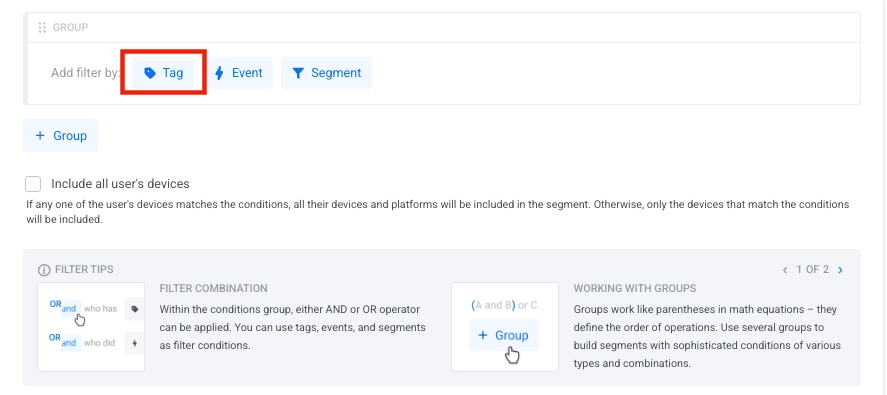
- Выберите тег из выпадающего списка Тег. Начните вводить название, чтобы найти нужный тег, если у вас их много.
- Нажмите Добавить значение, чтобы указать условие для тега, и выберите значение из выпадающего списка или начните вводить его для поиска.
- Выберите подходящий оператор для вашего условия. Узнать больше
Установка операторов для нескольких условий
Anchor link toЛогические операторы
Anchor link toКогда вы добавляете несколько условий по тегам в свой сегмент, вы можете использовать логические операторы для их объединения:
- И: Включает пользователей, которые соответствуют всем указанным значениям тегов
- ИЛИ: Включает пользователей, которые соответствуют любому из указанных значений тегов
Группы фильтров
Anchor link toКогда вы добавляете несколько фильтров в сегмент, они образуют группу фильтров. Все фильтры в одной группе используют один и тот же логический оператор (И или ИЛИ).
Чтобы изменить оператор для всей группы фильтров:
- Нажмите на текущий оператор (И/ИЛИ) в заголовке группы фильтров.
- Выберите новый оператор из выпадающего списка.
Включить все устройства пользователя
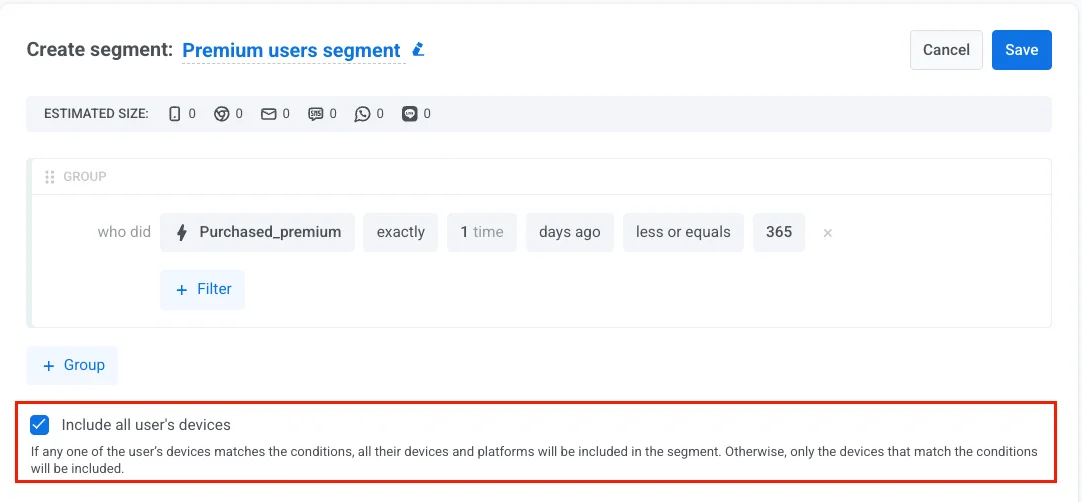
Anchor link toВключите эту опцию, чтобы таргетировать пользователя на всех его устройствах, а не только на том, которое соответствует условию сегмента. Это гарантирует, что он получит ваши сообщения на каждой платформе, которую использует.
-
Включено: Если любое из устройств пользователя соответствует условию (например, событие покупки, тег, поведение), все его устройства на всех платформах включаются в сегмент.
-
Отключено: В сегмент включаются только те устройства, которые соответствуют условию.
Операторы тегов по типам
Anchor link toДоступные операторы зависят от типа тега, с которым вы работаете. Ниже приведены операторы для каждого типа тега.
Операторы для строковых тегов
Anchor link toСтроковые теги хранят текстовые значения, такие как имена пользователей, адреса электронной почты, названия продуктов или идентификаторы. Используйте их для сегментации пользователей по категориям, предпочтениям или любым другим настраиваемым текстовым данным.
| Оператор | Описание | Пример |
|---|---|---|
| равно | Значение тега равно указанному значению | FavoriteColor равно "Синий" |
| не равно | Значение тега не равно указанному значению | Country не равно "Канада" |
| входит в список | Значение тега соответствует любому значению из предоставленного списка | Category входит в список ["Спорт", "Новости"] |
| не входит в список | Значение тега не соответствует ни одному значению из предоставленного списка | Status не входит в список ["Забанен", "Приостановлен"] |
| не установлено | Тегу не присвоено значение | Nickname не установлено |
| любое значение | У тега есть любое значение | Username любое значение |
Операторы для целочисленных тегов
Anchor link toЦелочисленные теги хранят целые числа, такие как возраст, уровень, счет или количество покупок. Идеально подходят для демографического таргетинга и сегментации на основе поведения с использованием числовых сравнений.
| Оператор | Описание | Пример |
|---|---|---|
| равно | Значение тега равно указанному числу | Age равно 30 |
| не равно | Значение тега не равно указанному числу | Level не равно 1 |
| больше или равно | Значение тега больше или равно указанному числу | Score больше или равно 100 |
| меньше или равно | Значение тега меньше или равно указанному числу | PurchaseCount меньше или равно 5 |
| между | Значение тега находится в указанном диапазоне (включительно) | Age между 18 и 65 |
| входит в список | Значение тега соответствует любому значению из списка | Level входит в список [5, 10, 15] |
| не входит в список | Значение тега не соответствует ни одному значению из списка | Streak не входит в список [0, 1] |
| не установлено | Тегу не присвоено значение | Score не установлено |
| любое значение | У тега есть любое присвоенное значение | Level любое значение |
Операторы для тегов-списков
Anchor link toТеги-списки позволяют хранить несколько значений для одного пользователя одновременно, что идеально подходит для предпочтений, интересов или подписок, где пользователи могут выбирать несколько вариантов (например, категории новостей, интересы к продуктам).
| Оператор | Описание | Пример |
|---|---|---|
| содержит хотя бы одно из | Тег содержит хотя бы одно из указанных значений | Interests содержит хотя бы одно из ["Спорт", "Технологии"] |
| не содержит ни одного из | Тег не содержит ни одного из указанных значений | Categories не содержит ни одного из ["Спам", "Акции"] |
| не установлено | Тегу не присвоено значение | Preferences не установлено |
| любое значение | У тега есть любое присвоенное значение | Subscriptions любое значение |
Операторы для булевых тегов
Anchor link toБулевы теги хранят только значения true или false. Используйте их для бинарных состояний, таких как подтверждение электронной почты, статус подписки или флаги функций.
| Оператор | Описание | Пример |
|---|---|---|
| истина | Значение тега — true | EmailVerified истина |
| ложь | Значение тега — false | PushEnabled ложь |
| не установлено | Тегу никогда не присваивалось значение | SMSConsent не установлено |
| любое значение | У тега есть любое присвоенное значение (true или false) | AccountActive любое значение |
Операторы для тегов-дат
Anchor link toТеги-даты хранят календарные даты. Используйте их для сегментации пользователей на основе дат регистрации, последней активности, дней рождения или любых других событий, зависящих от времени, с гибкими сравнениями относительных и абсолютных дат.
Относительные даты
Anchor link toЭти операторы сравнивают даты относительно сегодняшнего дня, позволяя создавать динамическую сегментацию по времени, которая автоматически обновляется каждый день.
| Оператор | Описание | Пример |
|---|---|---|
| за последние N дней | Дата находится в пределах последних N дней | LastOpen за последние 30 дней |
| ровно N дней назад | Дата соответствует ровно N дням назад | LastLogin ровно 7 дней назад |
| N или более дней назад | Дата старше или равна N дням | LastPurchase 90 или более дней назад |
| между N и M днями назад | Дата находится между двумя смещениями в днях | Signup между 7 и 30 днями назад |
Годовщина
Anchor link toЭти операторы соответствуют повторяющимся календарным датам (тот же месяц и день каждый год), игнорируя год. Идеально подходят для дней рождения и юбилейных кампаний.
| Оператор | Описание | Пример |
|---|---|---|
| сегодня | Годовщина наступает сегодня | Birthday сегодня |
| через N дней | Годовщина наступит через N дней | Birthday через 3 дня |
| N дней назад | Годовщина была N дней назад | Birthday 5 дней назад |
Конкретные даты
Anchor link toЭти операторы сравнивают с фиксированными календарными датами. Используйте их для одноразовых кампаний или анализа исторических дат.
| Оператор | Описание | Пример |
|---|---|---|
| в конкретную дату | Соответствует точной дате | LastLogin в "2023-01-15" |
| в конкретную дату или после | Дата наступает в указанную дату или после нее | LastPurchase в или после "2023-01-01" |
| в конкретную дату или до | Дата наступает в указанную дату или до нее | AccountCreated в или до "2022-12-31" |
| между датами | Между двумя календарными датами | LastOpen между "2022-02-28" и "2022-03-02" |
Существование
Anchor link toЭти операторы проверяют только, был ли присвоен тег-дата, не оценивая фактическое значение даты.
| Оператор | Описание | Пример |
|---|---|---|
| не установлено | У тега нет значения | TrialEndDate не установлено |
| любое значение | У тега есть любое значение | LastLogin любое значение |
Операторы для тегов-цен
Anchor link toТеги-цены хранят денежные значения с десятичной точностью в формате валюты (X.XX). Идеально подходят для сегментации пользователей по суммам покупок, уровням подписки, стоимости корзины или поведению расходов для кампаний, ориентированных на доход.
| Оператор | Описание | Пример |
|---|---|---|
| равно | Цена равна указанному значению | InAppPurchase равно 9.99 |
| не равно | Цена не равна указанному значению | LastPurchase не равно 0 |
| больше или равно | Цена больше или равна значению | TotalSpent больше или равно 100 |
| меньше или равно | Цена меньше или равна значению | CartValue меньше или равно 50 |
| между | Цена находится в указанном диапазоне (включительно) | OrderValue между 25 и 100 |
| входит в список | Цена соответствует любому значению из списка | SubscriptionPrice входит в список [9.99, 14.99, 19.99] |
| не входит в список | Цена не соответствует ни одному значению из списка | RefundAmount не входит в список [0, 5] |
| не установлено | Тегу не присвоено значение | LastPurchaseAmount не установлено |
| любое значение | У тега есть любое присвоенное значение | PurchaseHistory любое значение |
Операторы для тегов-версий
Anchor link toТеги-версий хранят номера версий в формате w.x.y.z (Major.Minor.Patch.Build) для версий приложения, ОС или SDK. Идеально подходят для таргетинга пользователей на определенных версиях для обновлений, сообщений о совместимости или развертывания функций.
| Оператор | Описание | Пример |
|---|---|---|
| равно | Версия равна указанному значению | AppVersion равно "2.5.0" |
| не равно | Версия не равна указанному значению | AppVersion не равно "1.0.0" |
| больше или равно | Версия больше или равна указанной версии | AppVersion больше или равно "2.0.0" |
| меньше или равно | Версия меньше или равна указанной версии | AppVersion меньше или равно "3.0.0" |
| между | Версия находится в диапазоне версий | AppVersion между "2.0.0" и "3.0.0" |
| входит в список | Версия равна любому из перечисленных значений | AppVersion входит в список ["2.1.0", "2.2.0", "2.3.0"] |
| не входит в список | Версия не равна ни одному из перечисленных значений | OSVersion не входит в список ["10.0", "11.0"] |
| не установлено | Тегу не присвоена версия | SDKVersion не установлено |
| любое значение | У тега есть любая присвоенная версия | AppVersion любое значение |
Примеры сегментации на основе тегов
Anchor link toНиже приведены практические сценарии, показывающие, как использовать фильтры по тегам для создания таргетированных сегментов аудитории.
Премиум-подписчики
Anchor link toЦель: Таргетировать пользователей с активной премиум-подпиской.
Как настроить:
- Тип тега: Строковый
- Тег:
subscription_type - Оператор: равно
- Значение:
premium
Пример использования: Отправляйте эксклюзивный контент, ранний доступ к функциям или специальные предложения только для премиум-пользователей, чтобы вовлечь платящих клиентов.
Кампании с таргетингом по возрасту
Anchor link toЦель: Таргетировать пользователей в определенном возрастном диапазоне.
Как настроить:
- Тип тега: Целочисленный
- Тег:
Age - Оператор: больше или равно
- Значение:
25
И
- Тег:
Age - Оператор: меньше или равно
- Значение:
35
Пример использования: Предоставляйте контент, продукты или услуги, соответствующие возрасту и адаптированные к конкретным демографическим группам.
Пользователи по интересам
Anchor link toЦель: Таргетировать пользователей, которые выбрали определенные интересы или категории.
Как настроить:
- Тип тега: Список
- Тег:
Interests - Оператор: входит в список
- Значение:
["Спорт", "Технологии"]
Пример использования: Отправляйте персонализированный контент на основе интересов пользователей, рекомендуйте релевантные продукты или создавайте кампании на основе интересов.
Пользователи с подтвержденной электронной почтой
Anchor link toЦель: Таргетировать пользователей, которые подтвердили свои адреса электронной почты.
Как настроить:
- Тип тега: Булев
- Тег:
EmailVerified - Оператор: истина
- Значение:
true
Пример использования: Отправляйте сообщения только проверенным пользователям, улучшайте доставляемость важных сообщений.
Недавние регистрации
Anchor link toЦель: Таргетировать пользователей, которые зарегистрировались в течение последних 30 дней.
Как настроить:
- Тип тега: Дата
- Тег:
SignupDate - Оператор: за последние N дней
- Значение:
30
Пример использования: Привлекайте новых пользователей с помощью приветственных сообщений, обучающих материалов или специальных предложений для новых клиентов.
Покупатели с высокой ценностью
Anchor link toЦель: Таргетировать пользователей, совершивших покупки на определенную сумму.
Как настроить:
- Тип тега: Цена
- Тег:
TotalSpent - Оператор: больше или равно
- Значение:
100.00
Пример использования: Предлагайте эксклюзивные скидки крупным покупателям, приглашайте в VIP-программы или отправляйте рекомендации премиум-продуктов.
Таргетинг по версии приложения
Anchor link toЦель: Таргетировать пользователей на определенной версии приложения для кампаний по обновлению.
Как настроить:
- Тип тега: Версия
- Тег:
AppVersion - Оператор: меньше или равно
- Значение:
2.0.0
Пример использования: Уведомляйте пользователей о важных обновлениях, продвигайте новые функции, доступные в новых версиях, или решайте проблемы совместимости.
Советы по сегментации на основе тегов
Anchor link to- Создайте четкие и последовательные правила именования тегов в вашем проекте, чтобы упростить создание и поддержку сегментов.
- Используйте несколько условий по тегам с операторами И/ИЛИ для создания точных определений аудитории.
- Комбинируйте фильтры по тегам с событиями или существующими сегментами для еще более таргетированных кампаний.
- Регулярно просматривайте и обновляйте значения тегов, чтобы ваши сегменты оставались точными по мере изменения данных пользователей.