كيفية قراءة علامة التبويب Errors
عندما لا يتلقى بعض المستلمين رسالتك، تُظهر علامة التبويب Errors السبب. فهي تسرد عمليات الإرسال الفاشلة للرسالة، حتى تتمكن من معرفة معنى كل خطأ وإصلاحه، أو تصدير عمليات الإرسال الفاشلة.
لفتح علامة التبويب، انتقل إلى صفحة إحصائيات الرسائل الخاصة بالرسالة وانقر على Errors، بجوار Overview وTimeline.
ما تعرضه علامة التبويب Errors
Anchor link toتعرض علامة التبويب عمليات الإرسال الفاشلة لقناة واحدة. إذا أُرسلت الرسالة عبر عدة قنوات، تعرض علامة التبويب القناة التي حددتها فوقها.
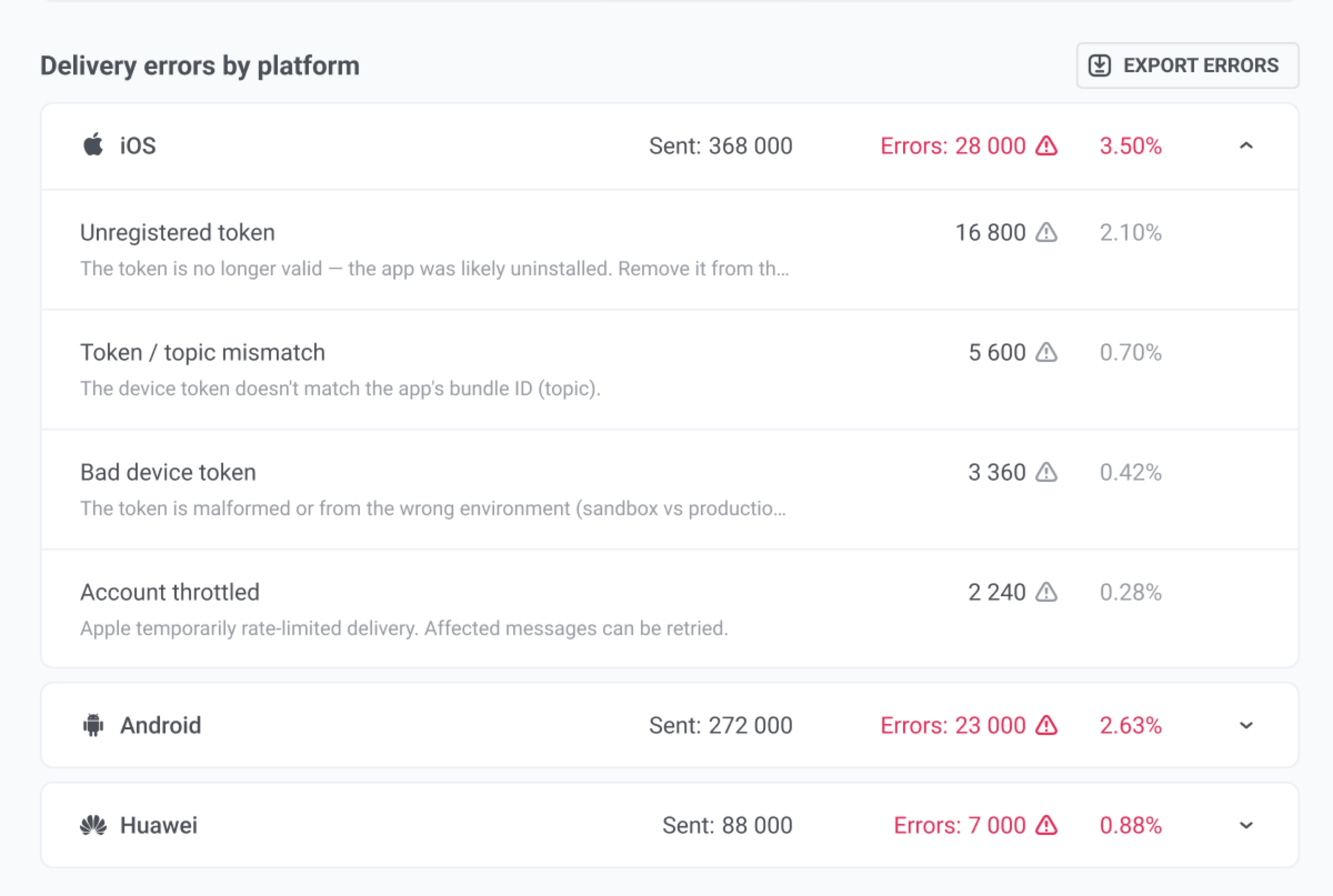
تُجمَّع عمليات الإرسال الفاشلة حسب المنصة، على سبيل المثال iOS أو Android أو Email. انقر على منصة لطي أخطائها أو توسيعها. تتكون كل مجموعة من الأجزاء التالية:
- صف المنصة: عدد الرسائل التي أُرسلت على هذه المنصة، وعدد الرسائل التي فشلت، والنسبة التي تمثلها من الجمهور المؤهل للقناة.
- صفوف الأخطاء: صف واحد لكل خطأ، يظهر باسمه ورمزه، على سبيل المثال Invalid To Phone Number (1001)، مع وصف قصير أسفله. لكل صف عدده الخاص ونسبته من الجمهور نفسه.
الشارة الحمراء على علامة التبويب Errors هي عدد عمليات الإرسال الفاشلة في القناة المحددة، بما في ذلك أخطاء المعالجة. إذا لم تكن هناك عمليات إرسال فاشلة، فلا تظهر الشارة.
عندما تكون علامة التبويب فارغة
Anchor link toتعرض علامة التبويب لا توجد أخطاء تسليم لهذه الرسالة في حالتين:
- لم يفشل أي شيء. لا توجد أخطاء لسردها.
- فشلت الرسالة قبل إرسالها (الحالة FAIL). لم يُرسل أي شيء، لذا لا يوجد ما يمكن سرده. هذا لا يعني أن الرسالة قد سُلّمت. يظهر السبب في علامة التبويب Overview. راجع لماذا فشلت الرسالة.
ما لا تعرضه علامة التبويب
Anchor link toتسرد علامة التبويب فقط عمليات الإرسال التي فشلت قبل أن يسلّمها Pushwoosh إلى منصة التوصيل أو أثناء تسليمها. ولا تسرد:
- الاستثناءات من الجمهور. المشتركون المستبعدون عمدًا، على سبيل المثال بسبب حد التكرار، أو مجموعة التحكم العامة، أو إلغاء اشتراك سابق. تعرضهم علامة التبويب Overview في صفوف مستثنى.
- حالات الرفض بعد أن قبلت منصة التوصيل الرسالة. على سبيل المثال، رسالة SMS يفشل المشغّل في تسليمها لاحقًا. يُحتسب مثل هذا الإرسال في علامة التبويب Overview ضمن قبِلته البوابة، وإلى أن يتأكد التسليم، ضمن لم يتأكّد التسليم.
- الإخفاقات المؤقتة التي يعيد Pushwoosh محاولتها. لا تُسجَّل كأخطاء.
البحث عن خطأ
Anchor link toلمعرفة معنى الخطأ وكيفية إصلاحه:
- اقرأ الاسم والرمز في صف الخطأ.
- ابحث عنهما في الأخطاء على جميع المنصات.
- إذا لم يكونا هناك، افتح صفحة منصة الصف ضمن أخطاء الإرسال.
- إذا كان الصف يحتوي على اسم فئة بدلًا من رمز، على سبيل المثال خطأ غير مصنف، فابحث عنه في فئات الأخطاء.
يصنّف Pushwoosh كل خطأ ضمن إحدى هذه الفئات. تعرض علامة التبويب اسم الفئة فقط للأخطاء التي ليس لها رمز.
الأخطاء على جميع المنصات
Anchor link toيمكن أن تظهر هذه الأخطاء على أي منصة، من الإشعارات إلى SMS وتطبيقات المراسلة. يُبلغ عنها Pushwoosh قبل تسليم الرسالة إلى منصة التوصيل أو أثناء تسليمها.
| الخطأ | ماذا يعني | ماذا تفعل |
|---|---|---|
| Push Token Not Found (1007)، وPhone Number Not Found (1007) في SMS | ليس لدى المشترك رمز إشعارات أو رقم هاتف أو معرّف دردشة لهذه المنصة في المشروع، لذا لم يرسل Pushwoosh الرسالة. | اجمع جهة الاتصال وسجّلها في المشروع. |
| Platform Is Disabled (10005) | المنصة معطّلة في المشروع. | فعّل المنصة في Settings > Configure Platforms. إذا كنت لا تريد الإرسال على هذه المنصة، فأزلها من الرسالة. |
| Skip Push (1011) | لم يكن لأحد العناصر النائبة قيمة لهذا المشترك ولا قيمة افتراضية. في SMS، وللنص المُنشأ من موجز المنتجات، يظهر أيضًا عندما يكون النص فارغًا بعد ملء العناصر النائبة. | تحقق من العناصر النائبة وقيمها الافتراضية في الرسالة أو الإعداد المسبق. |
| Unable To Compile Liquid Template (1014) | تحتوي الرسالة على خطأ في بناء جملة Liquid. | أصلح قالب Liquid في الرسالة أو الإعداد المسبق. |
| Internal Service Error (10006) | فشل الإرسال قبل أن يسلّمه Pushwoosh إلى منصة التوصيل أو أثناء تسليمه. على بعض المنصات يشمل أيضًا أخطاء الإعداد، راجع صفحة المنصة ضمن أخطاء الإرسال. | إذا تكرر، اتصل بـ دعم Pushwoosh. |
فئات الأخطاء
Anchor link toتوضح كل فئة أدناه ما الخطأ الذي حدث وما يجب فعله.
| الفئة | ماذا يعني | ماذا تفعل |
|---|---|---|
| رمز غير صالح أو منتهي الصلاحية | لم يعد بإمكان الرمز أو عنوان البريد الإلكتروني استقبال الرسائل، على سبيل المثال لأن التطبيق حُذف أو العنوان غير صالح. | شائع في الجماهير الكبيرة. قارن مع الإرسالات السابقة ذات الحجم المماثل. تعمق في البحث فقط إذا قفزت النسبة بشكل كبير. |
| لا يوجد رمز إشعارات | ليس لدى المشترك رمز إشعارات أو عنوان بريد إلكتروني أو رقم هاتف أو معرّف دردشة على هذه المنصة. | بالنسبة للإشعارات، اطلب من فريق التطوير التحقق من أن التطبيق يسجّل الأجهزة. بالنسبة للقنوات الأخرى، اجمع جهة الاتصال وسجّلها. |
| الجهاز غير موجود | الجهاز ليس ضمن جمهور Pushwoosh الخاص بك. | غالبًا ما يتبع فلاتر الشرائح أو تنظيف الجمهور. تحقق من الذي تم استهدافه. |
| المنصة معطّلة | هذه المنصة معطّلة في المشروع، أو أن واجهة API لمنصة التوصيل معطّلة، على سبيل المثال Firebase Cloud Messaging. | قم بتشغيل المنصة في تكوين التطبيق، أو قم بإزالتها من الإرسال. |
| تم تجاوز حصة المزوّد | قامت Apple أو Google أو منصة توصيل أخرى بتحديد الإرسال، أو استُنفدت حصة إرسال البريد الإلكتروني الخاصة بك. | أبطئ أو قسّم الإرسال. تحقق مع الدعم إذا استمر حدوث ذلك. |
| محتوى الرسالة غير صالح | تم رفض محتوى الرسالة (فارغ أو غير صالح). | افتح الإعداد المسبق أو نص الرسالة وقم بإصلاح المحتوى الفارغ أو المعطوب. |
| إعداد المنصة غير صالح | بيانات اعتماد التطبيق لهذه المنصة خاطئة أو قديمة (شهادات، مفاتيح، وما شابه). | تحقق من إعداد المنصة في Control Panel، أو اطلب من الدعم / المطورين تجديد بيانات الاعتماد. |
| خطأ من المزوّد | أبلغت منصة التوصيل عن مشكلة، أو لم يتم التعرف على الرمز. | بعض الحالات عادة ما تكون جيدة. حالات كثيرة: اتصل بـ دعم Pushwoosh مع تاريخ الرسالة ورمز الرسالة. |
| خطأ في المعالجة | حدث خطأ ما في المعالجة الخاصة بـ Pushwoosh أثناء الإرسال. | اتصل بـ دعم Pushwoosh. |
| خطأ غير مصنف | لم يتناسب الخطأ مع مجموعة معروفة. | يجب أن يكون نادرًا. إذا رأيت الكثير، اتصل بالدعم مع تاريخ الرسالة ورمز الرسالة. |
بالنسبة إلى SMS وViber وWhatsApp وTelegram وFacebook Messenger وKakao وLINE، يُدرج كل خطأ يعيده المزوّد ضمن خطأ من المزوّد، أيًا كان سببه، بما في ذلك حدود الإرسال وبيانات الاعتماد غير الصالحة ومشكلات القوالب. تنطبق تم تجاوز حصة المزوّد وإعداد المنصة غير صالح على الإشعارات والبريد الإلكتروني فقط. لمعرفة معنى مثل هذا الخطأ، ابحث عن اسمه ورمزه في أخطاء SMS وتطبيقات المراسلة.
أخطاء المعالجة
Anchor link toأخطاء المعالجة هي إخفاقات في المعالجة الخاصة بـ Pushwoosh: بناء الرسالة، أو تسليمها، أو قراءة رد منصة التوصيل. تراها في مكانين:
- تسردها علامة التبويب Errors مع الأخطاء الأخرى.
- في علامة التبويب Overview، يعرضها مسار التحويل في صف خاص بها، وليس ضمن عمليات الإرسال المرفوضة.
تصدير الأخطاء
Anchor link toيمكنك تصدير خطأ واحد أو جميع الأخطاء في علامة التبويب:
- لتصدير مستلمي خطأ واحد، انقر على أيقونة التنزيل بجوار ذلك الخطأ.
- لتصدير جميع الأخطاء في ملف واحد، انقر على تصدير الأخطاء.
يتطلب تصدير الأخطاء كلا الأمرين التاليين:
- إذن Personal data في دورك.
- الوصول إلى سجلات الرسائل في حسابك.
إذا كانت أيقونة التنزيل وتصدير الأخطاء غير ظاهرتين، فاطلب من مسؤول حسابك أو من الدعم التحقق من كلا الأمرين. الصفوف التي ليس لها رمز لا تحتوي على أيقونة تنزيل. استخدم تصدير الأخطاء لتضمينها.