BigQuery: إدراج صف
استخدم BigQuery: إدراج صف لبث صف واحد إلى جدول BigQuery من خطوة في الرحلة، من خلال واجهة برمجة تطبيقات الإدراج بالبث (streaming insert API). مثل Google Sheets: إضافة صف، تقوم هذه النقطة بالمصادقة من خلال حساب Google المتصل مرة واحدة للحساب بأكمله. لا يوجد حقل رمز مميز (token) على النقطة نفسها.
الاستخدامات النموذجية:
- تغذية جدول تقارير: إدراج صف لكل خطوة في الرحلة يتم الوصول إليها، للوحة معلومات أو استعلام مجدول لاحق.
- تسجيل الأحداث فور حدوثها: بث بيانات الرحلة الأولية إلى BigQuery بدلاً من انتظار تصدير دفعة.
- الربط مع البيانات الحالية: إدراج قيمة جهاز أو Tag يمكن لجداول BigQuery الخاصة بك الربط بها مع مجموعات البيانات الخاصة بك.
قبل أن تبدأ
Anchor link toقم بتوصيل حساب Google تحت الإعدادات > تكاملات الجهات الخارجية > Google. هذا هو نفس الاتصال الذي يستخدمه Google Sheets: إضافة صف. بعد توصيل Google، قم بتثبيت التكامل حتى تظهر النقطة في منشئ الرحلات.
هذه ليست بطاقة Google BigQuery الموجودة في تلك الصفحة. تلك هي تكامل BigQuery: تقوم ببث كل حدث رسالة لتطبيق ما إلى مخطط ثابت على مفتاح حساب خدمة. هذه النقطة تكتب صفًا واحدًا تحدده أنت، في الخطوة التي تضعها فيها، ولا تأخذ أي مفتاح خاص بها.
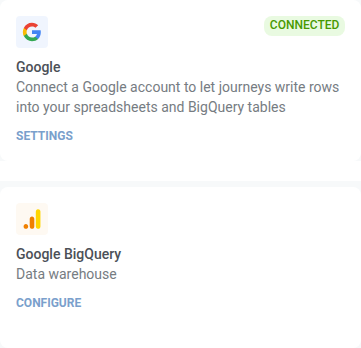
يجب أيضًا أن يكون هناك شيئان في مكانهما على جانب Google Cloud، وإلا سيفشل الطلب:
- يجب أن تكون مجموعة البيانات والجدول موجودين بالفعل. هذه النقطة تكتب الصفوف. لا تنشئ جدولًا أبدًا.
- يحتاج حساب Google المتصل إلى دور محرر بيانات BigQuery (أو أي دور يمنح
bigquery.tables.updateData) على مجموعة البيانات تلك.
تكوين النقطة
Anchor link to- اسحب BigQuery: إدراج صف من قسم التكاملات في اللوحة اليسرى إلى لوحة العمل.
- انقر نقرًا مزدوجًا على النقطة وأدخل اسم الخطوة.
- في معرف المشروع (Project ID)، أدخل معرف مشروع Google Cloud. استخدم المعرف، وليس اسم العرض، على سبيل المثال
my-analytics-prod.
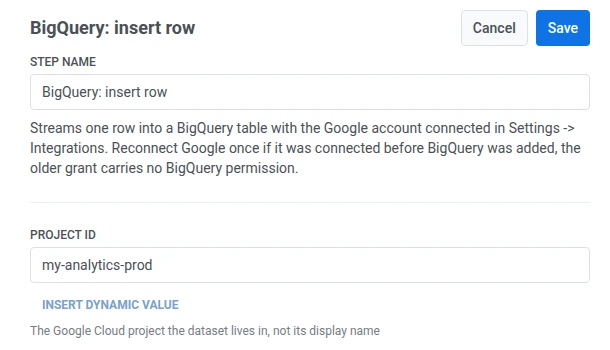
- في مجموعة البيانات (Dataset)، أدخل اسم مجموعة البيانات.

- في الجدول (Table)، أدخل اسم الجدول.

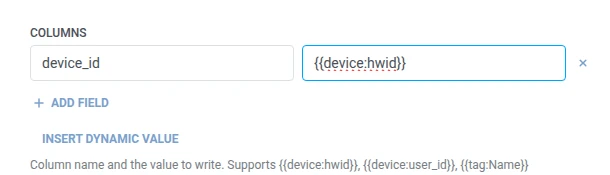
- في الأعمدة (Columns)، أضف صفًا واحدًا لكل عمود BigQuery للكتابة فيه. أدخل اسم العمود والقيمة. يجب أن تكون الأسماء غير فارغة وفريدة. يجب أن يكون كل عمود تدرجه موجودًا في مخطط الجدول. يمكن أن تكون القيمة نصًا ثابتًا أو ماكرو للمسافر مثل
{{tag:Name}}، وهي نفس الماكروهات الموجودة في نص Webhook. أو انقر على إدراج قيمة ديناميكية لاختيار سمة أنتجتها خطوة سابقة في هذه الرحلة، على سبيل المثال استجابة LLM أو قيمة Webhook معينة.
- انقر على حفظ.
الاستجابة
Anchor link toيستمر المسافر إلى أي خطوة تقوم بتوصيلها بعد ذلك على لوحة العمل.
السمات بعد تشغيل الخطوة
Anchor link toلا تُرجع هذه النقطة سمة عند النجاح. إذا رفض BigQuery صفًا، يتم كتابة الخطأ في bigquery_insert_error بدلاً من ذلك. انظر الإخفاقات والاستجابات غير المتوقعة.
الإخفاقات والاستجابات غير المتوقعة
Anchor link toافتح سجل المكالمات (Calls log) في درج النقطة وتحقق من الاستجابة:
- 401 — اتصال Google مفقود أو منتهي الصلاحية. أعد توصيله تحت الإعدادات > تكاملات الجهات الخارجية.
- 403 مع
accessDenied: Streaming insert is not allowed in the free tier— المشروع ليس لديه حساب فوترة مرفق. الإدراج بالبث، وهو ما تستخدمه هذه النقطة، ليس جزءًا من صندوق رمل BigQuery. قم بتمكين الفوترة على المشروع وسيمر نفس الطلب. - 403 مع
accessDeniedأوinsufficientPermissions— تم منح الاتصال قبل إضافة دعم BigQuery (أعد توصيله)، أو أن حساب Google ليس لديه وصول للكتابة إلى مجموعة البيانات. - 403 مع
quotaExceededأوrateLimitExceeded— تم استهلاك حصة الإدراج بالبث للمشروع. لا يوجد شيء لإعادة توصيله. يجب أن ترسل الرحلة أقل، أو يجب رفع الحصة في Google Cloud. - 404 — اسم المشروع أو مجموعة البيانات أو الجدول لا يتطابق مع أي شيء.
الطلب الفاشل يسقط المسافر من الرحلة. انظر الأخطاء والطلبات الفاشلة.
سيناريو مثال: تغذية جدول تقارير BigQuery
Anchor link toيريد فريق أن يكون نشاط الرحلة في نفس مجموعة بيانات BigQuery التي تستعلم عنها تقاريرهم المجدولة بالفعل.
- أضف BigQuery: إدراج صف مباشرة بعد الخطوة التي تريد تسجيلها. عيّن مجموعة البيانات إلى
marketingوالجدول إلىjourney_events. في الأعمدة، عيّنdevice_idإلى{{device:hwid}}. - انقر على حفظ.
بمجرد تشغيل هذا، يصل الصف إلى نفس الجدول الذي يقرأ منه الاستعلام المجدول، لذا فإن تشغيل التقرير التالي يتضمنه بالفعل.