إدارة المناطق الجغرافية والمجموعات
تعرض صفحة حملات Geo جميع مناطقك الجغرافية مرسومة على خريطة ومدرجة في جدول، مجمعة حسب المجموعة. تظهر المناطق المستقلة تحت قسم بدون مجموعة.
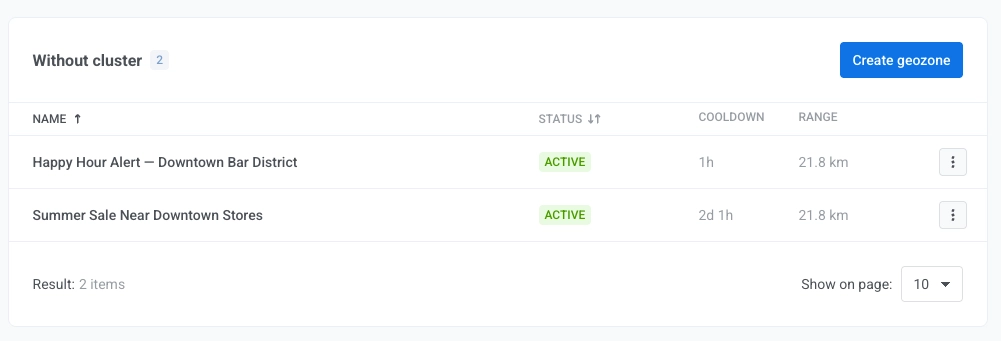
يمكن أن يعرض عمود الحالة (Status):
- نشط (Active). يمكن للمنطقة الجغرافية أن تعمل. لا يزال وقت التهدئة وجدول الحملة ساريين.
- مجدولة. تاريخ يبدأ من في المستقبل. لا تنفّذ المنطقة الجغرافية إجراءات الدخول (إرسال إشعار، إطلاق حدث) بعد.
- منتهية. لقد مر تاريخ ينتهي في. لم تعد المنطقة الجغرافية تنفّذ إجراءات الدخول.
- متوقف مؤقتًا. لقد أوقفت المنطقة الجغرافية مؤقتًا، أو أوقفت مجموعتها إذا ظهر عبر العنقود بجوار الحالة. انقر على استئناف في المنطقة الجغرافية أو المجموعة، أيهما أوقفته، لتعمل مرة أخرى.
تظل المناطق الجغرافية بحالة مجدولة ومنتهية مفعلة في النظام وتستأنف الإرسال من تلقاء نفسها عندما ينطبق نطاق التاريخ مرة أخرى. لا تحتاج إلى إيقافها مؤقتًا أو إعادة تفعيلها من أجل نطاق التاريخ وحده. لا تعتمد أحداث الخروج والبقاء والخروج المفترض على التواريخ، وتستمر في العمل في هذه المناطق الجغرافية.
إدارة منطقة جغرافية
Anchor link toلكل منطقة جغرافية يمكنك:
- إيقاف مؤقت أو استئناف المنطقة الجغرافية. لا تُطلق المنطقة الجغرافية المتوقفة مؤقتًا أي شيء: لا إجراءات دخول، ولا أحداث خروج أو بقاء أو خروج مفترض.
- تعديل (Edit) المنطقة الجغرافية في النموذج.
- نقل إلى مجموعة (Move to cluster). تعيينها إلى مجموعة مختلفة، أو إزالتها من مجموعتها الحالية. لإنشاء مجموعة أولاً، راجع إنشاء مجموعة.
- حذف (Delete) المنطقة الجغرافية بشكل دائم.
إدارة مجموعة
Anchor link toلكل مجموعة يمكنك:
- إيقاف مؤقت أو استئناف المجموعة. يؤدي إيقاف مجموعة مؤقتًا إلى إيقاف إجراءات الدخول (إرسال إشعار، إطلاق حدث) لكل منطقة جغرافية بداخلها. تستمر أحداث الخروج والبقاء والخروج المفترض في العمل.
- تعديل (Edit) اسم المجموعة أو وقت التهدئة.
- حذف (Delete) المجموعة. يمكن حذف المجموعات التي لا تحتوي على مناطق جغرافية مرتبطة بها فقط.