Adapty: تحديث سمات الملف الشخصي
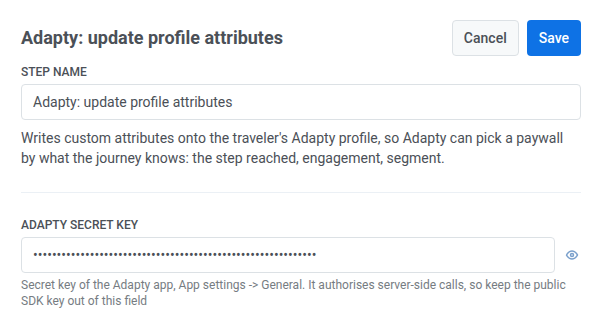
يقوم قالب نقطة Adapty: تحديث سمات الملف الشخصي بكتابة سمات مخصصة في الملف الشخصي للمسافر على Adapty، حتى يتمكن Adapty من اختيار جدار دفع بناءً على ما تعرفه الرحلة: الخطوة التي تم الوصول إليها، والتفاعل، والشريحة.
تكوين النقطة
Anchor link to- اسحب Adapty: تحديث سمات الملف الشخصي من قسم التكاملات (Integrations) إلى لوحة العمل.
- انقر نقرًا مزدوجًا على النقطة وأدخل اسم الخطوة (Step Name).
- في مفتاح Adapty السري (Adapty secret key)، أدخل المفتاح السري للتطبيق من Adapty: إعدادات التطبيق (App settings) > عام (General). يتم تخزينه بشكل مقنع، مثل رأس سري لـ webhook — مفتاح SDK عام لا يخول هذا الاستدعاء، لذا لا تضعه في هذا الحقل.
- حدد هوية المسافر باستخدام أحد هذه الحقول. اترك الحقل الآخر فارغًا. يتم حذف الحقل الفارغ من الطلب، ولا يتم إرساله فارغًا.
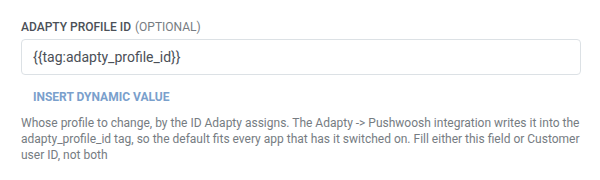
- معرف ملف Adapty الشخصي (Adapty profile ID) (الافتراضي): احتفظ بـ
{{tag:adapty_profile_id}}. يكتب تكامل Adapty ← Pushwoosh هذا الوسم (tag) عند تمكين التكامل. اترك معرف مستخدم العميل (Customer user ID) فارغًا.
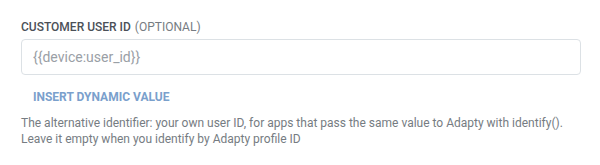
- معرف مستخدم العميل (Customer user ID): املأ هذا الحقل إذا كان التطبيق يمرر معرف المستخدم الخاص به إلى Adapty من خلال
identify()، على سبيل المثال{{device:user_id}}. اترك معرف ملف Adapty الشخصي (Adapty profile ID) فارغًا.
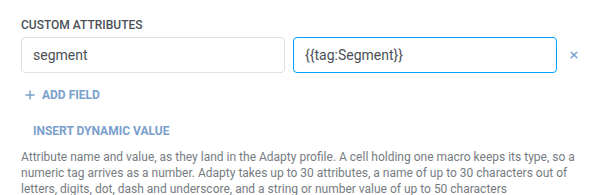
- في السمات المخصصة (Custom attributes)، أضف صفًا واحدًا لكل سمة لكتابتها في الملف الشخصي، مع اسم وقيمة. يجب أن تكون الأسماء غير فارغة وفريدة. انظر حقول المفتاح/القيمة (key/value fields).
- تحتفظ الخلية التي تحتوي على ماكرو واحد بنوع ذلك الماكرو. على سبيل المثال، يصل الوسم (tag) الرقمي كرقم.
- يمكنك إرسال ما يصل إلى 30 سمة.
- يمكن أن يصل طول كل اسم إلى 30 حرفًا: أحرف، أرقام، نقطة، شرطة، وشرطة سفلية.
- يمكن أن تصل قيمة كل حقل إلى 50 حرفًا.
- انقر على حفظ (Save).
الاستجابة
Anchor link toلا تقوم هذه النقطة بتعيين أي بيانات استجابة مرة أخرى إلى الرحلة. يؤدي الطلب الفاشل إلى إسقاط المسافر من الرحلة — انظر الأخطاء والطلبات الفاشلة (Errors and failed requests).
سيناريو مثال: إخبار Adapty بشريحة جدار الدفع التي ينتمي إليها المسافر
Anchor link toيريد تطبيق ما أن يعرض Adapty جدار دفع مختلفًا للمستخدمين في الفترة التجريبية عن المشتركين الذين انتهت صلاحية اشتراكهم، بناءً على ما تعرفه الرحلة بالفعل.
- أضف Adapty: تحديث سمات الملف الشخصي في النقطة من الرحلة حيث تكون شريحة المسافر معروفة. اترك معرف ملف Adapty الشخصي (Adapty profile ID) على قيمته الافتراضية. في السمات المخصصة (Custom attributes)، قم بتعيين
segmentإلى{{tag:Segment}}. - انقر على حفظ (Save).
بمجرد تشغيل هذا، يحمل ملف Adapty الشخصي للمسافر شريحته، ويمكن لاستهداف جدار الدفع في Adapty استخدامه بنفس الطريقة التي يستخدم بها أي سمة أخرى للملف الشخصي.