حدود معدل الإرسال
حدد عدد الرسائل التي يرسلها Pushwoosh في الثانية على كل قناة، حتى تُرسل الحملات ذات الحجم الكبير بوتيرة ثابتة بدلاً من إرسالها كلها دفعة واحدة.
تعيين حدود معدل الإرسال
Anchor link toقم بتعيين حدود معدل إرسال فردية لكل قناة رسائل: الإشعارات الفورية، ورسائل البريد الإلكتروني، والرسائل القصيرة.
لإعداد حدود معدل الإرسال:
- اذهب إلى الإعدادات > إعدادات تسليم الرسائل > معدل الإرسال.
- قم بتمكين أو تعطيل تحديد المعدل لكل قناة حسب الحاجة.
- حدد الحد الأقصى لعدد الرسائل التي سيتم إرسالها في الثانية لإدارة سرعة التسليم ومنع التحميل الزائد على الواجهة الخلفية أثناء عمليات الإرسال ذات الحجم الكبير.
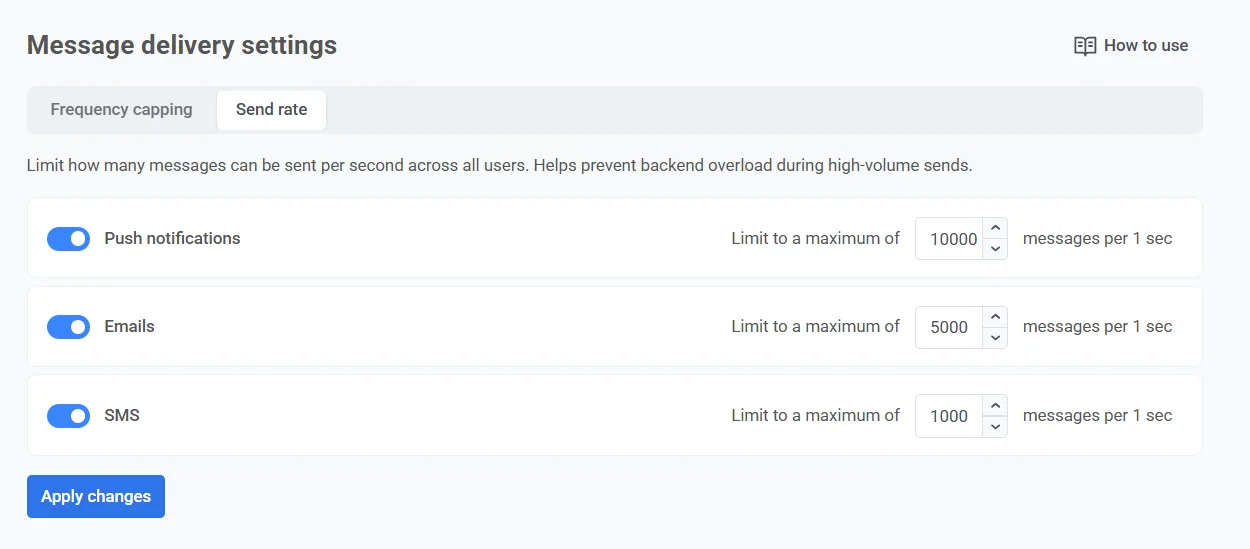
- انقر على تطبيق التغييرات، ثم قم بالتأكيد لحفظ إعداداتك.
التحكم في حدود معدل الإرسال للرسائل الفردية
Anchor link toبالإضافة إلى تعيين معدل إرسال عالمي لكل قناة، يمكنك أيضًا التحكم في معدل الإرسال للرسائل الفردية في رحلات العملاء والحملات لمرة واحدة. يتم ذلك في إعدادات الرسالة المحددة أو عنصر الرحلة.
يمكنك اختيار:
- استخدام إعدادات معدل الإرسال العالمية
- إرسال الرسائل بدون معدل إرسال عالمي
- استخدام معدل إرسال مخصص
للحصول على إرشادات مفصلة حول تكوين معدل الإرسال لكل رسالة، انظر أدلة العناصر الخاصة بالقناة والإشعارات الفورية لمرة واحدة.