Mattermost: نشر رسالة
استخدم Mattermost: نشر رسالة لإعلام فريقك في Mattermost من خطوة في الرحلة، على مثيل Mattermost الخاص بك أو الخاص بـ Pushwoosh. تصادق هذه النقطة باستخدام bot token الخاص بها. لا تستخدم أي تكامل على مستوى الحساب تم تكوينه في مكان آخر في الإعدادات.
الاستخدامات النموذجية:
- التنبيه عند التحويلات عالية القيمة: انشر رسالة عندما يكمل مستخدم عملية شراء أو يصل إلى هدف، حتى يراها الفريق في الوقت الفعلي.
- وضع علامة على خطوة تحتاج إلى تدخل بشري: إعلام الدعم أو المبيعات عندما يصل مستخدم إلى نقطة لا يمكن للبوت إكمالها.
- تتبع صحة الرحلة: انشر سطراً في كل مرة تنهي فيها مجموعة فرعاً، دون الحاجة إلى بناء لوحة تحكم.
تكوين النقطة
Anchor link to- اسحب Mattermost: نشر رسالة من قسم التكاملات في اللوحة اليسرى إلى لوحة العمل.
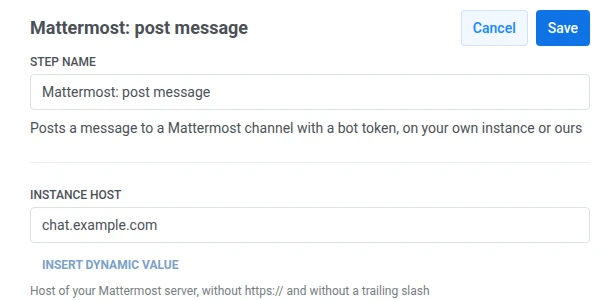
- انقر نقراً مزدوجاً على النقطة وأدخل اسم الخطوة.
- في مضيف المثيل، أدخل مضيف خادم Mattermost الخاص بك، على سبيل المثال
chat.example.com. لا تقم بتضمينhttps://أو شرطة مائلة في النهاية. يضيف Pushwooshhttps://ومسار API بنفسه.
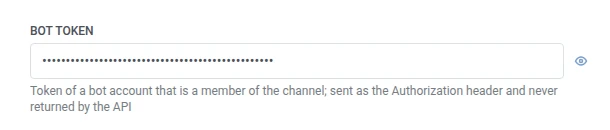
- في Bot token، أدخل الرمز المميز لحساب بوت عضو في القناة المستهدفة. يتم تخزينه مقنعاً، مثل رأس سري لـ webhook، ولا يعيده Mattermost أبداً إلى Pushwoosh.
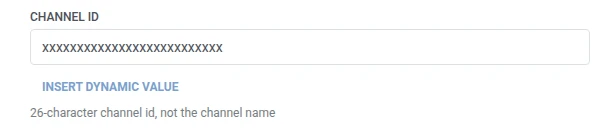
- في معرف القناة (Channel ID)، أدخل معرف القناة المكون من 26 حرفاً، وليس اسمها.
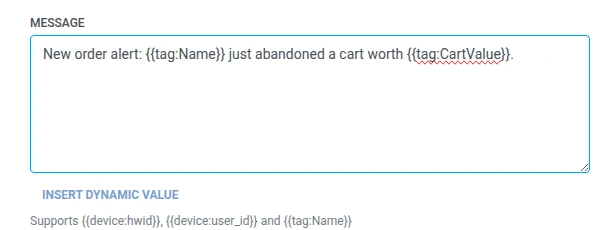
- في الرسالة، أدخل النص المراد نشره. يأخذ نفس وحدات الماكرو مثل أي نص Webhook:
{{device:hwid}},{{device:user_id}},{{tag:Name}}.
- انقر على حفظ.
الاستجابة
Anchor link toيواصل المستخدم الانتقال إلى أي خطوة تقوم بتوصيلها تالياً على لوحة العمل.
السمات بعد تشغيل الخطوة
Anchor link to| السمة | ما تحتويه |
|---|---|
mattermost_post_id | معرف المنشور الذي تم إنشاؤه |
كيفية استخدامها في الخطوات اللاحقة
Anchor link toلقد واصل المستخدم بالفعل إلى الخطوة التالية بغض النظر عن هذه السمة. احفظها في Tag باستخدام تحديث ملف تعريف المستخدم إذا كنت بحاجة إلى الإشارة إلى هذا المنشور المحدد لاحقاً، على سبيل المثال عند استكشاف أخطاء التسليم وإصلاحها.
الإخفاقات والاستجابات غير المتوقعة
Anchor link toيؤدي الطلب الفاشل إلى إخراج المستخدم من الرحلة. راجع الأخطاء والطلبات الفاشلة.
سيناريو مثال: تنبيه فريق النجاح بشأن مشترك معرض لخطر التوقف عن الاشتراك
Anchor link toيريد تطبيق اشتراكات إعلام فريق نجاح العملاء لديه في Mattermost عندما تكون خطة مشترك ذي قيمة عالية على وشك الانتهاء، حتى يتمكن شخص ما من التواصل معه قبل أن يتوقف عن الاشتراك.
- أضف عنصر الدخول المستند إلى المشغل وقم بتعيينه ليتم تفعيله عند وقوع حدث
SubscriptionExpiringSoon. - أضف Mattermost: نشر رسالة مباشرة بعده، مع النشر في قناة فريق النجاح باستخدام
{{tag:Name}} ({{tag:Plan}}) renews on {{tag:Renewal Date}}. - انقر على حفظ.
بمجرد تشغيل هذا، يتلقى فريق النجاح منشوراً على Mattermost في اللحظة التي يكون فيها مشترك ذو قيمة عالية في خطر، مع تفاصيل كافية للتواصل معه.