Push stories para iOS
As push stories transformam uma notificação push expandida do iOS em uma experiência de stories em tela cheia, no estilo do Instagram: imagens de ponta a ponta, páginas que avançam automaticamente e um botão em cada página.
Pré-requisitos
Anchor link toAntes de enviar push stories, sua equipe de iOS precisa:
- Adicionar uma Notification Content Extension ao aplicativo usando o módulo
PushwooshNotificationUI. Compartilhe com ela o guia Push stories para iOS. - Lançar uma atualização do aplicativo que inclua a extensão.
Criar o conteúdo de push stories
Anchor link toMonte, em um preset de push, as páginas exibidas quando o usuário expande a notificação. Consulte Criar conteúdo de push stories.
Enviar um push único com push stories
Anchor link to- Vá para Campanhas → Mensagens únicas → Enviar mensagem → Push único.
- Selecione ou crie o conteúdo Push stories.
- Configure o público, o agendamento e as demais configurações da mesma forma que para um push único comum.
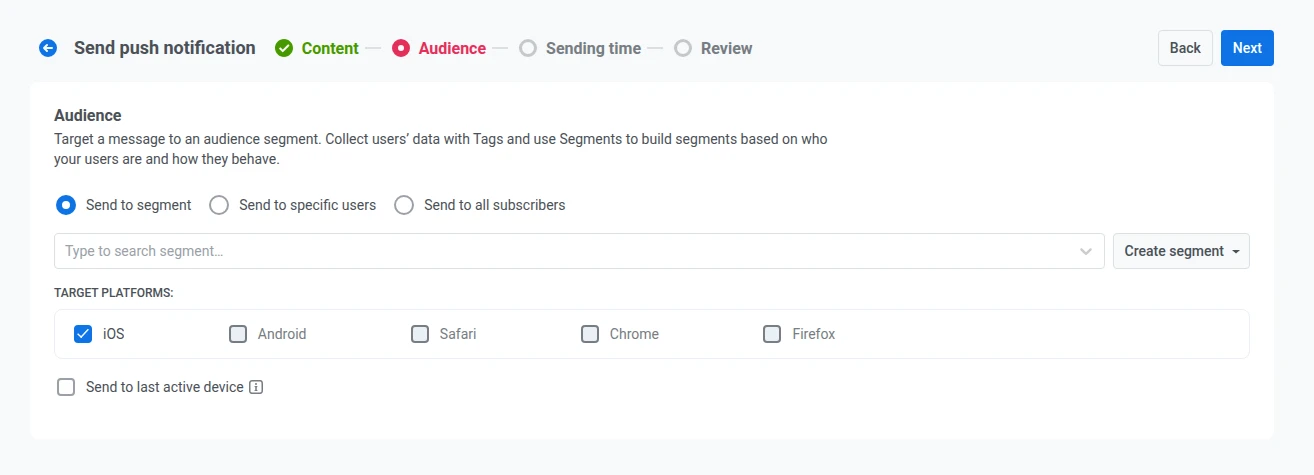
Como as stories são reproduzidas apenas no iOS, a lista Plataformas de destino na etapa Público fica bloqueada no iOS, e as outras plataformas ficam indisponíveis para este envio.
Enviar push stories em uma jornada
Anchor link toSelecione o conteúdo Push stories no elemento Push de uma jornada. O elemento mostra os requisitos do aplicativo para stories em um banner.
Referências
Anchor link to Push stories para iOS (guia do desenvolvedor) Adicione a Notification Content Extension e o módulo PushwooshNotificationUI ao seu aplicativo iOS.
Criar conteúdo de push stories Configuração campo a campo das páginas de Stories em um preset de push.
Push único Envie uma notificação push única e escolha o conteúdo, o público e o agendamento.