Loop
使用 Loop 为用户多次重复相同的步骤,而无需在画布上复制它们。它适用于需要一次又一次运行、直到您设置的上限的提醒、跟进和检查。最后一次重复后,用户将继续 journey 的下一部分。
使用场景
Anchor link to- 付款提醒: 发送提醒并等待付款。已付款的用户会继续,不再收到提醒。未付款的用户会在暂停后收到另一条提醒,直到达到您设置的上限。
- 挽回不活跃用户: 以有限次数发送提醒,每次之间有延迟。最后一次之后,将用户转到不同的优惠,或停止向他们发送消息。
- 持续检查某个事件: 一次又一次地等待同一个事件,而无需在画布上复制等待步骤。
前提条件
Anchor link to如果元素列表中没有 Loop,请联系 Pushwoosh 支持团队为您的账户启用它。
添加并配置 Loop
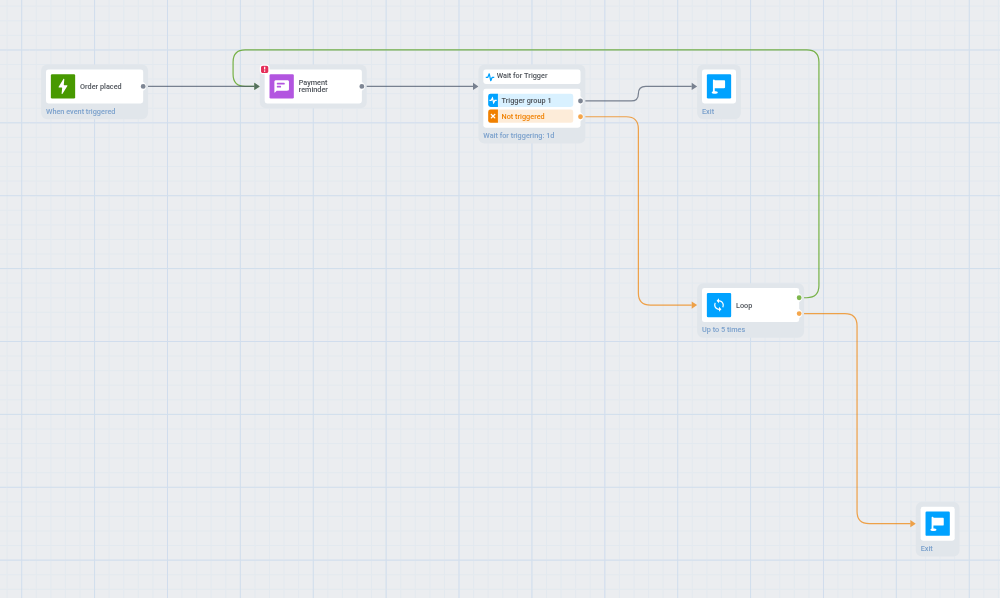
Anchor link to先搭建好您想要重复的步骤,然后将 Loop 放在它们之后。Loop 有两个输出:
- Repeat: 连接回第一个重复步骤。用户返回那里并再次执行这些步骤。
- Exit: 向前连接到循环之后的内容。用户在最后一次重复后到达那里。
-
在您想要重复的步骤之后立即添加 Loop 元素,然后双击它。
-
在 Maximum repeats 中,设置用户可以执行重复步骤的次数,从 1 到 100。默认值为 10。超出该范围的数字会在您保存时立即调整为最接近的限值。
-
在 Not more often than every, s 中,设置一个用户两次重复之间的最短间隔,以秒为单位:
- 0: 当重复步骤本身已经包含等待时使用,例如 Wait for Trigger 步骤、Time delay 步骤,或另一个有自己暂停设置的 Loop。
- 60 或更长: 当重复步骤中没有任何内容会等待时使用。Loop 会保留每个用户,直到自其上次重复以来已经过了该时间。如果您输入 1 到 59 之间的值,它会立即变为 60。
如果保留为
0,但没有任何重复步骤会等待,journey 将无法保存,并显示The loop body has no waiting element, set a minimum interval。如果没有任何暂停,循环将以系统能够处理的最快速度重复。请设置为 60 或更长,或在重复步骤中添加 Wait for Trigger 或 Time delay 步骤。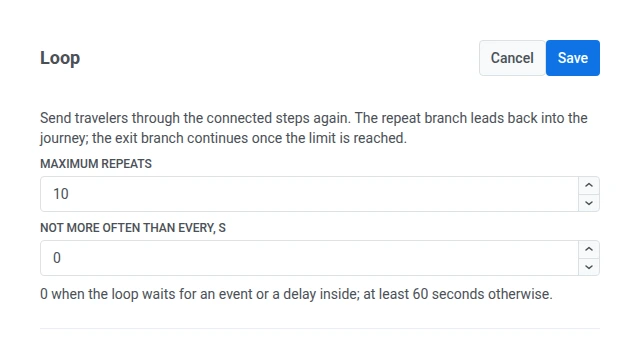
-
从 Repeat 输出拖动一条连接,回到您想要重复的第一个步骤。在上面的示例中,就是提醒 Push。
如果 Repeat 未连接,journey 将无法保存,并显示
Connect the repeat output of the Loop。如果它指向 Loop 本身,您将看到The repeat output of the Loop cannot lead to the Loop itself。 -
从 Exit 输出拖动一条连接,指向循环之后应该执行的步骤,例如最终消息或不同的优惠。用户在经过循环 Maximum repeats 次后到达那里。
-
点击 Save。
只有 Repeat 可以指向更早的步骤。如果您将任何其他输出连接到 journey 中更早的步骤,journey 将无法保存。
每次重复时会发生什么
Anchor link to重复部分中的每个步骤在每次重复时都会再次运行。构建时请牢记以下规则。
Tag 变更会累加
Anchor link to循环内的 Update user profile 步骤会在每次重复时运行。其含义取决于具体操作:
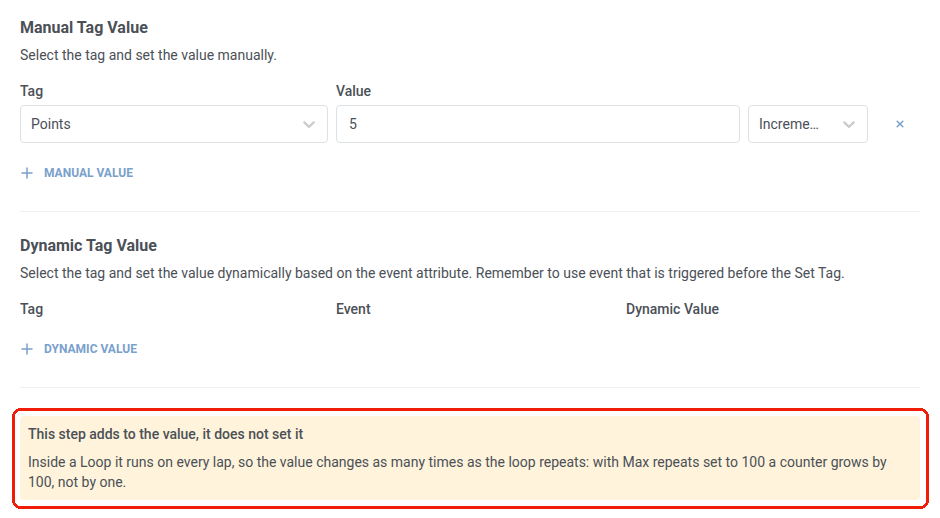
- 增加、减少、添加列表项、删除列表项: 变更会累加。例如,当 Maximum repeats 设置为 100 时,每次增加 1 的 Tag 会增加 100,而不是 1。
- 替换值: 可以安全地重复,因为它不会累加。
当某个步骤包含会累加的变更时,它会显示一条警告,说明该变更在每次重复时都会累加。
等待会在每次重复时重新开始
Anchor link toWait for Trigger 或 Time delay 步骤会从当前这次重复开始计时,而不是从用户进入循环时开始。24 小时的等待意味着每次重复都是 24 小时,因此经过该循环 3 次的用户可能会在其中花费长达 72 小时。
用户保持在同一测试分支中
Anchor link toA/B/n Split 每次用户到达该拆分点时,都会将其送入同一分支:包括每次重复,以及之后再次进入 journey 时。Holdout Split 的工作方式相同。这确保了测试结果的准确性,因为没有用户能够转移到另一分支并被重复计算。
Wait for Trigger 使用最新事件
Anchor link to循环中的 Wait for Trigger 步骤只保留当前这次重复的事件。每个新事件都会替换上一次重复的事件。使用事件数据的后续步骤始终获取最新事件,包括消息占位符、动态 Time delay、动态 Tag 值以及 Condition split。
目标只计算一次,消息每次都计算
Anchor link to在循环内达成的 Conversion Goal 对整个 journey 只计算一次,而不是每次重复都计算一次。
消息的计算方式则不同。渠道步骤的每次重复都是一次独立的发送,并计入用户的频率限制限额。一个重复 10 次的 Push 步骤最多可以使用该限额中的 10 次发送,而不是 1 次。
嵌套循环
Anchor link to您可以将一个 Loop 放置在另一个 Loop 的重复部分内。每个 Loop 都会计算自己的重复次数。内层 Loop 每次用户离开它时都会从零重新开始计数,因此它会在外层 Loop 的每次重复中再次运行完所有重复。
例如,如果外层 Loop 的 Maximum repeats 为 3,内层 Loop 为 2,则内层 Loop 的步骤最多可以运行 2 × 3 = 6 次。下方的合计 1000 次重复上限仍然适用。
所有循环的安全限制
Anchor link to一个用户在 journey 中所有 Loop 上的合计重复次数最多为 1000 次,即使每个 Loop 自身的 Maximum repeats 允许更多。
- 达到 1000 次的用户会通过最后一个 Loop 的 Exit 退出,即使该 Loop 自身的限制尚未达到。
- 此限制可防止循环嵌套循环叠加出远超您预期的重复次数,例如两个各重复 100 次的循环相互嵌套。