按事件构建细分
基于事件的细分 (Event-based segmentation) 允许您根据用户在您的应用或网站中的实际行为和操作来定位他们。通过关注用户参与模式,可以创建高度个性化和有效的营销活动。
按事件构建细分
Anchor link to要按事件构建细分:
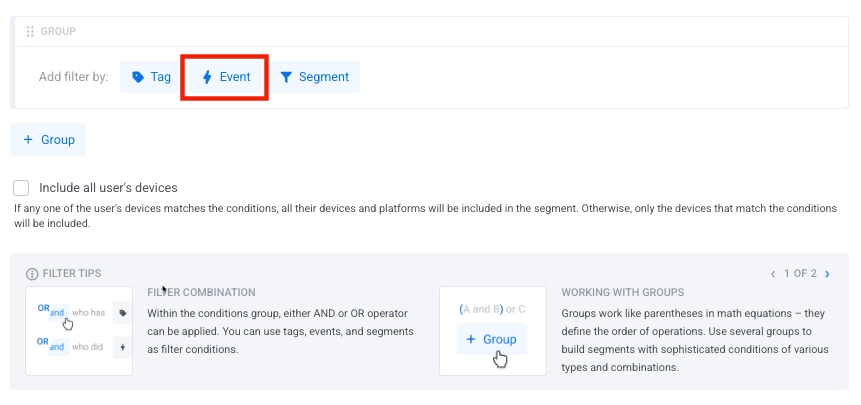
- 在 添加筛选依据: 部分,点击 事件。
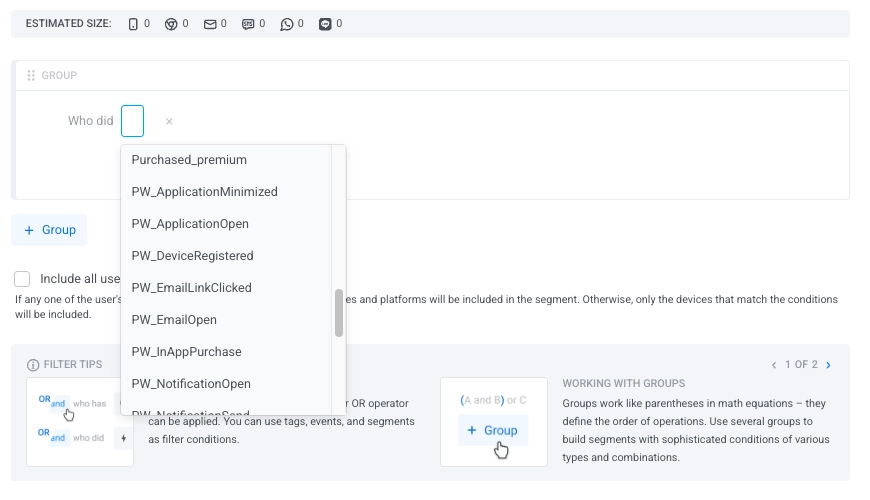
- 从下拉列表中选择一个事件。
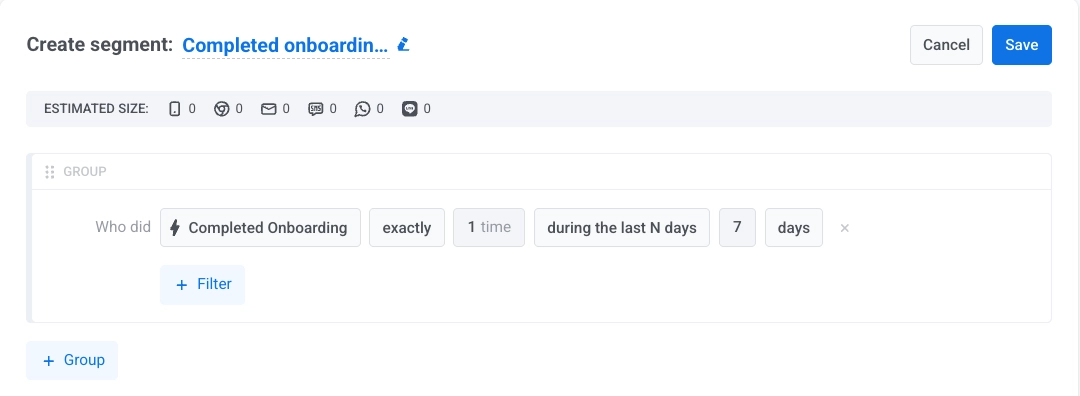
- 为所选事件指定条件:发生的次数和时间范围。
在为细分指定时间范围时,您可以从两个类别中选择:相对日期 和 具体日期。
相对日期
Anchor link to使用这些选项可根据当前日期动态更新时间窗口:
| 在过去 N 天内 | 包括在过去 N 天内发生的事件 |
| 恰好在 N 天前 | 定位在正好 N 天前触发了事件的用户 |
| 至少 N 天前 | 包括至少在 N 天前触发了事件的用户 |
| 在 N 天至 M 天前之间 | 定义今天之前的一段天数范围 |
| 在未来 N 天至 M 天之间 | 定义从今天起的 N 到 M 天的范围,其中 0 代表今天。N 和 M 都包含在内 |
特定日期
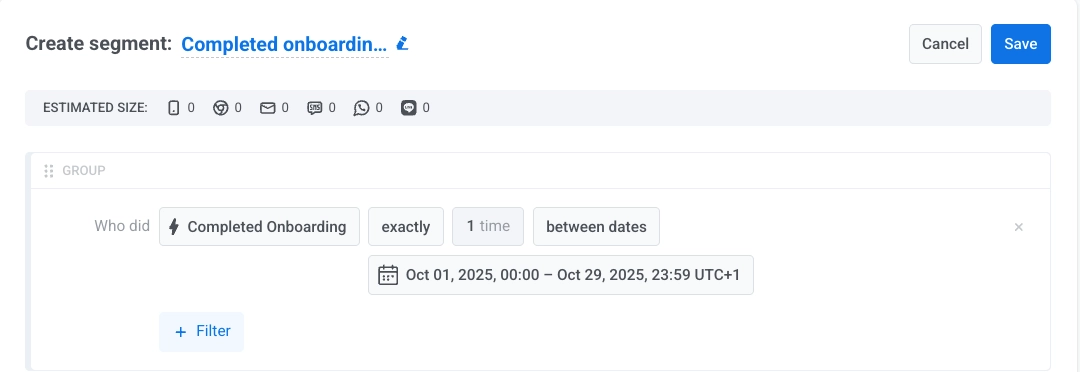
Anchor link to使用这些选项定义基于日历的固定筛选器:
| 在特定日期 | 包括在选定日历日期触发了事件的用户 |
| 在特定日期或之后 | 包括从选定日期开始触发了事件的用户 |
| 在特定日期或之前 | 包括截至并包含选定日期触发了事件的用户 |
| 介于日期之间 | 包括在两个特定日历日期之间触发了事件的用户 |
- (可选)点击 + 属性 将条件缩小到特定的事件属性。从下拉列表中选择属性,选择一个运算符,并指定一个值。开始输入以搜索基于先前记录数据的建议值。
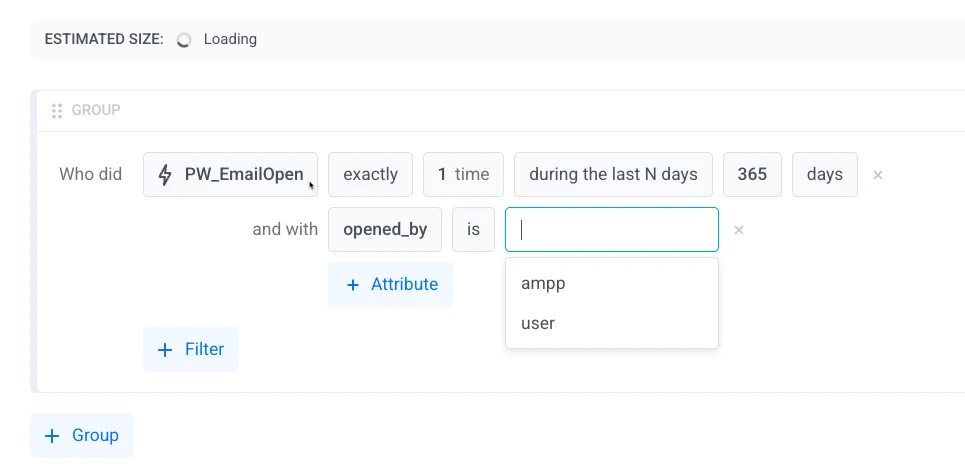
有关可用运算符的完整列表,请参阅按类型划分的事件属性运算符。
- (可选)当您需要匹配事件的总和(例如总消费额),而不是对单个事件设置限制时,请点击 + 总和。
选择 整数 或 小数(价格) 属性、运算符和阈值。仅当事件至少有一个 integer 或 decimal (price) 属性时,才会显示 + 总和。请参阅总和运算符。
示例:在过去 90 天内至少发生一次 Purchase,且 amount 的总和大于或等于 100,则定位在该时间段内消费 100 或以上的用户,无论是一次购买还是多次购买。
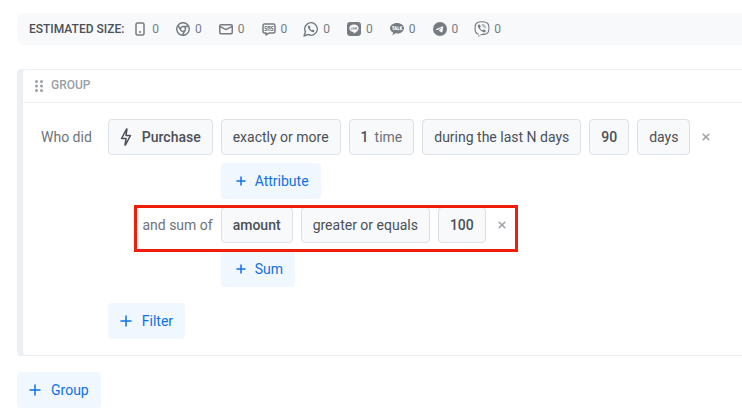
同一事件上的属性筛选器仍然适用:总和仅使用与之匹配的事件(例如,category 等于 "shoes" 的 amount 总计)。您可以添加多个总和,针对相同或不同的属性。用户必须满足您添加的每一个总和条件。
- 如果您将多个事件设置为细分条件,请选择您想要使用的运算符 (且/或)。
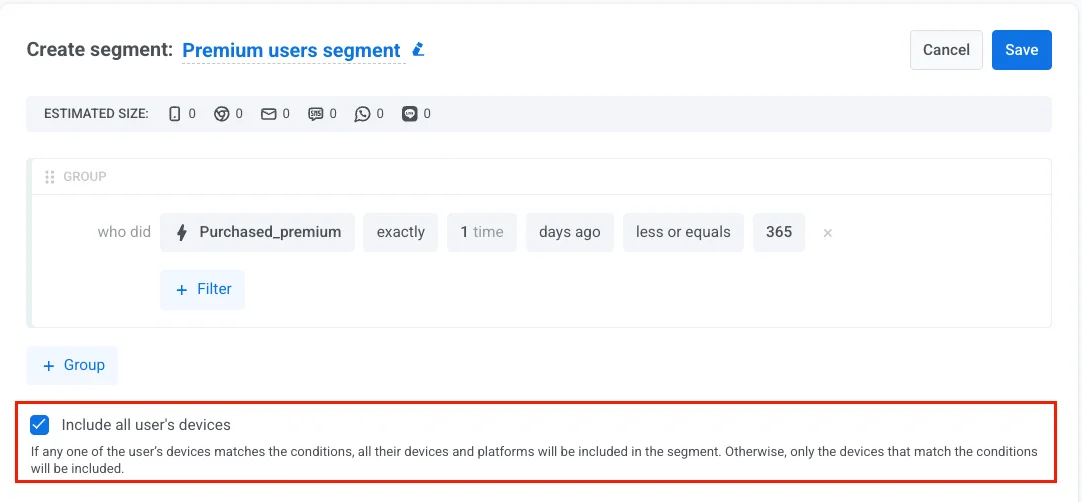
- 在筛选器组下方,启用 包含用户的所有设备 以在用户的所有设备上定位他们,而不仅仅是匹配细分条件的那个设备。这确保了他们在使用的每个平台上都能收到您的消息。
如果用户的任何设备匹配条件,则其所有设备都将被添加到细分中。如果复选框未被选中,则只包括匹配的设备。
这个相同的复选框会出现在细分的只读详情页面上,但处于禁用状态——它反映了创建该细分时的设置,并且无法在此处更改。
按类型划分的事件属性运算符
Anchor link to可用的运算符取决于您筛选的事件属性的类型。在下方选择一个类型以查看其运算符。
seglang 列显示构建器在运算符名称旁显示的运算符令牌,该令牌也用于细分语言。示例 列展示条件在构建器中的读法,而不是 seglang 语法。
| 运算符 | seglang | 描述 | 示例 |
|---|---|---|---|
| 等于 | eq | 属性值等于指定值 | button_name 等于 "checkout" |
| 不等于 | noteq | 属性值不等于指定值 | url 不等于 "/cart" |
| 开头为 | startswith | 属性值以指定字符串开头 | url 开头为 "https://example.com" |
| 结尾为 | endswith | 属性值以指定字符串结尾 | url 结尾为 ".html" |
| 包含 | contains | 属性值包含指定字符串 | url 包含 "/products/" |
| 为以下之一 | in | 属性值匹配所提供列表中的任何值 | button_name 为以下之一 ["submit", "cancel"] |
| 不为以下任一 | notin | 属性值不匹配所提供列表中的任何值 | category 不为以下任一 ["spam", "test"] |
| 未设置 | notset | 未记录该属性的值 | coupon_code 未设置 |
| 已设置(任意值) | any | 属性有任何记录值 | referrer 已设置(任意值) |
| 运算符 | seglang | 描述 | 示例 |
|---|---|---|---|
| 等于 | eq | 属性值等于指定数字 | level_number 等于 5 |
| 不等于 | noteq | 属性值不等于指定数字 | score 不等于 0 |
| 大于或等于 | gte | 属性值大于或等于指定数字 | points_earned 大于或等于 100 |
| 小于或等于 | lte | 属性值小于或等于指定数字 | attempts 小于或等于 3 |
| 介于 | between | 属性值在指定范围内(含) | level_number 介于 10 到 20 |
| 为以下之一 | in | 属性值匹配列表中的任何值 | level_number 为以下之一 [5, 10, 15] |
| 不为以下任一 | notin | 属性值不匹配列表中的任何值 | attempts 不为以下任一 [0, 1] |
| 未设置 | notset | 未记录该属性的值 | score 未设置 |
| 已设置(任意值) | any | 属性有任何记录值 | level_number 已设置(任意值) |
| 运算符 | seglang | 描述 | 示例 |
|---|---|---|---|
| 是 | eq true | 属性值为 true | enabled 是 |
| 否 | eq false | 属性值为 false | is_trial 否 |
| 未设置 | notset | 未记录该属性的值 | enabled 未设置 |
| 已设置(任意值) | any | 属性有任何记录值(true 或 false) | is_trial 已设置(任意值) |
此类型用于带小数的货币值。在控制面板中,当您创建或编辑事件属性时,它显示为 小数(价格)。
| 运算符 | seglang | 描述 | 示例 |
|---|---|---|---|
| 等于 | eq | 属性值等于指定价格 | total_price 等于 9.99 |
| 不等于 | noteq | 属性值不等于指定价格 | total_price 不等于 0 |
| 大于或等于 | gte | 属性值大于或等于某个价格 | total_price 大于或等于 50.00 |
| 小于或等于 | lte | 属性值小于或等于某个价格 | total_price 小于或等于 100.00 |
| 介于 | between | 属性值在指定价格范围内(含) | total_price 介于 10.00 到 50.00 |
| 为以下之一 | in | 属性值匹配列表中的任何值 | total_price 为以下之一 [9.99, 14.99, 19.99] |
| 不为以下任一 | notin | 属性值不匹配列表中的任何值 | total_price 不为以下任一 [0, 5] |
| 未设置 | notset | 未记录该属性的值 | total_price 未设置 |
| 已设置(任意值) | any | 属性有任何记录值 | total_price 已设置(任意值) |
列表类型的属性可以一次持有多个值,例如添加到购物车的产品 ID。
| 运算符 | seglang | 描述 | 示例 |
|---|---|---|---|
| 为以下之一 | in | 属性包含至少一个指定值 | product_ids 为以下之一 ["prod-123", "prod-456"] |
| 不为以下任一 | notin | 属性不包含任何指定值 | product_ids 不为以下任一 ["prod-789"] |
| 未设置 | notset | 未记录该属性的值 | product_ids 未设置 |
| 已设置(任意值) | any | 属性有任何记录值 | product_ids 已设置(任意值) |
总和运算符
Anchor link to总和条件比较匹配事件中某个属性的总值,因此支持的运算符比属性条件少。
| 运算符 | seglang | 描述 | 示例 |
|---|---|---|---|
| 等于 | eq | 总和等于指定数字 | total_price 等于 100 |
| 不等于 | noteq | 总和不等于指定数字 | total_price 不等于 0 |
| 大于或等于 | gte | 总和大于或等于指定数字 | total_price 大于或等于 100 |
| 小于或等于 | lte | 总和小于或等于指定数字 | total_price 小于或等于 500 |
| 介于 | between | 总和在指定范围内(含边界) | total_price 介于 100 到 500 |
基于事件的细分示例
Anchor link to以下是几个实际场景,说明了如何使用事件筛选器创建有意义的受众细分。
频繁购买者
Anchor link to目标: 定位近期进行多次购买的高度活跃用户。
如何设置:
- 事件:
Purchase_made - 条件: 不少于
- 次数:
3 - 时间范围: 在过去 N 天内
- 时间范围值:
30
用例: 向表现出频繁购买行为的用户发送特别优惠或忠诚度奖励。
高价值单次购买
Anchor link to目标: 定位进行了大额购买的用户,无论他们购买的频率如何。
如何设置:
- 事件:
Purchase_made - 条件: 不少于
- 次数:
1 - 时间范围: 在过去 N 天内
- 时间范围值:
30 - 属性:
total_price - 运算符: 大于或等于
- 属性值:
50
用例: 在大额消费者完成符合条件的购买后,立即邀请他们加入忠诚度或 VIP 计划。
一段时间内的总消费
Anchor link to目标: 定位合计购买额达到消费阈值的用户,即使没有单次购买达到该阈值。
如何设置:
- 事件:
Purchase_made - 条件: 不少于
- 次数:
1 - 时间范围: 在过去 N 天内
- 时间范围值:
90 - 总和:
total_price - 运算符: 大于或等于
- 总和值:
200
用例: 当客户在过去 90 天内的消费达到阈值后,将其升级到更高的忠诚度等级。
退款超过购买额
Anchor link to目标: 定位在一段时间内退回金额多于消费金额的用户。当退款使用同一事件和负金额跟踪时,此方法有效。
如何设置:
- 事件:
Purchase_made - 条件: 不少于
- 次数:
1 - 时间范围: 在过去 N 天内
- 时间范围值:
90 - 总和:
total_price - 运算符: 小于或等于
- 总和值:
-1
用例: 将这些用户引导到支持或赢回流程,而不是促销活动。
浏览了产品但未购买
Anchor link to目标: 识别已表现出兴趣但尚未转化的用户。
如何设置:
- 事件 1:
Product_Viewed- 条件: 不少于
- 次数:
1 - 时间范围: 在过去 N 天内
- 时间范围值:
7
- 事件 2:
Purchase_made- 条件: 从不
- 时间范围: 在过去 N 天内
- 时间范围值:
7
- 运算符: 且
用例: 向浏览了产品但尚未购买的用户发送提醒、特别优惠或个性化消息。
在营销活动期间参与的用户
Anchor link to目标: 定位在特定促销期间参与的用户。
如何设置:
- 事件:
Promotion_Click - 条件: 不少于
- 次数:
1 - 时间范围: 介于日期之间
- 时间范围值:
"2024-01-01"和"2024-01-31"
用例: 跟进与过去营销活动互动的用户,以推广相关优惠或收集反馈。
随时间推移的高价值行为
Anchor link to目标: 识别在自定义日期范围内执行了特定次数有价值事件的用户。
如何设置:
- 事件:
Subscription_Renewal - 条件: 不少于
- 次数:
2 - 时间范围: 介于日期之间
- 时间范围值:
"2024-01-01"和"2024-12-31"
用例: 向定期续订的忠实订阅者提供特别认可或高级功能。