Airtable: रिकॉर्ड बनाएँ
एक जर्नी स्टेप से Airtable टेबल में एक नया रिकॉर्ड जोड़ने के लिए Airtable: रिकॉर्ड बनाएँ का उपयोग करें।
विशिष्ट उपयोग:
- बेस में लीड या केस जोड़ें: यात्री से फ़ील्ड के साथ एक रिकॉर्ड जोड़ें, उस टीम के लिए जो Airtable में काम प्रबंधित करती है।
- एक ऑप्स लॉग बनाएँ: डेटाबेस के बाहर ट्रैकिंग के लिए, पहुँचे गए प्रत्येक स्टेप के लिए एक रिकॉर्ड जोड़ें।
- दूसरी टीम को सौंपें: एक साझा बेस पर लिखें ताकि एक गैर-तकनीकी टीम फॉलो-अप कर सके।
पॉइंट कॉन्फ़िगर करें
Anchor link to- बाएँ पैनल के Integrations सेक्शन से Airtable: रिकॉर्ड बनाएँ को कैनवास पर खींचें।
- पॉइंट पर डबल-क्लिक करें और एक स्टेप का नाम दर्ज करें।
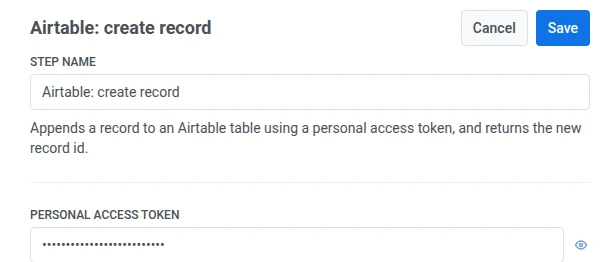
- व्यक्तिगत एक्सेस टोकन में, टारगेट बेस पर रिकॉर्ड लिखने की अनुमति के साथ एक Airtable व्यक्तिगत एक्सेस टोकन दर्ज करें। यह एक वेबहुक सीक्रेट हेडर की तरह मास्क करके संग्रहीत किया जाता है।
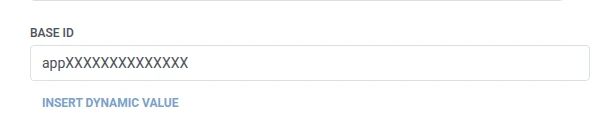
- बेस आईडी में, टारगेट Airtable बेस आईडी दर्ज करें।
- टेबल आईडी या नाम में, आईडी या नाम से टारगेट टेबल दर्ज करें।

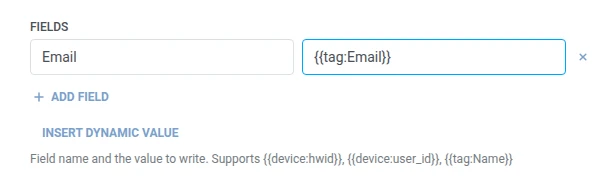
- फ़ील्ड्स में, लिखने के लिए प्रति Airtable फ़ील्ड एक पंक्ति जोड़ें। फ़ील्ड का नाम और मान दर्ज करें। नाम खाली नहीं होने चाहिए और अद्वितीय होने चाहिए। मान एक निश्चित टेक्स्ट या एक यात्री मैक्रो हो सकता है जैसे
{{tag:Name}}, वेबहुक बॉडी में उपयोग किए जाने वाले समान मैक्रो। या इस जर्नी में पहले के स्टेप द्वारा उत्पादित एक एट्रिब्यूट चुनने के लिए डायनामिक मान डालें पर क्लिक करें, उदाहरण के लिए एक LLM प्रतिक्रिया या एक मैप किया गया वेबहुक मान।
- सहेजें पर क्लिक करें।
प्रतिक्रिया
Anchor link toयात्री उस स्टेप पर आगे बढ़ता है जिसे आप कैनवास पर आगे जोड़ते हैं।
स्टेप चलने के बाद एट्रिब्यूट्स
Anchor link to| एट्रिब्यूट | इसमें क्या होता है |
|---|---|
airtable_record_id | नए रिकॉर्ड की आईडी |
बाद के स्टेप्स में इसका उपयोग कैसे करें
Anchor link toयात्री इस एट्रिब्यूट की परवाह किए बिना पहले ही अगले स्टेप पर आगे बढ़ चुका है। यदि आपको बाद में इस विशिष्ट रिकॉर्ड को देखने की आवश्यकता है, तो इसे उपयोगकर्ता प्रोफ़ाइल अपडेट करें के साथ एक टैग में सहेजें, उदाहरण के लिए Airtable के अपने API के माध्यम से।
विफलताएं और अप्रत्याशित प्रतिक्रियाएं
Anchor link toएक असफल अनुरोध यात्री को जर्नी से हटा देता है। त्रुटियाँ और असफल अनुरोध देखें।
उदाहरण परिदृश्य: Airtable में एक नया समर्थन केस लॉग करना
Anchor link toएक टीम Airtable में समर्थन मामलों को ट्रैक करती है और चाहती है कि जैसे ही कोई मामला खुले, एक पंक्ति बन जाए, बिना किसी के इसे हाथ से दर्ज किए।
- एक ट्रिगर-आधारित एंट्री तत्व जोड़ें और इसे
SupportCaseOpenedइवेंट पर फायर करने के लिए सेट करें। - इसके ठीक बाद Airtable: रिकॉर्ड बनाएँ जोड़ें। टेबल आईडी या नाम को
Casesपर सेट करें। फ़ील्ड्स में,Emailको{{tag:Email}}पर सेट करें। - सहेजें पर क्लिक करें।
एक बार जब यह चलता है, तो प्रत्येक नए समर्थन मामले को केस टेबल में एक पंक्ति मिलती है जिसमें यात्री का ईमेल पहले से भरा होता है।