एक क्लस्टर बनाएँ
क्लस्टर का उपयोग तब करें जब एक ही डिवाइस थोड़े समय में आपके कई ज़ोन में प्रवेश कर सकता है, उदाहरण के लिए, एक ही सड़क पर दो स्टोर। एक बार जब कोई डिवाइस क्लस्टर में किसी भी जियोज़ोन से पुश प्राप्त कर लेता है, तो यह उस क्लस्टर के अन्य सभी के लिए तब तक चुप रहता है जब तक कि कूलडाउन समाप्त नहीं हो जाता।
पहला जियोज़ोन बनाने के बाद, आप जियो अभियान पेज से क्लस्टर बना सकते हैं।
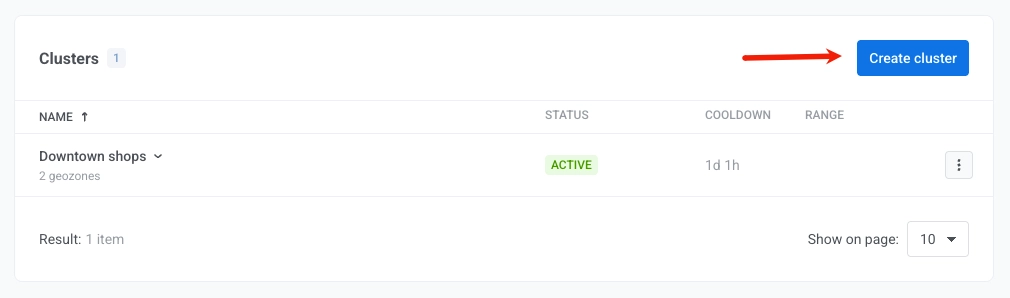
- जियो अभियान पेज पर, क्लस्टर बनाएँ पर क्लिक करें।
- क्लस्टर का नाम और क्लस्टर कूलडाउन दर्ज करें।
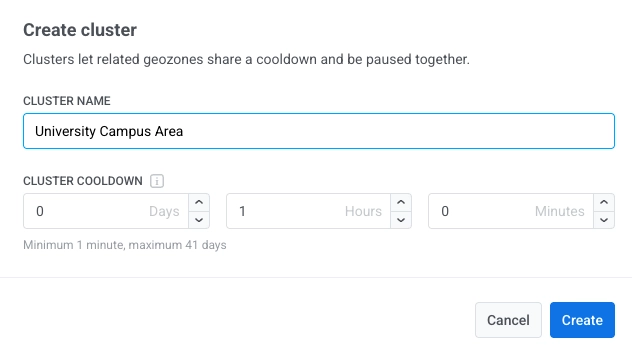
- बनाएँ पर क्लिक करें।
एक बार बन जाने के बाद, क्लस्टर जियो अभियान पेज पर दिखाई देता है। इसे जियोज़ोन असाइन करने के लिए:
- एक जियोज़ोन बनाते या संपादित करते समय कूलडाउन फ़ील्ड में मौजूदा क्लस्टर का उपयोग करें चुनें।
- जियो अभियान पेज पर क्लस्टर में ले जाएँ का उपयोग करें।
आप जियोज़ोन सहेजते समय एक क्लस्टर भी बना सकते हैं:
- कूलडाउन में, नया क्लस्टर चुनें।
- नाम और कूलडाउन दर्ज करें।
- सहेजें पर क्लिक करें।