HubSpot: 연락처 생성 또는 업데이트
HubSpot: 연락처 생성 또는 업데이트를 사용하여 Journey 단계에서 이메일로 HubSpot 연락처 하나를 업서트(upsert)합니다. 이메일을 찾을 수 없는 경우 새 연락처를 생성하고, 이메일을 찾은 경우 나열된 속성을 업데이트합니다. 이 지점은 자체 HubSpot 비공개 앱 토큰으로 인증합니다. 설정의 다른 곳에서 구성된 계정 수준 HubSpot 통합은 사용하지 않습니다.
일반적인 사용 사례:
- CRM에 Journey 활동 동기화: 영업팀이 Pushwoosh를 확인하지 않고도 Journey 진행 상황을 볼 수 있도록 연락처를 생성하거나 업데이트합니다.
- 연락처 정보 보강: 여정 참여자의 태그가 Journey를 통해 업데이트될 때 요금제나 마지막 구매와 같은 속성을 설정합니다.
- HubSpot 워크플로 트리거: Pushwoosh Journey 내에서 HubSpot 워크플로가 감시하는 속성을 업데이트합니다.
지점 구성하기
Anchor link to- 왼쪽 패널의 Integrations 섹션에서 HubSpot: 연락처 생성 또는 업데이트를 캔버스로 드래그합니다.
- 지점을 더블 클릭하고 Step Name을 입력합니다.
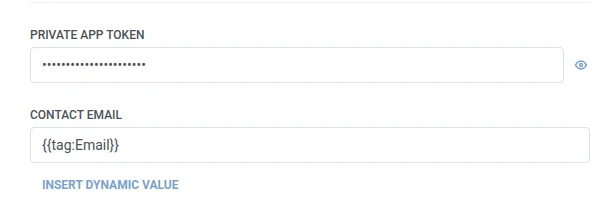
- Private app token에 연락처 쓰기 권한이 있는 HubSpot 비공개 앱 토큰을 입력합니다. 이 토큰은 웹훅 비밀 헤더처럼 마스킹 처리되어 저장됩니다.
- Contact email에 HubSpot이 기존 연락처를 찾는 데 사용하는 이메일을 입력합니다. 이 필드는 Properties와 동일한 매크로(예:
{{tag:Email}})를 사용하므로, 모든 여정 참여자가 하나의 고정된 주소에 충돌하는 대신 각자 자신의 연락처를 업서트합니다. Properties에 이메일을 반복해서 입력하지 마세요.
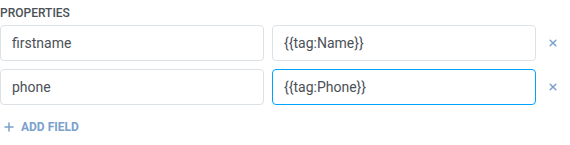
- Properties에서 설정할 HubSpot 속성마다 행을 하나씩 추가합니다. HubSpot의 내부 속성 이름(예:
firstname,phone)과 값을 입력합니다. 이름은 비어 있지 않아야 하며 고유해야 합니다. 값은 고정된 텍스트이거나 웹훅 본문에서와 동일한 여정 참여자 매크로(예:{{tag:Name}})일 수 있습니다. 또는 Insert Dynamic Value를 클릭하여 이 Journey의 이전 단계에서 생성된 속성(예: LLM 응답 또는 매핑된 웹훅 값)을 선택할 수 있습니다.
- Save를 클릭합니다.
여정 참여자는 캔버스에서 다음에 연결하는 단계로 계속 진행합니다.
단계 실행 후의 속성
Anchor link to| 속성 | 내용 |
|---|---|
hubspot_contact_id | HubSpot 연락처의 ID |
이후 단계에서 사용하는 방법
Anchor link to여정 참여자는 이 속성과 관계없이 이미 다음 단계로 진행했습니다. 나중에 HubSpot 자체 API를 통해 이 연락처에 다시 연결해야 하는 경우, 사용자 프로필 업데이트를 사용하여 태그에 저장하세요.
실패 및 예기치 않은 응답
Anchor link to요청이 실패하면 여정 참여자는 Journey에서 제외됩니다. 오류 및 실패한 요청을 참조하세요.
예시 시나리오: 새로운 가입자를 HubSpot에 동기화하기
Anchor link to한 팀이 별도의 가져오기 단계 없이 모든 신규 가입자를 HubSpot 연락처로 만들고 싶어 합니다.
- 트리거 기반 진입 요소를 추가하고
SignupCompleted이벤트에서 실행되도록 설정합니다. - 바로 뒤에 HubSpot: 연락처 생성 또는 업데이트를 추가합니다. Contact email을
{{tag:Email}}로 설정합니다. Properties에서firstname을{{tag:Name}}으로 설정합니다. - Save를 클릭합니다.
이것이 실행되면 모든 신규 가입자는 HubSpot 연락처로 존재하게 되며, 이메일로 생성 또는 업데이트되므로 반복 가입 시 중복이 발생하지 않습니다.