HubSpot: 연락처 속성 가져오기
HubSpot: 연락처 속성 가져오기 포인트 템플릿은 하나의 HubSpot 연락처에서 지정한 속성을 읽어 나머지 Journey로 전달합니다. 메시지에서 해당 속성을 출력하거나, 분기점에서 이를 기준으로 분기할 수 있습니다.
이 포인트는 자체 HubSpot 비공개 앱 토큰으로 인증하며, 설정의 다른 곳에서 구성된 계정 수준의 HubSpot 통합을 사용하지 않습니다.
포인트 구성하기
Anchor link to- 통합 섹션에서 HubSpot: 연락처 속성 가져오기를 캔버스로 드래그합니다.
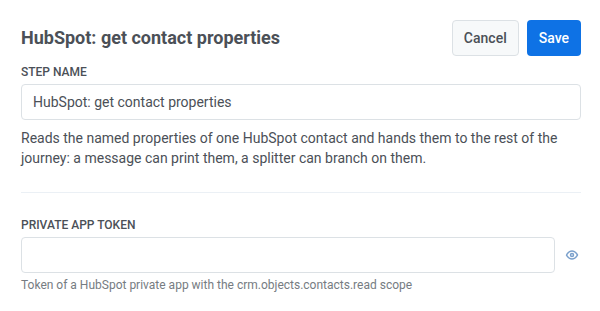
- 포인트를 더블 클릭하고 단계 이름을 입력합니다.
- 비공개 앱 토큰에
crm.objects.contacts.read범위의 HubSpot 비공개 앱 토큰을 입력합니다. 이 토큰은 웹훅 비밀 헤더처럼 마스킹되어 저장됩니다.
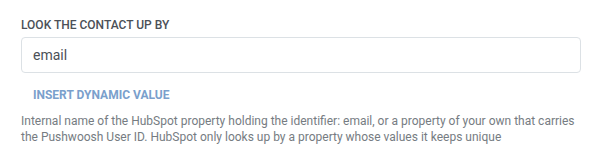
- 연락처 조회 기준에 식별자를 보유한 HubSpot 속성의 내부 이름을 입력합니다. 기본값은
email이며, Pushwoosh User ID를 포함하는 자체 속성을 사용할 수도 있습니다. HubSpot은 고유한 값을 유지하는 속성으로만 연락처를 조회합니다.
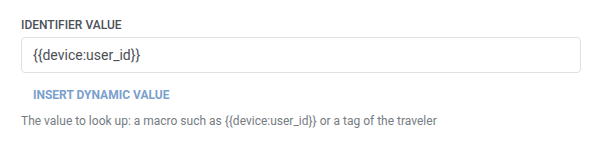
- 식별자 값에 조회할 값을 입력합니다. 예를 들어
{{device:user_id}}또는 여정 참여자의 태그를 사용할 수 있습니다.
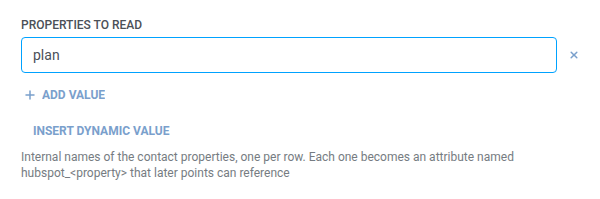
- 읽을 속성에 HubSpot 속성의 내부 이름(예:
firstname,lifecyclestage)을 행마다 추가합니다. 자세한 내용은 목록 필드를 참조하세요. 비어 있지 않은 값을 하나 이상 유지해야 합니다.
- 저장을 클릭합니다.
분기 연결하기
Anchor link to저장하면 포인트가 캔버스에 두 개의 분기를 표시합니다. 각 분기에 다음 단계를 연결합니다:
- 찾음: 식별자가 기존 HubSpot 연락처와 일치했습니다. 예를 들어, 조건 분기로 계속하거나 읽어온 속성을 사용하는 메시지를 보냅니다.
- 찾지 못함: HubSpot이 404(일치하는 연락처 없음)로 응답했습니다. 여정 참여자는 이탈하지 않습니다. 이 포인트는 실제 실패한 요청처럼 재시도하거나 실패한 요청 쿨다운을 기다리지 않습니다. 예를 들어, 다른 경로로 보내거나 일반 메시지를 보냅니다.
찾지 못함은 실패한 요청이 아닙니다. 실제 실패한 요청은 대신 여정 참여자를 이탈시킵니다. 오류 및 실패한 요청을 참조하세요.
찾음의 경우, 이후 단계에서 다음을 사용할 수 있습니다:
- 요청한 각 속성은 **
hubspot_<property>**로 사용됩니다. 예를 들어,firstname은hubspot_firstname이 됩니다. - 연락처 ID는 **
hubspot_contact_id**로 사용됩니다.
웹훅 응답 속성과 동일한 방식으로 사용합니다. 예를 들어, 조건 분기로 분기하거나 사용자 프로필 업데이트로 태그를 설정합니다.
찾지 못함의 경우, 이러한 속성은 사용할 수 없습니다.
예시 시나리오: HubSpot 연락처의 요금제로 메시지 개인화하기
Anchor link to한 팀이 Pushwoosh 태그에 별도의 사본을 보관하지 않고, HubSpot에 저장된 여정 참여자의 요금제 등급을 푸시에 언급하고 싶어 합니다.
- Journey에서 요금제를 읽어야 하는 지점에 HubSpot: 연락처 속성 가져오기를 추가합니다. 연락처 조회 기준은
email로 두고 식별자 값을{{tag:Email}}로 설정합니다. 읽을 속성에plan을 추가합니다. - 저장을 클릭한 다음, 찾음 분기를 텍스트에
hubspot_plan을 사용하는 푸시 단계에 연결하고, 찾지 못함 분기를 대신 일반 푸시를 보내는 단계에 연결합니다.
이것이 실행되면, 일치하는 HubSpot 연락처가 있는 여정 참여자는 실제 요금제가 언급된 푸시를 받고, 일치하는 연락처가 없는 여정 참여자는 이탈하는 대신 메시지를 받게 됩니다.