Amplitude: 이벤트 추적
Amplitude: 이벤트 추적을 사용하여 나열한 속성과 함께 HTTP API V2를 통해 여정 단계에서 Amplitude 프로젝트로 하나의 이벤트를 보낼 수 있습니다.
Pushwoosh는 여행자와 이 단계에서 Amplitude의 insert_id를 설정합니다. 즉, 예를 들어 반복되는 여정의 두 번째 바퀴에서 동일한 여행자가 이 지점을 두 번 통과하면 Amplitude에서는 두 개가 아닌 중복 제거된 하나의 이벤트로 기록됩니다.
일반적인 사용 사례:
- 여정 마일스톤 기록: 여행자가 단계에 도달하면 이벤트를 전송하여 Amplitude 퍼널에서 제품 이벤트 옆에 표시되도록 합니다.
- 교차 채널 퍼널 피드: Amplitude에서 하나의 퍼널 뷰를 위해 인앱 이벤트와 함께 푸시, 이메일 또는 SMS 마일스톤을 기록합니다.
- 반복 여정 안전하게 추적: 내장된 중복 제거 기능 덕분에 이 단계를 다시 통과하는 여행자는 여러 개가 아닌 하나의 이벤트로 기록됩니다.
지점 구성
Anchor link to- Integrations 섹션에서 Amplitude: track event를 캔버스로 드래그합니다.
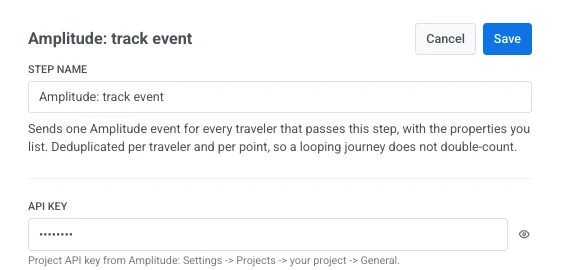
- 지점을 더블 클릭하고 단계 이름을 입력합니다.
- API key에 Amplitude의 프로젝트 API 키를 입력합니다: Settings > Projects > your project > General. 이 키는 웹훅 비밀 헤더처럼 마스킹되어 저장됩니다. Pushwoosh는 저장된 후에는 절대로 표시하거나 반환하지 않으며, 지점의 저장된 요청이나 호출 로그에 나타나지 않습니다.
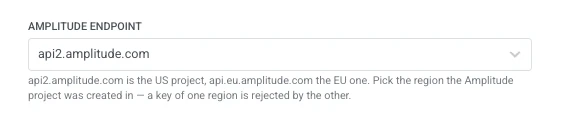
- Amplitude endpoint에서 Amplitude 프로젝트가 생성된 지역을 선택합니다: 미국 프로젝트의 경우
api2.amplitude.com, EU 프로젝트의 경우api.eu.amplitude.com입니다. 한 지역의 키는 다른 지역에서 거부됩니다.
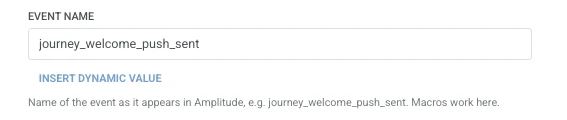
- Event name에 Amplitude에 표시될 이벤트를 입력합니다(예:
journey_welcome_push_sent). Event properties와 동일한 매크로를 사용합니다.
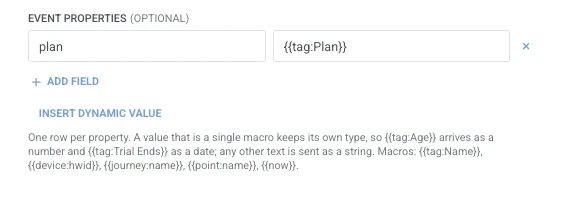
- Event properties에서 이벤트와 함께 보낼 속성마다 한 행을 추가합니다. 속성 이름과 값을 입력합니다. 이름은 비어 있지 않아야 하며 고유해야 합니다. 단일 여행자 매크로인 값은 Amplitude에서 자체 유형을 유지합니다(
{{tag:Age}}는 숫자로,{{tag:Trial Ends}}는 날짜로 도착). 다른 모든 텍스트는 문자열로 전송됩니다. 매크로는 웹훅 본문과 동일한 구문을 사용합니다. 또는 동적 값 삽입을 클릭하여 이 여정의 이전 단계에서 생성된 속성(예: LLM 응답 또는 매핑된 웹훅 값)을 선택합니다.
- 저장을 클릭합니다.
여행자는 캔버스에서 다음에 연결하는 단계로 계속 진행합니다.
단계 실행 후 속성
Anchor link to| 속성 | 내용 |
|---|---|
amplitude_events_ingested | Amplitude가 수집한 이벤트 수 |
이후 단계에서 사용하는 방법
Anchor link to여행자는 이 속성과 관계없이 이미 다음 단계로 계속 진행했습니다. 이벤트가 수집되었는지 확인하거나 조건 분할로 분기해야 하는 경우 사용자 프로필 업데이트를 사용하여 태그에 저장하세요.
실패 및 예기치 않은 응답
Anchor link to요청이 실패하면 여행자는 여정에서 제외됩니다. 오류 및 실패한 요청을 참조하세요.
예시 시나리오: 여정 전송을 Amplitude 퍼널에 기록하기
Anchor link to한 팀이 환영 푸시 전송이 다른 제품 이벤트와 동일한 Amplitude 퍼널에 표시되기를 원합니다.
- 이벤트가 발생해야 하는 여정 지점에 Amplitude: track event를 추가합니다. Event name을
journey_welcome_push_sent로 설정합니다. - 저장을 클릭합니다.
이것이 실행되면 전송이 Amplitude에서 나머지 제품 이벤트 옆에 표시되므로 퍼널은 여정 단계가 보고되지 않는 공백 대신 전체 그림을 반영합니다.