Telegram
Telegram 요소는 봇을 시작하고 Customer Journey에 진입한 사용자에게 일반 텍스트 Telegram 메시지를 전송합니다.
Telegram 요소 구성하기
Anchor link to- Telegram 요소를 Journey 캔버스에 추가합니다.
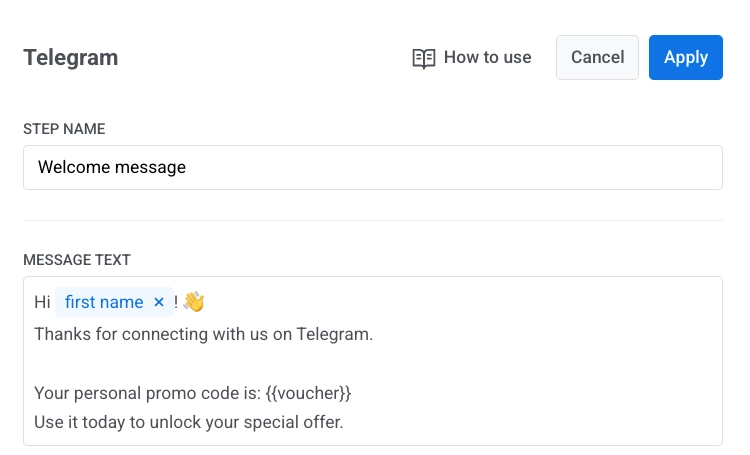
- 메시지 텍스트에 메시지 본문을 입력합니다.
- 메시지는 텍스트 전용으로 유지하고 4096자 이내로 작성합니다.
메시지 내용 개인화하기
Anchor link to태그와 Liquid 플레이스홀더를 사용하여 Telegram 메시지를 개인화할 수 있습니다. 자세히 알아보기
바우처 사용하기
Anchor link to바우처 코드를 포함하려면:
- 바우처 사용을 켭니다.
- 바우처 풀을 선택합니다.
- 선택 사항. 태그 할당을 설정합니다.
- 코드가 표시되어야 할 메시지 텍스트에
{{voucher}}를 추가합니다.
요소를 구성한 후 적용을 클릭합니다.
도달 가능성 및 통계
Anchor link to일시적인 네트워크 문제로 전송에 실패하면 Pushwoosh가 자동으로 재시도합니다.
Telegram이 bot blocked 또는 chat not found를 반환하면 Pushwoosh는 해당 사용자를 Telegram에 도달할 수 없는 것으로 표시합니다:
bot blocked는 통계에 봇을 차단한 사용자 건너뜀으로 표시됩니다.chat not found는 통계에 채팅을 찾을 수 없는 사용자 건너뜀으로 표시됩니다.
엔드투엔드 설정 가이드는 Customer Journey에서 Telegram 메시지 보내기를 참조하세요.