Recurring push
Recurring push sends the same push notification repeatedly at a chosen interval (e.g. daily, weekly) or on selected dates. The flow is the same for mobile and web push.
Prerequisites
- Recurring schedule is only available with Audience-based entry.
- Build a journey with Audience-based Entry and Push, then end the branch with an Exit element or by leaving it without an outgoing connection. See One-time push for the basic flow, then configure the entry schedule below.
Configure recurring entry
Anchor link toDouble-click the Audience-based entry element. Set Entry schedule to Recurring entry, then choose:
- On specific dates: users enter on the dates you pick (e.g. webinar or event dates).
- Periodically: users enter at a fixed interval (e.g. every 1 day, every 1 week).
Set the time and timezone as for a one-time scheduled send. Learn more about recurring entry.
On specific dates
Anchor link toSchedule the journey so users enter on multiple specific dates.
- Select On specific dates and pick the dates in the calendar. Click + Add Date to add more dates.
- Set the time and timezone.
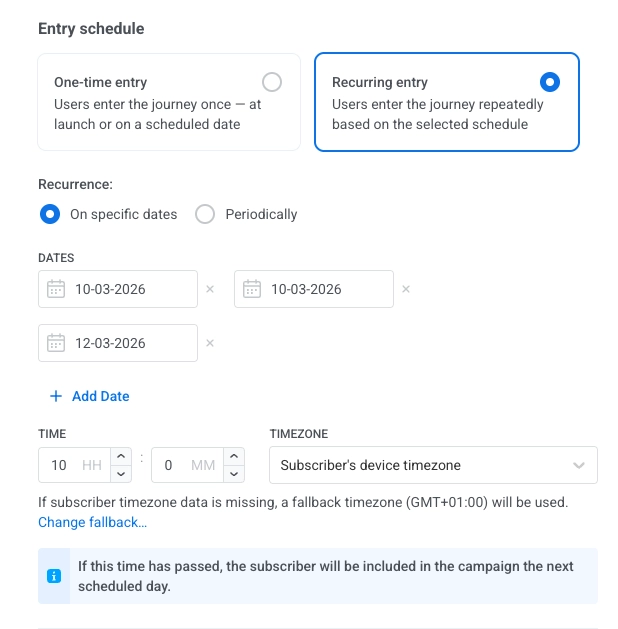
Timezone options:
- Subscriber’s device timezone (default): entry uses each subscriber’s device timezone. If timezone is missing, a fallback is used. Click Change fallback to change it.
- Specific timezone: pick a timezone from the dropdown for a fixed entry time.
Periodically
Anchor link toSet up a journey that runs at a fixed interval (e.g. every Monday at 9:00 AM).
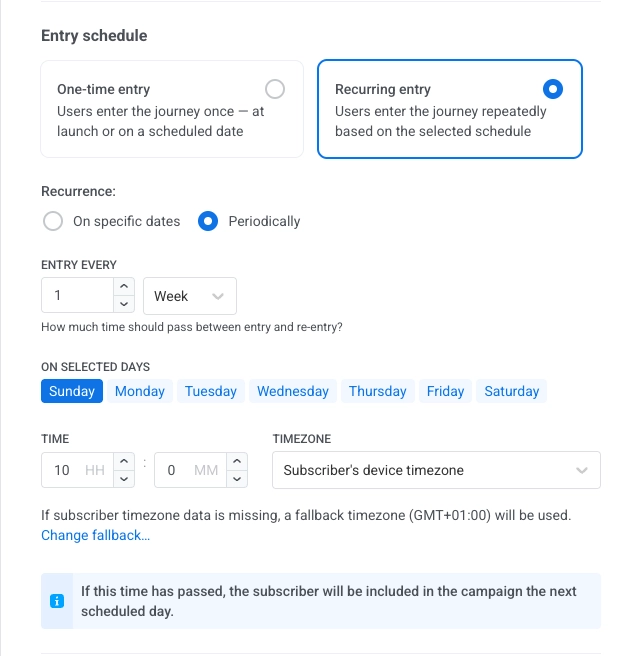
- Select Periodically.
- In ENTRY EVERY, set the interval (e.g. every 1 day, every 2 weeks).
- Pick the days (of the week or month, depending on the interval).
- Set the time and timezone the same way as for On specific dates.
Next steps
Anchor link to- Configure the Push element (message content).
- Configure any other journey elements you need.
- End the branch with an Exit element, or leave it without an outgoing connection.
Learn more about Journey elements.
Example: Weekly reminder for a fitness app
Anchor link toSend the same motivational push every Monday at 9:00 AM in each user’s local timezone.
- Create a basic push flow. Add Audience-based Entry to the canvas and select an Audience Source.
- Set recurring entry. In the element, set Entry schedule to Recurring entry → Periodically, ENTRY EVERY to every 1 week, day Monday.
- Set time and timezone. Set time to 9:00 AM and Subscriber’s device timezone.
- Add Push and end the branch. Add Push (create the message), then end the branch with an Exit element or by leaving it without an outgoing connection. Review and click Launch campaign.