How to create segments
Segments allow you to target specific groups of users based on their attributes and behavior. Pushwoosh provides multiple ways to create segments, from simple tag-based filters to advanced compound filters combining multiple conditions.
To build a segment, follow these steps:
- Go to the Segments (Filters) section of the Pushwoosh Control Panel.
- Click the Create Segment button to open the segment builder. For other creation methods (AI or import, plus High Speed Delivery if it’s enabled for your account), click the chevron next to the button and choose an option from the menu.
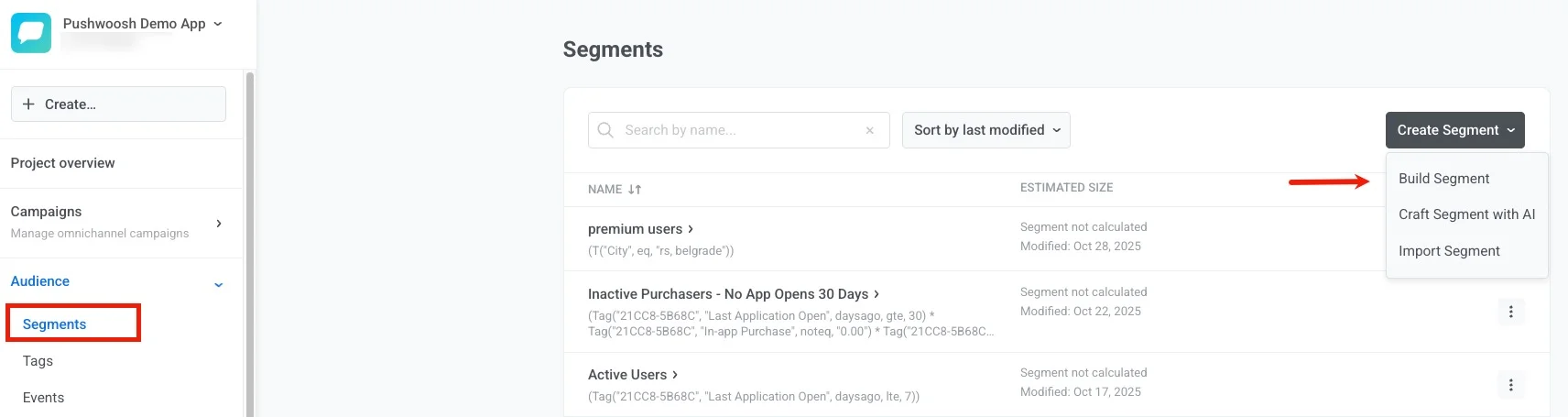
Ways to create segments
Anchor link toSelect a guide below to get started:
Build segments by tags
Start with the basics—create segments using user attributes and tag values. Build segments by events
Target users based on specific behaviors and event occurrences with flexible time frames. Build segments by existing segments
Reuse and combine previously created segments to build more complex audiences. Build segments by User ID
Target known users by their Pushwoosh User IDs and combine them with other filters. Build segments by geolocation
Target users who are near a selected point on the map within a defined radius. Build segments with compound filters
Create advanced segments by combining multiple filter types with logical operators. Create anniversary segments
Target users on significant dates like birthdays or app anniversaries. Import a segment
Create segments by uploading a CSV file with User IDs or Hardware IDs. Build segments with AI
Use natural language to automatically generate segments with AI assistance. Create segments via API
Build segments programmatically using the createFilter API method for automation.