BigQuery: insert row
Use BigQuery: insert row to stream one row into a BigQuery table from a journey step, through the streaming insert API. Like Google Sheets: add row, this point authenticates through the Google account connected once for the whole account. There’s no token field on the point itself.
Typical uses:
- Feed a reporting table: insert a row per journey step reached, for a dashboard or scheduled query downstream.
- Log events as they happen: stream raw journey data into BigQuery instead of waiting on a batch export.
- Join with existing data: insert a device or tag value your BigQuery tables can join against your own datasets.
Before you start
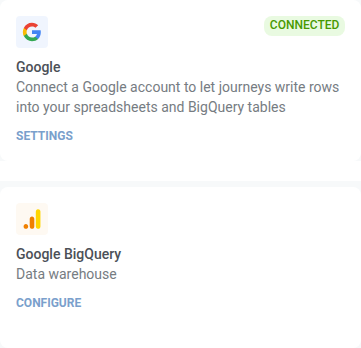
Anchor link toConnect a Google account under Settings > 3rd-party integrations > Google. This is the same connection Google Sheets: add row uses. After you connect Google, install the integration so the point appears in the journey builder.
This is not the Google BigQuery card on that page. That one is the BigQuery integration: it streams every message event of an application into a fixed schema on a service account key. This point writes one row you define, at the step you place it on, and takes no key of its own.
Two things also need to be in place on the Google Cloud side, or the request fails:
- The dataset and the table have to exist already. This point writes rows. It never creates a table.
- The connected Google account needs the BigQuery Data Editor role (or any role granting
bigquery.tables.updateData) on that dataset.
Configure the point
Anchor link to- Drag BigQuery: insert row from the Integrations section of the left panel onto the canvas.
- Double-click the point and enter a Step Name.
- In Project ID, enter the Google Cloud project ID. Use the id, not the display name, for example
my-analytics-prod.
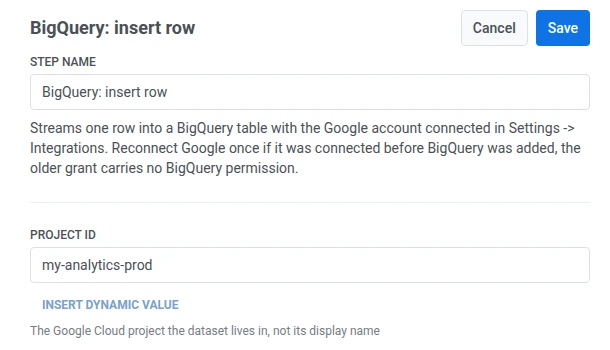
- In Dataset, enter the dataset name.

- In Table, enter the table name.

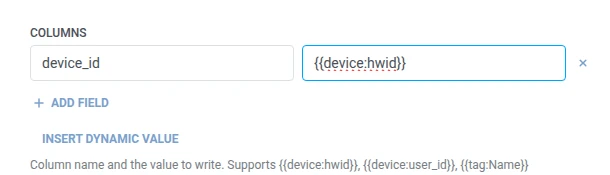
- In Columns, add one row per BigQuery column to write. Enter the column name and the value. Names must be non-empty and unique. Every column you list has to exist in the table’s schema. A value can be fixed text or a traveler macro such as
{{tag:Name}}, the same macros as in a Webhook body. Or click Insert Dynamic Value to pick an attribute an earlier step in this journey produced, for example an LLM response or a mapped Webhook value.
- Click Save.
Response
Anchor link toThe traveler continues to whatever step you connect next on the canvas.
Attributes after the step runs
Anchor link toThis point doesn’t return an attribute on success. If BigQuery rejects a row, the error is written to bigquery_insert_error instead. See Failures and unexpected responses.
Failures and unexpected responses
Anchor link toOpen Calls log in the point’s drawer and check the response:
- 401 — the Google connection is missing or expired. Reconnect it under Settings > 3rd-party integrations.
- 403 with
accessDenied: Streaming insert is not allowed in the free tier— the project has no billing account attached. Streaming inserts, which is what this point uses, are not part of the BigQuery sandbox. Enable billing on the project and the same request goes through. - 403 with
accessDeniedorinsufficientPermissions— the connection was granted before BigQuery support was added (reconnect it), or the Google account has no write access to the dataset. - 403 with
quotaExceededorrateLimitExceeded— the project’s streaming insert quota is spent. Nothing to reconnect. The journey has to send less, or the quota has to be raised in Google Cloud. - 404 — the project, dataset, or table name doesn’t match anything.
A failed request drops the traveler from the journey. See Errors and failed requests.
Example scenario: Feeding a BigQuery reporting table
Anchor link toA team wants journey activity in the same BigQuery dataset their scheduled reports already query.
- Add BigQuery: insert row right after the step you want to log. Set Dataset to
marketingand Table tojourney_events. In Columns, setdevice_idto{{device:hwid}}. - Click Save.
Once this runs, the row lands in the same table the scheduled query reads from, so the next report run already includes it.