Loop
Use Loop to repeat the same steps for a user several times without copying them on the canvas. It fits reminders, follow-ups, and checks that should run again and again, up to a limit you set. After the last repeat, the user moves on to the next part of the journey.
Use cases
Anchor link to- Payment reminders: send a reminder and wait for the payment. Users who pay move on and get no more reminders. Users who don’t pay get another reminder after a pause, up to the limit you set.
- Win back inactive users: send a limited number of nudges with a delay between them. After the last one, move users to a different offer or stop sending them messages.
- Keep checking for an event: wait for the same event again and again without copying the wait step across the canvas.
Prerequisites
Anchor link toIf Loop is missing from the elements list, ask Pushwoosh Support to turn it on for your account.
Add and configure Loop
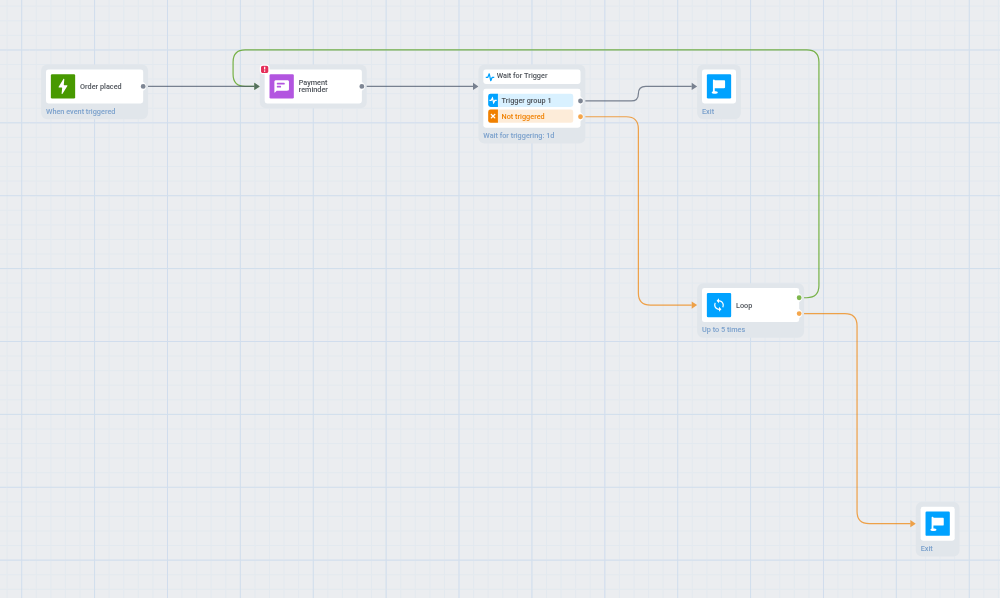
Anchor link toBuild the steps you want to repeat first, then place the Loop right after them. The Loop has two outputs:
- Repeat: a connection back to the first repeated step. Users go back there and go through the steps again.
- Exit: a connection forward to what comes after the loop. Users go there after their last repeat.
-
Add the Loop element right after the steps you want to repeat, and double-click it.
-
In Maximum repeats, set how many times a user can go through the repeated steps, from 1 to 100. The default is 10. A number outside that range snaps to the nearest limit as soon as you save.
-
In Not more often than every, s, set the shortest pause between two repeats for one user, in seconds:
- 0: use it when the repeated steps already wait on their own, with a Wait for Trigger step, a Time delay step, or another Loop that has its own pause.
- 60 or more: use it when nothing in the repeated steps waits. The Loop holds each user until that time has passed since their last repeat. If you type a value from 1 to 59, it changes to 60 right away.
If you leave
0but none of the repeated steps waits, the journey won’t save and showsThe loop body has no waiting element, set a minimum interval. Without any pause, the loop would repeat as fast as the system can process it. Set 60 or more, or add a Wait for Trigger or Time delay step to the repeated steps.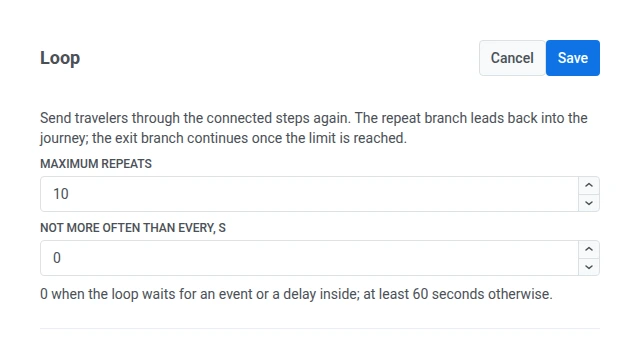
-
Drag a connection from the Repeat output back to the first step you want to repeat. In the example above, that’s the reminder Push.
If Repeat isn’t connected, the journey won’t save and shows
Connect the repeat output of the Loop. If it leads to the Loop itself, you’ll seeThe repeat output of the Loop cannot lead to the Loop itself. -
Drag a connection from the Exit output to the step that should come after the loop, for example a final message or a different offer. Users go there once they’ve gone through the loop Maximum repeats times.
-
Click Save.
Only Repeat can point back to an earlier step. If you connect any other output to a step earlier in the journey, the journey won’t save.
What happens on each repeat
Anchor link toEvery step in the repeated part runs again each time. Keep these rules in mind when you build it.
Tag changes add up
Anchor link toAn Update user profile step inside the loop runs on every repeat. What that means depends on the action:
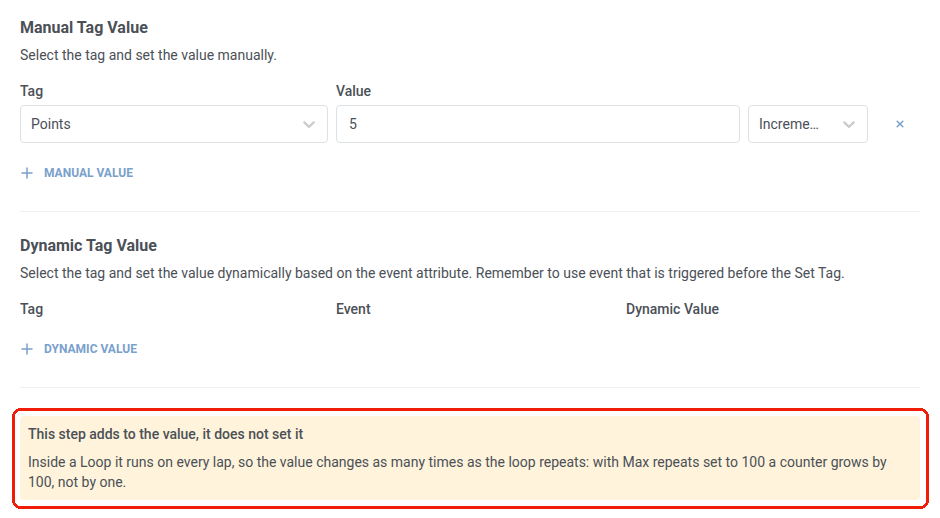
- Increase, decrease, add a list item, remove a list item: the change adds up. For example, with Maximum repeats set to 100, a Tag increased by 1 grows by 100, not by 1.
- Replace the value: safe to repeat, because it doesn’t add up.
When the step has a change that adds up, it shows a warning explaining that the change adds up on every repeat.
Waits start over on each repeat
Anchor link toA Wait for Trigger or Time delay step counts its time from the current repeat, not from when the user entered the loop. A 24-hour wait means 24 hours on every repeat, so a user who goes through the loop 3 times can spend up to 72 hours in it.
Users stay in the same test branch
Anchor link toAn A/B/n Split sends each user to the same branch every time they reach it: on every repeat, and when they enter the journey again later. A Holdout Split works the same way. This keeps test results accurate, because no user can move to another branch and be counted twice.
Wait for Trigger uses the latest event
Anchor link toA Wait for Trigger step in the loop keeps only the event from the current repeat. Each new event replaces the one from the previous repeat. Later steps that use event data always get the latest event, including message placeholders, a dynamic Time delay, a dynamic Tag value, and a Condition split.
Goals count once, messages count every time
Anchor link toA Conversion Goal reached inside the loop counts once for the journey, not once per repeat.
Messages work differently. Each repeat of a channel step is a separate send and counts toward the user’s frequency capping limit. A Push step that repeats 10 times can use up to 10 sends of that limit, not one.
Nested loops
Anchor link toYou can put one Loop inside the repeated part of another. Each Loop counts its own repeats. The inner Loop starts counting from zero each time users leave it, so it runs all its repeats again on every repeat of the outer Loop.
For example, if the outer Loop’s Maximum repeats is 3 and the inner Loop’s is 2, the inner Loop’s steps can run up to 2 × 3 = 6 times. The combined limit of 1000 repeats still applies.
Safety limit across all loops
Anchor link toOne user can go through at most 1000 repeats in total across all Loops in a journey, even if each Loop’s own Maximum repeats allows more.
- A user who reaches 1000 leaves through the last Loop’s Exit, even if that Loop’s own limit isn’t reached yet.
- The limit protects against loops inside loops multiplying into far more repeats than you expect, for example two 100-repeat loops placed one inside the other.