Adapty: update profile attributes
The Adapty: update profile attributes Point template writes custom attributes onto the traveler’s Adapty profile, so Adapty can pick a paywall by what the journey knows: the step reached, engagement, segment.
Configure the point
Anchor link to- Drag Adapty: update profile attributes from the Integrations section onto the canvas.
- Double-click the point and enter a Step Name.
- In Adapty secret key, enter the app’s secret key from Adapty: App settings > General. It’s stored masked, like a webhook secret header — a public SDK key doesn’t authorize this call, so keep it out of this field.
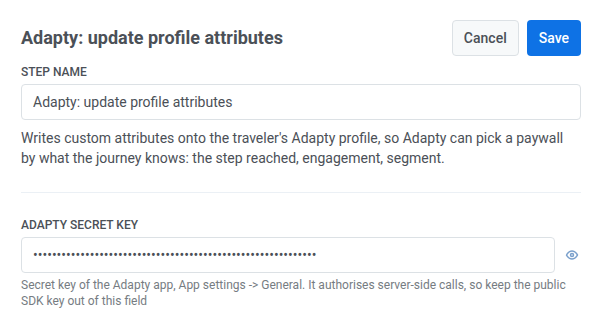
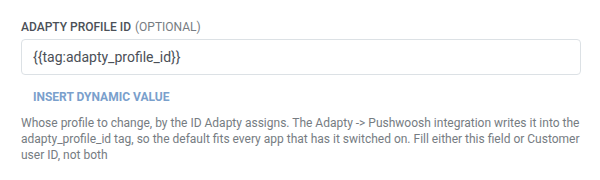
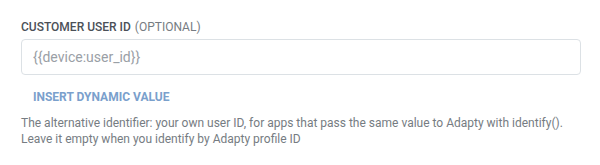
- Identify the traveler with one of these fields. Leave the other empty. An empty field is dropped from the request, not sent blank.
- Adapty profile ID (default): keep
{{tag:adapty_profile_id}}. The Adapty → Pushwoosh integration writes that tag when the integration is enabled. Leave Customer user ID empty.
- Customer user ID: fill this if the app passes its own user ID to Adapty through
identify(), for example{{device:user_id}}. Leave Adapty profile ID empty.
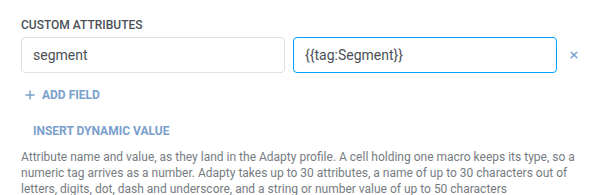
- In Custom attributes, add one row per attribute to write onto the profile, with a name and its value. Names must be non-empty and unique. See key/value fields.
- A cell that holds one macro keeps that macro’s type. For example, a numeric tag arrives as a number.
- You can send up to 30 attributes.
- Each name can be up to 30 characters: letters, digits, dot, dash, and underscore.
- Each value can be up to 50 characters.
- Click Save.
Response
Anchor link toThis point doesn’t map any response data back into the journey. A failed request drops the traveler from the journey — see Errors and failed requests.
Example scenario: Telling Adapty which paywall segment a traveler is in
Anchor link toAn app wants Adapty to show a different paywall to trial users than to lapsed subscribers, based on what the journey already knows.
- Add Adapty: update profile attributes at the point in the journey where the traveler’s segment is known. Leave Adapty profile ID at its default. In Custom attributes, set
segmentto{{tag:Segment}}. - Click Save.
Once this runs, the traveler’s Adapty profile carries their segment, and Adapty’s paywall targeting can use it the same way it uses any other profile attribute.