Integration points
Use Integration points to pass journey data into the CRM, analytics, spreadsheet, or AI tools you already use, without building a raw Webhook for each destination. Each point is a ready-made journey step for a specific tool, for example HubSpot, Google Sheets, or Amplitude.
Available integrations
Anchor link to| Point | When to use |
|---|---|
| Adapty: grant access level | When the journey should grant premium access without a purchase. For example, reward a traveler with a paid access level as compensation. Learn more |
| Adapty: update profile attributes | When Adapty should pick a paywall using data the journey already knows. For example, write the traveler’s segment or step reached onto their Adapty profile. Learn more |
| Adjust: send event | When you want journey activity in Adjust attribution reports. For example, send a conversion event so it reaches your ad networks. Learn more |
| Airtable: create record | When the journey should store a row in Airtable. For example, add a lead or case record with fields from the traveler. Learn more |
| Amplitude: set user properties | When you need Amplitude segments to match Pushwoosh tags. For example, sync plan tier or trial status onto the Amplitude user profile. Learn more |
| Amplitude: track event | When you want journey activity in Amplitude analytics. For example, log that a welcome push was sent so it appears in Amplitude funnels. Learn more |
| AppsFlyer: send event | When you want journey activity in AppsFlyer attribution reports. For example, send a conversion event so it reaches your ad networks. Learn more |
| BigQuery: insert row | When the journey should write into BigQuery. For example, insert a row for warehouse reporting or joins. Learn more |
| Dynamics 365: create or update record | When the journey should keep Dynamics 365 (Dataverse) in sync. For example, create or update a row matched by key. Learn more |
| Gemini: generate text | When you need short AI copy mid-journey for a later message. For example, draft a line with Gemini and reuse it in a push, email, or SMS. Learn more |
| Google Sheets: add row | When you want journey values in a spreadsheet as they happen. For example, append HWID and campaign name for a simple ops log. Learn more |
| HubSpot: add timeline event | When you want journey activity on a HubSpot contact’s own timeline, next to their emails and calls. For example, log that a traveler passed a step and whether they’re subscribed to push. Learn more |
| HubSpot: create or update contact | When the journey should create or refresh a contact in HubSpot CRM. For example, upsert by email after a lead fills a form. Learn more |
| HubSpot: get contact properties | When a later step needs data already stored on a HubSpot contact. For example, read a property to print it in a message or branch on it. Learn more |
| HubSpot: update subscription | When sales or email marketing need to see a contact’s push subscription state. For example, write it onto the HubSpot contact after a journey step. Learn more |
| LLM: generate text | When you need short AI copy mid-journey for a later message. For example, draft a line with Claude and reuse it in a push, email, or SMS. Learn more |
| Mattermost: post message | When a journey step should notify your team in Mattermost. For example, post when a high-value conversion happens. Learn more |
| Microsoft Fabric: ingest row | When the journey should feed Microsoft Fabric analytics. For example, ingest a row into an Eventhouse table. Learn more |
| Mixpanel: set profile | When you need Mixpanel profiles and segments to match Pushwoosh tags. For example, sync email or plan onto the Mixpanel profile. Learn more |
| Mixpanel: track event | When you want journey activity in Mixpanel analytics. For example, log a step so you can use it in Mixpanel funnels next to product events. Learn more |
| OpenAI: generate text | When you need short AI copy mid-journey for a later message. For example, draft a line with OpenAI and reuse it in a push, email, or SMS. Learn more |
| Salesforce: create or update record | When the journey should keep Salesforce in sync. For example, create or update a Contact matched by external id. Learn more |
| Slack: post message | When a journey step should notify your team in Slack. For example, post when a high-value conversion happens. Learn more |
| Snowflake: insert row | When the journey should write into Snowflake. For example, insert a row for reporting or a downstream pipeline. Learn more |
| Supabase: insert row | When the journey should write into a Supabase table. For example, insert a row your app already reads from that database. Learn more |
Install an integration
Anchor link toInstalling a point template and connecting a service account are two separate things, done in two different places:
- Install the template: from the journey builder or from Settings. This makes the point available to add to a journey.
- Connect the service account: also required for these points, each a different way. Details in each guide:
- Google Sheets: add row, BigQuery: insert row, Microsoft Fabric: ingest row, Salesforce: create or update record, and Dynamics 365: create or update record — under Settings > 3rd-party integrations > Connected services, not under Customer Journey Integrations.
- HubSpot: add timeline event — through the HubSpot integration installed from the HubSpot side, not Settings > 3rd-party integrations.
Install from the journey builder
Anchor link to- In the journey left panel, open the Integrations section.
- Drag an integration that is not installed yet onto the canvas.
This installs the template and adds the point to the canvas in one action.
If you don’t see the Integrations section in the left panel at all, contact Pushwoosh Support to request access. Once it’s on, you see the full catalog, regardless of what’s already installed.
Install from Settings
Anchor link to- Open Settings > 3rd-party integrations.
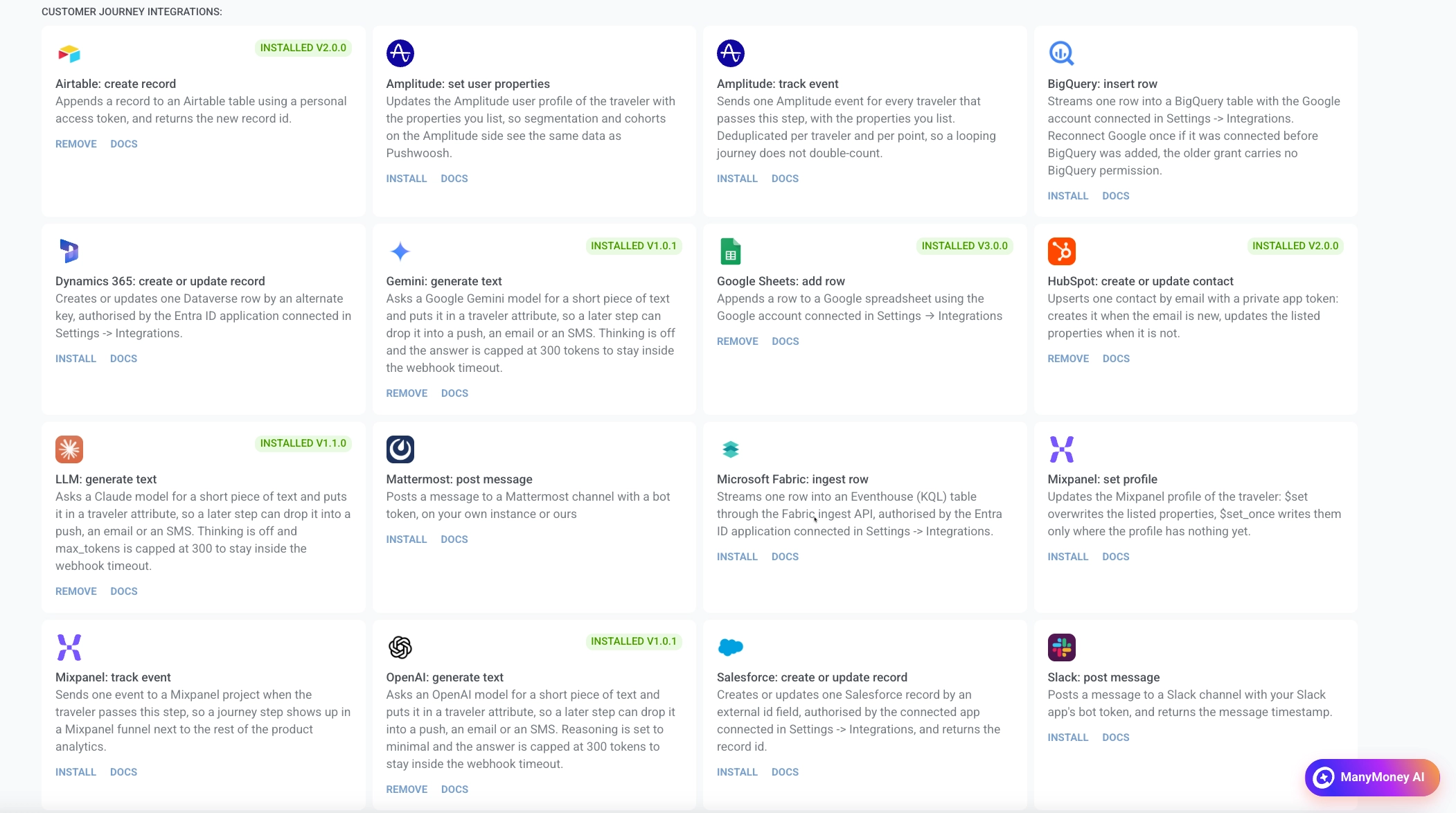
- Under Customer Journey Integrations, find the integration and click Install.
After you install from Settings, drag the integration from the Integrations section of the journey left panel onto the canvas, then configure the point.
Manage installed integrations
Anchor link toOn an installed card under Customer Journey Integrations:
- To remove an integration, click Remove.
- To open the setup guide, click Docs.
An Installed badge with the version means the integration is installed on the account.
Configure the point
Anchor link toOpen the point on the canvas and fill in its fields. Pushwoosh sends the request to the destination for you. How to fill each field is in that point’s guide.
Configuring list and key/value fields
Anchor link toSome fields let you add as many rows as the destination needs, instead of filling a fixed set of boxes. There are two shapes:
- List of values: one value per row. For example, Columns in Google Sheets: add row, or Properties to read in HubSpot: get contact properties.
- Name and value pairs: a name and a value per row. For example, Properties in HubSpot: create or update contact, or Fields in Airtable: create record. Each point names this field for what it holds.
When a field’s rows are values to send, like Columns or Properties to write, you can insert something about the current traveler (device ID, tag, and so on) instead of fixed text. When rows are names instead, like Properties to read, they take a plain identifier only. See that point’s guide.
Errors and failed requests
Anchor link toIf the request to the destination fails, the traveler leaves the journey at this step. See Request error.
Integration points follow the same timeouts, retries, rate limits, and endpoint cooldown as Webhook.
A few templates, like the two HubSpot points that look up a contact, declare extra branches for an answer the destination treats as a normal outcome rather than a refusal — for example a contact not found. A response that matches one of those branches isn’t a failed request: it skips retries, doesn’t cool the point down, and sends the traveler down that branch instead of dropping them. See the point’s own page for what triggers each branch.