Amplitude: track event
Use Amplitude: track event to send one event to an Amplitude project from a journey step, through the HTTP API V2, with the properties you list.
Pushwoosh sets Amplitude’s insert_id for you from the traveler and this step. That means the same traveler passing through this exact point twice, for example on a second lap of a looping journey, lands as one deduplicated event in Amplitude, not two.
Typical uses:
- Log journey milestones: send an event when a traveler reaches a step, so it shows up next to your product events in Amplitude funnels.
- Feed a cross-channel funnel: log push, email, or SMS milestones alongside in-app events for one funnel view in Amplitude.
- Track a looping journey safely: the built-in deduplication means a traveler who loops back through this step still lands as one event, not several.
Configure the point
Anchor link to- Drag Amplitude: track event from the Integrations section onto the canvas.
- Double-click the point and enter a Step Name.
- In API key, enter the project API key from Amplitude: Settings > Projects > your project > General. It’s stored masked, like a webhook secret header. Pushwoosh never displays or returns it once saved, and it never appears in the point’s stored request or in the Calls log.
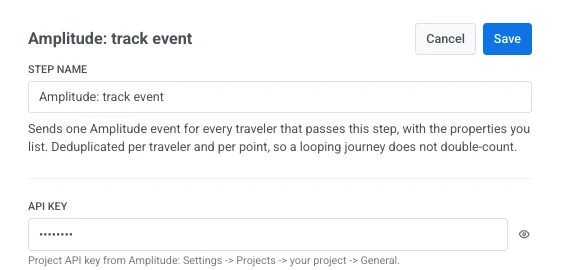
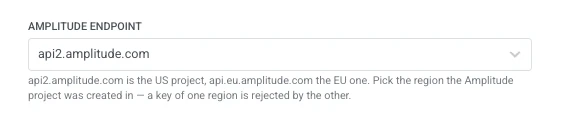
- In Amplitude endpoint, pick the region the Amplitude project was created in:
api2.amplitude.comfor a US project,api.eu.amplitude.comfor an EU one. A key from one region is rejected by the other.
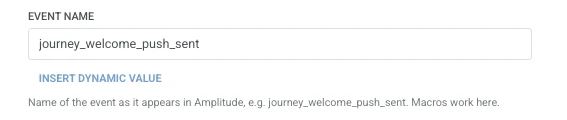
- In Event name, enter the event as it should appear in Amplitude, for example
journey_welcome_push_sent. It takes the same macros as Event properties.
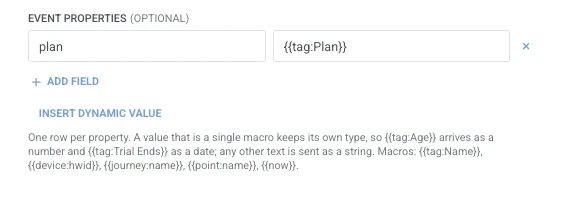
- In Event properties, add one row per property to send with the event. Enter the property name and the value. Names must be non-empty and unique. A value that’s a single traveler macro keeps its own type in Amplitude (
{{tag:Age}}arrives as a number,{{tag:Trial Ends}}as a date). Any other text is sent as a string. Macros use the same syntax as a Webhook body. Or click Insert Dynamic Value to pick an attribute an earlier step in this journey produced, for example an LLM response or a mapped Webhook value.
- Click Save.
Response
Anchor link toThe traveler continues to whatever step you connect next on the canvas.
Attributes after the step runs
Anchor link to| Attribute | What it holds |
|---|---|
amplitude_events_ingested | The number of events Amplitude ingested |
How to use it in later steps
Anchor link toThe traveler already continued to the next step regardless of this attribute. Save it to a Tag with Update user profile if you need to confirm the event was ingested or branch on it with Condition split.
Failures and unexpected responses
Anchor link toA failed request drops the traveler from the journey. See Errors and failed requests.
Example scenario: Logging journey sends into an Amplitude funnel
Anchor link toA team wants a welcome push send to show up in the same Amplitude funnel as their other product events.
- Add Amplitude: track event at the point in the journey where the event should fire. Set Event name to
journey_welcome_push_sent. - Click Save.
Once this runs, the send shows up in Amplitude next to the rest of the product events, so the funnel reflects the full picture instead of a gap where the journey step doesn’t report.