অন-সাইট প্রোডাক্ট রেকমেন্ডেশন
Web SDK আপনার ওয়েবসাইটে প্রোডাক্ট রেকমেন্ডেশন দেখাতে পারে: প্রোডাক্ট পেজে, কার্টে, ক্যাটালগ পেজে বা 404 পেজে। প্রোডাক্টগুলি অ্যাপ্লিকেশনের প্রোডাক্ট ক্যাটালগ থেকে আসে। এগুলি দেখানোর দুটি উপায় আছে:
- উইজেট:
data-pw-recommendationsঅ্যাট্রিবিউটসহ একটি এলিমেন্ট যোগ করুন, এবং SDK সেটিকে প্রোডাক্টের একটি গ্রিড দিয়ে পূরণ করে। - Headless API:
Pushwoosh.recommendations.fetchকল করুন এবং আপনার নিজের মার্কআপ দিয়ে প্রোডাক্টগুলি রেন্ডার করুন।
একটি লাইভ উদাহরণ হলো pushon.pushwoosh.com-এ Pushwoosh ডেমো শপ। এর 404 পেজে একটি উইজেট ব্লক এবং প্রোডাক্ট পেজে ও কার্টে headless ব্লক আছে।
পূর্বশর্ত
Anchor link to- Web SDK 3.96.0 বা তার পরবর্তী সংস্করণ, যা ওয়েব পুশ SDK 3.0 গাইড-এ বর্ণিত উপায়ে Pushwoosh CDN থেকে লোড করা হয়েছে।
web-push-notificationsnpm প্যাকেজে এখনও রেকমেন্ডেশন অন্তর্ভুক্ত নেই। - অ্যাপ্লিকেশনের প্রোডাক্ট ক্যাটালগ-এ প্রোডাক্ট।
- অ্যাপ্লিকেশনের জন্য অন-সাইট রেকমেন্ডেশন চালু থাকা। দেখুন অন-সাইট রেকমেন্ডেশন চালু করুন।
অন-সাইট রেকমেন্ডেশন চালু করুন
Anchor link toপ্রতিটি অ্যাপ্লিকেশনকে আলাদাভাবে চালু করতে হয়, কারণ যে ফিড ব্লকগুলি সরবরাহ করে সেটি পাবলিক এবং এর জন্য API টোকেন লাগে না। ততক্ষণ পর্যন্ত, ফিড একটি ত্রুটি দিয়ে উত্তর দেয় এবং ব্লকগুলি খালি থাকে।
কন্ট্রোল প্যানেলে অন-সাইট রেকমেন্ডেশন চালু করতে:
- অ্যাপ্লিকেশনের জন্য Content → Product Catalog-এ যান।
- On-site recommendations-এ ক্লিক করুন।
- Show recommendations on my website চালু করুন।
- Website domains-এ, যে ওয়েবসাইটগুলি ব্লক দেখাবে সেগুলির ডোমেন লিখুন, প্রতি লাইনে একটি। উদাহরণস্বরূপ,
shop.example.com। - Save-এ ক্লিক করুন।
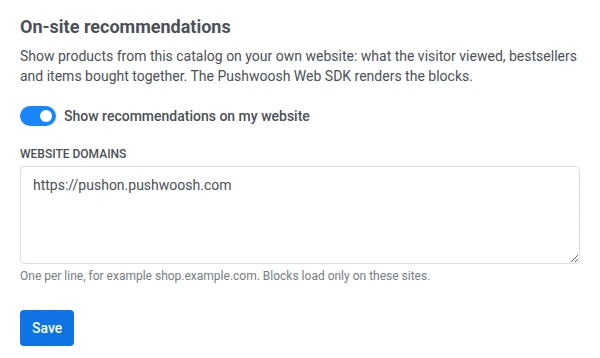
সেভ করার পরে:
- Website domains ডোমেনগুলিকে সেভাবে দেখায় যেভাবে Pushwoosh সেগুলি সংরক্ষণ করেছে:
https://যোগ করে, ছোট হাতের অক্ষরে এবং ডুপ্লিকেট ছাড়া। টাইপোর জন্য তালিকাটি পরীক্ষা করুন। - ব্লকগুলি শুধুমাত্র তালিকাভুক্ত ওয়েবসাইটগুলিতে লোড হয়। আপনি যদি Website domains খালি রাখেন, তাহলে ব্লকগুলি যেকোনো ওয়েবসাইটে লোড হয়।
- পরিবর্তনটি এক মিনিটের মধ্যে কার্যকর হয়।
আপনি যদি কন্ট্রোল প্যানেলে অ্যাক্সেস করতে না পারেন, তাহলে অ্যাপ্লিকেশনের জন্য অন-সাইট রেকমেন্ডেশন চালু করতে Pushwoosh সাপোর্ট বা আপনার Customer Success Manager-কে বলুন। অ্যাপ্লিকেশন কোড এবং আপনার ওয়েবসাইটগুলির ডোমেন অন্তর্ভুক্ত করুন।
রেকমেন্ডেশন স্ট্র্যাটেজি
Anchor link to| স্ট্র্যাটেজি | কী দেখায় | যা প্রয়োজন |
|---|---|---|
viewed | এই ভিজিটর সম্প্রতি যে প্রোডাক্টগুলি দেখেছেন। সাইন-ইন করা ভিজিটরের ক্ষেত্রে, তাঁর user ID-র অধীনে দেখা প্রোডাক্টগুলি প্রথমে আসে। | trackProductView দিয়ে পাঠানো প্রোডাক্ট ভিউ। |
bestsellers_30d | গত 30 দিনে অ্যাপ্লিকেশনের সবচেয়ে বেশি বিক্রি হওয়া প্রোডাক্ট। স্টক শেষ হয়ে যাওয়া প্রোডাক্টগুলি বাদ দেওয়া হয়। | অর্ডারের আইটেমসহ অর্ডার ইভেন্ট। |
also_bought | যে প্রোডাক্টগুলি প্রায়ই একটি নির্দিষ্ট প্রোডাক্টের সাথে একসাথে কেনা বা দেখা হয়। স্টক শেষ হয়ে যাওয়া প্রোডাক্টগুলি বাদ দেওয়া হয়। | trackProductView দিয়ে পাঠানো প্রোডাক্ট ভিউ, অর্ডার ইভেন্ট, বা প্রোডাক্ট ID বহনকারী অন্য যেকোনো ইভেন্ট। দেখুন প্রোডাক্ট অ্যাক্টিভিটি ট্র্যাক করুন। রিকোয়েস্টে একটি প্রোডাক্ট ID প্রয়োজন। |
যখন কোনো স্ট্র্যাটেজির দেখানোর মতো কিছু থাকে না, তখন ফিড তার পরিবর্তে ফলব্যাক স্ট্র্যাটেজি সরবরাহ করে। ফলব্যাক ডিফল্টভাবে bestsellers_30d। এর পরিবর্তে একটি খালি উত্তর পেতে এটিকে none-এ সেট করুন। উত্তর সবসময় জানায় যে আসলে কোন স্ট্র্যাটেজি সরবরাহ করা হয়েছে, যাতে আপনি ব্লকের শিরোনাম পরিবর্তন করতে পারেন।
প্রোডাক্ট ভিউ ট্র্যাক করুন
Anchor link toviewed এবং also_bought স্ট্র্যাটেজি প্রোডাক্ট ভিউ ব্যবহার করে। প্রতিটি প্রোডাক্ট পেজে, SDK প্রস্তুত হওয়ার পরে trackProductView কল করুন:
Pushwoosh.push(() => { Pushwoosh.trackProductView({ id: 'SKU-123', name: 'Linen shirt', price: 49.9, currency: 'USD', category: 'Shirts', url: 'https://shop.example.com/linen-shirt', imageUrl: 'https://shop.example.com/img/linen-shirt.jpg', });});শুধুমাত্র id আবশ্যক। আপনার প্রোডাক্ট ক্যাটালগে থাকা একই প্রোডাক্ট ID ব্যবহার করুন। SDK একটি PW_ProductView ইভেন্ট পাঠায় এবং 30 সেকেন্ডের মধ্যে একই প্রোডাক্টের পুনরাবৃত্ত ভিউ বাদ দেয়, তাই পেজ রিলোড দ্বিতীয় ভিউ হিসেবে গণনা হয় না।
অর্ডার ইভেন্ট পাঠান
Anchor link tobestsellers_30d স্ট্র্যাটেজি শুধুমাত্র অর্ডার ইভেন্ট থেকে হওয়া বিক্রি গণনা করে, এবং এটি প্রতিটি ব্লকের ডিফল্ট ফলব্যাক। যখন কোনো ভিজিটর অর্ডার দেন, তখন PW_OrderCreated পাঠান:
Pushwoosh.push((api) => { api.postEvent('PW_OrderCreated', { orderId: 'ORDER-10293', items: [ { productId: 'SKU-123', quantity: 1 }, { productId: 'SKU-456', quantity: 2 }, ], });});orderId আবশ্যক, কারণ এটি ছাড়া কোনো অর্ডার গণনা করা হয় না। items-এ, আপনার প্রোডাক্ট ক্যাটালগে থাকা একই প্রোডাক্ট ID ব্যবহার করুন। যখন কোনো অর্ডার পরিবর্তিত হয়, তখন একই orderId এবং items সহ PW_OrderUpdated পাঠান। এর পরিবর্তে আপনার সার্ভার থেকে অর্ডার ইভেন্ট পাঠাতে, দেখুন বেস্টসেলার: আপনার অর্ডার ইভেন্টে আইটেম যোগ করুন।
একটি উইজেট ব্লক যোগ করুন
Anchor link toযেখানে ব্লকটি দেখা যাওয়া উচিত, সেখানে data-pw-recommendations অ্যাট্রিবিউটসহ একটি এলিমেন্ট যোগ করুন। SDK শুধুমাত্র সেই পেজগুলিতে উইজেট লোড করে যেগুলিতে এমন এলিমেন্ট আছে।
<div data-pw-recommendations data-pw-strategy="also_bought" data-pw-product-id="SKU-123" data-pw-fallback="bestsellers_30d" data-pw-limit="4" data-pw-title="Bought together" data-pw-fallback-title="Popular right now" data-pw-block="pdp-also-bought" data-pw-min-height="260"></div>| অ্যাট্রিবিউট | বিবরণ |
|---|---|
data-pw-recommendations | এলিমেন্টটিকে একটি রেকমেন্ডেশন ব্লক হিসেবে চিহ্নিত করে। আবশ্যক। |
data-pw-strategy | viewed, bestsellers_30d, অথবা also_bought। ডিফল্ট bestsellers_30d। |
data-pw-fallback | মূল স্ট্র্যাটেজির কাছে কিছু না থাকলে যে স্ট্র্যাটেজি সরবরাহ করা হবে: viewed, bestsellers_30d, also_bought, অথবা none। ডিফল্ট bestsellers_30d। |
data-pw-limit | প্রোডাক্টের সংখ্যা, 1 থেকে 12। ডিফল্ট 6। |
data-pw-product-id | স্ক্রিনে থাকা প্রোডাক্ট। also_bought-এর জন্য আবশ্যক। |
data-pw-exclude | কমা দিয়ে আলাদা করা প্রোডাক্ট ID যেগুলি দেখানো হবে না, উদাহরণস্বরূপ যে প্রোডাক্টগুলি ইতিমধ্যে কার্টে আছে। সর্বোচ্চ 50টি। |
data-pw-block | ব্লকের নাম। এটি প্রোডাক্ট লিঙ্ক এবং ক্লিক ইভেন্টে যোগ করা হয়, যাতে আপনি অ্যানালিটিক্সে ব্লকগুলিকে আলাদা করতে পারেন। |
data-pw-title | ব্লকের শিরোনাম। |
data-pw-fallback-title | ফলব্যাক স্ট্র্যাটেজি সরবরাহ করা হলে যে শিরোনাম দেখানো হবে, উদাহরণস্বরূপ “You viewed”-এর পরিবর্তে “Popular right now”। |
data-pw-min-height | ব্লক লোড হওয়ার সময় সংরক্ষিত রাখার জায়গা, যাতে লেআউট শিফট এড়ানো যায়। একটি সংখ্যাকে পিক্সেল হিসেবে পড়া হয়। যেকোনো CSS দৈর্ঘ্যও কাজ করে। |
উইজেট প্রতিটি প্রোডাক্টের ছবি, নাম এবং মূল্য দেখায় এবং প্রোডাক্ট পেজে লিঙ্ক করে। প্রোডাক্ট লিঙ্কে utm_medium=onsite থাকে। কোনো প্রোডাক্টে ক্লিক করলে ব্লকের নাম, স্ট্র্যাটেজি এবং প্রোডাক্টের অবস্থানসহ একটি PW_RecommendationClick ইভেন্ট পাঠানো হয়।
আপনি যেকোনো data-pw-* অ্যাট্রিবিউট পরিবর্তন করলে ব্লকটি আবার লোড হয়। উদাহরণস্বরূপ, পেজ রিলোড ছাড়াই স্ক্রিনের প্রোডাক্ট পরিবর্তিত হলে data-pw-product-id আপডেট করুন।
সাধারণ পেজের জন্য ব্লক
Anchor link to| পেজ | স্ট্র্যাটেজি | যে অ্যাট্রিবিউটগুলি সেট করতে হবে |
|---|---|---|
| প্রোডাক্ট পেজ | also_bought | স্ক্রিনের প্রোডাক্টসহ data-pw-product-id, একই ID সহ data-pw-exclude |
| কার্ট | also_bought | কার্টের একটি প্রোডাক্টসহ data-pw-product-id, কার্টের সমস্ত প্রোডাক্টসহ data-pw-exclude |
| ক্যাটালগ বা হোম পেজ | bestsellers_30d | — |
| 404 পেজ | viewed | data-pw-fallback="bestsellers_30d" এবং data-pw-fallback-title, যাতে প্রথমবারের ভিজিটররা জনপ্রিয় প্রোডাক্ট দেখতে পান |
ব্লকের অবস্থা
Anchor link toউইজেট ব্লক এলিমেন্টে data-pw-state অ্যাট্রিবিউট সেট করে:
loading: প্রোডাক্ট লোড হচ্ছে।ready: প্রোডাক্ট দেখানো হচ্ছে।empty: স্ট্র্যাটেজি বা ফলব্যাক কোনোটিরই প্রোডাক্ট নেই। ব্লকটি খালি থাকে।error: প্রোডাক্ট লোড হয়নি। ব্লকটি খালি থাকে।
খালি ব্লকের চারপাশে আপনার নিজের ফ্রেম বা হেডিং লুকাতে অবস্থাটি ব্যবহার করুন:
.recommendations-frame:has([data-pw-state="empty"], [data-pw-state="error"]) { display: none;}উইজেটের স্টাইল
Anchor link toউইজেট একটি shadow DOM-এর ভিতরে রেন্ডার হয়, তাই আপনার সাইটের CSS এর কনটেন্টে পৌঁছায় না। এর পরিবর্তে ব্লক এলিমেন্টে এই কাস্টম প্রপার্টিগুলি সেট করুন:
| প্রপার্টি | বিবরণ | ডিফল্ট |
|---|---|---|
--pw-reco-font | ফন্ট ফ্যামিলি | পেজ থেকে ইনহেরিট করা |
--pw-reco-accent | মূল্যের রঙ | বর্তমান টেক্সটের রঙ |
--pw-reco-radius | প্রোডাক্ট ছবির কোণের ব্যাসার্ধ | 8px |
--pw-reco-columns | গ্রিড কলামের সংখ্যা। 600px পর্যন্ত চওড়া স্ক্রিনে গ্রিডে সবসময় 2টি কলাম থাকে। | যতগুলি আঁটে |
[data-pw-recommendations] { --pw-reco-columns: 4; --pw-reco-radius: 0; --pw-reco-accent: #337ab7;}আরও সূক্ষ্ম স্টাইলিংয়ের জন্য, শিরোনাম, গ্রিড এবং প্রতিটি প্রোডাক্ট কার্ড title, grid এবং card CSS parts হিসেবে উন্মুক্ত, উদাহরণস্বরূপ [data-pw-recommendations]::part(card)।
সিঙ্গেল-পেজ অ্যাপ্লিকেশন
Anchor link toডিফল্টভাবে, SDK প্রস্তুত হলে একবার ব্লক খোঁজে। আপনার সাইট যদি পরে ব্লক রেন্ডার করে, উদাহরণস্বরূপ একটি সিঙ্গেল-পেজ অ্যাপ্লিকেশনে নেভিগেশনের সময়, তাহলে init কলে recommendations.spa-কে true-তে সেট করুন:
Pushwoosh.push(['init', { applicationCode: 'XXXXX-XXXXX', // other initialization parameters... recommendations: { spa: true, },}]);XXXXX-XXXXX-কে আপনার অ্যাপ্লিকেশন কোড দিয়ে প্রতিস্থাপন করুন।
এরপর SDK পেজের উপর নজর রাখতে থাকে এবং একটি ব্লক দেখা দেওয়ামাত্র উইজেট লোড করে।
কোনো পেজে data-pw-recommendations এলিমেন্ট থাকলেও উইজেট বন্ধ রাখতে, recommendations.widget-কে false-এ সেট করুন। Headless API কাজ করতে থাকে।
আপনার নিজের মার্কআপ দিয়ে ব্লক রেন্ডার করুন
Anchor link toউইজেটের লেআউট আপনার ডিজাইনের সাথে না মিললে headless API ব্যবহার করুন। Pushwoosh.recommendations.fetch দিয়ে প্রোডাক্টের জন্য রিকোয়েস্ট করুন এবং Pushwoosh.recommendations.trackClick দিয়ে ক্লিক রিপোর্ট করুন:
Pushwoosh.push(async () => {  const request = {    strategy: 'also_bought',    productId: 'SKU-123',    exclude: ['SKU-123'],    fallback: 'bestsellers_30d',    limit: 4,    block: 'pdp-also-bought',  };  const { items, strategy } = await Pushwoosh.recommendations.fetch(request);
  const title = strategy === request.strategy ? 'Bought together' : 'Popular right now';  renderBlock(title, items, (item, index) => {    Pushwoosh.recommendations.trackClick({      block: request.block,      strategy,      productId: item.id,      position: index + 1,    });  });});
fetch উইজেট অ্যাট্রিবিউটগুলির মতোই প্যারামিটার নেয়: strategy, fallback, limit, productId, exclude, এবং block। এটি রিটার্ন করে:
items: প্রোডাক্টগুলি। প্রতিটিতেid,title,description,image_url,url,price,price_formatted,old_price_formatted(শুধুমাত্র সেলে থাকা প্রোডাক্টের জন্য),currency,category, এবংskuথাকে।strategy: আসলে সরবরাহ করা স্ট্র্যাটেজি। ফলব্যাক সরবরাহ করা হলে এটি অনুরোধ করা স্ট্র্যাটেজি থেকে আলাদা হয়, এবং উত্তর খালি হলে এটিnoneহয়।
রিকোয়েস্ট ব্যর্থ হলে, fetch একটি ত্রুটি থ্রো করে। এটি ক্যাচ করুন এবং ব্লকটি লুকিয়ে দিন।
trackClick PW_RecommendationClick ইভেন্ট পাঠায়। ক্লিকে অন্য পেজ খুললেও এটি ডেলিভার হয়। position হলো ব্লকে প্রোডাক্টের অবস্থান, 1 থেকে শুরু।
যোগাযোগে সম্মতি ছাড়া আচরণ
Anchor link toযদি ভিজিটরের জন্য Pushwoosh-এর সাথে যোগাযোগ নিষ্ক্রিয় থাকে, উদাহরণস্বরূপ init কলে communicationEnabled: false দিয়ে (দেখুন ওয়েব পুশ নোটিফিকেশনের জন্য ব্যবহারকারীর সম্মতি ম্যানেজ করুন):
trackProductViewএবংtrackClickকিছুই পাঠায় না।- ব্লকগুলি তখনও প্রোডাক্ট দেখায়, কিন্তু রিকোয়েস্ট ভিজিটরকে শনাক্ত করে না।
viewedস্ট্র্যাটেজির ব্যবহার করার মতো কোনো ইতিহাস থাকে না, তাই ফলব্যাক স্ট্র্যাটেজি সরবরাহ করা হয়।
ভিজিটর যোগাযোগ সক্রিয় করলে, প্রোডাক্ট ভিউ এবং ক্লিক আবার ট্র্যাক করা হয়।