Pushwoosh InboxKit iOS সেট আপ করা
iOS SDK 7.0.40 থেকে উপলব্ধ।
Pushwoosh InboxKit বিদ্যমান ইনবক্স ব্যাকএন্ডের উপরে একটি আধুনিক UIKit ইনবক্স স্ক্রিন সরবরাহ করে। ছয়টি ডিফল্ট সেল লেআউট সাধারণ কন্টেন্ট-কার্ডের আকারগুলি কভার করে — সাধারণ ব্যানার থেকে শুরু করে ইমেজ ক্যারোসেল, ইনলাইন ভিডিও এবং Apple Wallet পাস পর্যন্ত — ইনলাইন CTA বোতামগুলি সবচেয়ে সাধারণ ইন্টারঅ্যাকশনগুলি পরিচালনা করে, এবং যদি আপনার একটি বিশেষ চেহারার প্রয়োজন হয় তবে পুরো সারফেসটি সাবক্লাসিংয়ের জন্য উন্মুক্ত।
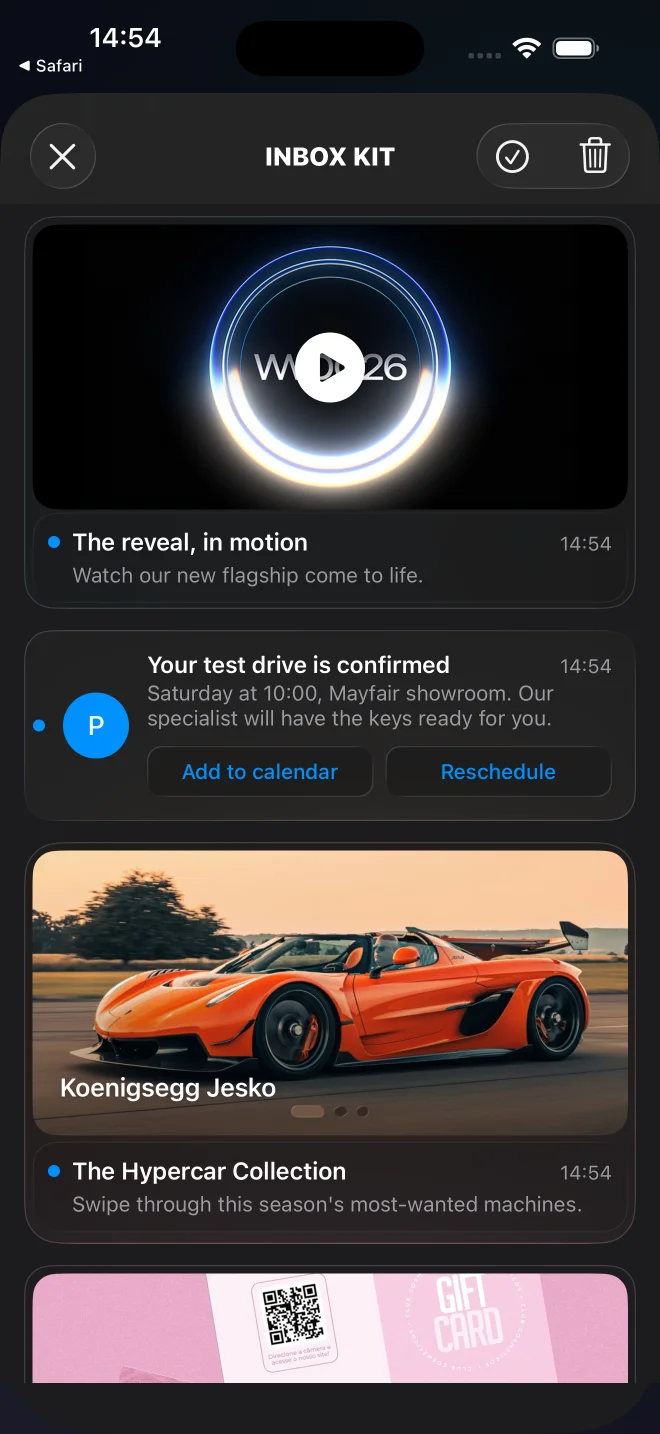
ডিফল্ট InboxKit ফিড ব্যানার, ক্যাপশনযুক্ত, ক্লাসিক, ক্যারোসেল, ভিডিও, এবং Apple Wallet কার্ড সহ।
কখন InboxKit ব্যবহার করবেন
Anchor link toযেকোনো নতুন iOS ইন্টিগ্রেশনের জন্য InboxKit ব্যবহার করুন। এটি পুরোনো Objective-C PushwooshInboxUI মডিউলের জন্য প্রস্তাবিত প্রতিস্থাপন।
InboxKit আপনাকে দেয়:
- ছয়টি বিল্ট-ইন সেল টাইপ — ব্যানার, ক্যাপশনযুক্ত, ক্লাসিক, ক্যারোসেল, ভিডিও, এবং Apple Wallet — পেলোডের
displayType-এর মাধ্যমে প্রতি মেসেজের জন্য নির্বাচিত, অথবা কোড থেকেattributes.forceCellKind-এর মাধ্যমে জোর করে সেট করা। সম্পূর্ণ তালিকার জন্য কার্ডের প্রকার দেখুন। (Apple Wallet কার্ডটি শুধুমাত্র iOS-এর জন্য।) - একটি টাইপড
PushwooshInboxButtonActionenum (openURL,dismiss,markRead,custom) সহ ইনলাইন CTA বোতাম। SDK প্রথম তিনটি স্বয়ংক্রিয়ভাবে পরিচালনা করে; আপনার ডেলিগেটcustom-কে আপনার নিজস্ব লজিকে রুট করে। - পিনিং সাপোর্ট:
actionParams["pinned"] == trueসহ মেসেজগুলি ফিডের শীর্ষে ভাসে এবং একটি পিন গ্লিফ রেন্ডার করে। - সোয়াইপ-টু-ডিলিট, পুল-টু-রিফ্রেশ, অদৃশ্য হওয়ার সাথে সাথে স্বয়ংক্রিয়ভাবে পঠিত হিসাবে চিহ্নিত করা — সবই
PushwooshInboxKitAttributes-এর মাধ্যমে টগলযোগ্য। - পার্সিস্টেন্ট স্টোরেজ: নেটওয়ার্ক কল এখনও স্বীকার না করা হলেও ডিলিট এবং পঠিত অবস্থা একটি প্রসেস রিস্টার্টের পরেও টিকে থাকে।
- সম্পূর্ণ কাস্টম লেআউটের জন্য একটি উন্মুক্ত
PushwooshInboxCellবেস ক্লাস।
সার্ভার চুক্তি অপরিবর্তিত — একই Pushwoosh ইনবক্স ব্যাকএন্ড, পেলোড এবং ড্যাশবোর্ড টুলিং আগের মতোই কাজ করে।
আপনার ইন্টিগ্রেশন পদ্ধতি বেছে নিন
Anchor link to- Swift Package Manager দিয়ে InboxKit সেট আপ করুন — নতুন প্রোজেক্টের জন্য প্রস্তাবিত।
- CocoaPods দিয়ে InboxKit সেট আপ করুন — যে প্রোজেক্টগুলি ইতিমধ্যে CocoaPods ব্যবহার করছে তাদের জন্য।
কার্ডের প্রকার
Anchor link toInboxKit প্রতিটি মেসেজের জন্য একটি সেল লেআউট বেছে নেয়। ডিফল্ট রিজলভার পুশ পেলোড থেকে displayType পড়ে — এটি data অবজেক্টের ভিতরে রাখুন, যা SDK actionParams-এর অধীনে সরবরাহ করে। যখন displayType অনুপস্থিত থাকে, তখন রিজলভার একটি হিউরিস্টিকের উপর নির্ভর করে: ছবি + কোনো শিরোনাম নেই → ব্যানার, ছবি + শিরোনাম + বডি → ক্যাপশনযুক্ত, অন্যথায় ক্লাসিক। কোড থেকে পুরো ফিডের জন্য একটি লেআউট জোর করে সেট করতে, attributes.forceCellKind সেট করুন।
প্রতিটি রিচ লেআউট সুন্দরভাবে ডিগ্রেড করে: যদি একটি বাধ্যতামূলক ফিল্ড অনুপস্থিত বা ভুল ফর্ম্যাটে থাকে, কার্ডটি একটি খালি প্লেসহোল্ডার রেন্ডার করার পরিবর্তে classic-এ ফিরে আসে (এবং কারণ সহ একটি WARN লগ করা হয়)। classic হল টার্মিনাল ফলব্যাক এবং মেসেজ যা বহন করে তাই রেন্ডার করে; মেসেজ এডিটর তার শিরোনাম, বডি এবং আইকন পূরণ করবে বলে আশা করা হয়।
displayType | লেআউট | প্রয়োজনীয় পেলোড ফিল্ড | এতে ডিগ্রেড হয় |
|---|---|---|---|
banner | ফুল-ব্লিড ছবি, কোনো টেক্সট নেই | ছবি (inbox_image বা data.image) | ছবি না থাকলে classic |
captioned | উপরে ছবি, নিচে শিরোনাম + বডি | ছবি (inbox_image বা data.image), মেসেজের title এবং content | ছবি, শিরোনাম বা বডি অনুপস্থিত থাকলে classic |
classic | রঙিন প্রাথমিক অ্যাভাটার + শিরোনাম + বডি | — (শিরোনাম, বডি এবং আইকন প্রত্যাশিত) | — |
carousel | সোয়াইপযোগ্য একাধিক ছবির গ্যালারি | মেসেজের title এবং content, data.carousel (১–৫টি স্লাইড) | কোনো স্লাইড বা শিরোনাম/বডি না থাকলে classic |
video | প্লে ব্যাজ সহ পোস্টার, ট্যাপ করলে ফুল-স্ক্রিন প্লেয়ার | data.video (url + ঐচ্ছিক poster) | কোনো ডেসক্রিপ্টর না থাকলে classic |
wallet | ”Add to Apple Wallet” বোতাম (শুধুমাত্র iOS) | data.wallet (.pkpass URL) | কোনো পাস URL না থাকলে classic |
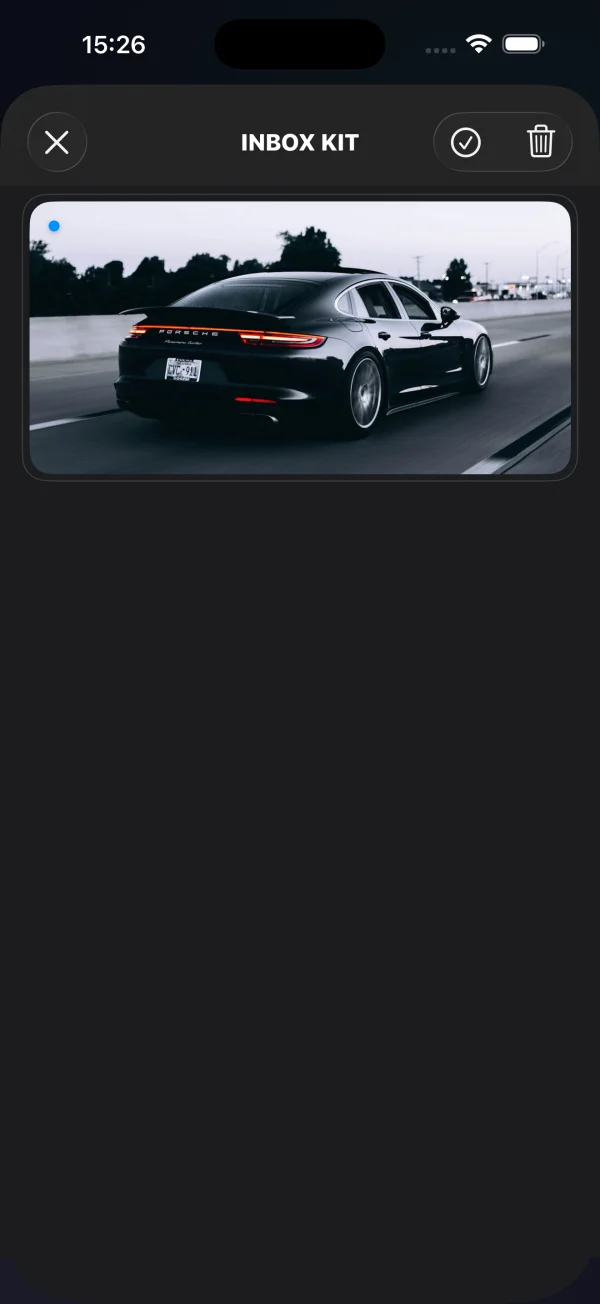
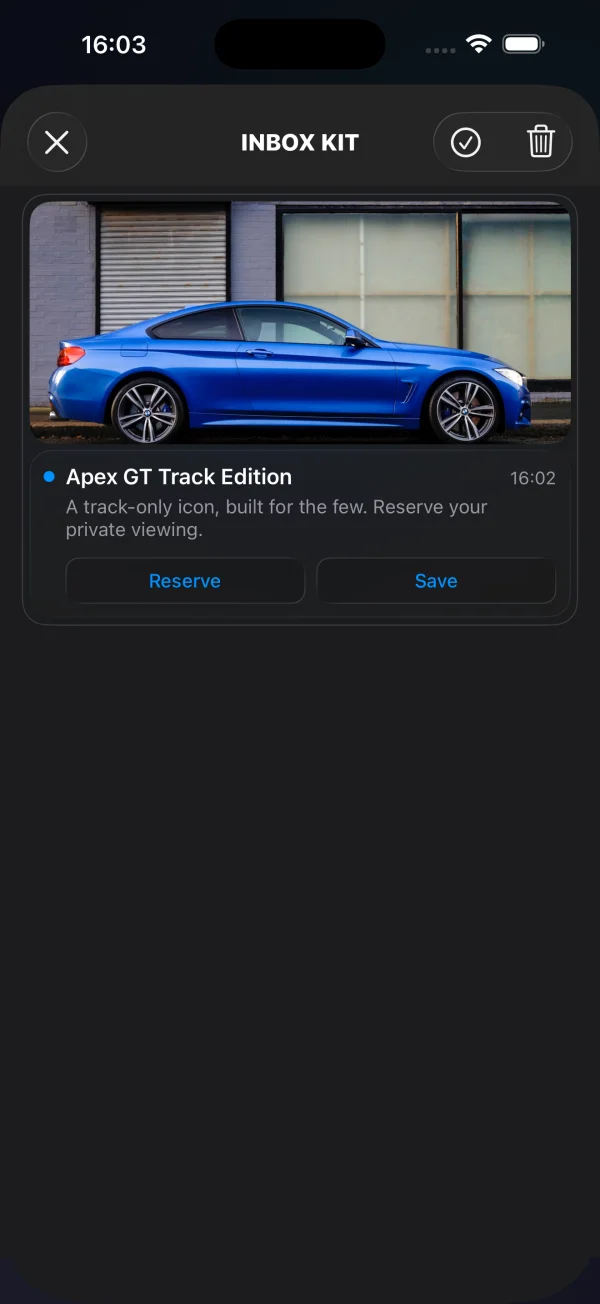
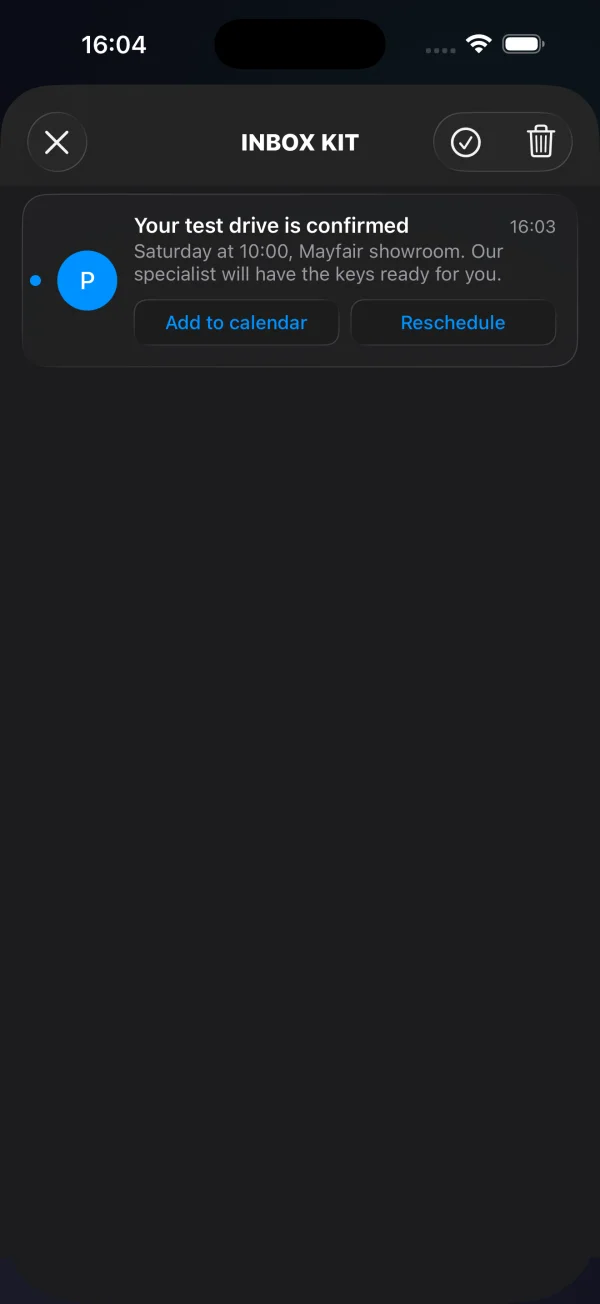
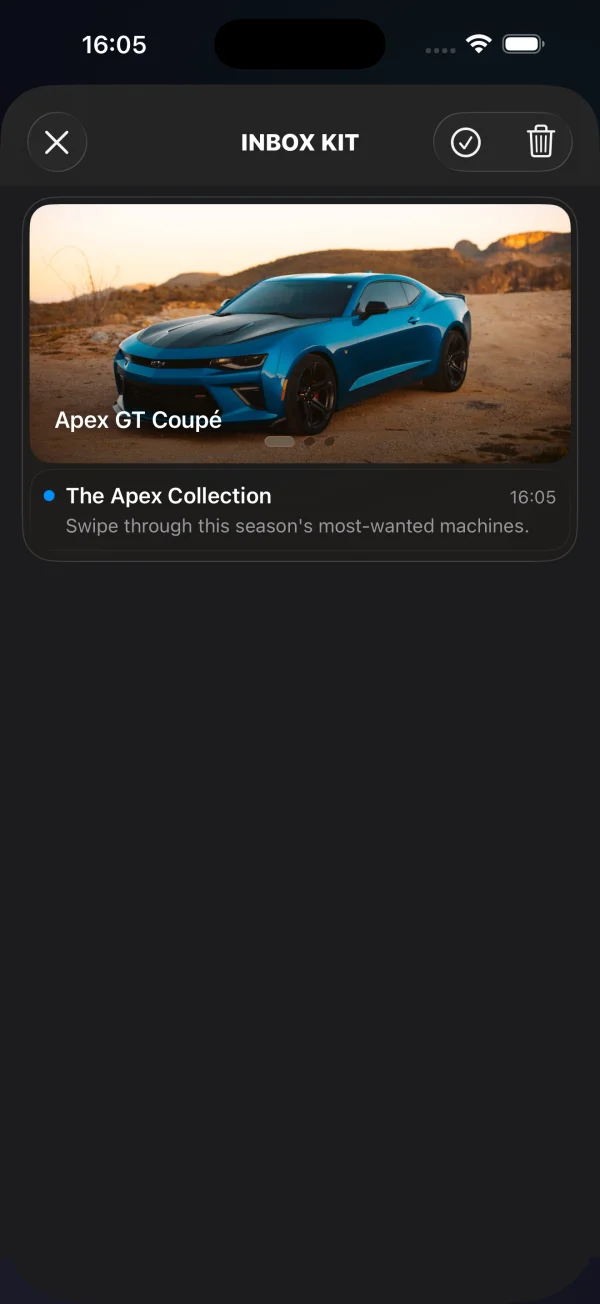
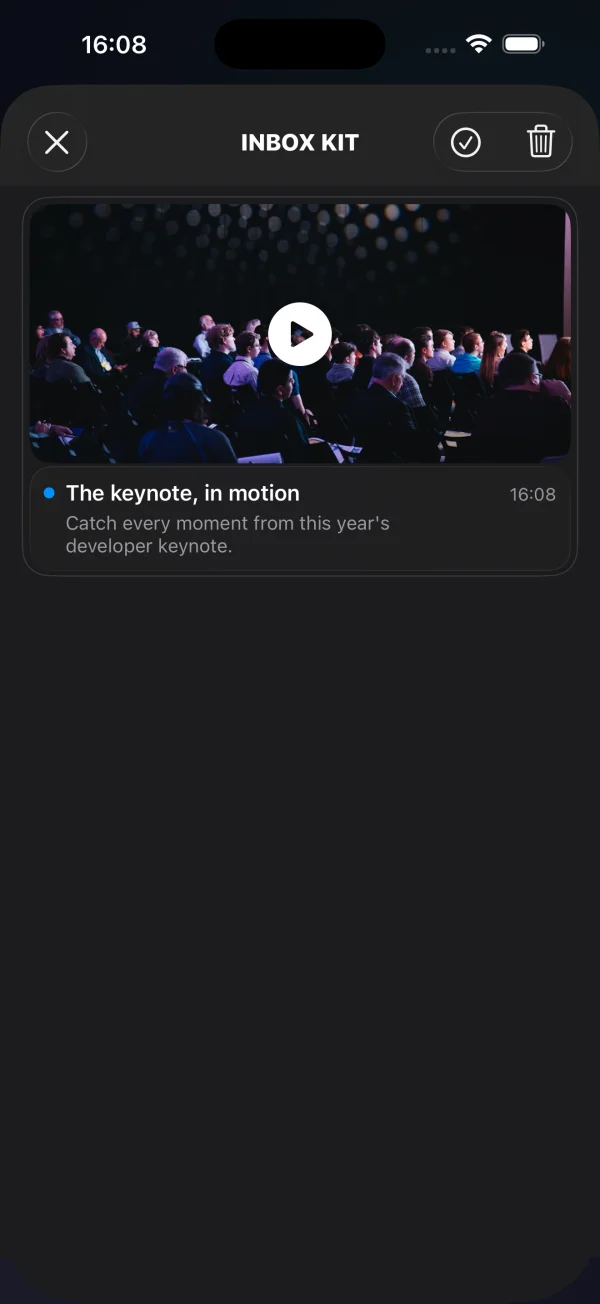
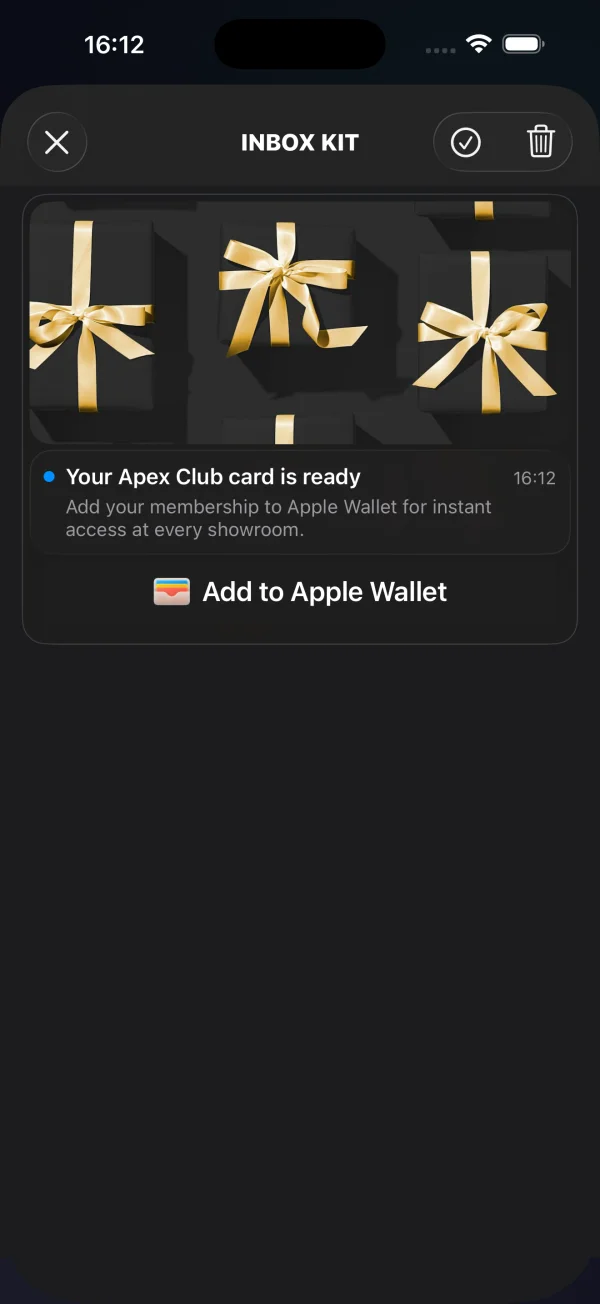
ব্যানার, ক্যাপশনযুক্ত এবং ক্লাসিক কার্ডগুলি স্ট্যান্ডার্ড মেসেজ ফিল্ড (ছবি, শিরোনাম, বডি) এবং ঐচ্ছিক buttons অ্যারে দ্বারা চালিত হয় — ইনলাইন CTA বোতাম যোগ করুন দেখুন। ক্যারোসেল, ভিডিও এবং Apple Wallet কার্ডগুলি data-এর ভিতরে অতিরিক্ত স্ট্রাকচার্ড ডেটা বহন করে, যা নিচে নথিভুক্ত করা হয়েছে।
ক্যারোসেল কার্ড
Anchor link toএকটি ক্যারোসেল একটি একক মেসেজ থেকে বেশ কয়েকটি ছবি রেন্ডার করে — একটি সোয়াইপযোগ্য গ্যালারি যেখানে ঐচ্ছিক প্রতি-স্লাইড ক্যাপশন এবং ট্যাপ ডেস্টিনেশন থাকে। স্লাইডগুলি data.carousel-এ থাকে। প্রতিটি স্লাইডের জন্য একটি image প্রয়োজন; title (ক্যাপশন ওভারলে) এবং url (ট্যাপ করলে খোলা ডিপ লিঙ্ক) ঐচ্ছিক। ছবি ছাড়া একটি স্লাইড বাদ দেওয়া হয়; url ছাড়া একটি স্লাইডে ট্যাপ করলে মেসেজের ডিফল্ট রো অ্যাকশনে চলে যায়। সর্বাধিক ৫টি স্লাইড দেখানো হয় — অতিরিক্ত স্লাইডগুলি বাদ দেওয়া হয় (ছবি ছাড়া একটি স্লাইড একটি স্থান ব্যবহার করে না)। এই লেআউটের জন্য মেসেজের title এবং content বাধ্যতামূলক; এগুলি ছাড়া কার্ডটি classic-এ ডিগ্রেড হয়।
{ "request": { "application": "XXXXX-XXXXX", "auth": "API_TOKEN", "notifications": [{ "send_date": "now", "ios_title": "New arrivals", "content": "Swipe through this week's drops", "inbox_days": 7, "data": { "displayType": "carousel", "carousel": [ { "image": "https://cdn.example.com/inbox/1.jpg", "title": "New in", "url": "myapp://product/1" }, { "image": "https://cdn.example.com/inbox/2.jpg", "title": "On sale", "url": "myapp://product/2" }, { "image": "https://cdn.example.com/inbox/3.jpg" } ] }, "platforms": [1] }] }}ভিডিও কার্ড
Anchor link toএকটি ভিডিও কার্ড একটি প্লে ব্যাজ সহ একটি পোস্টার ছবি দেখায়; এটিতে ট্যাপ করলে একটি ফুল-স্ক্রিন প্লেয়ার খোলে (সাইলেন্ট সুইচ চালু থাকলেও সাউন্ড অন থাকে)। ডেসক্রিপ্টরটি data.video-তে থাকে: url প্রয়োজনীয় এবং এটি একটি http/https স্ট্রিম বা ফাইল হতে হবে; poster একটি ঐচ্ছিক প্রিভিউ ছবি।
{ "request": { "application": "XXXXX-XXXXX", "auth": "API_TOKEN", "notifications": [{ "send_date": "now", "ios_title": "Watch the reveal", "content": "Tap to play", "inbox_days": 7, "data": { "displayType": "video", "video": { "url": "https://cdn.example.com/inbox/clip.mp4", "poster": "https://cdn.example.com/inbox/poster.jpg" } }, "platforms": [1] }] }}Apple Wallet কার্ড
Anchor link toApple Wallet কার্ড একটি ঐচ্ছিক হিরো ছবি, শিরোনাম এবং বডি দেখায় যা অফিসিয়াল Add to Apple Wallet বোতামের উপরে থাকে। বোতামটি ট্যাপ করলে .pkpass ডাউনলোড হয় এবং সিস্টেমের অ্যাড-পাস শিটটি উপস্থাপন করে। এটি কুপন, লয়ালটি কার্ড, টিকিট বা বোর্ডিং পাস সরাসরি ইনবক্স থেকে সরবরাহ করতে ব্যবহার করুন। কার্ডটি শুধুমাত্র iOS / Mac Catalyst-এর জন্য — অন্যান্য প্ল্যাটফর্মে মেসেজটি একটি ক্লাসিক কার্ড হিসাবে রেন্ডার হয়।
পাস URL data.wallet-এ থাকে, হয় একটি বেয়ার স্ট্রিং হিসাবে অথবা একটি pass ফিল্ড সহ একটি অবজেক্ট হিসাবে। একটি ঐচ্ছিক data.image হিরো ছবিটি যোগ করে। যখন কোনো পাস URL না থাকে বা ডিভাইস পাস যোগ করতে পারে না তখন বোতামটি স্বয়ংক্রিয়ভাবে নিজেকে লুকিয়ে রাখে।
{ "request": { "application": "XXXXX-XXXXX", "auth": "API_TOKEN", "notifications": [{ "send_date": "now", "ios_title": "Your loyalty card is ready", "content": "Add it to Apple Wallet in one tap", "inbox_days": 7, "data": { "displayType": "wallet", "image": "https://cdn.example.com/inbox/loyalty.png", "wallet": "https://passes.example.com/v1/passes/pass.com.example.loyalty/abc123?token=…" }, "platforms": [1] }] }}ফলাফলটি আপনার ডেলিগেটের কাছে রিপোর্ট করা হয়:
extension MyInboxHost: PushwooshInboxKitDelegate {
    func inboxKit(_ vc: PushwooshInboxKitViewController,                  didAddWalletPassFor message: PWInboxMessageProtocol) {        // পাসটি এখন ব্যবহারকারীর Wallet-এ আছে — আপনি চাইলে একটি কনফার্মেশন দেখাতে পারেন।    }
    func inboxKit(_ vc: PushwooshInboxKitViewController,                  didFailToAddWalletPassFor message: PWInboxMessageProtocol,                  error: Error?) {        // ডাউনলোড ব্যর্থ হয়েছে — একটি রিট্রাই, লগ ইত্যাদি দেখান।    }}
উভয় কলব্যাকই ঐচ্ছিক (এগুলিতে ডিফল্ট খালি ইমপ্লিমেন্টেশন থাকে)। একজন ব্যবহারকারী সিস্টেম শিট বাতিল করলে তা সাফল্য বা ব্যর্থতা কোনোটিই নয়, তাই সেক্ষেত্রে কোনো কলব্যাক ফায়ার হয় না।
অ্যাক্সেসিবিলিটি
Anchor link toInboxKit সেলগুলি বক্সের বাইরেই VoiceOver-এর জন্য প্রস্তুত। ব্যানার, ক্যাপশনযুক্ত এবং ক্লাসিক কার্ডগুলি তাদের শিরোনাম, বডি এবং তারিখ অন্তর্নিহিত লেবেলের মাধ্যমে প্রকাশ করে এবং ইনলাইন CTA বোতামগুলি তাদের নিজস্ব শিরোনাম পড়ে। রিচ কার্ডগুলি সুস্পষ্ট সেমান্টিকস যোগ করে:
- ভিডিও — পোস্টারটি “Play video” লেবেলযুক্ত একটি একক বোতাম উপাদান হিসাবে প্রকাশ করা হয় (traits
.button+.startsMediaSession), তাই VoiceOver এটিকে একটি সাধারণ ছবির পরিবর্তে একটি মিডিয়া নিয়ন্ত্রণ হিসাবে ঘোষণা করে। - ক্যারোসেল — প্রতিটি স্লাইড একটি বোতাম উপাদান যার অ্যাক্সেসিবিলিটি লেবেল হল স্লাইডের ক্যাপশন, অথবা যখন কোনো ক্যাপশন না থাকে তখন “Slide”। পেজ ইন্ডিকেটর বর্তমান অবস্থানকে “n of total” হিসাবে ঘোষণা করে।
- Apple Wallet — Add to Apple Wallet বোতামটি Apple-এর স্ট্যান্ডার্ড
PKAddPassButton, যা তার নিজস্ব স্থানীয়কৃত VoiceOver লেবেল বহন করে।
UI টেস্টিং এবং অটোমেশনের জন্য, দুটি স্থিতিশীল accessibilityIdentifier সেট করা আছে: ভিডিও পোস্টারে inboxkit.video.play এবং Wallet বোতামে inboxkit.wallet.add।
একটি মেসেজ থেকে কাস্টম ডেটা পড়ুন
Anchor link toএকটি পুশকে ইনবক্সে উপস্থিত করতে, Messages API createMessage অনুরোধে অবশ্যই inbox_image, inbox_date, বা inbox_days অন্তর্ভুক্ত থাকতে হবে — এই ফিল্ডগুলির একটি ছাড়া পুশটি একটি নিয়মিত নোটিফিকেশন হিসাবে বিতরণ করা হয় এবং কখনও ইনবক্স ফিডে পৌঁছায় না। ফ্রি-ফর্ম কাস্টম ডেটা data কী-এর অধীনে যায়, যা SDK ক্লায়েন্টকে u প্যারামিটার হিসাবে সরবরাহ করে:
{ "request": { "application": "XXXXX-XXXXX", "auth": "API_TOKEN", "notifications": [{ "send_date": "now", "ios_title": "Summer sale", "content": "30% off everything — limited time only", "inbox_image": "https://cdn.example.com/inbox/summer.png", "inbox_days": 7, "data": { "displayType": "captioned", "promo_id": "SUMMER2026", "screen": "promo_details" }, "platforms": [1] }] }}SDK সেই অবজেক্টটি ইনবক্স মেসেজে actionParams-এর মাধ্যমে প্রকাশ করে। ব্যবহারকারী যখন রো বা একটি ইনলাইন CTA ট্যাপ করে তখন ডেলিগেট থেকে এটি পড়ুন:
extension MyInboxHost: PushwooshInboxKitDelegate {
    func inboxKit(_ vc: PushwooshInboxKitViewController,                  didSelect message: PWInboxMessageProtocol) -> Bool {        guard let params = message.actionParams as? [String: Any] else { return true }
        // কাস্টম `data` অবজেক্টটি "u" কী-এর অধীনে আসে —        // হয় একটি নেস্টেড ডিকশনারি হিসাবে অথবা একটি JSON-এনকোডেড স্ট্রিং হিসাবে,        // পেলোডটি আপস্ট্রিমে কীভাবে তৈরি হয়েছিল তার উপর নির্ভর করে।        let custom: [String: Any]? = {            if let dict = params["u"] as? [String: Any] { return dict }            if let raw = params["u"] as? String,               let bytes = raw.data(using: .utf8),               let parsed = try? JSONSerialization.jsonObject(with: bytes) as? [String: Any] {                return parsed            }            return nil        }()
        if let promoId = custom?["promo_id"] as? String {            navigateToPromo(promoId)            return false   // আমরা ট্যাপটি হ্যান্ডেল করেছি; SDK-এর ডিফল্ট অ্যাকশন চালানো উচিত নয়        }        return true    }}
একই actionParams["u"] লুকআপ ইনলাইন CTA বোতামগুলির জন্য inboxKit(_:didTapButton:onMessage:)-এর ভিতরে কাজ করে। টাইপড CTA কেসগুলির জন্য (openURL, dismiss, markRead) SDK ইতিমধ্যে ডিফল্ট অ্যাকশন সম্পাদন করে — সেই আচরণটি রাখতে true রিটার্ন করুন, অথবা এটি দমন করতে এবং আপনার নিজেরটি চালাতে false রিটার্ন করুন।
ইনলাইন CTA বোতাম যোগ করুন
Anchor link toএকটি মেসেজ তিনটি পর্যন্ত ইনলাইন কল-টু-অ্যাকশন বোতাম বহন করতে পারে। বোতামগুলি data-এর ভিতরে অন্যান্য কাস্টম ডেটার পাশাপাশি একটি buttons অ্যারে হিসাবে থাকে। SDK স্বয়ংক্রিয়ভাবে ক্যাপশনযুক্ত এবং ক্লাসিক সেলগুলির ভিতরে এগুলি রেন্ডার করে:
{ "request": { "application": "XXXXX-XXXXX", "auth": "API_TOKEN", "notifications": [{ "send_date": "now", "ios_title": "New promo card", "content": "Tap a button to claim or save", "inbox_image": "https://cdn.example.com/inbox/promo.png", "inbox_days": 7, "data": { "displayType": "captioned", "promo_id": "SUMMER2026", "buttons": [ { "title": "Claim", "url": "https://example.com/promo/SUMMER2026" }, { "title": "Read", "action": "markRead" }, { "title": "Save", "action": "custom", "tag": "save_promo" } ] }, "platforms": [1] }] }}প্রতিটি বোতাম অবজেক্টের এই ফিল্ডগুলি রয়েছে:
| ক্ষেত্র | টাইপ | কখন |
|---|---|---|
title | string | প্রয়োজনীয়। দৃশ্যমান বোতামের লেবেল। |
url | string | একটি নন-এমটি পার্সযোগ্য URL একটি openURL অ্যাকশন তৈরি করে। আপনার ডেলিগেট এটি দমন না করলে SDK UIApplication.shared.open-এর মাধ্যমে এটি খোলে। |
action | string | সুস্পষ্ট অ্যাকশন টোকেন: dismiss (ফিড থেকে মেসেজটি সরিয়ে দেয়), markRead (মেসেজটি পঠিত হিসাবে চিহ্নিত করে), বা custom (হোস্ট-হ্যান্ডেলড)। কেস-ইনসেনসিটিভ। |
| অন্য কিছু | any | যখন action custom হয়, তখন বোতাম অবজেক্টের title এবং action ছাড়া প্রতিটি কী আপনার ডেলিগেটের কাছে কাস্টম পেলোড হিসাবে ফরোয়ার্ড করা হয় — মার্কেটারের সাথে একটি কী-তে সম্মত হন (যেমন tag) এবং তার উপর ভিত্তি করে ডিসপ্যাচ করুন। |
রেজোলিউশন অগ্রাধিকার: প্রথমে সুস্পষ্ট action টোকেন, তারপর url যদি নন-এমটি হয়, অন্যথায় বোতামটি custom-এ পড়ে যা সম্পূর্ণ পেলোড বহন করে (title এবং action ছাড়া)।
আপনার ডেলিগেট থেকে ট্যাপগুলি ইন্টারসেপ্ট করুন। button.action প্রপার্টিটি হল টাইপড PushwooshInboxButtonAction enum:
extension MyInboxHost: PushwooshInboxKitDelegate {
    func inboxKit(_ vc: PushwooshInboxKitViewController,                  didTapButton button: PushwooshInboxButton,                  onMessage message: PWInboxMessageProtocol) -> Bool {        switch button.action {        case .openURL(let url):            // ডিফল্ট আচরণ ঠিক আছে — SDK-কে URL খুলতে দিন।            return true
        case .dismiss, .markRead:            // SDK উভয়ই হ্যান্ডেল করে। আপনি যদি ওভাররাইড করতে চান তবে false রিটার্ন করুন।            return true
        case .custom(let payload):            // মার্কেটার-ডিফাইন্ড কাস্টম বোতাম। আপনি যে কী-তে সম্মত হয়েছেন তার উপর ভিত্তি করে ডিসপ্যাচ করুন।            if let tag = payload["tag"] as? String {                switch tag {                case "save_promo":                    saveCurrentPromoLocally(message: message)                default:                    break                }            }            return true   // কাস্টমের জন্য উপেক্ষা করা হয়েছে — SDK এখানে কখনও ডিফল্ট অ্যাকশন চালায় না        }    }}