Pushwoosh Mendix মডিউল অ্যাকশন
Mendix-এর জন্য Pushwoosh মডিউল দুটি জায়গায় তার কার্যকারিতা প্রকাশ করে: Pushwoosh ইভেন্টস উইজেট, যা SDK শুরু করে এবং ইনকামিং নোটিফিকেশনগুলিকে ন্যানোফ্লো ইভেন্টে পরিণত করে, এবং জাভাস্ক্রিপ্ট অ্যাকশন যা আপনি নেটিভ মোবাইল নেভিগেশন প্রোফাইলের যেকোনো ন্যানোফ্লো থেকে কল করেন। এই পেজটিতে দুটিই তালিকাভুক্ত করা হয়েছে।
Pushwoosh ইভেন্টস উইজেট প্রপার্টি
Anchor link toউইজেটটি কিছুই রেন্ডার করে না। এটিকে একবার, নেটিভ মোবাইল নেভিগেশন প্রোফাইলে প্রথমে লোড হওয়া পেজে রাখুন। এটি SDK শুরু করে, ঐচ্ছিকভাবে ডিভাইস রেজিস্টার করে, এবং প্রতিটি পুশ নোটিফিকেশন ইভেন্টের জন্য একটি ন্যানোফ্লো ট্রিগার করে।
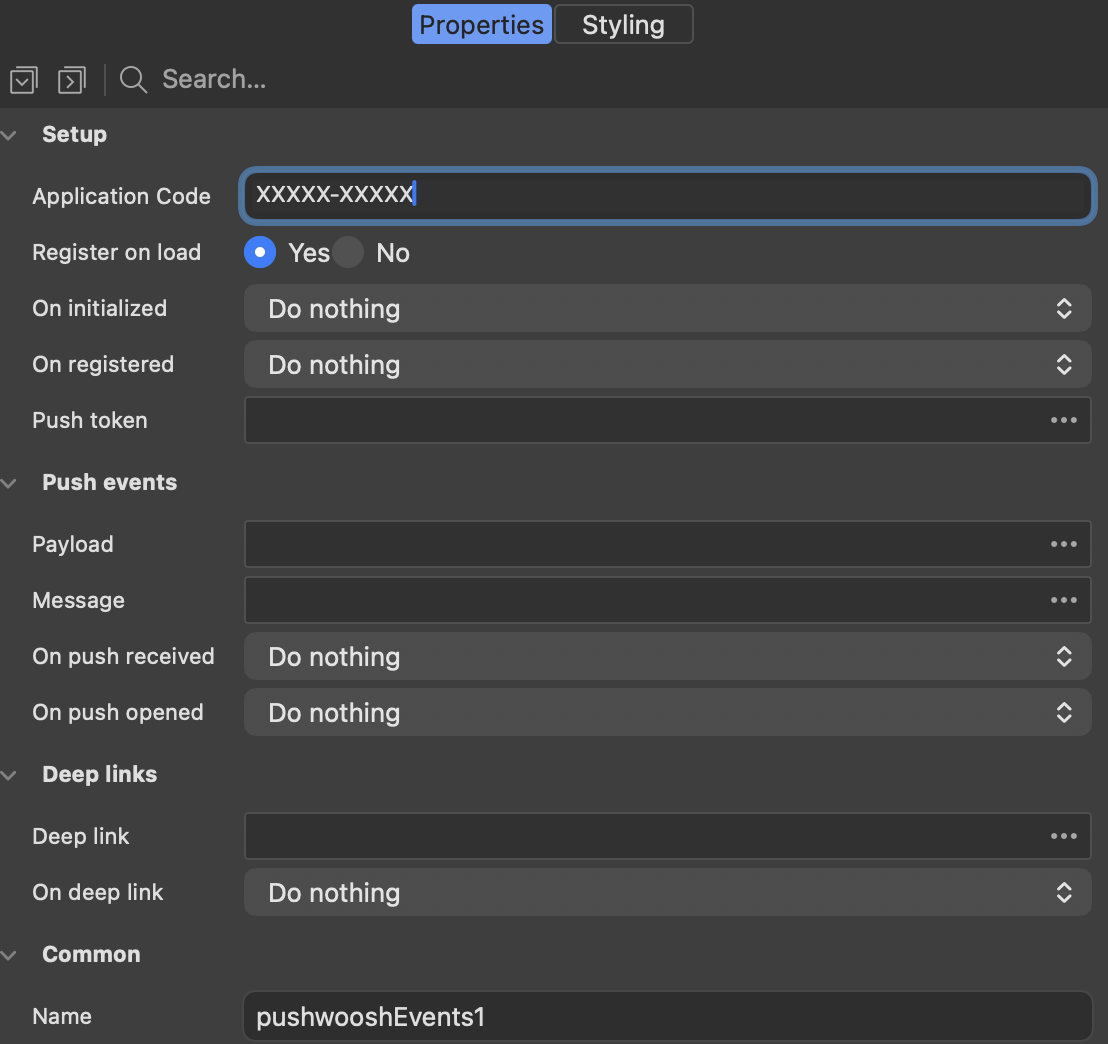
সেটআপ
Anchor link toএই প্রপার্টিগুলি SDK শুরু করে এবং এটি প্রস্তুত হলে রিপোর্ট করে।
| প্রপার্টি | এটি কী করে |
|---|---|
| Application Code | আপনার অ্যাপের Pushwoosh অ্যাপ্লিকেশন কোড, যেমন XXXXX-XXXXX। আবশ্যক। |
| Register on load | উইজেট লোড হওয়ার সাথে সাথে ডিভাইসটি রেজিস্টার করে। iOS-এ এটি সিস্টেম পারমিশন প্রম্পট দেখায়, তাই আপনি যদি RegisterForPushNotifications অ্যাকশন দিয়ে পরে জিজ্ঞাসা করতে চান তবে এটি বন্ধ করুন। |
| On initialized | একটি ন্যানোফ্লো যা SDK শুরু হওয়ার পরে একবার চলে। |
| On registered | একটি ন্যানোফ্লো যা ডিভাইসে পুশ টোকেন থাকলে চলে। |
| Push token | স্ট্রিং অ্যাট্রিবিউট যেখানে On registered চলার আগে পুশ টোকেন লেখা হয়। |
পুশ ইভেন্টস
Anchor link toএই প্রপার্টিগুলি আপনার মডেলে একটি ইনকামিং নোটিফিকেশন সরবরাহ করে এবং একটি ন্যানোফ্লো ট্রিগার করে।
| প্রপার্টি | এটি কী করে |
|---|---|
| Payload | স্ট্রিং অ্যাট্রিবিউট যা JSON হিসাবে সম্পূর্ণ নোটিফিকেশন পেলোড গ্রহণ করে। |
| Message | স্ট্রিং অ্যাট্রিবিউট যা নোটিফিকেশন টেক্সট গ্রহণ করে। |
| On push received | একটি ন্যানোফ্লো যা অ্যাপটি ফোরগ্রাউন্ডে থাকাকালীন একটি নোটিফিকেশন এলে চলে। |
| On push opened | একটি ন্যানোফ্লো যা ব্যবহারকারী একটি নোটিফিকেশনে ট্যাপ করলে চলে। |
ডিপ লিঙ্কস
Anchor link toএই প্রপার্টিগুলি একটি নোটিফিকেশন পরিচালনা করে যা অ্যাপের একটি নির্দিষ্ট পেজে একটি লিঙ্ক বহন করে।
| প্রপার্টি | এটি কী করে |
|---|---|
| Deep link | স্ট্রিং অ্যাট্রিবিউট যা নোটিফিকেশন থেকে ডিপ লিঙ্ক URL গ্রহণ করে। |
| On deep link | একটি ন্যানোফ্লো যা একটি খোলা নোটিফিকেশন লিঙ্ক বহন করলে চলে। এটি On push opened-এর পাশাপাশি চলে। |
ন্যানোফ্লো চলার আগে অ্যাট্রিবিউটগুলি পূরণ করা হয়, তাই ন্যানোফ্লো সেগুলি সরাসরি পড়তে পারে।
সেটআপ অ্যাকশন
Anchor link toআপনি যখন উইজেট ব্যবহার না করে নিজে SDK শুরু করেন তখন এই অ্যাকশনগুলি ব্যবহার করুন।
Initialize
Anchor link toPushwoosh SDK শুরু করে। এটিকে একবার, অন্য কোনো Pushwoosh অ্যাকশনের আগে, সাধারণত হোম পেজের অন-লোড ন্যানোফ্লো থেকে কল করুন। যখন Pushwoosh ইভেন্টস উইজেট পেজে থাকে তখন আপনার এটির প্রয়োজন নেই, কারণ উইজেটটি নিজেই SDK শুরু করে।
Android-এ, FCM সেন্ডার আইডি google-services.json থেকে আসে, যা নেটিভ বিল্ড তুলে নেয়। এটি এই অ্যাকশনে পাস করা হয় না।
| প্যারামিটার | টাইপ | বর্ণনা |
|---|---|---|
applicationCode | String | Pushwoosh অ্যাপ্লিকেশন কোড, যেমন XXXXX-XXXXX। আবশ্যক। |
notificationHandling | String | ঐচ্ছিক। default বা manual। ডিফল্ট আচরণের জন্য এটি খালি রাখুন। |
একটি বুলিয়ান রিটার্ন করে যা SDK শুরু হলে true হয়।
রেজিস্ট্রেশন অ্যাকশন
Anchor link toএই অ্যাকশনগুলি নিয়ন্ত্রণ করে যে এই ডিভাইসটি নোটিফিকেশন পাবে কিনা, এবং এটিকে সম্বোধনকারী আইডেন্টিফায়ারগুলি প্রকাশ করে।
RegisterForPushNotifications
Anchor link toপুশ নোটিফিকেশনের জন্য ডিভাইসটি রেজিস্টার করে এবং পুশ টোকেন রিটার্ন করে। iOS-এ এটি সিস্টেম পারমিশন প্রম্পট ট্রিগার করে, তাই এটিকে ফ্লো-এর এমন একটি পয়েন্টে কল করুন যেখানে জিজ্ঞাসা করা ব্যবহারকারীর জন্য অর্থবহ হয়।
পুশ টোকেন সহ একটি স্ট্রিং রিটার্ন করে।
UnregisterForPushNotifications
Anchor link toডিভাইসটি আনরেজিস্টার করে। এটি RegisterForPushNotifications আবার কল না করা পর্যন্ত নোটিফিকেশন গ্রহণ করা বন্ধ করে দেয়।
যে টোকেন দিয়ে ডিভাইসটি আনরেজিস্টার করা হয়েছিল তা সহ একটি স্ট্রিং রিটার্ন করে।
GetPushToken
Anchor link toবর্তমান পুশ টোকেন রিটার্ন করে, অথবা ডিভাইসটি এখনও রেজিস্টার করা না থাকলে একটি খালি স্ট্রিং রিটার্ন করে।
একটি স্ট্রিং রিটার্ন করে।
GetHwid
Anchor link toডিভাইসের HWID রিটার্ন করে, যে আইডেন্টিফায়ার দিয়ে Pushwoosh এটিকে সম্বোধন করে। Pushwoosh কন্ট্রোল প্যানেল বা সার্ভার API থেকে একটি একক ডিভাইসকে টার্গেট করতে এটি ব্যবহার করুন।
একটি স্ট্রিং রিটার্ন করে।
ইউজার আইডেন্টিটি অ্যাকশন
Anchor link toএই অ্যাকশনগুলি একটি ডিভাইসকে একজন ব্যক্তির সাথে সংযুক্ত করে, যাতে একটি বার্তা সেই ব্যক্তির ব্যবহৃত প্রতিটি ডিভাইসে পৌঁছায়।
SetUserId
Anchor link toডিভাইসটিকে একজন ব্যবহারকারীর সাথে যুক্ত করে। লগইন করার পরে এটি কল করুন।
| প্যারামিটার | টাইপ | বর্ণনা |
|---|---|---|
userId | String | ব্যবহারকারীর জন্য আপনার নিজস্ব আইডেন্টিফায়ার। আবশ্যক। |
একটি বুলিয়ান রিটার্ন করে।
GetUserId
Anchor link toডিভাইসের সাথে বর্তমানে যুক্ত ইউজার আইডি রিটার্ন করে, অথবা কোনোটি সেট করা না থাকলে একটি খালি স্ট্রিং রিটার্ন করে।
একটি স্ট্রিং রিটার্ন করে।
SetEmails
Anchor link toPushwoosh-এর সাথে ব্যবহারকারীর ইমেল ঠিকানা রেজিস্টার করে, যাতে তাদের কাছে পুশের পাশাপাশি ইমেলের মাধ্যমেও পৌঁছানো যায়।
| প্যারামিটার | টাইপ | বর্ণনা |
|---|---|---|
emails | String | একটি ঠিকানা, বা কমা দ্বারা পৃথক করা বেশ কয়েকটি। আবশ্যক। |
একটি বুলিয়ান রিটার্ন করে।
ট্যাগ অ্যাকশন
Anchor link toট্যাগ হল ডিভাইসের প্রপার্টি যা থেকে Pushwoosh কন্ট্রোল প্যানেলে সেগমেন্ট তৈরি করা হয়।
SetTags
Anchor link toডিভাইসে ট্যাগ সেট করে।
| প্যারামিটার | টাইপ | বর্ণনা |
|---|---|---|
tagsJson | String | একটি JSON অবজেক্ট, যেমন {"Language":"en","Level":7,"Premium":true}। আবশ্যক। |
একটি বুলিয়ান রিটার্ন করে।
GetTags
Anchor link toডিভাইসে বর্তমানে সেট করা ট্যাগগুলি একটি JSON স্ট্রিং হিসাবে রিটার্ন করে।
একটি স্ট্রিং রিটার্ন করে।
ইভেন্ট অ্যাকশন
Anchor link toইভেন্ট হল যা থেকে ট্রিগারড ক্যাম্পেইন এবং ইন-অ্যাপ মেসেজ শুরু করা হয়।
PostEvent
Anchor link toPushwoosh-এ একটি ইভেন্ট পোস্ট করে।
| প্যারামিটার | টাইপ | বর্ণনা |
|---|---|---|
eventName | String | কন্ট্রোল প্যানেলে কনফিগার করা ইভেন্টের নাম। আবশ্যক। |
attributesJson | String | ঐচ্ছিক। ইভেন্ট অ্যাট্রিবিউটের একটি JSON অবজেক্ট। |
একটি বুলিয়ান রিটার্ন করে।
অন্তর্নিহিত SDK কল সফলতা বা ব্যর্থতা কোনোটিই রিপোর্ট করে না, তাই কলটি SDK-কে হস্তান্তর করার সাথে সাথে অ্যাকশনটি true রিটার্ন করে।
লোকাল নোটিফিকেশন অ্যাকশন
Anchor link toলোকাল নোটিফিকেশন অ্যাপ নিজেই তৈরি করে এবং এর জন্য কোনো নেটওয়ার্কের প্রয়োজন হয় না, যা এগুলিকে রিমাইন্ডারের জন্য উপযুক্ত করে তোলে।
ScheduleLocalNotification
Anchor link toডিভাইসে একটি লোকাল নোটিফিকেশন শিডিউল করে।
| প্যারামিটার | টাইপ | বর্ণনা |
|---|---|---|
message | String | নোটিফিকেশন টেক্সট। আবশ্যক। |
afterSeconds | Integer/Long | এটি দেখানোর আগে কতক্ষণ অপেক্ষা করতে হবে, সেকেন্ডে। আবশ্যক, এবং শূন্য বা তার বেশি। |
customDataJson | String | ঐচ্ছিক। একটি JSON অবজেক্ট যা নোটিফিকেশনের সাথে ফেরত দেওয়া হয়। |
কলটি SDK-কে হস্তান্তর করার সাথে সাথে একটি বুলিয়ান রিটার্ন করে। SDK রিপোর্ট করে না যে নোটিফিকেশনটি আসলে শিডিউল করা হয়েছিল কিনা।
ClearLocalNotifications
Anchor link toযে লোকাল নোটিফিকেশনগুলি শিডিউল করা হয়েছে কিন্তু এখনও ফায়ার হয়নি সেগুলি বাতিল করে।
কলটি SDK-কে হস্তান্তর করার সাথে সাথে একটি বুলিয়ান রিটার্ন করে।
ClearNotificationCenter
Anchor link toনোটিফিকেশন সেন্টার থেকে অ্যাপের ইতিমধ্যে ডেলিভার করা নোটিফিকেশনগুলি সরিয়ে দেয়।
কলটি SDK-কে হস্তান্তর করার সাথে সাথে একটি বুলিয়ান রিটার্ন করে।
প্রাইভেসি অ্যাকশন
Anchor link toএই অ্যাকশনগুলি আপনার অ্যাপে একটি কনসেন্ট টগলকে সমর্থন করে, এবং ডিভাইসের জন্য সমস্ত Pushwoosh মেসেজিং চালু বা বন্ধ করে।
IsCommunicationEnabled
Anchor link toডিভাইসটি বর্তমানে Pushwoosh থেকে কমিউনিকেশন গ্রহণ করার অনুমতিপ্রাপ্ত কিনা তা জানায়। একটি প্রাইভেসি টগলের অবস্থা রেন্ডার করতে এটি ব্যবহার করুন।
একটি বুলিয়ান রিটার্ন করে।
SetCommunicationEnabled
Anchor link toডিভাইসের জন্য Pushwoosh-এর সাথে কমিউনিকেশন চালু বা বন্ধ করে। এটি বন্ধ করলে সমস্ত মেসেজিং বন্ধ হয়ে যায়, যা এটিকে ‘আমার সাথে যোগাযোগ করবেন না’ টগলের সাথে যুক্ত করার অ্যাকশন করে তোলে।
| প্যারামিটার | টাইপ | বর্ণনা |
|---|---|---|
enabled | Boolean | মেসেজিং অনুমতি দেওয়ার জন্য true, এটি বন্ধ করার জন্য false। আবশ্যক। |
একটি বুলিয়ান রিটার্ন করে।
সেটিংস অ্যাকশন
Anchor link toএই অ্যাকশনগুলি এই ডিভাইসের জন্য SDK-এর আচরণ পরিবর্তন করে।
SetLanguage
Anchor link toডিভাইসের জন্য মেসেজ স্থানীয়করণ করতে Pushwoosh যে ভাষা ব্যবহার করে তা ওভাররাইড করে। ডিফল্টভাবে ডিভাইসের ভাষা ব্যবহৃত হয়।
| প্যারামিটার | টাইপ | বর্ণনা |
|---|---|---|
language | String | একটি দুই-অক্ষরের কোড যেমন en, de, nl। আবশ্যক। |
কলটি SDK-কে হস্তান্তর করার সাথে সাথে একটি বুলিয়ান রিটার্ন করে।
SetReverseProxy
Anchor link toসমস্ত Pushwoosh ট্র্যাফিক আপনার নিজস্ব এন্ডপয়েন্টের মাধ্যমে রুট করে। এটিকে Initialize-এর আগে কল করুন, অন্যথায় প্রাথমিক অনুরোধগুলি এখনও সরাসরি Pushwoosh-এ যাবে।
| প্যারামিটার | টাইপ | বর্ণনা |
|---|---|---|
url | String | প্রক্সি বেস URL। আবশ্যক। |
headersJson | String | ঐচ্ছিক। অতিরিক্ত HTTP হেডারগুলির একটি JSON অবজেক্ট। |
কলটি SDK-কে হস্তান্তর করার সাথে সাথে একটি বুলিয়ান রিটার্ন করে।
SetShowForegroundAlert
Anchor link toঅ্যাপ খোলা থাকাকালীন একটি নোটিফিকেশন এলে তা সিস্টেম অ্যালার্ট হিসাবে দেখানো হবে কিনা তা নিয়ন্ত্রণ করে। ডিফল্টভাবে এটি চালু থাকে, তাই উইজেটের On push received ইভেন্টের মাধ্যমে ফোরগ্রাউন্ড নোটিফিকেশনগুলি নিজে পরিচালনা করতে এটি বন্ধ করুন।
| প্যারামিটার | টাইপ | বর্ণনা |
|---|---|---|
showAlert | Boolean | সিস্টেম অ্যালার্ট দেখানোর জন্য true। আবশ্যক। |
কলটি SDK-কে হস্তান্তর করার সাথে সাথে একটি বুলিয়ান রিটার্ন করে।
GetShowForegroundAlert
Anchor link toঅ্যাপ খোলা থাকাকালীন একটি নোটিফিকেশন এলে তা সিস্টেম অ্যালার্ট হিসাবে দেখানো হবে কিনা তা জানায়। এটি ডিফল্টভাবে চালু থাকে।
একটি বুলিয়ান রিটার্ন করে।
অন্যান্য চ্যানেল অ্যাকশন
Anchor link toএই অ্যাকশনগুলি ব্যবহারকারীকে পুশের বাইরে Pushwoosh সমর্থিত মেসেজিং চ্যানেলগুলির জন্য রেজিস্টার করে।
RegisterSmsNumber
Anchor link toব্যবহারকারীর ফোন নম্বর রেজিস্টার করে যাতে Pushwoosh তাদের কাছে SMS-এর মাধ্যমে পৌঁছাতে পারে।
| প্যারামিটার | টাইপ | বর্ণনা |
|---|---|---|
phoneNumber | String | আন্তর্জাতিক ফরম্যাটে, যেমন +31201234567। আবশ্যক। |
কলটি SDK-কে হস্তান্তর করার সাথে সাথে একটি বুলিয়ান রিটার্ন করে।
RegisterWhatsappNumber
Anchor link toব্যবহারকারীর ফোন নম্বর রেজিস্টার করে যাতে Pushwoosh তাদের কাছে WhatsApp-এর মাধ্যমে পৌঁছাতে পারে।
| প্যারামিটার | টাইপ | বর্ণনা |
|---|---|---|
phoneNumber | String | আন্তর্জাতিক ফরম্যাটে, যেমন +31201234567। আবশ্যক। |
কলটি SDK-কে হস্তান্তর করার সাথে সাথে একটি বুলিয়ান রিটার্ন করে।