macOS
SDK ডাউনলোড করুন
নমুনা প্রজেক্ট
SDK API ডক্স
SDK ইন্টিগ্রেট করার আগে, আপনার Pushwoosh প্রজেক্টে macOS প্ল্যাটফর্মটি কনফিগার করুন। macOS কনফিগারেশন গাইডটি অনুসরণ করুন।
Pushwoosh.framework লিঙ্ক করা
Anchor link toআপনার প্রজেক্টে একটি ডিপেন্ডেন্সি ম্যানেজারের মাধ্যমে Pushwoosh.framework যোগ করুন, আপনার podfile বা cartfile-এ নিম্নলিখিত লাইনগুলি বসিয়ে:
platform :osx, '10.7'
target 'MyApp' do  pod 'Pushwoosh_mac'end
github "Pushwoosh/pushwoosh-mac-sdk"বিকল্পভাবে, আপনি ফ্রেমওয়ার্কটিকে আপনার প্রজেক্টের Build Phases-এর Link Binaries With Libraries-এ সরাসরি ড্র্যাগ এবং ড্রপ করতে পারেন।
লাইব্রেরি যোগ করা
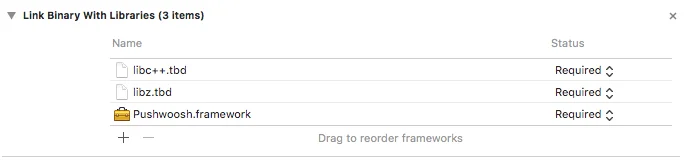
Anchor link toআপনার প্রজেক্টের Build Phases ট্যাবে, Link Binaries With Libraries খুলুন এবং আইটেম যোগ করুন (”+” বোতাম) ক্লিক করুন। আপনার প্রজেক্টে libz.tbd এবং libc++.tbd লাইব্রেরিগুলি অনুসন্ধান করুন এবং যোগ করুন:
অ্যাপটিকে Pushwoosh কন্ট্রোল প্যানেলের সাথে লিঙ্ক করা
Anchor link toআপনার Info.plist-এ, আপনার Pushwoosh অ্যাপ্লিকেশন কোডটিকে ভ্যালু হিসাবে দিয়ে একটি স্ট্রিং টাইপ কী Pushwoosh_APPID যোগ করুন।
AppDelegate পরিবর্তন করা
Anchor link toআপনার AppDelegate-এ নিম্নলিখিত কোডটি যোগ করুন:
import PushKitimport Pushwoosh
func application(_ application: UIApplication, didFinishLaunchingWithOptions launchOptions: [UIApplicationLaunchOptionsKey : Any]? = nil) -> Bool {
//lots of your initialization code
//-----------PUSHWOOSH PART-----------
NSUserNotificationCenter.default.delegate = Pushwoosh.sharedInstance()?.notificationCenterDelegateProxy
// set custom delegate for push handling, in our case - view controllerPushwoosh.sharedInstance().delegate = self
// handling push on app startPushwoosh.sharedInstance().handlePushReceived(aNotification.userInfo)
// register for push notifications!Pushwoosh.sharedInstance().registerForPushNotifications()
#import <Pushwoosh/Pushwoosh.h>
- (void)applicationDidFinishLaunching:(NSNotification *)aNotification{ //lots of your initialization code
//-----------PUSHWOOSH PART-----------
[NSUserNotificationCenter defaultUserNotificationCenter].delegate = [Pushwoosh sharedInstance].notificationCenterDelegateProxy;
// set custom delegate for push handling, in our case - view controller [Pushwoosh sharedInstance].delegate = self;
// handling push on app start [[Pushwoosh sharedInstance] handlePushReceived:[aNotification userInfo]];
// register for push notifications! [[Pushwoosh sharedInstance] registerForPushNotifications]; }আপনার UIApplicationDelegate-এ নিম্নলিখিত কোডটি যোগ করুন (উপরের একই ফাইল)।
// system push notification registration success callback, delegate to PWMessagingDelegatefunc application(_ application: NSApplication, didRegisterForRemoteNotificationsWithDeviceToken deviceToken: Data) {   Pushwoosh.sharedInstance()?.handlePushRegistration(deviceToken)}
// system push notification registration error callback, delegate to PWMessagingDelegatefunc application(_ application: NSApplication, didFailToRegisterForRemoteNotificationsWithError error: Error) {   Pushwoosh.sharedInstance()?.handlePushRegistrationFailure(error)}
// system push notification registration success callback, delegate to pushManager- (void)application:(NSApplication *)application didRegisterForRemoteNotificationsWithDeviceToken:(NSData *)deviceToken { [[Pushwoosh sharedInstance] handlePushRegistration:deviceToken];}
// system push notification registration error callback, delegate to pushManager- (void)application:(NSApplication *)application didFailToRegisterForRemoteNotificationsWithError:(NSError *)error { [[Pushwoosh sharedInstance] handlePushRegistrationFailure:error];}পুশ নোটিফিকেশনগুলি হ্যান্ডেল করতে, আপনার UIApplicationDelegate-এ নিম্নলিখিত ফাংশনটি যোগ করুন (তিন ধাপ উপরের একই ফাইল):
//this event is fired when the push gets receivedfunc pushwoosh(_ pushwoosh: Pushwoosh!, onMessageReceived message: PWMessage!) {   print("onMessageReceived: \(String(describing: message.payload))")}
//this event is fired when user taps the notificationfunc pushwoosh(_ pushwoosh: Pushwoosh!, onMessageOpened message: PWMessage!) {   print("onMessageOpened: \(String(describing: message.payload))")}
//this event is fired when the push gets received- (void)pushwoosh:(Pushwoosh *)pushwoosh onMessageReceived:(PWMessage *)message { NSLog(@"onMessageReceived: %@", message.payload);}
//this event is fired when user taps the notification- (void)pushwoosh:(Pushwoosh *)pushwoosh onMessageOpened:(PWMessage *)message { NSLog(@"onMessageOpened: %@", message.payload);}পুশ নোটিফিকেশন সক্রিয় করা
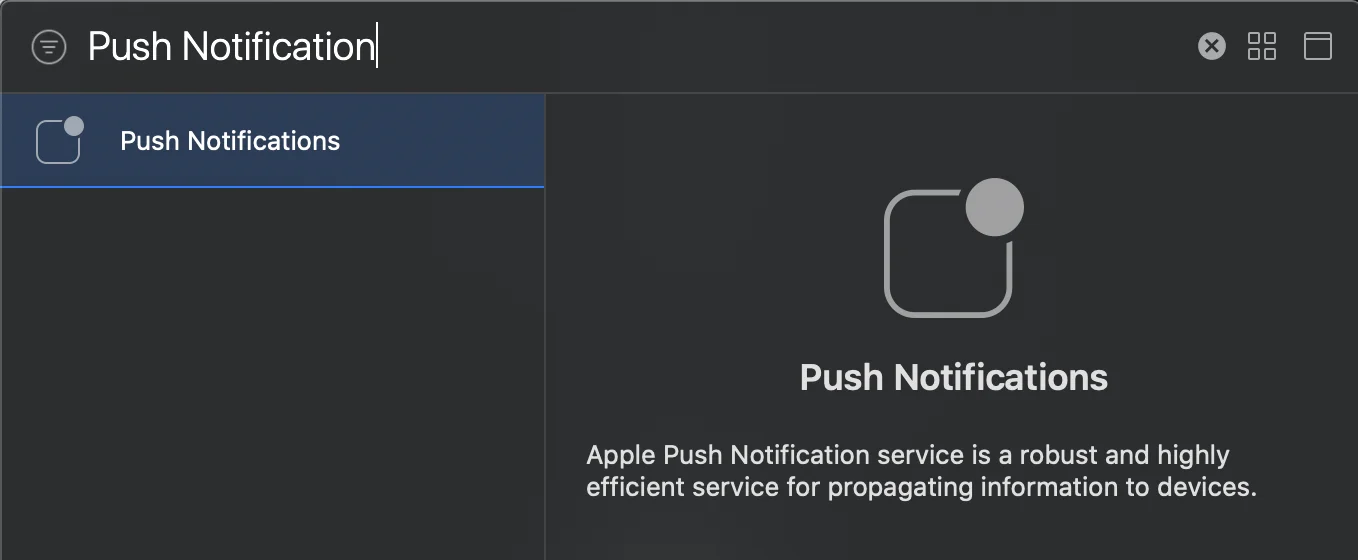
Anchor link toআপনার টার্গেটে Signing and Capabilities-এ যান। + Capability চাপুন এবং Push Notifications যোগ করুন।