온사이트 제품 추천
Web SDK는 웹사이트의 제품 페이지, 장바구니, 카탈로그 페이지 또는 404 페이지에 제품 추천을 표시할 수 있습니다. 제품은 애플리케이션의 제품 카탈로그에서 가져옵니다. 제품을 표시하는 방법은 두 가지입니다.
- 위젯:
data-pw-recommendations속성이 있는 요소를 추가하면 SDK가 해당 요소를 제품 그리드로 채웁니다. - Headless API:
Pushwoosh.recommendations.fetch를 호출하고 자체 마크업으로 제품을 렌더링합니다.
실제 예시는 pushon.pushwoosh.com의 Pushwoosh 데모 쇼핑몰입니다. 404 페이지에는 위젯 블록이, 제품 페이지와 장바구니에는 headless 블록이 있습니다.
사전 요구 사항
Anchor link to- 웹 푸시 SDK 3.0 가이드에 설명된 대로 Pushwoosh CDN에서 로드한 Web SDK 3.96.0 이상.
web-push-notificationsnpm 패키지에는 아직 추천 기능이 포함되어 있지 않습니다. - 애플리케이션의 제품 카탈로그에 있는 제품.
- 애플리케이션에 대해 켜져 있는 온사이트 추천. 온사이트 추천 켜기를 참조하세요.
온사이트 추천 켜기
Anchor link to블록을 제공하는 피드는 공개되어 있고 API 토큰이 필요하지 않기 때문에, 각 애플리케이션은 개별적으로 활성화해야 합니다. 활성화하기 전까지 피드는 오류로 응답하고 블록은 비어 있습니다.
Control Panel에서 온사이트 추천을 켜려면:
- 해당 애플리케이션의 콘텐츠 → 제품 카탈로그로 이동합니다.
- On-site recommendations를 클릭합니다.
- Show recommendations on my website를 켭니다.
- Website domains에 블록을 표시할 웹사이트의 도메인을 한 줄에 하나씩 입력합니다. 예:
shop.example.com. - 저장을 클릭합니다.
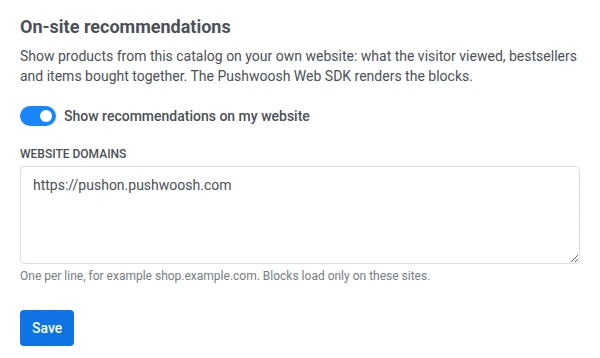
저장한 후:
- Website domains에는 Pushwoosh가 저장한 형태로 도메인이 표시됩니다.
https://가 추가되고, 소문자로 변환되며, 중복이 제거됩니다. 목록에 오타가 없는지 확인하세요. - 블록은 목록에 있는 웹사이트에서만 로드됩니다. Website domains를 비워 두면 블록은 모든 웹사이트에서 로드됩니다.
- 변경 사항은 1분 이내에 적용됩니다.
Control Panel에 접근할 수 없는 경우 Pushwoosh 지원팀 또는 담당 Customer Success Manager에게 애플리케이션의 온사이트 추천을 켜 달라고 요청하세요. 애플리케이션 코드와 웹사이트 도메인을 함께 알려 주세요.
추천 전략
Anchor link to| 전략 | 표시 내용 | 필요한 데이터 |
|---|---|---|
viewed | 이 방문자가 최근에 조회한 제품. 로그인한 방문자의 경우 해당 user ID로 조회한 제품이 먼저 표시됩니다. | trackProductView로 전송한 제품 조회. |
bestsellers_30d | 지난 30일 동안 애플리케이션에서 가장 많이 판매된 제품. 품절된 제품은 건너뜁니다. | 주문 항목이 포함된 주문 이벤트. |
also_bought | 특정 제품과 함께 자주 구매되거나 조회되는 제품. 품절된 제품은 건너뜁니다. | trackProductView로 전송한 제품 조회, 주문 이벤트 또는 제품 ID가 포함된 기타 이벤트. 제품 활동 추적하기를 참조하세요. 요청에 제품 ID가 필요합니다. |
전략에 표시할 항목이 없으면 피드는 대신 폴백 전략을 제공합니다. 폴백 전략의 기본값은 bestsellers_30d입니다. 대신 빈 응답을 받으려면 none으로 설정하세요. 응답에는 실제로 제공된 전략이 항상 표시되므로 블록 제목을 변경할 수 있습니다.
제품 조회 추적하기
Anchor link toviewed 및 also_bought 전략은 제품 조회를 사용합니다. 모든 제품 페이지에서 SDK가 준비된 후 trackProductView를 호출하세요.
Pushwoosh.push(() => { Pushwoosh.trackProductView({ id: 'SKU-123', name: 'Linen shirt', price: 49.9, currency: 'USD', category: 'Shirts', url: 'https://shop.example.com/linen-shirt', imageUrl: 'https://shop.example.com/img/linen-shirt.jpg', });});id만 필수입니다. 제품 카탈로그와 동일한 제품 ID를 사용하세요. SDK는 PW_ProductView 이벤트를 전송하며, 30초 이내에 같은 제품을 반복 조회한 경우 이를 건너뛰므로 페이지를 새로고침해도 두 번째 조회로 계산되지 않습니다.
주문 이벤트 전송하기
Anchor link tobestsellers_30d 전략은 주문 이벤트의 판매만 집계하며, 모든 블록의 기본 폴백 전략입니다. 방문자가 주문하면 PW_OrderCreated를 전송하세요.
Pushwoosh.push((api) => { api.postEvent('PW_OrderCreated', { orderId: 'ORDER-10293', items: [ { productId: 'SKU-123', quantity: 1 }, { productId: 'SKU-456', quantity: 2 }, ], });});orderId가 없는 주문은 집계되지 않으므로 orderId는 필수입니다. items에는 제품 카탈로그와 동일한 제품 ID를 사용하세요. 주문이 변경되면 동일한 orderId 및 items와 함께 PW_OrderUpdated를 전송하세요. 서버에서 주문 이벤트를 전송하려면 Bestsellers: 주문 이벤트에 항목 추가하기를 참조하세요.
위젯 블록 추가하기
Anchor link to블록을 표시할 위치에 data-pw-recommendations 속성이 있는 요소를 추가합니다. SDK는 이러한 요소가 있는 페이지에서만 위젯을 로드합니다.
<div data-pw-recommendations data-pw-strategy="also_bought" data-pw-product-id="SKU-123" data-pw-fallback="bestsellers_30d" data-pw-limit="4" data-pw-title="Bought together" data-pw-fallback-title="Popular right now" data-pw-block="pdp-also-bought" data-pw-min-height="260"></div>| 속성 | 설명 |
|---|---|
data-pw-recommendations | 요소를 추천 블록으로 표시합니다. 필수입니다. |
data-pw-strategy | viewed, bestsellers_30d 또는 also_bought. 기본값은 bestsellers_30d입니다. |
data-pw-fallback | 기본 전략에 항목이 없을 때 제공할 전략: viewed, bestsellers_30d, also_bought 또는 none. 기본값은 bestsellers_30d입니다. |
data-pw-limit | 제품 수(1~12). 기본값은 6입니다. |
data-pw-product-id | 화면에 표시된 제품. also_bought에 필수입니다. |
data-pw-exclude | 표시하지 않을 제품 ID를 쉼표로 구분한 목록(예: 이미 장바구니에 있는 제품). 최대 50개. |
data-pw-block | 블록 이름. 제품 링크와 클릭 이벤트에 추가되므로 분석에서 블록을 구분할 수 있습니다. |
data-pw-title | 블록 제목. |
data-pw-fallback-title | 폴백 전략이 제공되었을 때 표시할 제목(예: “You viewed” 대신 “Popular right now”). |
data-pw-min-height | 레이아웃 이동을 방지하기 위해 블록이 로드되는 동안 확보할 공간. 숫자는 픽셀로 해석됩니다. 모든 CSS 길이 값도 사용할 수 있습니다. |
위젯은 각 제품의 이미지, 이름, 가격을 표시하고 제품 페이지로 연결됩니다. 제품 링크에는 utm_medium=onsite가 포함됩니다. 제품을 클릭하면 블록 이름, 전략, 제품 위치가 포함된 PW_RecommendationClick 이벤트가 전송됩니다.
data-pw-* 속성을 변경하면 블록이 다시 로드됩니다. 예를 들어 페이지 새로고침 없이 화면의 제품이 바뀌면 data-pw-product-id를 업데이트하세요.
일반적인 페이지용 블록
Anchor link to| 페이지 | 전략 | 설정할 속성 |
|---|---|---|
| 제품 페이지 | also_bought | 화면의 제품으로 data-pw-product-id, 같은 ID로 data-pw-exclude |
| 장바구니 | also_bought | 장바구니의 제품 하나로 data-pw-product-id, 장바구니의 모든 제품으로 data-pw-exclude |
| 카탈로그 또는 홈 페이지 | bestsellers_30d | — |
| 404 페이지 | viewed | 처음 방문한 사용자에게 인기 제품이 표시되도록 data-pw-fallback="bestsellers_30d" 및 data-pw-fallback-title |
블록 상태
Anchor link to위젯은 블록 요소에 data-pw-state 속성을 설정합니다.
loading: 제품을 로드하는 중입니다.ready: 제품이 표시됩니다.empty: 전략과 폴백 전략 모두 제품이 없습니다. 블록은 비어 있습니다.error: 제품이 로드되지 않았습니다. 블록은 비어 있습니다.
상태를 사용하여 빈 블록을 둘러싼 자체 프레임이나 제목을 숨길 수 있습니다.
.recommendations-frame:has([data-pw-state="empty"], [data-pw-state="error"]) { display: none;}위젯 스타일 지정하기
Anchor link to위젯은 shadow DOM 내부에서 렌더링되므로 사이트의 CSS가 위젯 콘텐츠에 적용되지 않습니다. 대신 블록 요소에 다음 사용자 지정 속성을 설정하세요.
| 속성 | 설명 | 기본값 |
|---|---|---|
--pw-reco-font | 글꼴 패밀리 | 페이지에서 상속 |
--pw-reco-accent | 가격 색상 | 현재 텍스트 색상 |
--pw-reco-radius | 제품 이미지의 모서리 반경 | 8px |
--pw-reco-columns | 그리드 열 수. 너비가 600px 이하인 화면에서는 그리드가 항상 2열입니다. | 들어갈 수 있는 만큼 |
[data-pw-recommendations] { --pw-reco-columns: 4; --pw-reco-radius: 0; --pw-reco-accent: #337ab7;}더 세밀하게 스타일을 지정하려면 제목, 그리드, 각 제품 카드가 title, grid, card CSS parts로 노출되어 있으므로 이를 사용하세요(예: [data-pw-recommendations]::part(card)).
싱글 페이지 애플리케이션
Anchor link to기본적으로 SDK는 준비되었을 때 한 번만 블록을 찾습니다. 사이트에서 블록을 나중에 렌더링하는 경우(예: 싱글 페이지 애플리케이션에서 페이지를 이동할 때) init 호출에서 recommendations.spa를 true로 설정하세요.
Pushwoosh.push(['init', { applicationCode: 'XXXXX-XXXXX', // other initialization parameters... recommendations: { spa: true, },}]);XXXXX-XXXXX를 애플리케이션 코드로 바꾸세요.
그러면 SDK가 페이지를 계속 감시하다가 블록이 나타나면 위젯을 로드합니다.
페이지에 data-pw-recommendations 요소가 있어도 위젯을 끄려면 recommendations.widget을 false로 설정하세요. Headless API는 계속 작동합니다.
자체 마크업으로 블록 렌더링하기
Anchor link to위젯의 레이아웃이 디자인에 맞지 않으면 headless API를 사용하세요. Pushwoosh.recommendations.fetch로 제품을 요청하고 Pushwoosh.recommendations.trackClick으로 클릭을 보고합니다.
Pushwoosh.push(async () => {  const request = {    strategy: 'also_bought',    productId: 'SKU-123',    exclude: ['SKU-123'],    fallback: 'bestsellers_30d',    limit: 4,    block: 'pdp-also-bought',  };  const { items, strategy } = await Pushwoosh.recommendations.fetch(request);
const title = strategy === request.strategy ? 'Bought together' : 'Popular right now'; renderBlock(title, items, (item, index) => { Pushwoosh.recommendations.trackClick({ block: request.block, strategy, productId: item.id, position: index + 1, }); });});fetch는 위젯 속성과 동일한 매개변수 strategy, fallback, limit, productId, exclude, block을 받습니다. 반환값은 다음과 같습니다.
items: 제품 목록. 각 제품에는id,title,description,image_url,url,price,price_formatted,old_price_formatted(할인 중인 제품만 해당),currency,category,sku가 있습니다.strategy: 실제로 제공된 전략. 폴백 전략이 제공된 경우 요청한 전략과 다르며, 응답이 비어 있으면none입니다.
요청이 실패하면 fetch가 오류를 발생시킵니다. 오류를 처리하고 블록을 숨기세요.
trackClick은 PW_RecommendationClick 이벤트를 전송합니다. 이 이벤트는 클릭으로 다른 페이지가 열려도 전달됩니다. position은 블록 내 제품의 위치이며 1부터 시작합니다.
커뮤니케이션 동의가 없을 때의 동작
Anchor link to방문자에 대해 Pushwoosh와의 커뮤니케이션이 비활성화된 경우(예: init 호출에서 communicationEnabled: false 설정, 웹 푸시 알림 사용자 동의 관리 참조):
trackProductView및trackClick은 아무것도 전송하지 않습니다.- 블록에는 여전히 제품이 표시되지만 요청에서 방문자를 식별하지 않습니다.
viewed전략은 사용할 기록이 없으므로 폴백 전략이 제공됩니다.
방문자가 커뮤니케이션을 활성화하면 제품 조회와 클릭이 다시 추적됩니다.