macOS
SDK를 통합하기 전에 Pushwoosh 프로젝트에서 macOS 플랫폼을 구성하세요. macOS 구성 가이드를 따르세요.
Pushwoosh.framework 연결
Anchor link to의존성 관리자를 통해 프로젝트에 Pushwoosh.framework를 추가하려면 podfile 또는 cartfile에 다음 줄을 넣으세요:
platform :osx, '10.7'
target 'MyApp' do  pod 'Pushwoosh_mac'end
github "Pushwoosh/pushwoosh-mac-sdk"또는, 프레임워크를 프로젝트의 Build Phases에 있는 Link Binaries With Libraries로 간단히 드래그 앤 드롭할 수도 있습니다.
라이브러리 추가
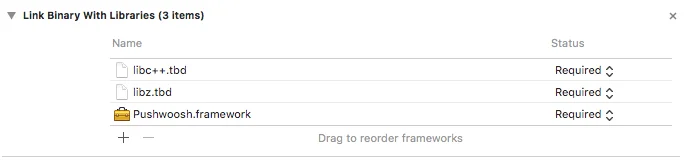
Anchor link to프로젝트의 Build Phases 탭에서 Link Binaries With Libraries를 열고 항목 추가(”+”) 버튼을 클릭하세요. libz.tbd와 libc++.tbd 라이브러리를 검색하여 프로젝트에 추가하세요:
앱과 Pushwoosh Control Panel 연결
Anchor link to사용자의 Info.plist에서 문자열 타입의 키 Pushwoosh_APPID를 추가하고 값으로 Pushwoosh Application Code를 입력하세요.
AppDelegate 수정
Anchor link toAppDelegate에 다음 코드를 추가하세요:
import PushKitimport Pushwoosh
func application(_ application: UIApplication, didFinishLaunchingWithOptions launchOptions: [UIApplicationLaunchOptionsKey : Any]? = nil) -> Bool {
//많은 초기화 코드
//-----------PUSHWOOSH 부분-----------
NSUserNotificationCenter.default.delegate = Pushwoosh.sharedInstance()?.notificationCenterDelegateProxy
// 푸시 처리를 위한 커스텀 델리게이트 설정, 여기서는 뷰 컨트롤러Pushwoosh.sharedInstance().delegate = self
// 앱 시작 시 푸시 처리Pushwoosh.sharedInstance().handlePushReceived(aNotification.userInfo)
// 푸시 알림 등록!Pushwoosh.sharedInstance().registerForPushNotifications()
#import <Pushwoosh/Pushwoosh.h>
- (void)applicationDidFinishLaunching:(NSNotification *)aNotification{ //많은 초기화 코드
//-----------PUSHWOOSH 부분-----------
[NSUserNotificationCenter defaultUserNotificationCenter].delegate = [Pushwoosh sharedInstance].notificationCenterDelegateProxy;
// 푸시 처리를 위한 커스텀 델리게이트 설정, 여기서는 뷰 컨트롤러 [Pushwoosh sharedInstance].delegate = self;
// 앱 시작 시 푸시 처리 [[Pushwoosh sharedInstance] handlePushReceived:[aNotification userInfo]];
// 푸시 알림 등록! [[Pushwoosh sharedInstance] registerForPushNotifications]; }UIApplicationDelegate(위와 동일한 파일)에 다음 코드를 추가하세요.
// 시스템 푸시 알림 등록 성공 콜백, PWMessagingDelegate로 위임func application(_ application: NSApplication, didRegisterForRemoteNotificationsWithDeviceToken deviceToken: Data) {   Pushwoosh.sharedInstance()?.handlePushRegistration(deviceToken)}
// 시스템 푸시 알림 등록 실패 콜백, PWMessagingDelegate로 위임func application(_ application: NSApplication, didFailToRegisterForRemoteNotificationsWithError error: Error) {   Pushwoosh.sharedInstance()?.handlePushRegistrationFailure(error)}
// 시스템 푸시 알림 등록 성공 콜백, pushManager로 위임- (void)application:(NSApplication *)application didRegisterForRemoteNotificationsWithDeviceToken:(NSData *)deviceToken { [[Pushwoosh sharedInstance] handlePushRegistration:deviceToken];}
// 시스템 푸시 알림 등록 실패 콜백, pushManager로 위임- (void)application:(NSApplication *)application didFailToRegisterForRemoteNotificationsWithError:(NSError *)error { [[Pushwoosh sharedInstance] handlePushRegistrationFailure:error];}푸시 알림을 처리하려면 UIApplicationDelegate(세 단계 위와 동일한 파일)에 다음 함수를 추가하세요:
//이 이벤트는 푸시를 수신했을 때 발생합니다func pushwoosh(_ pushwoosh: Pushwoosh!, onMessageReceived message: PWMessage!) {   print("onMessageReceived: \(String(describing: message.payload))")}
//이 이벤트는 사용자가 알림을 탭했을 때 발생합니다func pushwoosh(_ pushwoosh: Pushwoosh!, onMessageOpened message: PWMessage!) {   print("onMessageOpened: \(String(describing: message.payload))")}
//이 이벤트는 푸시를 수신했을 때 발생합니다- (void)pushwoosh:(Pushwoosh *)pushwoosh onMessageReceived:(PWMessage *)message { NSLog(@"onMessageReceived: %@", message.payload);}
//이 이벤트는 사용자가 알림을 탭했을 때 발생합니다- (void)pushwoosh:(Pushwoosh *)pushwoosh onMessageOpened:(PWMessage *)message { NSLog(@"onMessageOpened: %@", message.payload);}푸시 알림 활성화
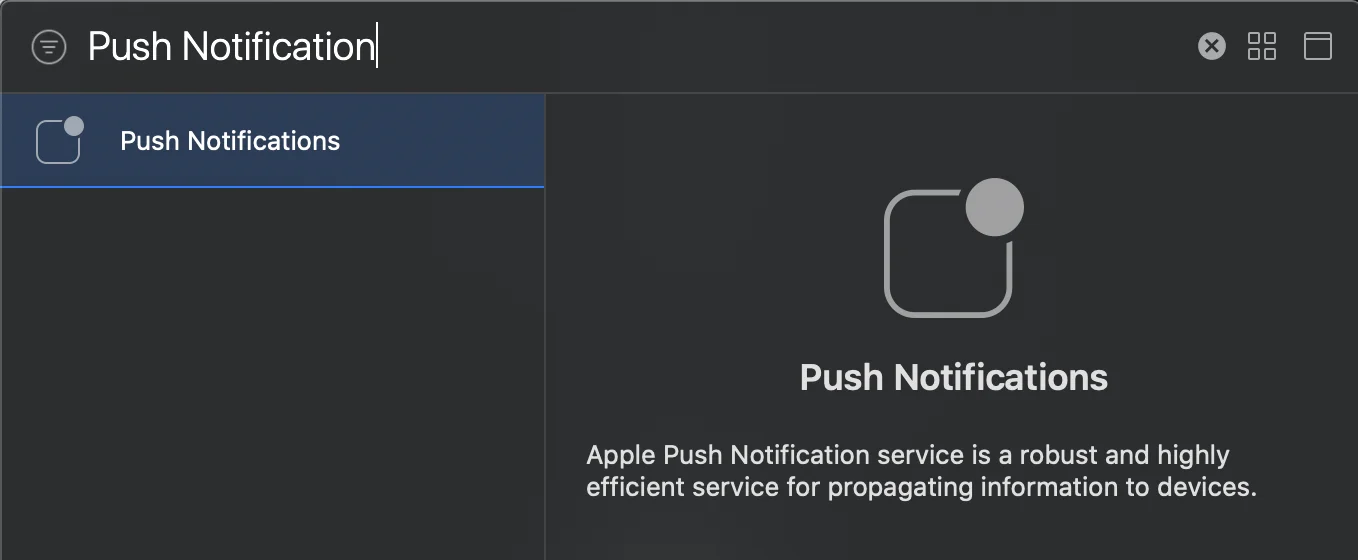
Anchor link to타겟의 Signing and Capabilities로 이동하세요. + Capability를 누르고 Push Notifications를 추가하세요.