iOS Live Activities
Live Activities는 iPhone 또는 iPad 잠금 화면과 Dynamic Island에 앱의 최신 데이터를 표시합니다. 이 기능을 통해 사용자는 한눈에 실시간 정보를 확인하고 표시된 정보와 관련된 빠른 작업을 수행할 수 있습니다.
다음은 Live Activities를 사용하는 몇 가지 예입니다:
- 배달 앱에서 주문 상태 표시
- 훈련 앱에서 실시간 카운트다운 제공
- 택시 앱에서 추적 정보 표시
- 스포츠 앱에서 게임 통계 및 현재 점수 표시
- 날씨 앱에서 시간별 예보 제공
아래 설명된 대로 Pushwoosh iOS SDK를 사용하여 Live Activities를 활성화할 수 있습니다. Live Activities를 관리하고 콘텐츠를 업데이트하려면 /updateLiveActivity 메서드를 사용하세요.
위젯 확장 프로그램 추가
Anchor link to- 새 대상 만들기
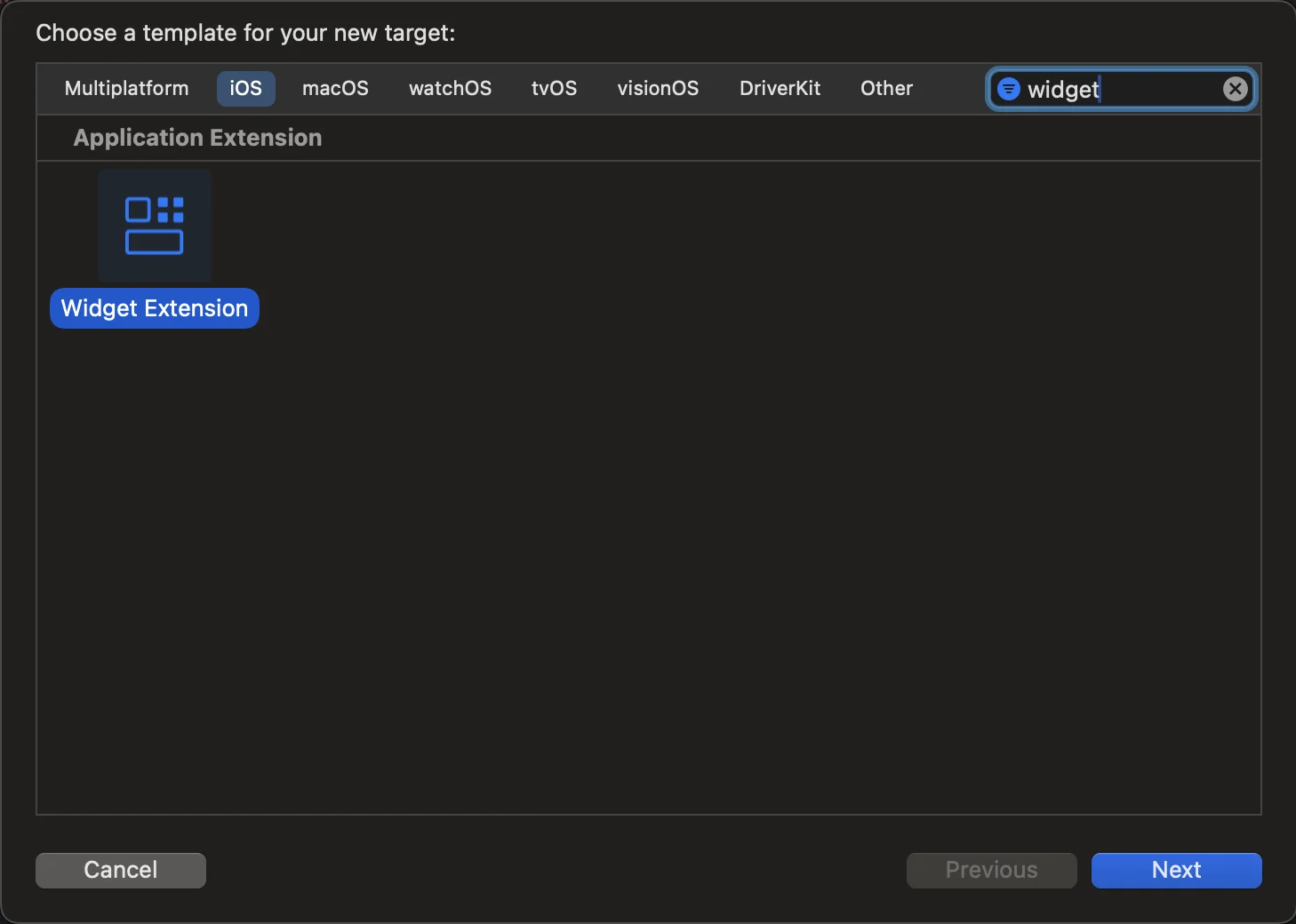
파일 > 새로 만들기 > 대상으로 이동하여 위젯 확장을 선택합니다.
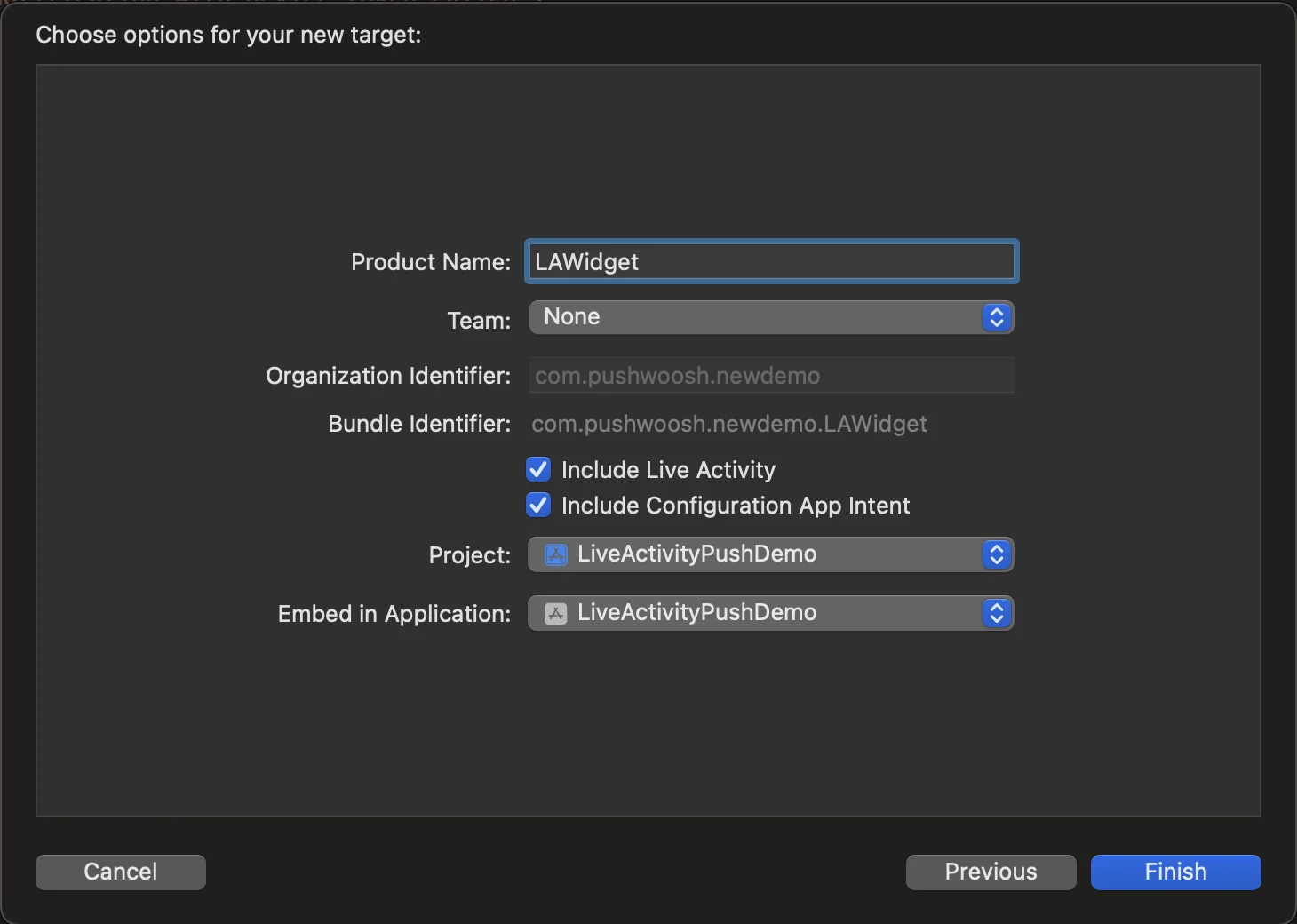
- 위젯 확장 구성 이름을 입력하고 Live Activity 포함을 선택한 다음 마침을 클릭하세요.
Info.plist 구성
Anchor link to기본 대상에서 Info.plist 파일을 찾아 “Supports Live Activities” 키를 삽입하고 값을 YES로 설정합니다.
<key>NSSupportsLiveActivities</key> <true/>앱에서 Live Activities 활성화하기
Anchor link toLive Activities를 활성화하려면 기존 위젯 확장 프로그램에 코드를 추가하거나 앱에 아직 없는 경우 새로 만드세요. Live Activities는 사용자 인터페이스에 SwiftUI 및 WidgetKit 기능을 사용합니다. ActivityKit은 각 Live Activity의 수명 주기를 처리합니다. 즉, API를 사용하여 Live Activity를 요청, 업데이트, 종료하고 ActivityKit 푸시 알림을 수신합니다. Live Activities에 대한 자세한 내용은 Apple 문서에서 확인할 수 있습니다.
- Xcode에서 프로젝트의 ContentView 파일로 이동하여 Button을 만듭니다
import SwiftUI
struct ContentView: View {    var body: some View {        VStack(spacing: 20) {
            Button(action: {                LiveActivityManager.shared.startActivity()            }, label: {                Text("Start Live Activity")                    .foregroundColor(.white)                    .padding()                    .background(Color.blue)                    .cornerRadius(10)            })        }        .padding()    }}
#Preview {    ContentView()}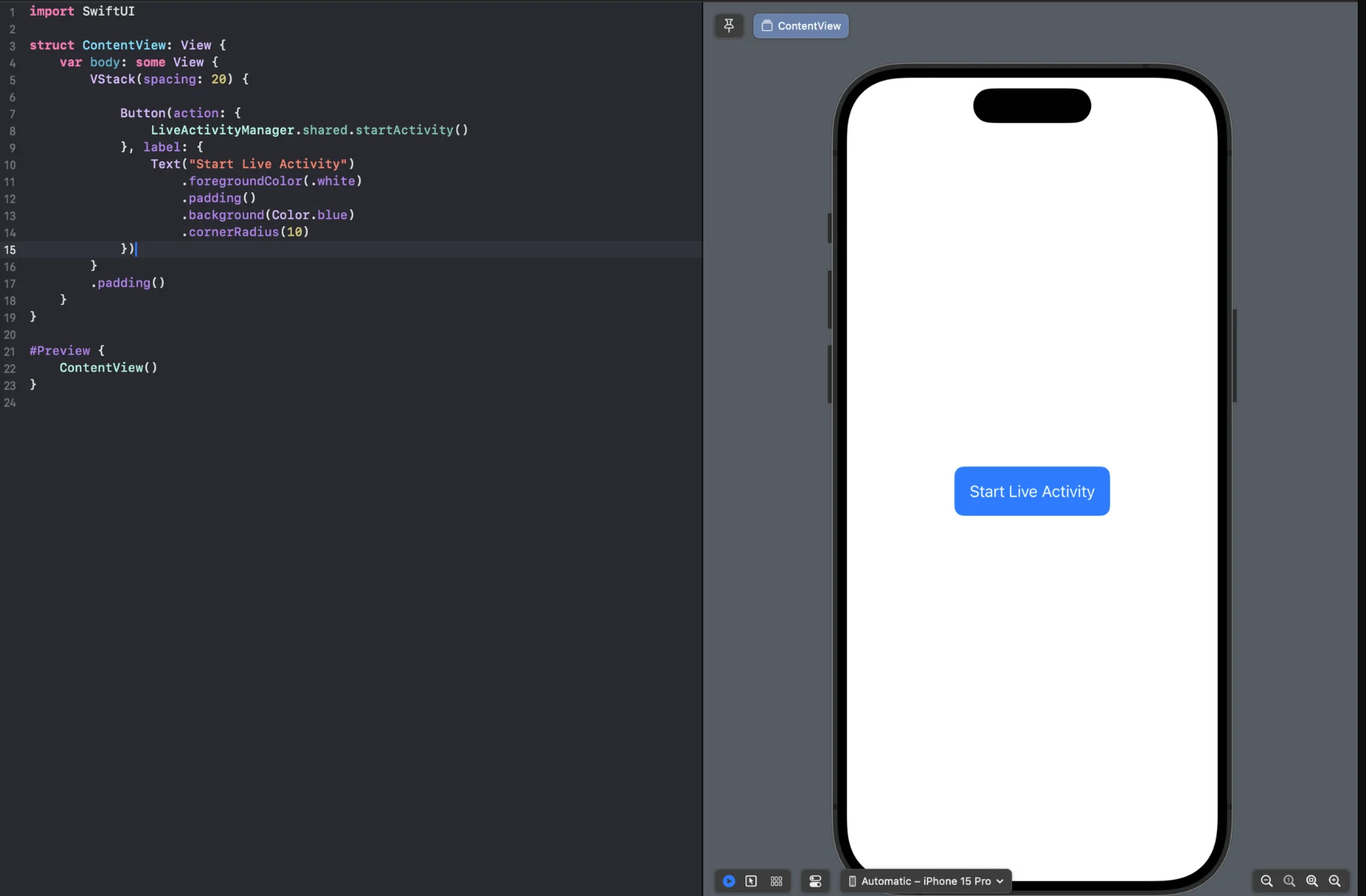
- Live Activities를 관리하기 위해 LiveActivityManager.swift 파일을 만듭니다
import Foundationimport ActivityKitimport UIKitimport PushwooshFrameworkimport PushwooshLiveActivities
class LiveActivityManager: NSObject, ObservableObject { public static let shared: LiveActivityManager = LiveActivityManager()
private var currentActivity: Activity<FoodDeliveryAttributes>? = nil
override init() { super.init() }
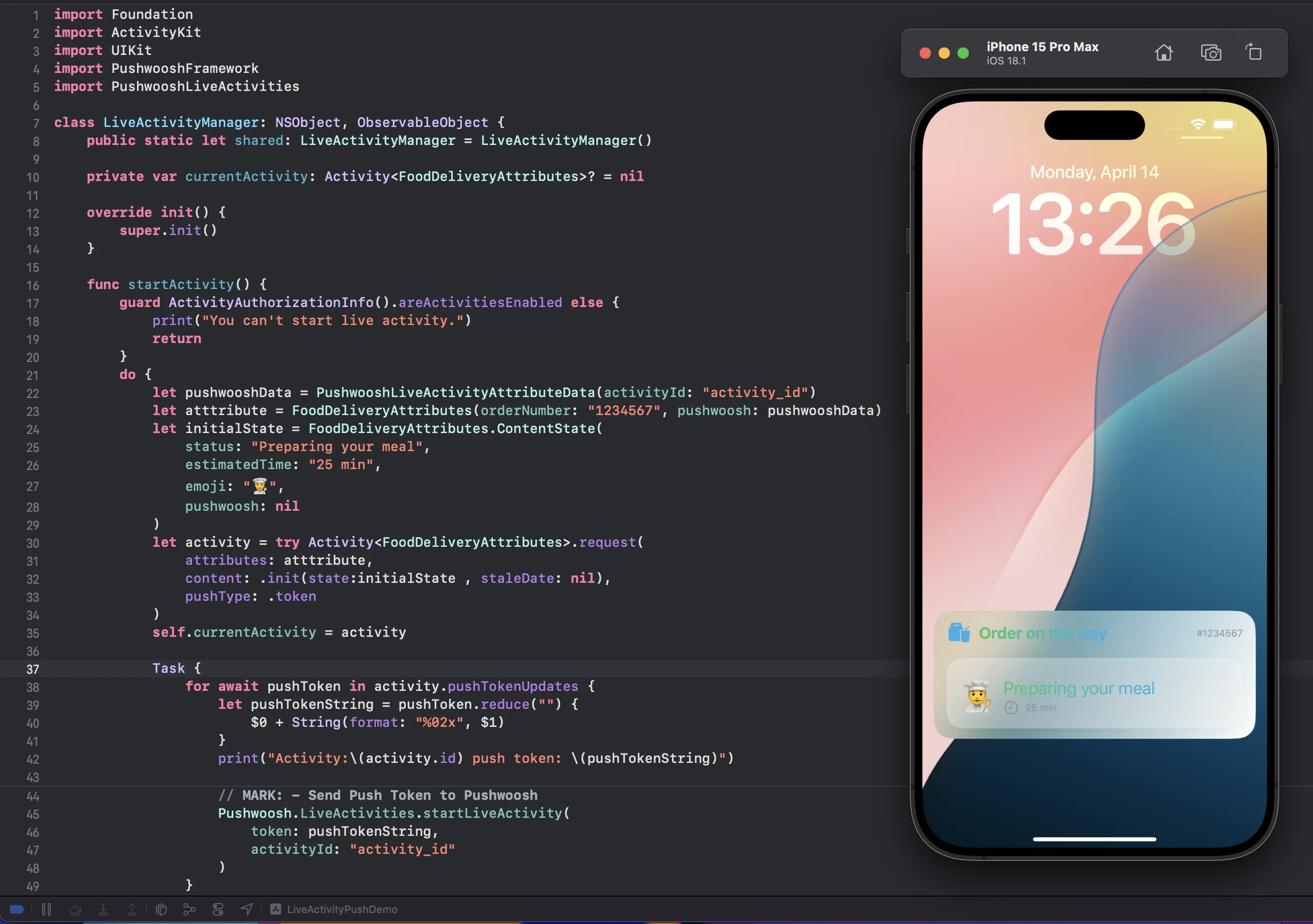
func startActivity() { guard ActivityAuthorizationInfo().areActivitiesEnabled else { print("You can't start live activity.") return } do { let pushwooshData = PushwooshLiveActivityAttributeData(activityId: "activity_id") let atttribute = FoodDeliveryAttributes(orderNumber: "1234567", pushwoosh: pushwooshData) let initialState = FoodDeliveryAttributes.ContentState( status: "Preparing your meal", estimatedTime: "25 min", emoji: "👨🍳", pushwoosh: nil ) let activity = try Activity<FoodDeliveryAttributes>.request( attributes: atttribute, content: .init(state:initialState , staleDate: nil), pushType: .token ) self.currentActivity = activity
Task { for await pushToken in activity.pushTokenUpdates { let pushTokenString = pushToken.reduce("") { $0 + String(format: "%02x", $1) } print("Activity:\(activity.id) push token: \(pushTokenString)")
// MARK: - Send Push Token to Pushwoosh Pushwoosh.LiveActivities.startLiveActivity( token: pushTokenString, activityId: "activity_id" ) } } } catch { print("Start Activity Error: \(error.localizedDescription)") } }}- 이제 프로젝트를 실행하고 ‘Start Live Activity’ 버튼을 누릅니다. 그런 다음 잠금 화면으로 이동하여 생성된 Live Activity를 확인합니다.
원격 푸시 알림으로 Live Activity 시작하기
Anchor link to- 원격 푸시 알림을 통해 Live Activity를 시작하려면
pushToStartTokenUpdates토큰을 Pushwoosh로 보내야 합니다.
func getPushToStartToken() {    if #available(iOS 17.2, *) {        Task {            for await data in Activity<LiveActivityAttributes>.pushToStartTokenUpdates {                let token = data.map {String(format: "%02x", $0)}.joined()                print("Activity PushToStart Token: \(token)")
// Send `pushToStartTokenUpdates` token to Pushwoosh try await Pushwoosh.LiveActivities.sendPushToStartLiveActivity(token: token) } } }}- 원격 푸시 알림으로 Live Activity 시작하기
Live Activities 관리
Anchor link toPushwoosh iOS SDK는 Live Activities 작업을 위한 다음 메서드를 제공합니다:
// Send Live Activity Push To Start Token to Pushwooshstatic func sendPushToStartLiveActivity(token: String)static func sendPushToStartLiveActivity(token: String, completion: @escaping (Error?) -> Void)
// Start Live Activity Methods with Activity IDstatic func startLiveActivity(token: String, activityId: String)static func startLiveActivity(token: String, activityId: String, completion: @escaping (Error?) -> Void)
// Stop Live Activity Methodsstatic func stopLiveActivity()static func stopLiveActivity(completion: @escaping (Error?) -> Void)
static func stopLiveActivity(activityId: String)static func stopLiveActivity(activityId: String, completion: @escaping (Error?) -> Void)
// Schedule a Live Activity to start at a future date (iOS 26.0+)static func schedule<Attributes: PushwooshLiveActivityAttributes>(attributes: Attributes, contentState: Attributes.ContentState, at startDate: Date, alertTitle: String, alertBody: String) throws -> Activity<Attributes>
// Cancel a scheduled or running Live Activity by its Activity ID (iOS 16.2+)static func cancel<Attributes: PushwooshLiveActivityAttributes>(_ activityType: Attributes.Type, activityId: String)
Activity ID 매개변수를 사용하여 세그먼트별로 Live Activities를 업데이트할 수도 있습니다. 활동을 생성할 때 특정 사용자 세그먼트와 관련된 고유한 Activity ID 매개변수를 메서드에 전달해야 합니다.
예를 들어, N명의 사용자가 Live Activity에서 동일한 이벤트를 구독했습니다. 이 경우 Activity ID 매개변수는 이 N명의 모든 사용자에게 고유해야 합니다.
Live Activity 작업을 마쳤을 때 다음 메서드를 사용하세요:
static func stopLiveActivity()static func stopLiveActivity(completion: @escaping (Error?) -> Void)미래 날짜에 시작하도록 Live Activity 예약하기
Anchor link toLive Activity를 즉시 시작하는 대신 미래의 날짜에 시작하도록 예약할 수 있습니다. alertTitle과 alertBody는 예약된 활동이 실제로 시작될 때 발생하는 로컬 알림 경고에서 사용자에게 표시됩니다:
if #available(iOS 26.0, *) {    let startDate = Date().addingTimeInterval(3600) // starts in 1 hour
do { let activity = try Pushwoosh.LiveActivities.schedule( attributes: atttribute, contentState: initialState, at: startDate, alertTitle: "Game starting!", alertBody: "The match is about to begin" ) self.currentActivity = activity } catch { print("Schedule Activity Error: \(error.localizedDescription)") }}startDate는 미래여야 하며, 그렇지 않으면 호출이 예외를 발생시킵니다. 앱이 포그라운드에 있는 동안 메인 스레드에서 schedule을 호출하세요. 예약 시 Pushwoosh에 대한 요청은 없습니다. 서버는 활동이 실제로 시작되고 setup() 메서드(아래 참조)에 의해 설치된 동일한 토큰 관찰자를 통해 푸시 토큰을 수신하면 활동에 대해 알게 됩니다.
Activity ID로 Live Activity 취소하기
Anchor link toActivity 인스턴스에 대한 참조를 유지하지 않고 Activity ID로 Live Activity를 취소하려면 cancel(_:activityId:)을 사용하세요:
if #available(iOS 16.2, *) { Pushwoosh.LiveActivities.cancel(FoodDeliveryAttributes.self, activityId: "activity_id")}cancel은 기기에서 즉시 활동을 종료하고 Pushwoosh 서버에 알립니다. 이는 서버에만 알리고 기기에서 직접 활동을 종료하지 않는 stopLiveActivity(activityId:)와 다릅니다. cancel은 schedule로 예약되었지만 아직 시작되지 않은 Live Activity에도 작동하여 시작되기 전에 취소됩니다.
Setup() 메서드.
Anchor link toPushwoosh는 PushwooshLiveActivities.setup 함수를 도입하여 활동 ID 전송을 단순화했으며, 이 함수는 애플리케이션 내에서 Live Activity의 전체 수명 주기를 처리합니다. 이 함수는 pushToStart 및 pushToUpdate 토큰 업데이트를 자동으로 수신합니다. 이 방법을 사용함으로써 애플리케이션은 더 이상 Live Activities의 시작을 수동으로 추적하거나 활동 업데이트를 위한 토큰 업데이트를 관리할 필요가 없습니다.
이 방법을 사용하면 모든 토큰 관리를 저희 쪽에서 처리하므로, 여러분이 유지 관리해야 할 코드의 양이 줄어듭니다. 이는 통합을 단순화하고 앱에 더 원활하고 효율적인 경험을 보장하므로 이 방법을 사용하는 것을 권장합니다.
AppDelegate에서 PushwooshFramework와 PushwooshLiveActivities를 임포트하고 Pushwoosh.LiveActivities 모듈에서 setup 메서드를 호출해야 합니다.
AppDelegate.swift
if #available(iOS 16.1, *) { Pushwoosh.LiveActivities.setup(FoodDeliveryAttributes.self)}FoodDeliveryAttributes
import WidgetKitimport SwiftUIimport ActivityKitimport PushwooshFrameworkimport PushwooshLiveActivities
struct FoodDeliveryAttributes: PushwooshLiveActivityAttributes {    public struct ContentState: PushwooshLiveActivityContentState {        var status: String        var estimatedTime: String        var emoji: String        var pushwoosh: PushwooshLiveActivityContentStateData?    }
var orderNumber: String var pushwoosh: PushwooshLiveActivityAttributeData}FoodDeliveryAttributes: 이 구조체는 PushwooshLiveActivityAttributes 프로토콜을 준수합니다. 앱 내에서 Live Activity의 속성을 정의하는 데 사용됩니다.
마이그레이션 가이드
Anchor link toPushwoosh iOS SDK 버전 6.8.0부터 SDK 구조를 업데이트했습니다. 이제 Live Activities 메서드는 PushwooshLiveActivities 모듈을 통해 액세스됩니다.
Pushwoosh iOS SDK 6.8.0 이전 버전을 사용하고 아래 나열된 메서드를 호출했다가 6.8.0 이상 버전으로 업데이트한 경우 다음 변경 사항에 유의하세요:
static func setup<Attributes: PushwooshLiveActivityAttributes>(_ activityType: Attributes.Type)static func defaultSetup()static func defaultStart(_ activityId: String, attributes: [String: Any], content: [String: Any])이제 이러한 메서드에 액세스하려면 LiveActivity 모듈을 사용해야 합니다.
import PushwooshFrameworkimport PushwooshLiveActivitiesPushwoosh.LiveActivities.setup(FoodDeliveryAttributes.self)Pushwoosh.LiveActivities.defaultSetup()Pushwoosh.LiveActivities.defaultStart("activity_id", attributes: ["key_attribute": "value_attribute"], content: ["key_content": "value_content"])또한 아래 나열된 대로 Pushwoosh.sharedInstance()를 통한 메서드 지원을 유지했지만, 이러한 메서드는 향후 릴리스에서 사용 중단될 예정입니다.
// Send Live Activity Push To Start Token to Pushwooshstatic func sendPushToStartLiveActivity(token: String)static func sendPushToStartLiveActivity(token: String, completion: @escaping (Error?) -> Void)
// Start Live Activity Methods with Activity IDstatic func startLiveActivity(token: String, activityId: String)static func startLiveActivity(token: String, activityId: String, completion: @escaping (Error?) -> Void)
// Stop Live Activity Methodsstatic func stopLiveActivity()static func stopLiveActivity(completion: @escaping (Error?) -> Void)
static func stopLiveActivity(activityId: String)static func stopLiveActivity(activityId: String, completion: @escaping (Error?) -> Void)