使用 Swift Package Manager 设置 InboxKit
自 iOS SDK 7.0.40 起可用。
InboxKit 作为 Pushwoosh-XCFramework Swift 包中的一个独立库产品提供。您需要先集成主 SDK;如果从头开始,请先遵循基本集成指南。
添加 InboxKit 包产品
Anchor link to1. 在 Xcode 中打开您的项目,并导航到项目设置 → Package Dependencies,然后按 + 按钮。
2. 输入以下包 URL:
https://github.com/Pushwoosh/Pushwoosh-XCFramework3. 将 Dependency Rule 设置为 Up to Next Major Version,并使用最新的稳定版本,然后点击 Add Package。
4. 在包选择屏幕上,至少选择以下产品并将其添加到您的主应用目标中:
- PushwooshFramework(必需)
- PushwooshCore(必需)
- PushwooshBridge(必需)
- PushwooshInboxKit(新模块)
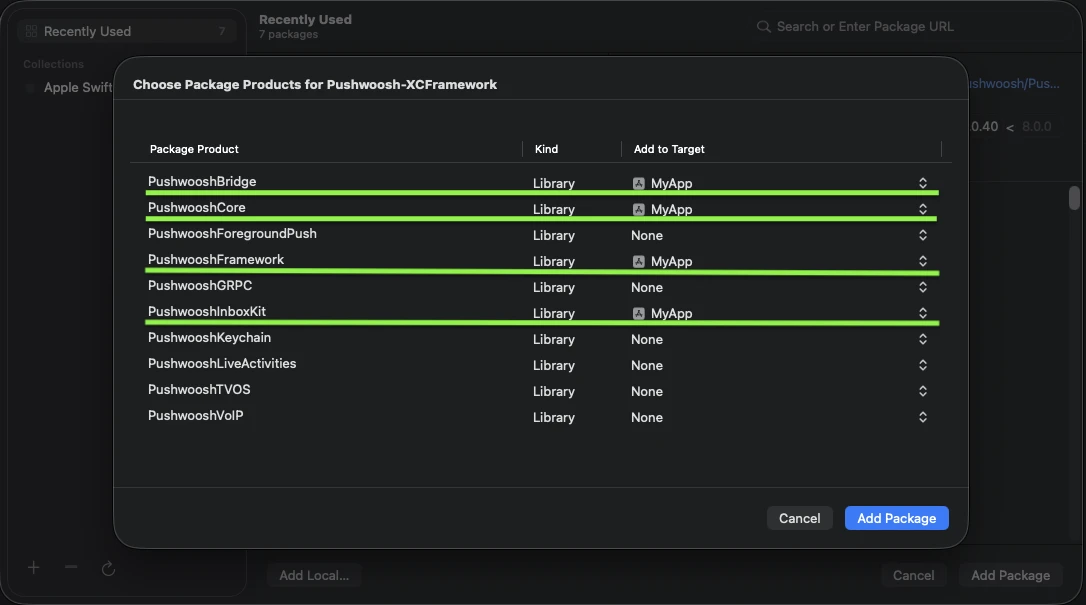
将四个高亮显示的产品添加到您的主应用目标。
5. 打开您的主应用目标,在 Frameworks, Libraries, and Embedded Content 下,确认 PushwooshInboxKit.xcframework 已列出并嵌入。
就这样 — InboxKit 现在已与主 SDK 一起链接。
显示收件箱
Anchor link to将收件箱控制器添加到任何导航流中。默认配置足以让您获得一个包含三种标准单元格类型的工作收件箱:
import PushwooshInboxKit
let inboxVC = PushwooshInboxKitViewController()navigationController?.pushViewController(inboxVC, animated: true)
@import PushwooshInboxKit;
PushwooshInboxKitViewController *inboxVC = [PushwooshInboxKitViewController new];[self.navigationController pushViewController:inboxVC animated:YES];自定义收件箱
Anchor link to在 Swift 中,通过 PushwooshInboxKitAttributes 值类型配置控制器。在 Objective-C 中,使用控制器上对 @objc 友好的设置器 — PushwooshInboxKitAttributes 是一个 Swift 结构体,并且没有桥接。
var attributes = PushwooshInboxKitAttributes()attributes.pullToRefreshEnabled = trueattributes.swipeToDeleteEnabled = trueattributes.pinningEnabled = trueattributes.style.unreadBadgeColor = .systemBlueattributes.style.titleFont = .systemFont(ofSize: 17, weight: .semibold)
let inboxVC = PushwooshInboxKitViewController(attributes: attributes)
PushwooshInboxKitViewController *inboxVC = [PushwooshInboxKitViewController new];[inboxVC setBackgroundColor:[UIColor systemBackgroundColor]];[inboxVC setEmptyMessage:@"You have no messages yet"];Style 结构体公开了默认单元格使用的所有颜色、字体、圆角半径和日期格式化程序。默认情况下,每个值都是 Apple 的语义颜色,因此收件箱会自动响应系统的深色模式。
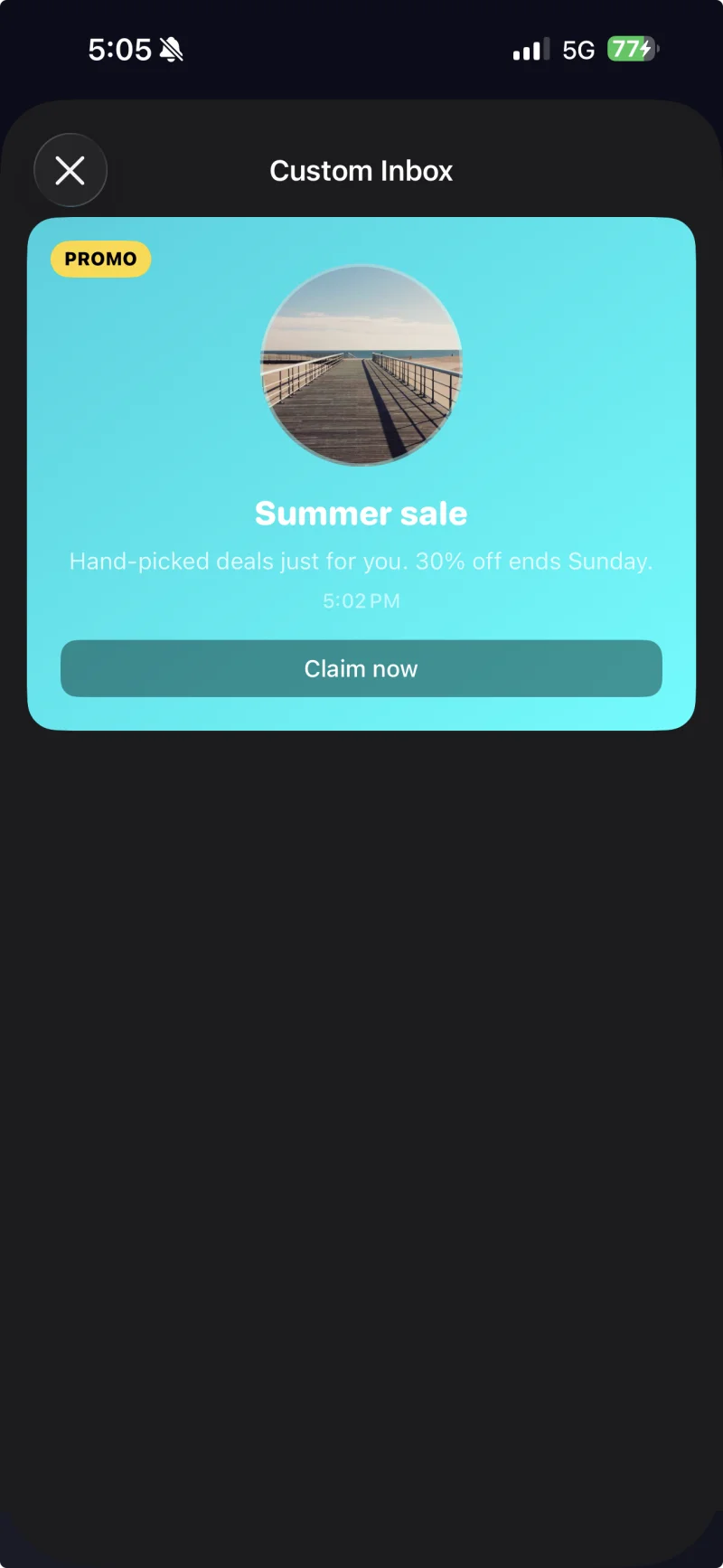
通过 PushwooshInboxKitAttributes.Style 应用了自定义主题的带标题单元格。
处理点击和刷新
Anchor link to遵循 PushwooshInboxKitDelegate 协议以响应用户操作和刷新事件。每个方法都有一个默认实现,因此您只需覆盖所需的方法:
final class InboxCoordinator: NSObject, PushwooshInboxKitDelegate {    func inboxKit(_ vc: PushwooshInboxKitViewController,                  didSelect message: PWInboxMessageProtocol) -> Bool {        // 返回 true 以让 SDK 打开消息 URL 或富媒体。        // 如果您完全处理了点击(例如,路由到自定义屏幕),则返回 false。        return true    }
    func inboxKit(_ vc: PushwooshInboxKitViewController,                  didRefreshWith messages: [PWInboxMessageProtocol],                  error: Error?) {        // 如果需要,可在此处显示您自己的空状态或错误状态。    }}
inboxVC.delegate = inboxCoordinator