Grundlegende Integrationsanleitung für das iOS SDK
Dieser Abschnitt enthält Informationen zur Integration des Pushwoosh SDK in Ihre iOS-Anwendung.
Voraussetzungen
Anchor link toUm das Pushwoosh iOS SDK in Ihre App zu integrieren, benötigen Sie Folgendes:
Integrationsschritte
Anchor link to1. Installation
Anchor link toSie können das Pushwoosh SDK entweder über den Swift Package Manager oder CocoaPods in Ihre Anwendung integrieren.
Swift Package Manager
Anchor link toFügen Sie im Abschnitt Package Dependencies das folgende Paket hinzu:
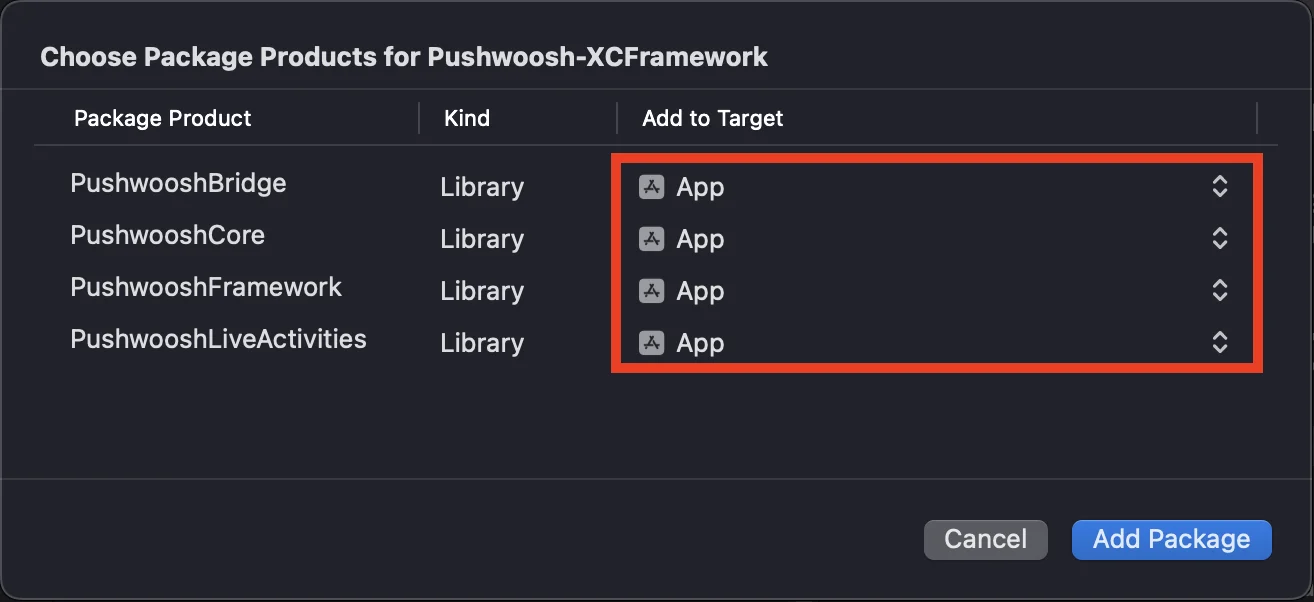
https://github.com/Pushwoosh/Pushwoosh-XCFrameworkUm das Pushwoosh iOS SDK zu verwenden, stellen Sie sicher, dass Sie die folgenden vier Frameworks zu Ihrem App-Ziel hinzufügen, wenn Sie über den Swift Package Manager integrieren:
PushwooshFrameworkPushwooshCorePushwooshBridgePushwooshLiveActivities
CocoaPods
Anchor link toÖffnen Sie Ihr Podfile und fügen Sie die Abhängigkeit hinzu:
# Uncomment the next line to define a global platform for your project# platform :ios, '9.0'
target 'MyApp' do  # Comment the next line if you don't want to use dynamic frameworks  use_frameworks!
  pod 'PushwooshXCFramework'
end
Führen Sie dann im Terminal den folgenden Befehl aus, um die Abhängigkeiten zu installieren:
pod install2. Funktionen
Anchor link toUm Push-Benachrichtigungen in Ihrem Projekt zu aktivieren, müssen Sie bestimmte Funktionen hinzufügen.
Fügen Sie im Abschnitt „Signing & Capabilities“ die folgenden Funktionen hinzu:
Push NotificationsBackground Modes. Nachdem Sie diese Funktion hinzugefügt haben, aktivieren Sie das Kontrollkästchen fürRemote notifications.
Wenn Sie zeitkritische Benachrichtigungen (iOS 15+) verwenden möchten, fügen Sie auch die Funktion Time Sensitive Notifications hinzu.
3. Initialisierungscode
Anchor link toAppDelegate
Anchor link toFügen Sie den folgenden Code zu Ihrer AppDelegate-Klasse hinzu:
import SwiftUIimport PushwooshFramework
@mainstruct MyApp: App {    // AppDelegate als UIApplicationDelegate registrieren    @UIApplicationDelegateAdaptor(AppDelegate.self) var appDelegate
    var body: some Scene {        WindowGroup {            ContentView()        }    }}
class AppDelegate: NSObject, UIApplicationDelegate, PWMessagingDelegate {
    func application(_ application: UIApplication, didFinishLaunchingWithOptions launchOptions: [UIApplication.LaunchOptionsKey: Any]?) -> Bool {        // Initialisierungscode        // Benutzerdefinierten Delegaten für die Push-Behandlung festlegen        Pushwoosh.sharedInstance().delegate = self
        // Für Push-Benachrichtigungen registrieren        Pushwoosh.sharedInstance().registerForPushNotifications()
        return true    }
    // Von APNS empfangenen Token verarbeiten    func application(_ application: UIApplication, didRegisterForRemoteNotificationsWithDeviceToken deviceToken: Data) {        Pushwoosh.sharedInstance().handlePushRegistration(deviceToken)    }
    // Fehler beim Empfang des Tokens verarbeiten    func application(_ application: UIApplication, didFailToRegisterForRemoteNotificationsWithError error: Error) {        Pushwoosh.sharedInstance().handlePushRegistrationFailure(error)    }
    //für stille Push-Benachrichtigungen    func application(_ application: UIApplication, didReceiveRemoteNotification userInfo: [AnyHashable: Any], fetchCompletionHandler completionHandler: @escaping (UIBackgroundFetchResult) -> Void) {        Pushwoosh.sharedInstance().handlePushReceived(userInfo)        completionHandler(.noData)    }
    // Wird ausgelöst, wenn ein Push empfangen wird    func pushwoosh(_ pushwoosh: Pushwoosh, onMessageReceived message: PWMessage) {        print("onMessageReceived: ", message.payload!.description)    }
    // Wird ausgelöst, wenn ein Benutzer auf die Benachrichtigung tippt    func pushwoosh(_ pushwoosh: Pushwoosh, onMessageOpened message: PWMessage) {        print("onMessageOpened: ", message.payload!.description)    }}
struct ContentView: View {    var body: some View {        Text("Pushwoosh with SwiftUI")            .padding()    }}
import PushwooshFramework
@UIApplicationMainclass AppDelegate: UIResponder, UIApplicationDelegate, PWMessagingDelegate {
var window: UIWindow?
func application(_ application: UIApplication, didFinishLaunchingWithOptions launchOptions: [UIApplication.LaunchOptionsKey: Any]?) -> Bool { //Initialisierungscode //benutzerdefinierten Delegaten für die Push-Behandlung festlegen, in unserem Fall AppDelegate Pushwoosh.sharedInstance().delegate = self;
//für Push-Benachrichtigungen registrieren Pushwoosh.sharedInstance().registerForPushNotifications()
return true }
//von APNS empfangenen Token verarbeiten func application(_ application: UIApplication, didRegisterForRemoteNotificationsWithDeviceToken deviceToken: Data) { Pushwoosh.sharedInstance().handlePushRegistration(deviceToken) }
//Fehler beim Empfang des Tokens verarbeiten func application(_ application: UIApplication, didFailToRegisterForRemoteNotificationsWithError error: Error) { Pushwoosh.sharedInstance().handlePushRegistrationFailure(error); }
//für stille Push-Benachrichtigungen func application(_ application: UIApplication, didReceiveRemoteNotification userInfo: [AnyHashable : Any], fetchCompletionHandler completionHandler: @escaping (UIBackgroundFetchResult) -> Void) { Pushwoosh.sharedInstance().handlePushReceived(userInfo) completionHandler(.noData) }
//dieses Ereignis wird ausgelöst, wenn der Push empfangen wird func pushwoosh(_ pushwoosh: Pushwoosh, onMessageReceived message: PWMessage) { print("onMessageReceived: ", message.payload!.description) }
// Wird ausgelöst, wenn ein Benutzer auf die Benachrichtigung tippt func pushwoosh(_ pushwoosh: Pushwoosh, onMessageOpened message: PWMessage) { print("onMessageOpened: ", message.payload!.description) }}#import <PushwooshFramework/PushwooshFramework.h>
@implementation AppDelegate
- (BOOL)application:(UIApplication *)application didFinishLaunchingWithOptions:(NSDictionary *)launchOptions { //-----------PUSHWOOSH-TEIL-----------
// benutzerdefinierten Delegaten für die Push-Behandlung festlegen, in unserem Fall AppDelegate [Pushwoosh sharedInstance].delegate = self;
//für Push-Benachrichtigungen registrieren! [[Pushwoosh sharedInstance] registerForPushNotifications];
return YES;}
//von APNS empfangenen Token verarbeiten- (void)application:(UIApplication *)application didRegisterForRemoteNotificationsWithDeviceToken:(NSData *)deviceToken { [[Pushwoosh sharedInstance] handlePushRegistration:deviceToken];}
//Fehler beim Empfang des Tokens verarbeiten- (void)application:(UIApplication *)application didFailToRegisterForRemoteNotificationsWithError:(NSError *)error { [[Pushwoosh sharedInstance] handlePushRegistrationFailure:error];}
//für stille Push-Benachrichtigungen- (void)application:(UIApplication *)application didReceiveRemoteNotification:(NSDictionary *)userInfo fetchCompletionHandler:(void (^)(UIBackgroundFetchResult))completionHandler { [[Pushwoosh sharedInstance] handlePushReceived:userInfo]; completionHandler(UIBackgroundFetchResultNoData);}
//dieses Ereignis wird ausgelöst, wenn der Push empfangen wird- (void)pushwoosh:(Pushwoosh *)pushwoosh onMessageReceived:(PWMessage *)message { NSLog(@"onMessageReceived: %@", message.payload);}
//dieses Ereignis wird ausgelöst, wenn der Benutzer auf die Benachrichtigung tippt- (void)pushwoosh:(Pushwoosh *)pushwoosh onMessageOpened:(PWMessage *)message { NSLog(@"onMessageOpened: %@", message.payload);}
@endInfo.plist
Anchor link toIn Ihrer Info.plist:
- setzen Sie den Schlüssel
Pushwoosh_APPIDauf den Pushwoosh Application Code. - setzen Sie den Schlüssel
Pushwoosh_API_TOKENauf das Pushwoosh Device API Token
4. Nachverfolgung der Nachrichtenzustellung
Anchor link toPushwoosh unterstützt die Nachverfolgung von Zustellereignissen für Push-Benachrichtigungen über die Notification Service Extension
Notification Service Extension hinzufügen
Anchor link to- Wählen Sie in Xcode File > New > Target…
- Wählen Sie Notification Service Extension und klicken Sie auf Next.
- Geben Sie den Zielnamen ein und klicken Sie auf Finish.
- Wenn Sie zur Aktivierung aufgefordert werden, klicken Sie auf Cancel.
Abhängigkeiten für die Notification Service Extension (nur CocoaPods)
Anchor link toHinweis: Wenn Sie den Swift Package Manager zur Verwaltung von Abhängigkeiten verwenden, können Sie diesen Schritt überspringen, da die Abhängigkeiten automatisch hinzugefügt werden.
Öffnen Sie Ihr Podfile und fügen Sie die Abhängigkeit für das Ziel hinzu:
# Uncomment the next line to define a global platform for your project# platform :ios, '9.0'
target 'MyApp' do  # Comment the next line if you don't want to use dynamic frameworks  use_frameworks!
  pod 'PushwooshXCFramework'
end
target 'MyAppNotificationExtension' do  use_frameworks!
  pod 'PushwooshXCFramework'
end
Führen Sie den folgenden Befehl im Terminal aus, um die Abhängigkeiten zu aktualisieren:
pod updatePushwoosh SDK zur Notification Service Extension hinzufügen
Anchor link toDieser Code ermöglicht es Ihnen, Benachrichtigungen innerhalb Ihrer Notification Extension abzufangen und zu verarbeiten.
import UserNotificationsimport PushwooshFramework
class NotificationService: UNNotificationServiceExtension {
    var contentHandler: ((UNNotificationContent) -> Void)?    var bestAttemptContent: UNMutableNotificationContent?
    override func didReceive(_ request: UNNotificationRequest, withContentHandler contentHandler: @escaping (UNNotificationContent) -> Void) {        // Pushwoosh **********        PWNotificationExtensionManager.shared().handle(request, contentHandler: contentHandler)        // ********************
        self.contentHandler = contentHandler        bestAttemptContent = (request.content.mutableCopy() as? UNMutableNotificationContent)
        if let bestAttemptContent = bestAttemptContent {            // Ändern Sie hier den Benachrichtigungsinhalt...            contentHandler(bestAttemptContent)        }    }
    override func serviceExtensionTimeWillExpire() {        // Wird aufgerufen, kurz bevor die Erweiterung vom System beendet wird.        // Nutzen Sie dies als Gelegenheit, Ihren "besten Versuch" für modifizierten Inhalt zu liefern, andernfalls wird die ursprüngliche Push-Payload verwendet.        if let contentHandler = contentHandler, let bestAttemptContent =  bestAttemptContent {            contentHandler(bestAttemptContent)        }    }
}
#import "PWNotificationExtensionManager.h"
@interface NotificationService : UNNotificationServiceExtension
@end
@implementation NotificationService
- (void)didReceiveNotificationRequest:(UNNotificationRequest *)request withContentHandler:(void (^)(UNNotificationContent * _Nonnull))contentHandler { // Pushwoosh ********** [[PWNotificationExtensionManager sharedManager] handleNotificationRequest:request contentHandler:contentHandler]; //*********************}
@endInfo.plist
Anchor link toFügen Sie in der Info.plist Ihrer Notification Service Extension hinzu:
Pushwoosh_APPID- Ihr Application Code.
5. Projekt ausführen
Anchor link to- Erstellen und führen Sie das Projekt aus.
- Gehen Sie zum Pushwoosh Control Panel und senden Sie eine Push-Benachrichtigung.
- Sie sollten die Benachrichtigung in der App sehen.
Erweiterte Pushwoosh iOS-Integration
Anchor link toIn diesem Stadium haben Sie das SDK bereits integriert und können Push-Benachrichtigungen senden und empfangen. Lassen Sie uns nun die Kernfunktionalität erkunden
Push-Benachrichtigungen
Anchor link toIm Pushwoosh SDK gibt es zwei Callbacks, die für die Behandlung von Push-Benachrichtigungen konzipiert sind:
onMessageReceived: Diese Methode wird aufgerufen, wenn eine Push-Benachrichtigung empfangen wird.onMessageOpened: Diese Methode wird aufgerufen, wenn der Benutzer mit der Benachrichtigung interagiert (sie öffnet)
Diese Callbacks ermöglichen es Entwicklern, den Empfang und die Benutzerinteraktion mit Push-Benachrichtigungen in ihren Anwendungen zu verwalten
import PushwooshFramework
class AppDelegate: NSObject, UIApplicationDelegate, PWMessagingDelegate {
    func application(_ application: UIApplication, didFinishLaunchingWithOptions launchOptions: [UIApplication.LaunchOptionsKey : Any]? = nil) -> Bool {        Pushwoosh.sharedInstance().delegate = self;    }
    func pushwoosh(_ pushwoosh: Pushwoosh, onMessageOpened message: PWMessage) {        if let payload = message.payload {            print("onMessageOpened: \(payload)")        }    }
    func pushwoosh(_ pushwoosh: Pushwoosh, onMessageReceived message: PWMessage) {        if let payload = message.payload {            print("onMessageReceived: \(payload)")        }    }}
#import <PushwooshFramework/PushwooshFramework.h>
@interface AppDelegate () <PWMessagingDelegate>
@end
@implementation AppDelegate
- (BOOL)application:(UIApplication *)application didFinishLaunchingWithOptions:(NSDictionary *)launchOptions { [[Pushwoosh sharedInstance] setDelegate:self]; return YES;}
- (void)pushwoosh:(Pushwoosh *)pushwoosh onMessageOpened:(PWMessage *)message { if (message.payload) { NSLog(@"onMessageOpened: %@", message.payload); }}
- (void)pushwoosh:(Pushwoosh *)pushwoosh onMessageReceived:(PWMessage *)message { if (message.payload) { NSLog(@"onMessageReceived: %@", message.payload); }}@endBenutzerkonfiguration
Anchor link toIndem Sie sich auf das individuelle Benutzerverhalten und die Vorlieben konzentrieren, können Sie personalisierte Inhalte liefern, was zu einer erhöhten Benutzerzufriedenheit und -loyalität führt
import PushwooshFramework
class Registration {
    func afterUserLogin(user: User) {        let pushwoosh = Pushwoosh.sharedInstance()        // Benutzer-ID festlegen        if let userId = user.userId {            pushwoosh.setUserId(userId)        }
        // Benutzer-E-Mail festlegen        if let userEmail = user.email {            pushwoosh.setEmail(userEmail)        }
        // Benutzer-SMS-Nummer festlegen        if let userSmsNumber = user.SmsNumber {            pushwoosh.registerSmsNumber(userSmsNumber)        }
        // Benutzer-WhatsApp-Nummer festlegen        if let userWhatsAppNumber = user.WhatsAppNumber {            pushwoosh.registerSmsNumber(userWhatsAppNumber)        }
        // zusätzliche Benutzerinformationen als Tags für Pushwoosh festlegen        if let age = user.userDetails.age,            let name = user.userDetails.userName,            let lastLogin = user.userDetails.lastLoginDate {            pushwoosh.setTags([                "age": age,                "name": name,                "last_login": lastLogin            ])        }    }}
#import <PushwooshFramework/PushwooshFramework.h>
@implementation Registration
- (void)afterUserLogin:(User *)user { Pushwoosh *pushwoosh = [Pushwoosh sharedInstance];
// Benutzer-ID festlegen if (user.userId) { [pushwoosh setUserId:user.userId]; }
// Benutzer-E-Mail festlegen if (user.email) { [pushwoosh setEmail:user.email]; }
// zusätzliche Benutzerinformationen als Tags für Pushwoosh festlegen if (user.userDetails.age && user.userDetails.userName && user.userDetails.lastLoginDate) { NSDictionary *tags = @{ @"age": user.userDetails.age, @"name": user.userDetails.userName, @"last_login": user.userDetails.lastLoginDate }; [pushwoosh setTags:tags]; }}
@endTags
Anchor link toTags sind Schlüssel-Wert-Paare, die Benutzern oder Geräten zugewiesen werden und eine Segmentierung nach Attributen wie Vorlieben oder Verhalten ermöglichen, was gezielte Nachrichtenübermittlung ermöglicht.
import PushwooshFramework
class UpdateUser {    func afterUserUpdateProfile(user: User) {        let pushwoosh = Pushwoosh.sharedInstance()
        // Liste der bevorzugten Kategorien festlegen        pushwoosh.setTags(["favorite_categories" : user.getFavoriteCategories()])
        // Zahlungsinformationen festlegen        pushwoosh.setTags([            "is_subscribed": user.isSubscribed(),            "payment_status": user.getPaymentStatus(),            "billing_address": user.getBillingAddress()        ])    }}
#import <PushwooshFramework/PushwooshFramework.h>
@implementation UpdateUser
- (void)afterUserUpdateProfile:(User *)user { Pushwoosh *pushwoosh = [Pushwoosh sharedInstance];
// Liste der bevorzugten Kategorien festlegen [pushwoosh setTags:@{@"favorite_categories" : user.getFavoriteCategories}];
// Zahlungsinformationen festlegen NSDictionary *tags = @{ @"is_subscribed": @(user.isSubscribed), @"payment_status": user.getPaymentStatus, @"billing_address": user.getBillingAddress }; [pushwoosh setTags:tags];}
@endEvents
Anchor link toEvents sind spezifische Benutzeraktionen oder Vorkommnisse innerhalb der App, die verfolgt werden können, um das Verhalten zu analysieren und entsprechende Nachrichten oder Aktionen auszulösen
import PushwooshFramework
class Registration {
    func afterUserLogin(user: User) {        if let userName = user.getUserName(), let lastLogin = user.getLastLoginDate() {            PWInAppManager.shared().postEvent("login", withAttributes: [                "name": userName,                "last_login": lastLogin            ])        }    }
    func afterUserPurchase(user: User, product: Product) {        let pushwoosh = Pushwoosh.sharedInstance()
        // Kaufereignis verfolgen        PWInAppManager.shared().postEvent("purchase", withAttributes: [            "product_id": product.getId(),            "product_name": product.getName(),            "price": product.getPrice(),            "quantity": product.getQuantity()        ])
        // Benutzer-Tags festlegen        let lastPurchaseDate = Date().timeIntervalSince1970        let lifetimeSpend = getCurrentLifetimeSpend() + product.getPrice()
        pushwoosh.setTags([            "last_purchase_date": lastPurchaseDate,            "lifetime_spend": lifetimeSpend        ])    }}
#import <PushwooshFramework/PushwooshFramework.h>#import <PushwooshFramework/PWInAppManager.h>
@implementation Registration
- (void)afterUserLogin:(User *)user { NSString *userName = [user getUserName]; NSDate *lastLogin = [user getLastLoginDate];
if (userName && lastLogin) { [[PWInAppManager sharedManager] postEvent:@"login" withAttributes:@{ @"name": userName, @"last_login": lastLogin }]; }}
- (void)afterUserPurchase:(User *)user product:(Product *)product { Pushwoosh *pushwoosh = [Pushwoosh sharedInstance];
// Kaufereignis verfolgen [[PWInAppManager sharedManager] postEvent:@"purchase" withAttributes:@{ @"product_id": [product getId], @"product_name": [product getName], @"price": @([product getPrice]), @"quantity": @([product getQuantity]) }];
// Benutzer-Tags festlegen NSTimeInterval lastPurchaseDate = [[NSDate date] timeIntervalSince1970]; double lifetimeSpend = /* aktuellen Gesamtausgaben abrufen */ + [product getPrice];
NSDictionary *tags = @{ @"last_purchase_date": @(lastPurchaseDate), @"lifetime_spend": @(lifetimeSpend) };
[pushwoosh setTags:tags];}
@endRich Media
Anchor link toRich Media bezieht sich auf interaktive und multimediale Inhalte wie Bilder, Videos oder HTML, die in Benachrichtigungen und In-App-Nachrichten verwendet werden, um das Engagement der Benutzer zu erhöhen
import PushwooshFramework
class ViewController: UIViewController, PWRichMediaPresentingDelegate {
    override func viewDidLoad() {        super.viewDidLoad()        let richMediaConfiguration = PWModalWindowConfiguration.shared()
        PWRichMediaManager.shared().delegate = self        richMediaConfiguration.configureModalWindow(with: .PWModalWindowPositionBottom,                                                                 present: .PWAnimationPresentFromBottom,                                                                 dismiss: .PWAnimationDismissDown)    }
    func richMediaManager(_ richMediaManager: PWRichMediaManager!, shouldPresent richMedia: PWRichMedia!) -> Bool {        print("Rich media will be presented with: \(richMedia.pushPayload!)")        return true    }
    func richMediaManager(_ richMediaManager: PWRichMediaManager!, didPresent richMedia: PWRichMedia!) {        print("Rich media has been presented with: \(richMedia.pushPayload!)")    }
    func richMediaManager(_ richMediaManager: PWRichMediaManager!, didClose richMedia: PWRichMedia!) {        print("Rich media has been closed with: \(richMedia.pushPayload!)")    }
    func richMediaManager(_ richMediaManager: PWRichMediaManager!, presentingDidFailFor richMedia: PWRichMedia!, withError error: (any Error)!) {        print("Failed to present rich media with: \(richMedia.pushPayload!). Error: \(error.localizedDescription)")    }}
#import "ViewController.h"#import <PushwooshFramework/PushwooshFramework.h>#import <PushwooshFramework/PWRichMediaManager.h>#import <PushwooshFramework/PWModalWindowConfiguration.h>
@interface ViewController () <PWRichMediaPresentingDelegate>
@end
@implementation ViewController
- (void)viewDidLoad { [super viewDidLoad];
[[PWRichMediaManager sharedManager] setDelegate:self]; [[PWModalWindowConfiguration shared] configureModalWindowWith:PWModalWindowPositionBottom presentAnimation:PWAnimationPresentFromBottom dismissAnimation:PWAnimationDismissDown];}
- (BOOL)richMediaManager:(PWRichMediaManager *)richMediaManager shouldPresentRichMedia:(PWRichMedia *)richMedia { NSLog(@"Rich media will be presented with: %@", richMedia.pushPayload); return YES;}
- (void)richMediaManager:(PWRichMediaManager *)richMediaManager didPresentRichMedia:(PWRichMedia *)richMedia { NSLog(@"Rich media has been presented with: %@", richMedia.pushPayload);}
- (void)richMediaManager:(PWRichMediaManager *)richMediaManager didCloseRichMedia:(PWRichMedia *)richMedia { NSLog(@"Rich media has been closed with:: %@", richMedia.pushPayload);}
- (void)richMediaManager:(PWRichMediaManager *)richMediaManager presentingDidFailForRichMedia:(PWRichMedia *)richMedia withError:(NSError *)error { NSLog(@"Failed to present rich media with: %@. Error: %@", richMedia.pushPayload, error.localizedDescription);}
@endFehlerbehebung
Anchor link toFehler beim Erstellen des Moduls ‘PushwooshFramework’
Anchor link toBeim Erstellen Ihres Projekts kann ein Fehler auftreten, der dem folgenden ähnelt:
Failed to build module 'PushwooshFramework'; this SDK is not supported by the compiler(the SDK is built with 'Apple Swift version 5.10 (swiftlang-5.10.0.13 clang-1500.3.9.4)',while this compiler is 'Apple Swift version 6.1.2 effective-5.10 (swiftlang-6.1.2.1.2 clang-1700.0.13.5)')Ursache: Dieser Fehler hängt nicht mit der Inkompatibilität der Swift-Compiler-Version zusammen. Ab der Pushwoosh iOS SDK-Version 6.8.0 ist das SDK in mehrere Komponenten modularisiert, die miteinander interagieren. Der Fehler tritt auf, wenn nicht alle erforderlichen Frameworks zu Ihrem Projekt hinzugefügt wurden.
Lösung: Stellen Sie sicher, dass alle vier erforderlichen Frameworks zu Ihrem App-Ziel hinzugefügt werden, wenn Sie über den Swift Package Manager integrieren:
PushwooshFrameworkPushwooshCorePushwooshBridgePushwooshLiveActivities
Um dies in Xcode zu überprüfen:
- Wählen Sie Ihr Projekt im Project Navigator aus
- Wählen Sie Ihr App-Ziel aus
- Gehen Sie zu General > Frameworks, Libraries, and Embedded Content
- Bestätigen Sie, dass alle vier Frameworks aufgelistet sind
Wenn Sie während des Integrationsprozesses auf Probleme stoßen, lesen Sie bitte den Abschnitt Support und Community.