Web push SDK 3.0
การผสานรวม
Anchor link toรับ Pushwoosh Web Push SDK และแตกไฟล์ คุณควรมีไฟล์ต่อไปนี้:
Anchor link toดาวน์โหลด Pushwoosh Web Push SDK หากคุณยังไม่ได้ดาวน์โหลด
- pushwoosh-service-worker.js
วางไฟล์ทั้งหมดนี้ไว้ที่ไดเรกทอรีราก (root) ระดับบนสุดของเว็บไซต์ของคุณ
Anchor link toเริ่มต้น SDK:
Anchor link to- รวม SDK จาก CDN ของเราแบบ asynchronously
<script type="text/javascript" src="//cdn.pushwoosh.com/webpush/v3/pushwoosh-web-notifications.js" async></script>- เริ่มต้น Web Push SDK และตรวจสอบให้แน่ใจว่าได้จัดคิวการเริ่มต้นจนกว่า SDK จะโหลดเสร็จสมบูรณ์
<script type="text/javascript">var Pushwoosh = Pushwoosh || [];Pushwoosh.push(['init', { logLevel: 'info', // ค่าที่เป็นไปได้: error, info, debug applicationCode: 'XXXXX-XXXXX', // application code ของคุณจาก Pushwoosh Control Panel apiToken: 'XXXXXXX', // Device API Token safariWebsitePushID: 'web.com.example.domain', // สตริง reverse-domain ที่ไม่ซ้ำกัน ซึ่งได้รับจาก Apple Developer Portal ของคุณ ใช้เฉพาะเมื่อแอปพลิเคชันของคุณมีส่วน Safari Configuration (ดูข้อกำหนดเบื้องต้นด้านบน) defaultNotificationTitle: 'Pushwoosh', // ตั้งค่าชื่อเริ่มต้นสำหรับ push notifications defaultNotificationImage: 'https://yoursite.com/img/logo-medium.png', // URL ไปยังรูปภาพการแจ้งเตือนที่กำหนดเอง autoSubscribe: false, // หรือ true หากเป็น true จะแจ้งให้ผู้ใช้สมัครรับ push เมื่อ SDK เริ่มต้น subscribeWidget: { enable: true }, userId: 'user_id', // ไม่บังคับ, ตั้งค่า User ID ที่กำหนดเอง tags: { 'Name': 'John Smith' // ไม่บังคับ, ตั้งค่า Tags ที่กำหนดเอง }}]);</script>Web popups
Anchor link toแคมเปญ Web popup จะโหลดโดยค่าเริ่มต้น — ไม่จำเป็นต้องมีรายการ webPopups ในอ็อบเจกต์ init ของคุณ เพิ่มรายการนี้เฉพาะเมื่อต้องการยกเลิกหรือเปลี่ยนค่าเริ่มต้น:
webPopups: { // enable: false, // ไม่บังคับ, เลือกไม่ใช้ทั้งหมด: bundle จะไม่ถูกโหลด autoShow: true, // ไม่บังคับ, ตั้งค่าเป็น false เพื่อโหลด popups โดยไม่แสดงโดยอัตโนมัติ — ดูเมธอด WebPopups ด้านล่าง colorScheme: 'auto', // ไม่บังคับ, 'auto' (ค่าเริ่มต้น) | 'light' | 'dark'},แคมเปญ Web popup จะแสดงโอเวอร์เลย์ที่คุณกำหนดค่าใน Control Panel เช่น โปรโมชั่น, ประกาศ, หรือแบบฟอร์มเก็บข้อมูลลูกค้า ซึ่งแตกต่างจาก popup สมัครรับข้อมูลที่กำหนดเอง (subscribePopup) ซึ่งจัดการเฉพาะการเลือกรับ web push เท่านั้น แคมเปญ Web popup สามารถแสดงเนื้อหาใดๆ ที่คุณกำหนดค่าได้
สำหรับการตั้งค่าใน Control Panel โปรดดู ทำความเข้าใจ Web popups
หากต้องการหยุด Web popup บนไซต์โดยไม่ต้องแก้ไข snippet ให้ปิดใน Control Panel:
- ไปที่ Settings → Configure platforms → Web แล้วค้นหาการ์ด Web popups
- คลิก Turn off

ป้ายจะเปลี่ยนจาก Set in the snippet เป็น Off ตั้งแต่การโหลดหน้าครั้งถัดไปภายในหนึ่งนาที SDK จะไม่โหลด popup แม้ว่า snippet จะตั้งค่า webPopups.enable: true ไว้ก็ตาม autoShow และ colorScheme ยังคงมาจาก snippet หากต้องการให้ snippet เป็นตัวกำหนดอีกครั้ง ให้คลิก Return to snippet บนการ์ดเดียวกัน
การ์ดนี้ทำงานได้ไม่ว่า Settings source จะเป็นค่าใด แต่เวอร์ชัน SDK ที่ต้องใช้ขึ้นอยู่กับแหล่งที่มานั้น:
- init snippet บนไซต์ของคุณ: Web SDK 3.93.1 ขึ้นไป SDK เวอร์ชันที่เก่ากว่าจะไม่สนใจสวิตช์นี้และยังคงโหลด popup ตามที่ snippet กำหนด
- หน้านี้: Web SDK 3.93.0 ขึ้นไป
colorScheme จะเลือกชุดสีที่ popup ซึ่งกำหนดค่า dark mode จะแสดงผลด้วย:
'auto'(ค่าเริ่มต้น): เป็นไปตามชุดสีระดับ OS ของผู้เข้าชม (prefers-color-scheme)'light'หรือ'dark': แสดงชุดสีนั้นเสมอ โดยไม่คำนึงถึงการตั้งค่า OS ของผู้เข้าชม
popup ที่ไม่ได้กำหนดค่า dark mode ในตัวแก้ไขจะแสดงผลเป็น light เสมอ — colorScheme ไม่มีผลต่อมัน
สำหรับการควบคุมผ่านโปรแกรม โปรดดู เมธอด WebPopups และ อีเวนต์ Web popup
ข้อความแจ้งให้สมัครรับข้อมูล
Anchor link toเพื่อกระตุ้นให้ผู้ใช้ของคุณสมัครรับ push notifications ให้ใช้ Subscription widget ซึ่งเป็นพรอมต์และกระดิ่งตัวเปิดที่คุณกำหนดค่าร่วมกัน วิดเจ็ตนี้มาแทนที่ ปุ่มสมัครรับ push และ Custom Subscription Popup รุ่นเก่า ซึ่งยังคงใช้งานได้บนไซต์ที่ใช้อยู่แล้ว แต่ไม่ใช่จุดเริ่มต้นที่แนะนำสำหรับการผสานรวมใหม่
การกำหนดค่า
Anchor link toเพื่อให้การใช้งาน push notifications บนเว็บไซต์ของคุณเสร็จสมบูรณ์ คุณต้องกำหนดค่าแพลตฟอร์มเว็บใน Pushwoosh Control Panel ของคุณตามคำแนะนำทีละขั้นตอนของเรา:
หน้าจอกำหนดค่าเดียวกันนี้ยังมีการ์ด Web SDK configuration ด้วย
การลงทะเบียน service worker ในขอบเขตที่แตกต่างกัน
Anchor link toบางครั้งคุณไม่สามารถวางไฟล์ service worker ในไดเรกทอรีรากของเว็บไซต์ได้ แต่ต้องวางในไดเรกทอรีย่อย
ในกรณีนี้ ให้แก้ไขการกำหนดค่า (ขั้นตอนที่ 4.3) โดยเพิ่มพารามิเตอร์
serviceWorkerUrl: “/push-notifications/pushwoosh-service-worker.js”
โดยที่ /push-notifications/pushwoosh-service-worker.js คือเส้นทางไปยังไฟล์ pushwoosh-service-worker.js
ตัวจัดการอีเวนต์ (Event handlers)
Anchor link toใน Pushwoosh Web SDK 3.0 คุณสามารถสมัครรับอีเวนต์บางอย่างเพื่อติดตามหรือยกเลิกการสมัครรับอีเวนต์หากไม่ต้องการติดตามอีกต่อไป
ในการติดตามการโหลดของ Web SDK 3.0 ให้เรียกอีเวนต์ onLoad ดังนี้:
// Load EventPushwoosh.push(['onLoad', (api) => { console.log('Pushwoosh load!');}]);ในการติดตามการเริ่มต้น Web SDK ที่ถูกต้อง ให้เรียกอีเวนต์ onReady:
// Ready EventPushwoosh.push((api) => { console.log('Pushwoosh ready!');});ในการสมัครหรือยกเลิกการสมัครรับอีเวนต์ใดๆ ของ SDK ให้ใช้ตัวจัดการหลังจากที่ SDK โหลดแล้ว:
Pushwoosh.push(['onLoad', (api) => {  function onEventNameHandler() {    console.log('Triggered event: event-name!');  }
  // ในการสมัครรับอีเวนต์:  Pushwoosh.addEventHandler('event-name', onEventNameHandler)
  // ในการยกเลิกการสมัครรับอีเวนต์:  Pushwoosh.removeEventHandler('event-name', onEventNameHandler)}]);
อีเวนต์ของ SDK
Anchor link toอีเวนต์ Subscribe
Anchor link toทำงานหลังจากผู้ใช้ตกลงที่จะรับ push notifications
Pushwoosh.push(['onLoad', (api) => { Pushwoosh.addEventHandler('subscribe', (payload) => { console.log('Triggered event: subscribe'); });}]);อีเวนต์ Unsubscribe
Anchor link toทำงานหลังจากอุปกรณ์ถูกยกเลิกการลงทะเบียนจากการแจ้งเตือน
Pushwoosh.push(['onLoad', (api) => { Pushwoosh.addEventHandler('unsubscribe', (payload) => { console.log('Triggered event: unsubscribe'); });}]);อีเวนต์วิดเจ็ตการสมัครรับข้อมูล
Anchor link toติดตามการแสดงผลของวิดเจ็ต Subscription Prompt
Pushwoosh.push(['onLoad', (api) => {  // ทำงานเมื่อแสดงวิดเจ็ต Subscription Prompt  Pushwoosh.addEventHandler('show-subscription-widget', (payload) => {    console.log('Triggered event: show-subscription-widget');  });
  // ทำงานเมื่อซ่อนวิดเจ็ต Subscription Prompt  Pushwoosh.addEventHandler('hide-subscription-widget', (payload) => {    console.log('Triggered event: hide-subscription-widget');  });}]);
อีเวนต์ไดอะล็อกการอนุญาตการแจ้งเตือน
Anchor link toติดตามการแสดงผลของไดอะล็อกการสมัครรับข้อมูลแบบเนทีฟ
Pushwoosh.push(['onLoad', function (api) {  // ทำงานเมื่อแสดงไดอะล็อกการอนุญาต  Pushwoosh.addEventHandler('show-notification-permission-dialog', (payload) => {    console.log('Triggered event: show-notification-permission-dialog');  });
  // ทำงานเมื่อซ่อนไดอะล็อกการอนุญาตด้วยหนึ่งในสามสถานะที่เป็นไปได้:  // 1. default - ไดอะล็อกถูกปิด  // 2. granted - ได้รับการอนุญาต  // 3. denied - การอนุญาตถูกปฏิเสธ  Pushwoosh.addEventHandler('hide-notification-permission-dialog', (payload) => {    console.log('Triggered event: hide-notification-permission-dialog', payload.permission);  });}]);
อีเวนต์การอนุญาต
Anchor link toตรวจสอบสถานะการอนุญาต push notifications เมื่อ SDK เริ่มต้น; ติดตามการอัปเดตสถานะนี้เมื่อใดก็ตามที่เกิดขึ้น
Pushwoosh.push(['onLoad', (api) => {  // ทำงานระหว่างการเริ่มต้น SDK หาก 'autoSubscribe: false' และ/หรือหากผู้ใช้ไม่สนใจข้อความแจ้งเตือน push  Pushwoosh.addEventHandler('permission-default', (payload) => {    console.log('Triggered event: permission-default');  });
  // ทำงานระหว่างการเริ่มต้น SDK หากการแจ้งเตือนถูกบล็อก หรือเมื่อผู้ใช้บล็อก push notifications  Pushwoosh.addEventHandler('permission-denied', (payload) => {    console.log('Triggered event: permission-denied');  });
  // ทำงานระหว่างการเริ่มต้น SDK หากการแจ้งเตือนได้รับอนุญาต หรือเมื่อผู้ใช้อนุญาต push notifications  Pushwoosh.addEventHandler('permission-granted', (payload) => {    console.log('Triggered event: permission-granted');  });}]);
อีเวนต์รับ push
Anchor link toติดตามการส่ง push ไปยังอุปกรณ์
Pushwoosh.push(['onLoad', (api) => { // ทำงานเมื่อ push notification แสดงขึ้น Pushwoosh.addEventHandler('receive-push', (payload) => { console.log('Triggered event: receive-push', payload.notification); });}]);อีเวนต์การแจ้งเตือน
Anchor link toติดตามว่า push notification ถูกเปิดหรือปิดโดยผู้ใช้
Pushwoosh.push(['onLoad', (api) => {  // ทำงานเมื่อผู้ใช้คลิกที่การแจ้งเตือน  Pushwoosh.addEventHandler('open-notification', (payload) => {    console.log('Triggered event: open-notification', payload.notification);  });
  // ทำงานเมื่อผู้ใช้ปิด push notification  Pushwoosh.addEventHandler('hide-notification', (payload) => {    console.log('Triggered event: hide-notification', payload.notification);  });}]);
อีเวนต์ Inbox
Anchor link toติดตามการแจ้งเตือนที่ส่งไปยัง Inbox
Pushwoosh.push(['onLoad', (api) => {  // ทำงานโดย ServiceWorker หลังจากได้รับข้อความ Inbox และบันทึกลงใน indexedDB  Pushwoosh.addEventHandler('receive-inbox-message', (payload) => {    console.log('Triggered event: receive-inbox-message', payload.message);  });
  // ทำงานหลังจาก Inbox ได้รับการอัปเดตโดยอัตโนมัติขณะที่หน้ากำลังโหลด  Pushwoosh.addEventHandler('update-inbox-messages', (payload) => {    console.log('Triggered event: receive-inbox-message', payload.messages);  });}]);
อีเวนต์ popup สมัครรับข้อมูลที่กำหนดเอง
Anchor link toสำหรับรายละเอียดเกี่ยวกับการจัดการอีเวนต์ popup สมัครรับข้อมูลที่กำหนดเอง โปรดดูที่ คู่มืออีเวนต์ popup สมัครรับข้อมูลที่กำหนดเอง
อีเวนต์ Web popup
Anchor link toPushwoosh.push(['onLoad', (api) => { // ทำงานเมื่อ web popups โหลดเสร็จและไปป์ไลน์การแสดงผลอัตโนมัติได้ทำงานสำหรับหน้าปัจจุบัน Pushwoosh.addEventHandler('web-popups-ready', () => { console.log('Triggered event: web-popups-ready'); });
// ทำงานเมื่อ web popup แสดงขึ้น ไม่ว่าจะโดยอัตโนมัติหรือผ่าน webPopups.show() Pushwoosh.addEventHandler('show-web-popup', (payload) => { console.log('Triggered event: show-web-popup', payload.code, payload.trigger); // trigger: 'auto' | 'api' });
// ทำงานเมื่อ web popup ถูกซ่อน Pushwoosh.addEventHandler('hide-web-popup', (payload) => { console.log('Triggered event: hide-web-popup', payload.code, payload.reason); // reason: 'user' | 'api' | 'preempted' });}]);หลังจากที่ Web Push SDK เริ่มต้นแล้ว คุณสามารถเรียกใช้ Pushwoosh API ต่อไปนี้ได้ เมธอดทั้งหมดจะคืนค่าอ็อบเจกต์ Promise
Pushwoosh.push((api) => {  // ตั้งค่า tags สำหรับผู้ใช้  api.setTags({    'Tag Name 1': 'value1',    'Tag Name 2': 'value2'  });
  // รับ tags สำหรับผู้ใช้จากเซิร์ฟเวอร์  api.getTags();
  // ลงทะเบียน User ID  api.registerUser('user123');
    // ลงทะเบียนอีเมลผู้ใช้  api.registerEmail('user@example.com');
  // ลงทะเบียนหมายเลข SMS  api.registerSmsNumber('+15551234567');
  // ลงทะเบียนหมายเลข WhatsApp  api.registerWhatsappNumber('+1234567890');
  // โพสต์ Event  api.postEvent('myEventName', {attributeName: 'attributeValue'});
  //ยกเลิกการลงทะเบียนจากการแจ้งเตือน  api.unregisterDevice();
  // ตั้งค่าภาษาของอุปกรณ์ (จะเขียนทับค่าใน "Language" Tag)  api.setLanguage('es');
  // หรือลงทะเบียนผู้ใช้หลายรายการพร้อมอุปกรณ์และช่องทาง  api.multiRegisterDevice({    user_id: 'user123',    email: 'user@example.com',    sms_phone_number: '+1234567890',    tags: {      'UserType': { operation: TTagOperationSet, value: 'Premium' },      'Interests': { operation: TTagOperationAppend, values: ['sports', 'technology'] }    }  });});
multiRegisterDevice
Anchor link toเมธอดการลงทะเบียนที่ปรับปรุงใหม่ซึ่งช่วยให้สามารถลงทะเบียนโปรไฟล์ผู้ใช้กับอุปกรณ์และช่องทางการส่งข้อความหลายรายการในการเรียก API เพียงครั้งเดียว เมธอดนี้มีประโยชน์อย่างยิ่งสำหรับแอปพลิเคชันข้ามแพลตฟอร์มหรือเมื่อใช้กลยุทธ์การส่งข้อความแบบ omnichannel
Pushwoosh.push((api) => { api.multiRegisterDevice({ user_id: 'user123', // ไม่บังคับ: ตัวระบุผู้ใช้ email: 'user@example.com', // ไม่บังคับ: อีเมลสำหรับการส่งข้อความทางอีเมล sms_phone_number: '+1234567890', // ไม่บังคับ: หมายเลขโทรศัพท์ SMS (รูปแบบ E.164) whatsapp_phone_number: '+1234567890', // ไม่บังคับ: หมายเลข WhatsApp (รูปแบบ E.164) kakao_phone_number: '+1234567890', // ไม่บังคับ: หมายเลข KakaoTalk (รูปแบบ E.164) language: 'en', // ไม่บังคับ: รหัสภาษา (ISO 639-1) timezone: 'America/New_York', // ไม่บังคับ: ตัวระบุไทม์โซน city: 'New York', // ไม่บังคับ: เมืองสำหรับการกำหนดเป้าหมาย country: 'US', // ไม่บังคับ: ประเทศสำหรับการกำหนดเป้าหมาย state: 'NY', // ไม่บังคับ: รัฐสำหรับการกำหนดเป้าหมาย tags: { // ไม่บังคับ: ค่า tag พร้อมการดำเนินการ 'UserType': { operation: TTagOperationSet, // ตั้งค่า tag (0) value: 'Premium' }, 'Interests': { operation: TTagOperationAppend, // เพิ่มค่าต่อท้าย tag (1) values: ['sports', 'technology'] }, 'LoginCount': { operation: TTagOperationIncrement, // เพิ่มค่า tag (3) value: '1' } }, push_devices: [ // ไม่บังคับ: อาร์เรย์ของอุปกรณ์ push { hwid: 'web-device-456', platform: TPlatformChrome, // แพลตฟอร์ม Chrome (11) push_token: 'fcm-token-here', app_version: '2.1.0', platformData: { public_key: 'web-push-public-key', auth_token: 'web-push-auth-token', browser: 'chrome' } } ] }) .then((response) => { console.log('Multi-registration successful:', response); }) .catch((error) => { console.error('Multi-registration failed:', error); });});ประเภทแพลตฟอร์ม:
TPlatformSafari(10): แพลตฟอร์ม Safari แอปพลิเคชันที่ไม่มีส่วน การกำหนดค่า Safari จะลงทะเบียนอุปกรณ์ Safari เป็นTPlatformChrome(11) แทนTPlatformChrome(11): แพลตฟอร์ม ChromeTPlatformFirefox(12): แพลตฟอร์ม Firefox
ประเภทการดำเนินการ Tag:
TTagOperationSet(0): ตั้งค่า tag (แทนที่ค่าที่มีอยู่)TTagOperationAppend(1): เพิ่มค่าต่อท้าย tag (เพิ่มในรายการ)TTagOperationRemove(2): ลบค่า tag (ลบออกจากรายการ)TTagOperationIncrement(3): เพิ่มค่า tag (เพิ่มค่าตัวเลข)
ประโยชน์:
- การเรียก API ครั้งเดียว: ลงทะเบียนอุปกรณ์และช่องทางหลายรายการพร้อมกัน
- การดำเนินการแบบอะตอม: การลงทะเบียนทั้งหมดจะสำเร็จหรือล้มเหลวพร้อมกัน
- เน้นผู้ใช้เป็นศูนย์กลาง: เชื่อมโยงอุปกรณ์ทั้งหมดกับโปรไฟล์ผู้ใช้เดียว
- การแท็กขั้นสูง: รองรับการดำเนินการ tag ที่ซับซ้อน
- ข้ามแพลตฟอร์ม: จัดการหลายแพลตฟอร์มพร้อมกัน
ตัวอย่างการส่ง Tags ไปยัง Pushwoosh:
Pushwoosh.push((api) => { var myCustomTags = { 'Tag 1': 123, 'Tag 2': 'some string' }; api.setTags(myCustomTags) .then((res) => { var skipped = res && res.skipped || []; if (!skipped.length) { console.log('success'); } else { console.warn('skipped tags:', skipped); } }) .catch((err) => { console.error('setTags error:', err); });});เพิ่มค่า Tag
Anchor link toในการเพิ่มค่าของ Number Tag ให้ใช้พารามิเตอร์ operation ที่มีค่า ‘increment’ ดังนี้:
Pushwoosh.push((api) => { api.setTags({ 'Tag 1': { operation: 'increment', value: 1 } })});เพิ่มค่าต่อท้าย Tag
Anchor link toในการเพิ่มค่าใหม่ต่อท้าย List Tag ที่มีอยู่ ให้ใช้พารามิเตอร์ operation ที่มีค่า ‘append’ ดังนี้:
Pushwoosh.push((api) => { api.setTags({ 'Tag 3': { operation: 'append', value: ['Value3'] } })});ลบค่า Tag
Anchor link toในการลบค่าออกจาก List Tag ให้ใช้พารามิเตอร์ operation ที่มีค่า ‘remove’ ดังนี้:
Pushwoosh.push((api) =>{ api.setTags({ 'Tag 3': { operation: 'remove', value: ['Value2'] } })});เมธอดสาธารณะ
Anchor link toPushwoosh.subscribe()
เมธอดนี้ใช้เพื่อขออนุญาตจากผู้ใช้สำหรับ push notifications หากผู้ใช้สมัครรับข้อมูลแล้ว เมธอดจะหยุดทำงาน
หากผู้ใช้ยังไม่ได้สมัครรับ push:
- จะมีการขออนุญาตสำหรับ push notifications
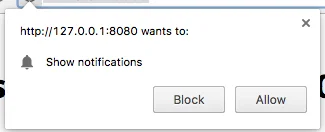
- หากผู้ใช้อนุญาตการแจ้งเตือน อีเวนต์
onSubscribeจะถูกเรียก
Pushwoosh.subscribe() จะทำงานโดยอัตโนมัติหากตั้งค่า autoSubscribe: true ระหว่างการเริ่มต้น SDK
เรียกเมธอดนี้หากคุณเลือกที่จะแจ้งให้ผู้ใช้สมัครรับ push ด้วยตนเองโดยใช้พารามิเตอร์ autoSubscribe: false ระหว่างการเริ่มต้น:
<button onclick="Pushwoosh.subscribe()">Subscribe</button><script> Pushwoosh.push(['onSubscribe', (api) => { console.log('ผู้ใช้สมัครรับข้อมูลสำเร็จ'); }]);</script>Pushwoosh.unsubscribe()
- เมธอด
/unregisterDeviceจะทำงาน - อีเวนต์
onUnsubscribeจะถูกเรียก
<button onclick="Pushwoosh.unsubscribe()">Unsubscribe</button><script type="text/javascript"> Pushwoosh.push(['onUnsubscribe', (api) => { console.log('ผู้ใช้ยกเลิกการสมัครรับข้อมูลสำเร็จ'); }]);</script>Pushwoosh.isSubscribed()
ตรวจสอบว่าผู้ใช้สมัครรับข้อมูลหรือไม่ และคืนค่าแฟล็ก true/false
Pushwoosh.isSubscribed().then((isSubscribed) => { console.log('isSubscribed', isSubscribed);});Pushwoosh.getHWID()
คืนค่า Pushwoosh HWID
Pushwoosh.getHWID().then((hwid) => { console.log('hwid:', hwid);});Pushwoosh.getPushToken()
คืนค่า push token หากมี
Pushwoosh.getPushToken().then((pushToken) => { console.log('pushToken:', pushToken);});Pushwoosh.getUserId()
คืนค่า User ID หากมี
Pushwoosh.getUserId().then((userId) => { console.log('userId:', userId);});Pushwoosh.getParams()
คืนค่ารายการพารามิเตอร์ต่อไปนี้:
Pushwoosh.getParams().then((params) => { params = params || {}; var hwid = params.hwid; var pushToken = params.pushToken; var userId = params.userId;});Pushwoosh.isAvailableNotifications()
ตรวจสอบว่าเบราว์เซอร์รองรับ Pushwoosh WebSDK 3.0 หรือไม่ คืนค่า ‘true’ หรือ ‘false’
Pushwoosh.isAvailableNotifications() // true/falseเมธอด InboxMessages
Anchor link tomessagesWithNoActionPerformedCount(): Promise<number>
คืนค่าจำนวนข้อความที่เปิดแล้ว
Pushwoosh.pwinbox.messagesWithNoActionPerformedCount() .then((count) => { console.log(`${count} messages opened`); });unreadMessagesCount()
คืนค่าจำนวนข้อความที่ยังไม่ได้อ่าน
Pushwoosh.pwinbox.unreadMessagesCount() .then((count) => { console.log(`${count} messages unread`); });messagesCount(): Promise<number>
คืนค่าจำนวนข้อความทั้งหมด
Pushwoosh.pwinbox.messagesCount() .then((count) => { console.log(`${count} messages`); });loadMessages(): Promise<Array>
โหลดรายการข้อความที่ยังไม่ถูกลบ
Pushwoosh.pwinbox.loadMessages() .then(() => { console.log('Messages have been loaded'); });readMessagesWithCodes(codes: Array<string>): Promise<void>
ทำเครื่องหมายข้อความว่าอ่านแล้วโดยใช้ Inbox_Ids
Pushwoosh.pwinbox.readMessagesWithCodes(codes) .then(() => { console.log('Messages have been read'); });performActionForMessageWithCode(code: string): Promise<void>
ดำเนินการที่กำหนดให้กับข้อความและทำเครื่องหมายข้อความว่าอ่านแล้ว
Pushwoosh.pwinbox.performActionForMessageWithCode(code) .then(() => { console.log('Action has been performed'); });deleteMessagesWithCodes(codes: Array<string>): Promise<void>
ทำเครื่องหมายข้อความว่าถูกลบ
Pushwoosh.pwinbox.deleteMessagesWithCodes([code]) .then(() => { console.log('Messages have been deleted'); });syncMessages(): Promise<void>
ซิงโครไนซ์ข้อความกับเซิร์ฟเวอร์
Pushwoosh.pwinbox.syncMessages() .then(() => { console.log('Messages have been synchronized'); });เมธอด WebPopups
Anchor link toAPI Web popups แบบโปรแกรมจะพร้อมใช้งานเมื่อใดก็ตามที่วิดเจ็ตถูกโหลด ซึ่งเป็นค่าเริ่มต้น (ดูด้านบน) เข้าถึงได้ผ่าน Pushwoosh.moduleRegistry.webPopups เมื่ออีเวนต์ web-popups-ready ถูกเรียก
show(code: string): Promise<boolean>
แสดง popup ทันที โดยข้ามเงื่อนไขการแสดงผลทั้งหมด (การหน่วงเวลา, กฎของหน้า, ประเภทอุปกรณ์/ผู้เข้าชม, การจำกัดความถี่, ประเภททริกเกอร์) ปิด popup ที่มองเห็นอยู่แล้วเพื่อเปิดทางให้ Resolves false แทนที่จะ reject เมื่อไม่สามารถแสดง popup ได้
Pushwoosh.moduleRegistry.webPopups.show('popup_code') .then((shown) => console.log('Popup shown:', shown));hide(code?: string): boolean
ซ่อน popup ที่มองเห็นอยู่ หากมีการส่ง code จะซ่อนเฉพาะเมื่อตรงกับ popup ที่มองเห็นอยู่เท่านั้น คืนค่า false หากไม่มีอะไรถูกซ่อน
Pushwoosh.moduleRegistry.webPopups.hide();hideAll(): boolean
ซ่อน popup ที่มองเห็นอยู่และยกเลิกทุกอย่างที่ยังคงค้างอยู่สำหรับการโหลดหน้าปัจจุบัน show() ยังคงทำงานต่อไป
Pushwoosh.moduleRegistry.webPopups.hideAll();isVisible(code?: string): boolean
ตรวจสอบว่า popup กำลังมองเห็นอยู่หรือไม่ หากไม่มี code จะตรวจสอบว่ามี popup ใดๆ มองเห็นอยู่หรือไม่
Pushwoosh.moduleRegistry.webPopups.isVisible('popup_code');getVisibleCode(): string | null
คืนค่า code ของ popup ที่กำลังแสดงบนหน้าจอ หรือ null หากไม่มี popup ใดมองเห็นอยู่
Pushwoosh.moduleRegistry.webPopups.getVisibleCode();getAvailableCodes(): Array<string>
คืนค่า codes ของ popup ทุกอันที่เซิร์ฟเวอร์ส่งคืนสำหรับอุปกรณ์นี้
Pushwoosh.moduleRegistry.webPopups.getAvailableCodes();getState(): object
คืนค่าภาพรวมของสถานะ Web popup: visible (code บนหน้าจอ หรือ null), queued (codes ที่รอช่องแสดงผล), waiting (codes ที่มีตัวจับเวลาหน่วงเวลาที่ทำงานอยู่), และ available (ทุก code ที่เซิร์ฟเวอร์ส่งคืน)
Pushwoosh.moduleRegistry.webPopups.getState();การรองรับ Progressive Web App
Anchor link toในการผสานรวม Pushwoosh เข้ากับ Progressive Web Application (PWA) ของคุณ ให้ทำตามขั้นตอนที่อธิบายไว้ด้านล่าง สำหรับผู้ใช้ iPhone และ iPad โปรดดู Web push บน iPhone และ iPad เพิ่มเติม
1. คัดลอกเส้นทางไปยังไฟล์ Service Worker ของคุณ:
if ('serviceWorker' in navigator) { window.addEventListener('load', () => { navigator.serviceWorker.register('/service-worker.js') // <- url ของ service worker ของคุณ });}จากนั้น ใช้พารามิเตอร์ serviceWorkerUrl ขณะเริ่มต้น WebSDK ดังนี้:
var Pushwoosh = Pushwoosh || [];Pushwoosh.push(['init', { logLevel: 'error', applicationCode: 'XXXXX-XXXXX', safariWebsitePushID: 'web.com.example.domain', defaultNotificationTitle: 'Pushwoosh', defaultNotificationImage: 'https://yoursite.com/img/logo-medium.png', serviceWorkerUrl: '/service-worker.js', // <- url ของ service worker ของคุณ}]);WebSDK ไม่ได้ลงทะเบียน Service Worker ใหม่ทันที; Service Worker จะถูกลงทะเบียนเมื่อจำเป็น:
- เมื่ออุปกรณ์ได้รับ push token (ในการลงทะเบียนอุปกรณ์หรือการสมัครรับข้อมูลใหม่)
- เมื่อ push token ถูกลบ (ในการลบอุปกรณ์ออกจากฐานผู้ใช้)
ซึ่งจะช่วยให้หน้าเว็บของคุณโหลดเร็วขึ้นโดยลดจำนวนคำขอไปยังเซิร์ฟเวอร์
เบราว์เซอร์ไม่อนุญาตให้ลงทะเบียน Service Worker สองตัวที่แตกต่างกันในเวลาเดียวกัน (อ่านเพิ่มเติม: https://github.com/w3c/ServiceWorker/issues/921) ดังนั้นเพื่อให้ PWA ของคุณทำงานได้อย่างถูกต้อง ควรลงทะเบียน Service Worker ร่วมกันสำหรับ codebase ของคุณและ codebase ของ Pushwoosh
2. เพิ่มสตริงต่อไปนี้ไปยัง Service Worker ของคุณ (ที่จุดเริ่มต้นหรือจุดสิ้นสุด ไม่สำคัญ):
importScripts('https://cdn.pushwoosh.com/webpush/v3/pushwoosh-service-worker.js' + self.location.search);ดังนั้นคุณจึงเปิดใช้งานการรับและประมวลผล push notifications ที่ส่งผ่านบริการของ Pushwoosh สำหรับ Service Worker ของคุณ
การติดตั้งจาก Google Tag Manager
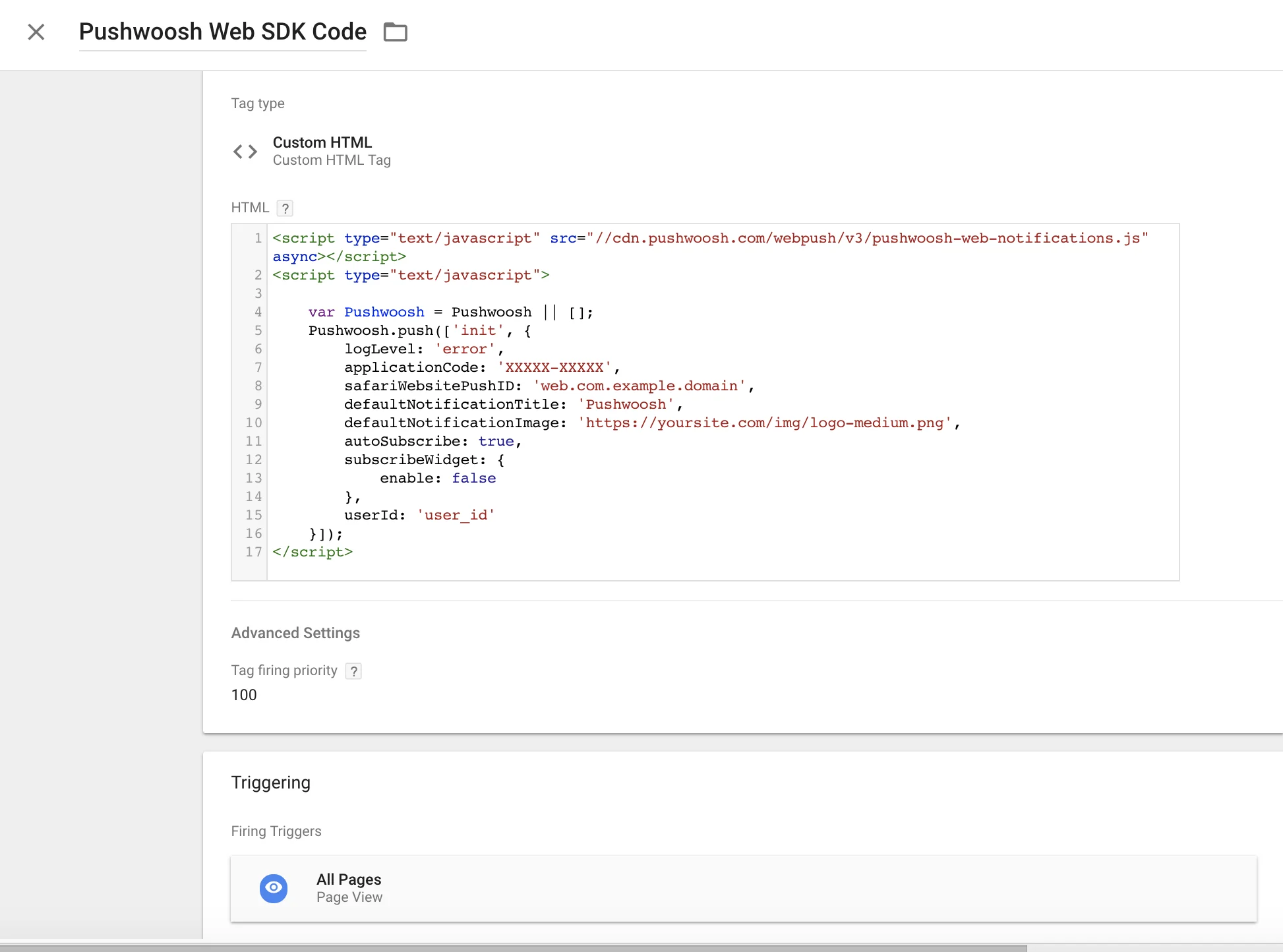
Anchor link toใช้โค้ดต่อไปนี้ใน Google Tag Manager ของคุณเพื่อเริ่มต้น Pushwoosh SDK สร้าง Custom HTML Tag และวางโค้ดด้านล่าง ตรวจสอบให้แน่ใจว่าได้เปลี่ยน Pushwoosh Application Code, Safari Website ID และ URL รูปภาพการแจ้งเตือนเริ่มต้นของคุณ
นอกจากนี้ ให้ตั้งค่าลำดับความสำคัญของ Tag Firing ให้สูง (เช่น 100) และทริกเกอร์บน All Pages ดูภาพหน้าจอด้านล่างคัดลอก
<script type="text/javascript" src="//cdn.pushwoosh.com/webpush/v3/pushwoosh-web-notifications.js" async></script><script type="text/javascript"> var Pushwoosh = Pushwoosh || []; Pushwoosh.push(['init', { logLevel: 'error', applicationCode: 'XXXXX-XXXXX', safariWebsitePushID: 'web.com.example.domain', defaultNotificationTitle: 'Pushwoosh', defaultNotificationImage: 'https://yoursite.com/img/logo-medium.png', autoSubscribe: true, subscribeWidget: { enable: false }, userId: 'user_id' }]);</script>