ตั้งค่า InboxKit ด้วย CocoaPods
ใช้งานได้ตั้งแต่ iOS SDK 7.0.40
InboxKit มาในรูปแบบ subspec ที่เป็นตัวเลือกของ pod หลัก PushwooshXCFramework คุณจำเป็นต้องผสานรวม SDK หลักไว้แล้ว หากคุณเริ่มต้นจากศูนย์ ให้ทำตาม คู่มือการผสานรวมพื้นฐาน ก่อน
เพิ่ม InboxKit pod
Anchor link to- เปิด
Podfileของคุณและเพิ่ม InboxKit subspec ไปยัง target ของแอป:
target 'MyApp' do  use_frameworks!
pod 'PushwooshXCFramework' pod 'PushwooshXCFramework/PushwooshInboxKit'end- รัน
pod installจากไดเรกทอรีโปรเจกต์ของคุณ:
pod install- เปิดไฟล์
.xcworkspaceที่สร้างขึ้น ตอนนี้ InboxKit จะถูกเชื่อมโยงเข้ากับ SDK หลักแล้ว
แสดง inbox
Anchor link toเพิ่ม inbox controller ไปยัง navigation flow ใดก็ได้ การกำหนดค่าเริ่มต้นก็เพียงพอที่จะทำให้ inbox ทำงานได้ด้วย cell มาตรฐานสามประเภท:
import PushwooshInboxKit
let inboxVC = PushwooshInboxKitViewController()navigationController?.pushViewController(inboxVC, animated: true)
@import PushwooshInboxKit;
PushwooshInboxKitViewController *inboxVC = [PushwooshInboxKitViewController new];[self.navigationController pushViewController:inboxVC animated:YES];ปรับแต่ง inbox
Anchor link toใน Swift ให้กำหนดค่า controller ผ่าน value type PushwooshInboxKitAttributes ส่วนใน Objective-C ให้ใช้ setters ที่รองรับ @objc บน controller — เนื่องจาก PushwooshInboxKitAttributes เป็น Swift struct และไม่ได้ถูก bridged
var attributes = PushwooshInboxKitAttributes()attributes.pullToRefreshEnabled = trueattributes.swipeToDeleteEnabled = trueattributes.pinningEnabled = trueattributes.style.unreadBadgeColor = .systemBlueattributes.style.titleFont = .systemFont(ofSize: 17, weight: .semibold)
let inboxVC = PushwooshInboxKitViewController(attributes: attributes)
PushwooshInboxKitViewController *inboxVC = [PushwooshInboxKitViewController new];[inboxVC setBackgroundColor:[UIColor systemBackgroundColor]];[inboxVC setEmptyMessage:@"You have no messages yet"];Style struct จะเปิดเผยสี, ฟอนต์, corner radii และ date formatter ทั้งหมดที่ใช้โดย cell เริ่มต้น ทุกค่าเป็นสี semantic ของ Apple โดยค่าเริ่มต้น ดังนั้น inbox จึงตอบสนองต่อ dark mode ของระบบโดยอัตโนมัติ
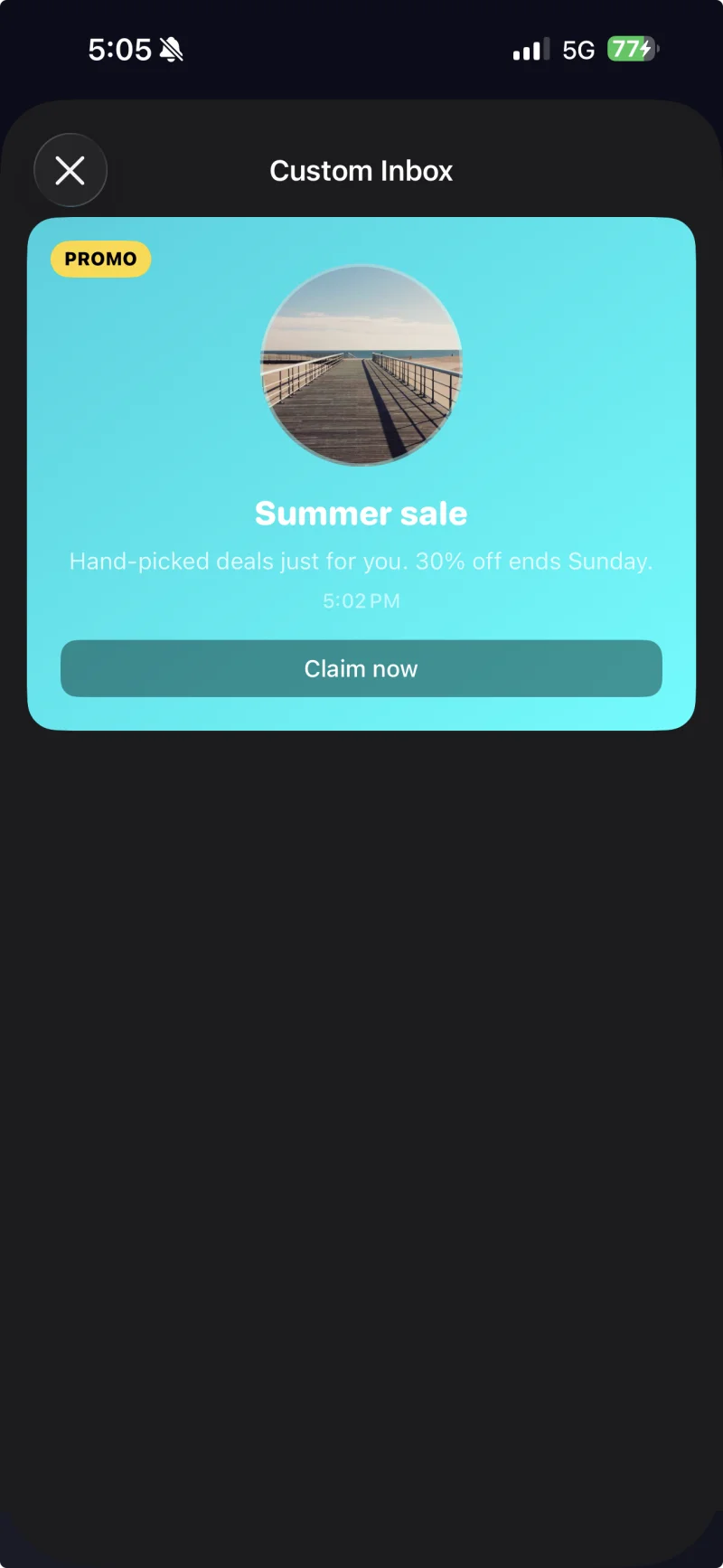
Cell ที่มีคำบรรยายพร้อมธีมที่กำหนดเองซึ่งปรับใช้ผ่าน PushwooshInboxKitAttributes.Style
จัดการการแตะและการรีเฟรช
Anchor link toทำตาม PushwooshInboxKitDelegate เพื่อตอบสนองต่อการกระทำของผู้ใช้และ event การรีเฟรช ทุกเมธอดมีการใช้งานเริ่มต้น ดังนั้นคุณจึงสามารถ override เฉพาะส่วนที่ต้องการได้:
final class InboxCoordinator: NSObject, PushwooshInboxKitDelegate {    func inboxKit(_ vc: PushwooshInboxKitViewController,                  didSelect message: PWInboxMessageProtocol) -> Bool {        // คืนค่า true เพื่อให้ SDK เปิด URL ของข้อความหรือ richmedia        // คืนค่า false หากคุณจัดการการแตะทั้งหมดแล้ว (เช่น นำทางไปยังหน้าจอที่กำหนดเอง)        return true    }
    func inboxKit(_ vc: PushwooshInboxKitViewController,                  didRefreshWith messages: [PWInboxMessageProtocol],                  error: Error?) {        // แสดงสถานะว่างเปล่า / ข้อผิดพลาดของคุณเองที่นี่หากจำเป็น    }}
inboxVC.delegate = inboxCoordinator
SDK มี bulk operations เป็นเมธอด @objc บน controller ดังนั้นคุณจึงสามารถเชื่อมต่อเข้ากับ UIBarButtonItem ได้โดยตรง:
let markAll = UIBarButtonItem( image: UIImage(systemName: "checkmark.circle"), style: .plain, target: inboxVC, action: #selector(PushwooshInboxKitViewController.markAllAsRead))let clearRead = UIBarButtonItem( image: UIImage(systemName: "trash"), style: .plain, target: inboxVC, action: #selector(PushwooshInboxKitViewController.clearReadMessages))inboxVC.navigationItem.rightBarButtonItems = [clearRead, markAll]