Push Stories สำหรับ iOS
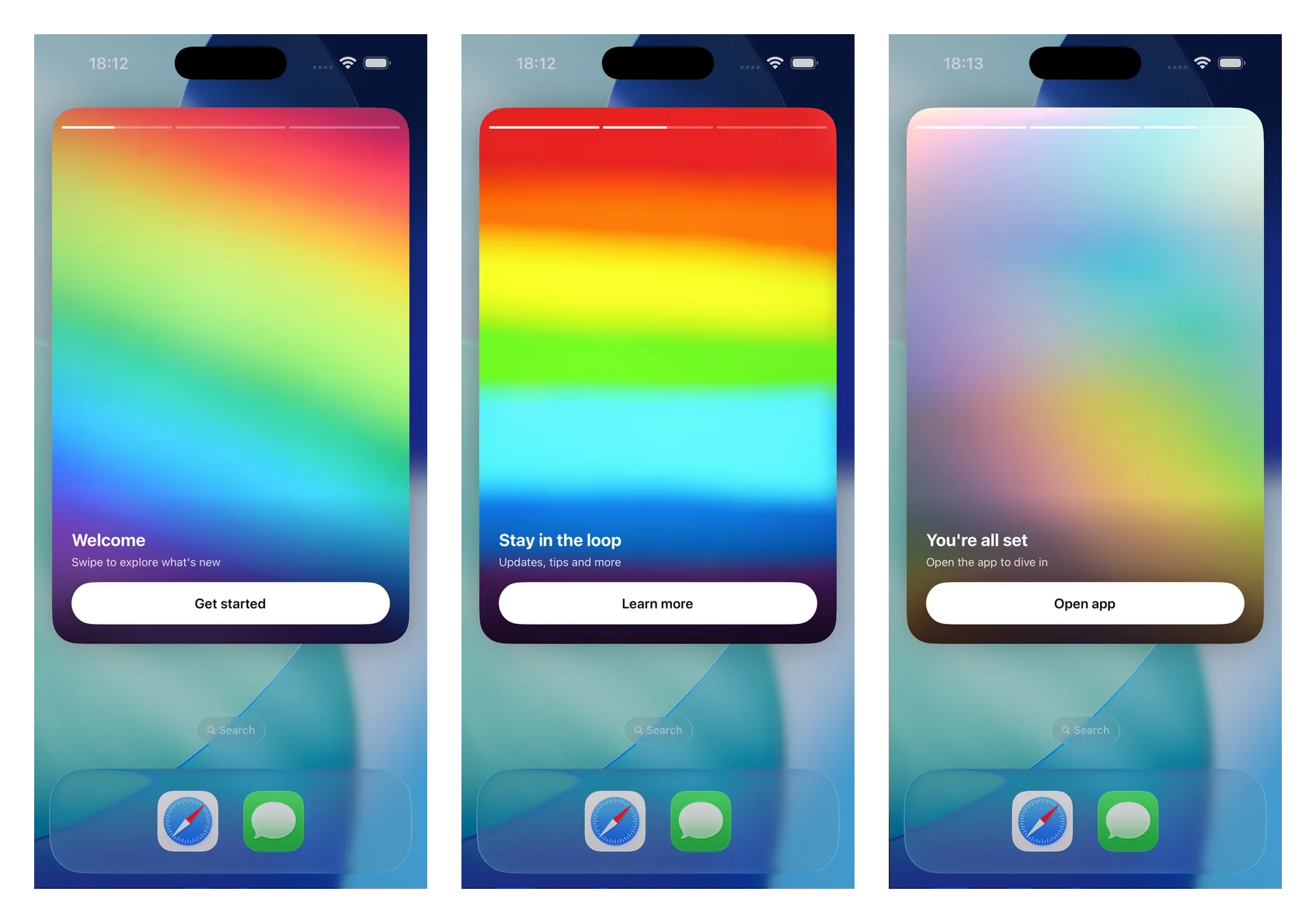
Push stories เปลี่ยน push notification ที่ขยายออกให้เป็นประสบการณ์ stories แบบเต็มหน้าจอ สไตล์ Instagram: รูปภาพเต็มขอบ, แถบความคืบหน้าที่ด้านบน, การเลื่อนหน้าอัตโนมัติ, การแตะเพื่อนำทาง และปุ่มพร้อม deep link โดยจะแสดงผลโดย Notification Content Extension โดยใช้โมดูล PushwooshNotificationUI แบบสแตนด์อโลน — คุณเพียงแค่ subclass view controller ตัวเดียว และ SDK จะจัดการเรื่องการแยกวิเคราะห์, การโหลดรูปภาพ, ความคืบหน้า, เวลา, การนำทาง และ deep links
พร้อมใช้งานตั้งแต่เวอร์ชัน 7.0.46
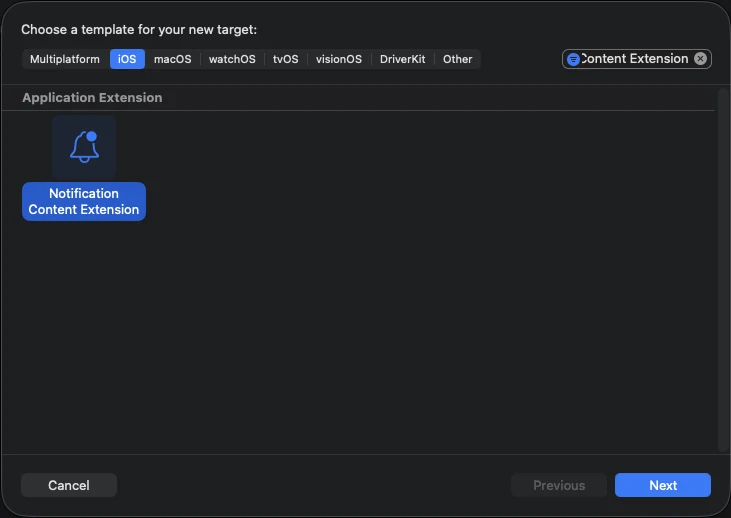
1. เพิ่ม Notification Content Extension
Anchor link toใน Xcode เลือก File > New > Target… เลือก Notification Content Extension และตั้งชื่อ (ตัวอย่างเช่น StoriesContentExtension)
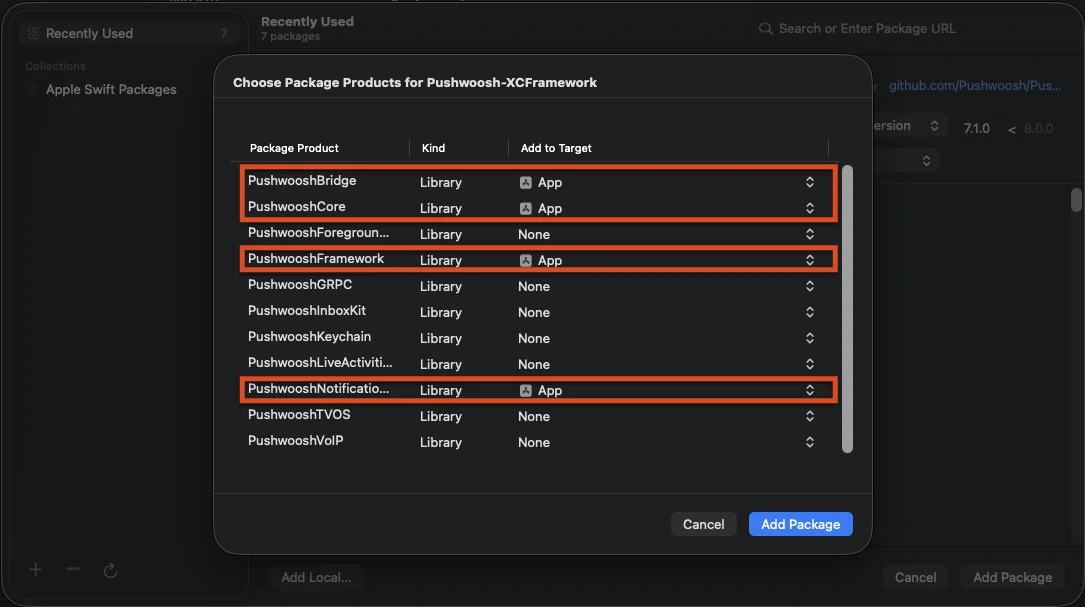
2. เพิ่มโมดูล PushwooshNotificationUI
Anchor link toPushwooshNotificationUI เป็นโมดูลแบบสแตนด์อโลนที่ไม่มีการพึ่งพา Pushwoosh อื่นๆ ดังนั้นจึงมีขนาดเล็กภายในกระบวนการของ extension เพิ่มโมดูลนี้ไปยัง content extension target (ไม่ใช่ app target)
Swift Package Manager
CocoaPods
target 'StoriesContentExtension' do  use_frameworks!
  pod 'PushwooshXCFramework/PushwooshNotificationUI'end
3. Subclass view controller ของ stories
Anchor link toแทนที่เนื้อหาของ NotificationViewController ที่สร้างขึ้นด้วย subclass ของ PushwooshStoriesViewController นี่คือการผสานรวมทั้งหมด
import PushwooshNotificationUI
class NotificationViewController: PushwooshStoriesViewController {}
4. กำหนดค่า Info.plist ของ extension
Anchor link toใน Info.plist ของ content extension ให้ตั้งค่าคีย์ต่อไปนี้ภายใต้ NSExtension > NSExtensionAttributes:
<key>UNNotificationExtensionCategory</key><string>PW_STORIES</string><key>UNNotificationExtensionUserInteractionEnabled</key><true/><key>UNNotificationExtensionDefaultContentHidden</key><true/><key>UNNotificationExtensionInitialContentSizeRatio</key><real>1.5</real>5. ส่งการแจ้งเตือน push stories
Anchor link toส่งการแจ้งเตือนที่มี category เป็น PW_STORIES และมี custom data ที่มีบล็อก pw_stories อยู่ ใช้ฟิลด์ ios_category_custom สำหรับ category และฟิลด์ data สำหรับ payload ของ stories
{ "request": { "application": "APPLICATION_CODE", "auth": "API_ACCESS_TOKEN", "notifications": [ { "send_date": "now", "content": "Tap to explore", "ios_title": "Push Stories", "ios_category_custom": "PW_STORIES", "ios_root_params": { "aps": { "mutable-content": 1 } }, "data": { "pw_stories": { "pages": [ { "image": "https://example.com/story-1.jpg", "duration": 5.0, "link": "yourapp://page1", "button_title": "Get started", "title": "Welcome", "subtitle": "Swipe to explore what's new" }, { "image": "https://example.com/story-2.jpg", "duration": 4.0, "link": "yourapp://page2", "button_title": "Learn more", "title": "Stay in the loop", "subtitle": "Updates, tips and more" } ] } } } ] }}แต่ละหน้ารองรับฟิลด์ต่อไปนี้ เฉพาะ image เท่านั้นที่จำเป็น ส่วนที่เหลือเป็นทางเลือก
| ฟิลด์ | คำอธิบาย |
|---|---|
image | URL ของรูปภาพเต็มหน้าจอสำหรับหน้านั้นๆ |
duration | จำนวนวินาทีที่หน้าจะแสดงบนหน้าจอก่อนที่จะเลื่อนไปหน้าถัดไปโดยอัตโนมัติ ค่าเริ่มต้นประมาณ 5 วินาที |
link | Deep link ที่จะเปิดเมื่อแตะปุ่มของหน้านั้นๆ |
button_title | ชื่อของปุ่มบนหน้านั้นๆ |
title | ข้อความชื่อเรื่องที่แสดงทับบนหน้านั้นๆ |
subtitle | ข้อความชื่อเรื่องรองที่แสดงทับบนหน้านั้นๆ |
การปรับแต่ง
Anchor link toOverride คุณสมบัติใน subclass ของคุณเพื่อปรับแต่งประสบการณ์ ทั้งหมดมีค่าเริ่มต้นที่เหมาะสม
import PushwooshNotificationUI
class NotificationViewController: PushwooshStoriesViewController { override var storyAspectRatio: CGFloat { 1.5 } // keep in sync with InitialContentSizeRatio override var hapticsEnabled: Bool { true } override var longPressToPauseEnabled: Bool { true } override var crossfadesBetweenPages: Bool { true } override var loopsAfterLastPage: Bool { false }}| คุณสมบัติ | ค่าเริ่มต้น | คำอธิบาย |
|---|---|---|
storyAspectRatio | 1.5 | อัตราส่วนภาพ (สูง ÷ กว้าง) ของพื้นที่ stories ควรรักษาให้สอดคล้องกับ UNNotificationExtensionInitialContentSizeRatio |
hapticsEnabled | false | เล่นการสั่นเบาๆ เมื่อมีการนำทางด้วยการแตะ |
longPressToPauseEnabled | false | กดค้างเพื่อหยุดหน้าปัจจุบัน; ปล่อยเพื่อเล่นต่อ |
crossfadesBetweenPages | false | ใช้เอฟเฟกต์ cross-dissolve ระหว่างหน้าแทนการตัดภาพทันที จะกลับไปเป็นการเปลี่ยนภาพทันทีเมื่อเปิดใช้งาน Reduce Motion |
loopsAfterLastPage | false | เริ่มต้นใหม่จากหน้าแรกหลังจากหน้าสุดท้ายจบลง |
appGroupIdentifier | nil | App Group ที่ใช้ร่วมกับ Notification Service Extension สำหรับการ pre-cache มีเดีย (ดูด้านล่าง) |
คุณยังสามารถ override showDefaultContent(for:) เพื่อปรับแต่งเนื้อหาสำรองที่จะแสดงเมื่อ payload หายไปหรือมีรูปแบบไม่ถูกต้อง (โดยค่าเริ่มต้นจะแสดงเนื้อหาของ alert)
การ pre-cache มีเดีย
Anchor link toเพื่อให้เฟรมแรกแสดงผลทันทีแบบออฟไลน์ ให้แชร์ App Group ระหว่าง Content Extension และ Notification Service Extension ของคุณ Override appGroupIdentifier บน stories controller จากนั้นดาวน์โหลดมีเดียล่วงหน้าจาก didReceive(_:withContentHandler:) ของ Service Extension ของคุณ:
import PushwooshNotificationUI
PushwooshStoriesMediaPrefetcher.prefetch(    userInfo: request.content.userInfo,    appGroupIdentifier: "group.com.example.app") {    contentHandler(bestAttemptContent)}
เปิดใช้งานความสามารถ App Groups บนทั้งสอง extension ด้วย group identifier เดียวกัน และส่ง mutable-content: 1 เพื่อให้ Service Extension ทำงาน หากไม่มี App Group มีเดียจะถูกแคชในไดเรกทอรี tmp ของ extension แทน
Lifecycle และ analytics callbacks
Anchor link toตั้งค่า storiesDelegate เพื่อสังเกตการณ์เหตุการณ์ของ story — การแสดงผลหน้า, การแตะปุ่ม, การเสร็จสิ้น และการแสดงเนื้อหาสำรอง ปฏิบัติตาม PushwooshStoriesDelegate; ทุกเมธอดเป็นทางเลือก ดังนั้นให้ implement เฉพาะเมธอดที่คุณต้องการ
import PushwooshNotificationUI
class NotificationViewController: PushwooshStoriesViewController, PushwooshStoriesDelegate {    override func viewDidLoad() {        super.viewDidLoad()        storiesDelegate = self    }
func storiesViewController(_ controller: PushwooshStoriesViewController, didStartWithPageCount pageCount: Int) {} func storiesViewController(_ controller: PushwooshStoriesViewController, didShow page: StoryPage, at index: Int) {} func storiesViewController(_ controller: PushwooshStoriesViewController, didTapActionFor page: StoryPage, at index: Int) {} func storiesViewControllerDidFinish(_ controller: PushwooshStoriesViewController) {} func storiesViewControllerDidShowFallback(_ controller: PushwooshStoriesViewController) {}}| Callback | ทำงานเมื่อ |
|---|---|
didStartWithPageCount: | payload ของ stories ที่ถูกต้องถูกแยกวิเคราะห์และการเล่นกำลังจะเริ่มขึ้น |
didShow:at: | หน้าหนึ่งปรากฏขึ้น ใช้สำหรับการนับการแสดงผลต่อหน้า |
didTapActionFor:at: | ผู้ใช้แตะปุ่ม call-to-action |
storiesViewControllerDidFinish: | หน้าสุดท้ายเล่นจบแล้ว |
storiesViewControllerDidShowFallback: | payload หายไปหรือมีรูปแบบไม่ถูกต้อง และเนื้อหาสำรองถูกแสดงขึ้น |
StoryPage ที่ส่งไปยัง callbacks จะเปิดเผย imageURL, duration, link, buttonTitle, title และ subtitle ของหน้านั้นๆ
การนำทาง
Anchor link toแตะที่หนึ่งในสามของหน้าจอด้านขวาเพื่อไปยังหน้าถัดไป และหนึ่งในสามด้านซ้ายเพื่อย้อนกลับ การปัดแนวนอนไม่ได้ถูกนำมาใช้โดยเจตนา เนื่องจากขัดแย้งกับท่าทางการปัดเพื่อปิดการแจ้งเตือนของระบบ การแตะปุ่มของหน้าจะเปิด deep link และปิดการแจ้งเตือน