ตั้งค่า InboxKit ด้วย Swift Package Manager
ใช้งานได้ตั้งแต่ iOS SDK 7.0.40
InboxKit จัดส่งเป็นผลิตภัณฑ์ไลบรารีแยกต่างหากภายในแพ็คเกจ Swift Pushwoosh-XCFramework คุณจำเป็นต้องผสานรวม SDK หลักไว้แล้ว หากคุณเริ่มต้นจากศูนย์ ให้ทำตาม คู่มือการผสานรวมพื้นฐาน ก่อน
เพิ่มผลิตภัณฑ์แพ็คเกจ InboxKit
Anchor link to-
เปิดโปรเจกต์ของคุณใน Xcode และไปที่การตั้งค่าของโปรเจกต์ → Package Dependencies จากนั้นกดปุ่ม +
-
ป้อน Package URL ต่อไปนี้:
https://github.com/Pushwoosh/Pushwoosh-XCFramework-
ตั้งค่า Dependency Rule เป็น Up to Next Major Version พร้อมกับเวอร์ชันเสถียรล่าสุด จากนั้นคลิก Add Package
-
บนหน้าจอการเลือกแพ็คเกจ ให้เลือกผลิตภัณฑ์ต่อไปนี้เป็นอย่างน้อย และเพิ่มไปยัง target หลักของแอปของคุณ:
- PushwooshFramework (จำเป็น)
- PushwooshCore (จำเป็น)
- PushwooshBridge (จำเป็น)
- PushwooshInboxKit (โมดูลใหม่)
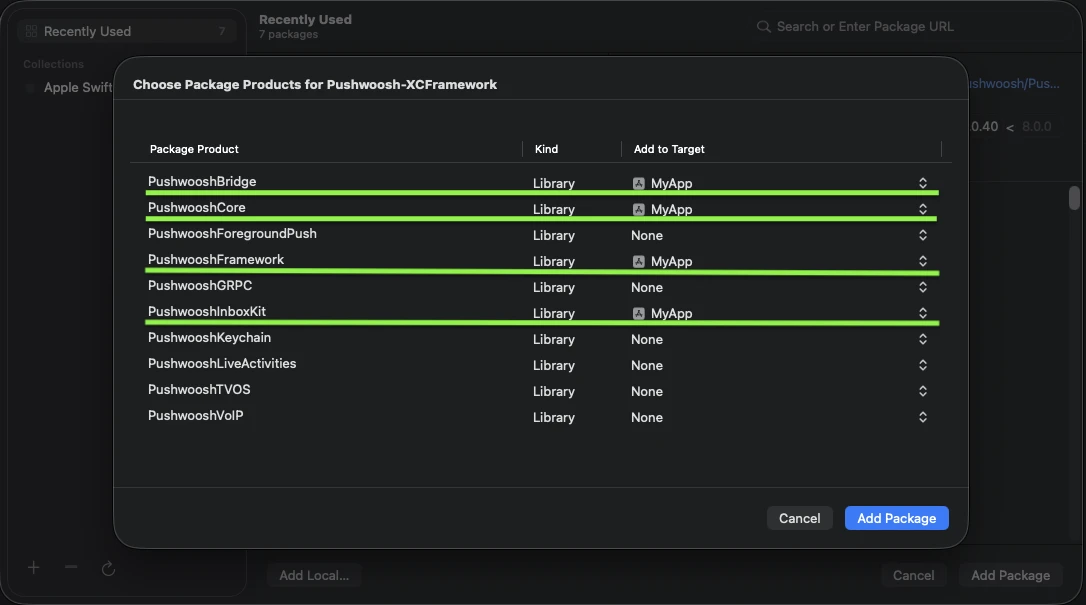
เพิ่มผลิตภัณฑ์ที่ไฮไลต์ทั้งสี่ไปยัง target หลักของแอปของคุณ
- เปิด target หลักของแอปของคุณ และภายใต้ Frameworks, Libraries, and Embedded Content ยืนยันว่า
PushwooshInboxKit.xcframeworkอยู่ในรายการและถูกฝัง (embedded)
เพียงเท่านี้ — InboxKit ก็ถูกเชื่อมโยงเข้ากับ SDK หลักแล้ว
แสดงอินบ็อกซ์
Anchor link toเพิ่ม inbox controller ไปยัง navigation flow ใดก็ได้ การกำหนดค่าเริ่มต้นก็เพียงพอที่จะทำให้อินบ็อกซ์ทำงานได้ด้วยเซลล์มาตรฐานสามประเภท:
import PushwooshInboxKit
let inboxVC = PushwooshInboxKitViewController()navigationController?.pushViewController(inboxVC, animated: true)
@import PushwooshInboxKit;
PushwooshInboxKitViewController *inboxVC = [PushwooshInboxKitViewController new];[self.navigationController pushViewController:inboxVC animated:YES];ปรับแต่งอินบ็อกซ์
Anchor link toใน Swift ให้กำหนดค่า controller ผ่าน value type PushwooshInboxKitAttributes ใน Objective-C ให้ใช้ setters ที่เป็นมิตรกับ @objc บน controller — PushwooshInboxKitAttributes เป็น Swift struct และไม่ได้ถูก bridge
var attributes = PushwooshInboxKitAttributes()attributes.pullToRefreshEnabled = trueattributes.swipeToDeleteEnabled = trueattributes.pinningEnabled = trueattributes.style.unreadBadgeColor = .systemBlueattributes.style.titleFont = .systemFont(ofSize: 17, weight: .semibold)
let inboxVC = PushwooshInboxKitViewController(attributes: attributes)
PushwooshInboxKitViewController *inboxVC = [PushwooshInboxKitViewController new];[inboxVC setBackgroundColor:[UIColor systemBackgroundColor]];[inboxVC setEmptyMessage:@"You have no messages yet"];struct Style เปิดเผยสี, ฟอนต์, corner radii และ date formatter ทั้งหมดที่ใช้โดยเซลล์เริ่มต้น ทุกค่าเป็นสี semantic ของ Apple ตามค่าเริ่มต้น ดังนั้นอินบ็อกซ์จึงตอบสนองต่อ dark mode ของระบบโดยอัตโนมัติ
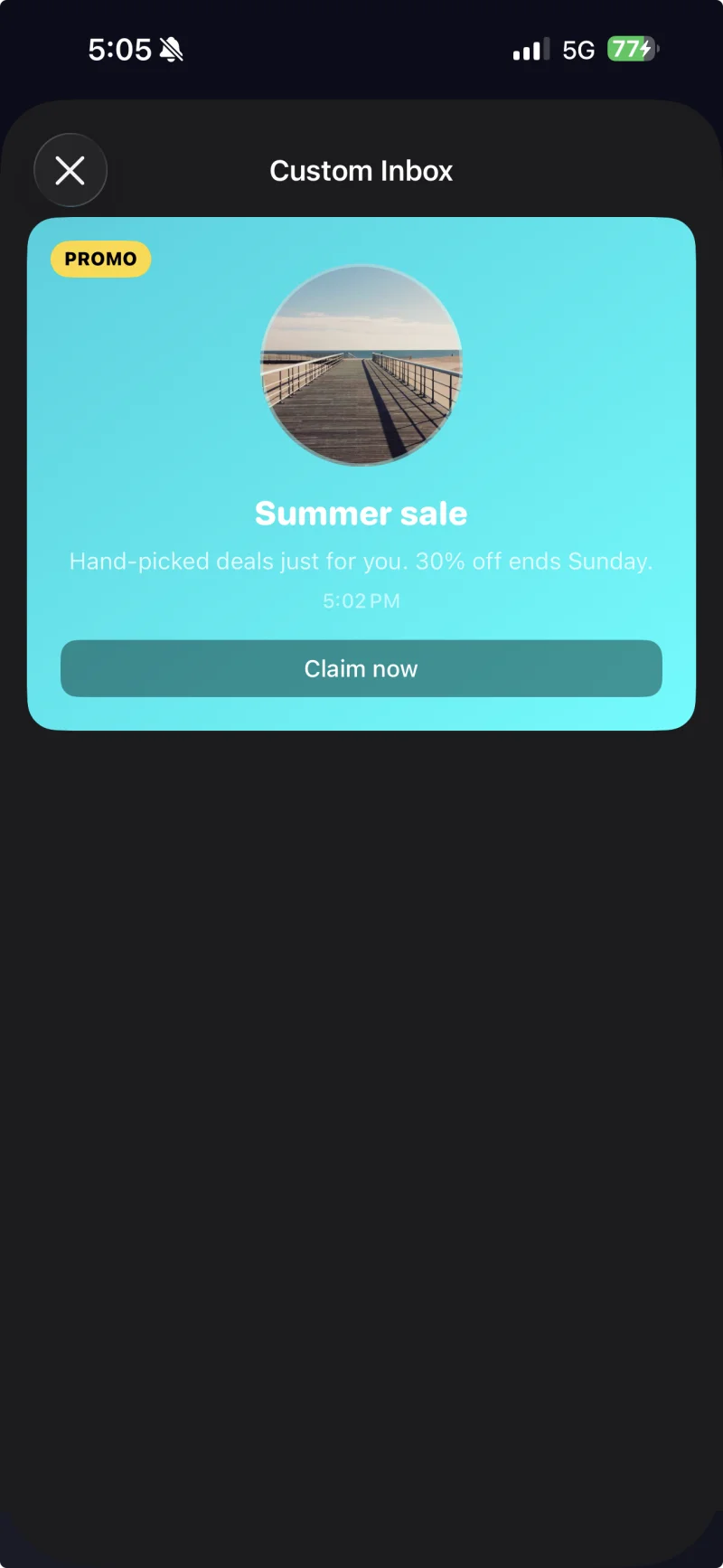
เซลล์ที่มีคำบรรยายพร้อมธีมที่กำหนดเองซึ่งใช้ผ่าน PushwooshInboxKitAttributes.Style
จัดการการแตะและการรีเฟรช
Anchor link toปฏิบัติตาม PushwooshInboxKitDelegate เพื่อตอบสนองต่อการกระทำของผู้ใช้และเหตุการณ์การรีเฟรช ทุกเมธอดมีการใช้งานเริ่มต้น ดังนั้นคุณจึง override เฉพาะสิ่งที่คุณต้องการ:
final class InboxCoordinator: NSObject, PushwooshInboxKitDelegate {    func inboxKit(_ vc: PushwooshInboxKitViewController,                  didSelect message: PWInboxMessageProtocol) -> Bool {        // Return true to let the SDK open the message URL or richmedia.        // Return false if you handled the tap entirely (e.g. routed to a custom screen).        return true    }
    func inboxKit(_ vc: PushwooshInboxKitViewController,                  didRefreshWith messages: [PWInboxMessageProtocol],                  error: Error?) {        // Show your own empty / error state here if needed.    }}
inboxVC.delegate = inboxCoordinator