iOS एक्शन बटन कॉन्फ़िगरेशन
iOS इंटरैक्टिव नोटिफिकेशन उपयोगकर्ताओं को ऐप खोले बिना नोटिफिकेशन बैनर से कार्रवाई करने की सुविधा देते हैं। Pushwoosh में आप इसे iOS श्रेणियों के साथ सेट करते हैं: प्रत्येक श्रेणी में एक या दो बटन होते हैं जिन्हें आप कंट्रोल पैनल में बनाते हैं और एक पुश से जोड़ते हैं।
एक श्रेणी बनाएं
Anchor link to- Pushwoosh में अपने एप्लिकेशन का प्लेटफ़ॉर्म कॉन्फ़िगर करें (Configure platforms) पेज खोलें।
- iOS प्लेटफ़ॉर्म के बगल में एक्शन बटन (Action buttons) पर क्लिक करें। आप इसे मुख्य iOS प्लेटफ़ॉर्म सेटअप से पहले या बाद में कर सकते हैं।

- एक श्रेणी का नाम (Category name) दर्ज करें। आप बाद में श्रेणी खोजने के लिए इस नाम का उपयोग करेंगे।
- बटन लेबल (Button label) निर्दिष्ट करें। यह बटन पर टेक्स्ट है। iOS टेक्स्ट की दो पंक्तियाँ तक दिखाता है।
- एक बटन प्रकार (Button type) चुनें:
- विनाशकारी (Destructive): डिलीट, रिजेक्ट, या डिसमिस जैसी कार्रवाइयों के लिए।
- गैर-विनाशकारी (Non-destructive): सकारात्मक या तटस्थ कार्रवाइयों के लिए।
- एक बटन आईडी (Button ID) सेट करें। यह श्रेणी के भीतर अद्वितीय होना चाहिए। जब उपयोगकर्ता बटन पर टैप करता है तो आपका ऐप यह आईडी प्राप्त करता है। नोटिफिकेशन डेलीगेट में इसे कैसे पढ़ना है, यह जानने के लिए iOS इंटरैक्टिव पुश नोटिफिकेशन पर डेवलपर्स गाइड देखें।
- उपयोगकर्ता द्वारा बटन पर टैप करने पर ऐप खोलने के लिए वैकल्पिक रूप से कार्रवाई पर ऐप लॉन्च करें (Launch app on action) को सक्षम करें।
- दूसरा बटन जोड़ने के लिए, पहले बटन के बगल में + पर क्लिक करें और चरण 4-7 दोहराएं। एक श्रेणी में अधिकतम दो बटन हो सकते हैं। दूसरे बटन को हटाने के लिए - का उपयोग करें।
- श्रेणी को सहेजने के लिए बनाएं (Create) पर क्लिक करें। यह नीचे दी गई सूची में अपनी श्रेणी आईडी (Category ID) के साथ दिखाई देता है।
पुश में श्रेणी का उपयोग करें
Anchor link toएक बार बन जाने के बाद, जब आप API के माध्यम से पुश भेजते हैं, तो श्रेणी संलग्न करें, createMessage में ios_category_id के रूप में श्रेणी आईडी (Category ID) पास करें।
उदाहरण
Anchor link toफिटनेस री-एंगेजमेंट पुश के लिए, आप एक श्रेणी fitness_reengagement को इस प्रकार परिभाषित कर सकते हैं:
- 20% छूट का दावा करें (
claim_offer): गैर-विनाशकारी, कार्रवाई पर ऐप लॉन्च करें (Launch app on action) चालू - शायद बाद में (
dismiss): विनाशकारी, कार्रवाई पर ऐप लॉन्च करें (Launch app on action) बंद
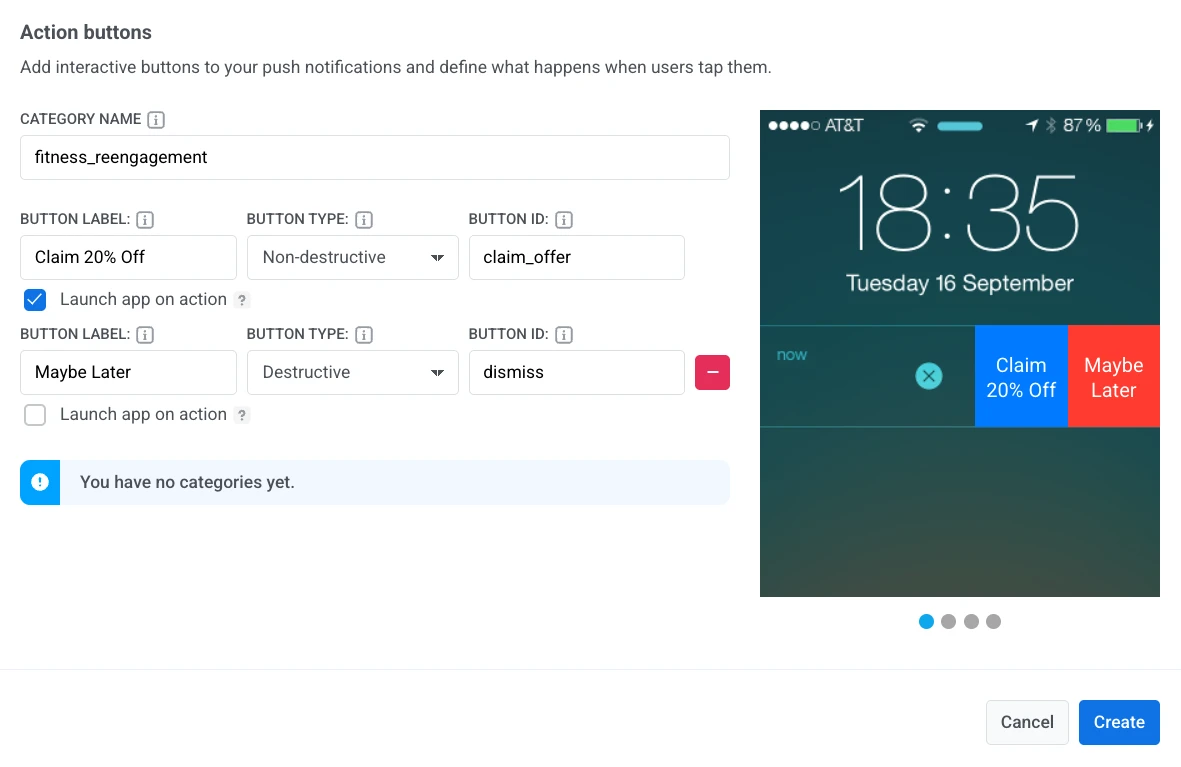
जब उपयोगकर्ता 20% छूट का दावा करें पर टैप करता है, तो ऐप खुल जाता है और आपका कोड claim_offer प्राप्त करता है। शायद बाद में ऐप खोले बिना नोटिफिकेशन को खारिज कर देता है।