Pushwoosh InboxKit iOS सेटअप करना
iOS SDK 7.0.40 से उपलब्ध है।
Pushwoosh InboxKit मौजूदा इनबॉक्स बैकएंड के ऊपर एक आधुनिक UIKit इनबॉक्स स्क्रीन प्रदान करता है। छह डिफ़ॉल्ट सेल लेआउट सामान्य कंटेंट-कार्ड आकृतियों को कवर करते हैं — साधारण बैनर से लेकर इमेज कैरोसेल, इनलाइन वीडियो, और Apple Wallet पास तक — इनलाइन CTA बटन सबसे आम इंटरैक्शन को संभालते हैं, और यदि आपको एक विशेष लुक की आवश्यकता है तो पूरी सतह सबक्लासिंग के लिए खुली है।
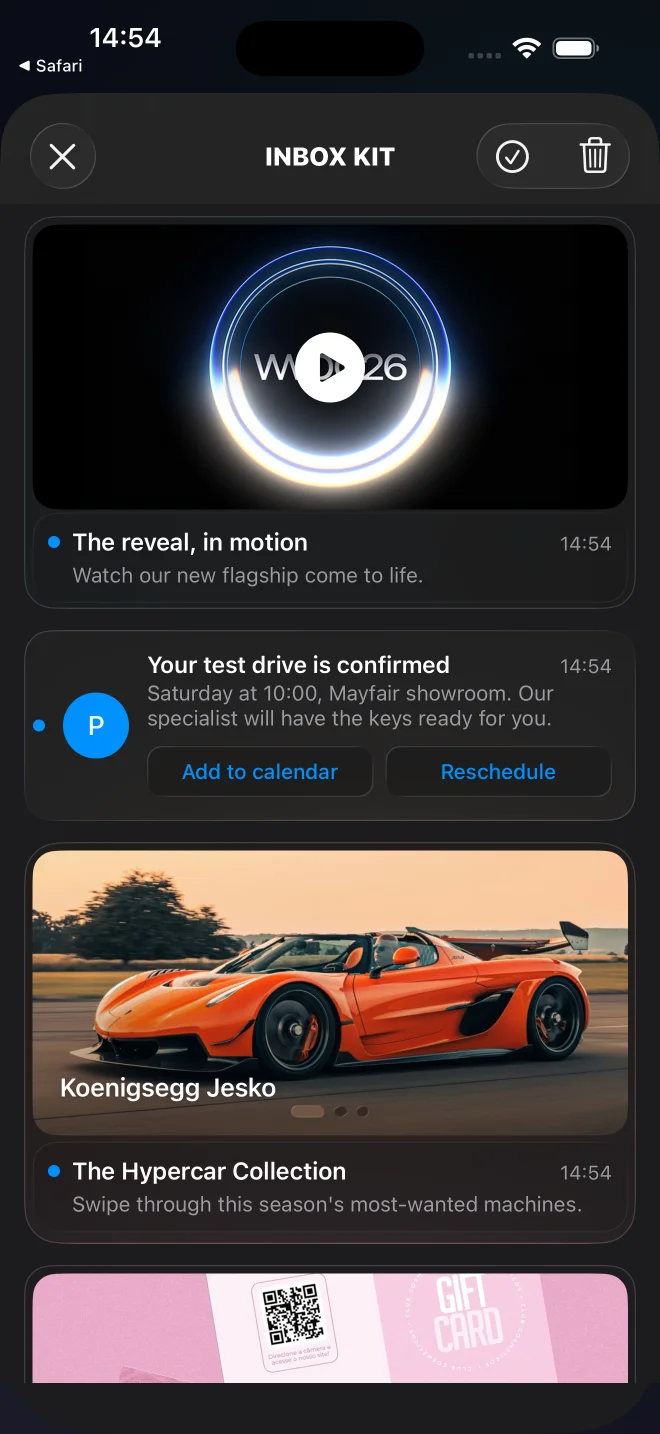
बैनर, कैप्शन्ड, क्लासिक, कैरोसेल, वीडियो, और Apple Wallet कार्ड के साथ डिफ़ॉल्ट InboxKit फ़ीड।
InboxKit का उपयोग कब करें
Anchor link toकिसी भी नए iOS इंटीग्रेशन के लिए InboxKit का उपयोग करें। यह पुराने Objective-C PushwooshInboxUI मॉड्यूल के लिए अनुशंसित प्रतिस्थापन है।
InboxKit आपको देता है:
- छह बिल्ट-इन सेल प्रकार — बैनर, कैप्शन्ड, क्लासिक, कैरोसेल, वीडियो, और Apple Wallet — पेलोड के
displayTypeके माध्यम से प्रति संदेश चयनित, या कोड सेattributes.forceCellKindके माध्यम से लागू किया गया। पूरी सूची के लिए कार्ड प्रकार देखें। (Apple Wallet कार्ड केवल iOS के लिए है।) - एक टाइप्ड
PushwooshInboxButtonActionएनम (openURL,dismiss,markRead,custom) के साथ इनलाइन CTA बटन। SDK पहले तीन को स्वचालित रूप से संभालता है; आपका डेलीगेटcustomको आपके अपने लॉजिक पर रूट करता है। - पिनिंग समर्थन:
actionParams["pinned"] == trueवाले संदेश फ़ीड के शीर्ष पर तैरते हैं और एक पिन ग्लिफ़ प्रस्तुत करते हैं। - स्वाइप-टू-डिलीट, पुल-टू-रिफ्रेश, गायब होने पर स्वचालित रूप से पढ़ा हुआ चिह्नित करना — सभी
PushwooshInboxKitAttributesके माध्यम से टॉगल करने योग्य हैं। - स्थायी भंडारण: डिलीट और पढ़ी हुई स्थिति एक प्रक्रिया पुनरारंभ के बाद भी बनी रहती है, भले ही नेटवर्क कॉल को अभी तक स्वीकार नहीं किया गया हो।
- पूरी तरह से कस्टम लेआउट के लिए एक खुला
PushwooshInboxCellबेस क्लास।
सर्वर अनुबंध अपरिवर्तित है — वही Pushwoosh इनबॉक्स बैकएंड, पेलोड, और डैशबोर्ड टूलिंग पहले की तरह काम करते हैं।
अपना इंटीग्रेशन तरीका चुनें
Anchor link to- Swift Package Manager के साथ InboxKit सेटअप करें — नए प्रोजेक्ट्स के लिए अनुशंसित।
- CocoaPods के साथ InboxKit सेटअप करें — उन प्रोजेक्ट्स के लिए जो पहले से ही CocoaPods का उपयोग कर रहे हैं।
कार्ड के प्रकार
Anchor link toInboxKit प्रति संदेश एक सेल लेआउट चुनता है। डिफ़ॉल्ट रिज़ॉल्वर पुश पेलोड से displayType पढ़ता है — इसे data ऑब्जेक्ट के अंदर रखें, जिसे SDK actionParams के तहत डिलीवर करता है। जब displayType गायब होता है, तो रिज़ॉल्वर एक अनुमान पर वापस आ जाता है: छवि + कोई शीर्षक नहीं → बैनर, छवि + शीर्षक + बॉडी → कैप्शन्ड, अन्यथा क्लासिक। कोड से पूरे फ़ीड के लिए एक लेआउट को बाध्य करने के लिए, attributes.forceCellKind सेट करें।
प्रत्येक रिच लेआउट शालीनता से डिग्रेड होता है: यदि कोई अनिवार्य फ़ील्ड अनुपस्थित या विकृत है, तो कार्ड एक खाली प्लेसहोल्डर प्रस्तुत करने के बजाय classic पर वापस आ जाता है (और कारण के साथ एक WARN लॉग किया जाता है)। classic अंतिम फॉलबैक है और संदेश जो भी वहन करता है उसे प्रस्तुत करता है; संदेश संपादक से इसके शीर्षक, बॉडी और आइकन को भरने की उम्मीद की जाती है।
displayType | लेआउट | आवश्यक पेलोड फ़ील्ड | इसमें बदल जाता है |
|---|---|---|---|
banner | फुल-ब्लीड छवि, कोई टेक्स्ट नहीं | छवि (inbox_image या data.image) | classic जब कोई छवि नहीं होती |
captioned | ऊपर छवि, नीचे शीर्षक + बॉडी | छवि (inbox_image या data.image), संदेश title और content | classic जब छवि, शीर्षक या बॉडी गायब हो |
classic | रंगीन प्रारंभिक अवतार + शीर्षक + बॉडी | — (शीर्षक, बॉडी और आइकन अपेक्षित) | — |
carousel | स्वाइप करने योग्य मल्टी-इमेज गैलरी | संदेश title और content, data.carousel (1-5 स्लाइड) | classic जब कोई स्लाइड या कोई शीर्षक/बॉडी नहीं होती |
video | प्ले बैज के साथ पोस्टर, टैप पर फुल-स्क्रीन प्लेयर | data.video (url + वैकल्पिक poster) | classic जब कोई डिस्क्रिप्टर नहीं होता |
wallet | ”Apple Wallet में जोड़ें” बटन (केवल iOS) | data.wallet (.pkpass URL) | classic जब कोई पास URL नहीं होता |
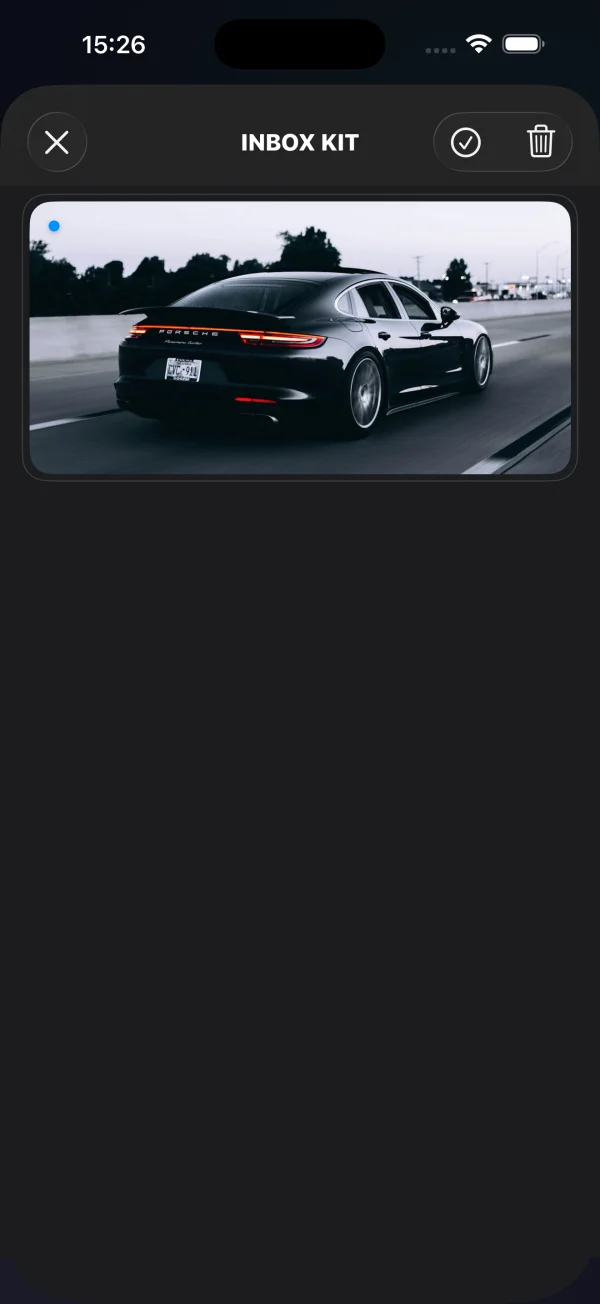
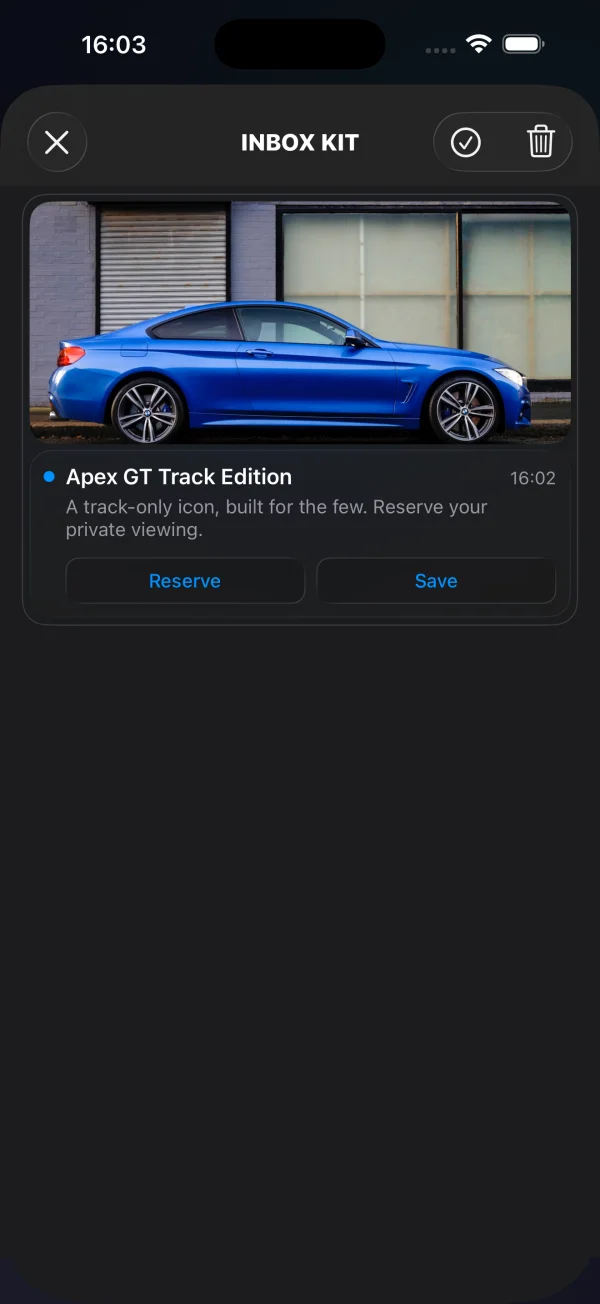
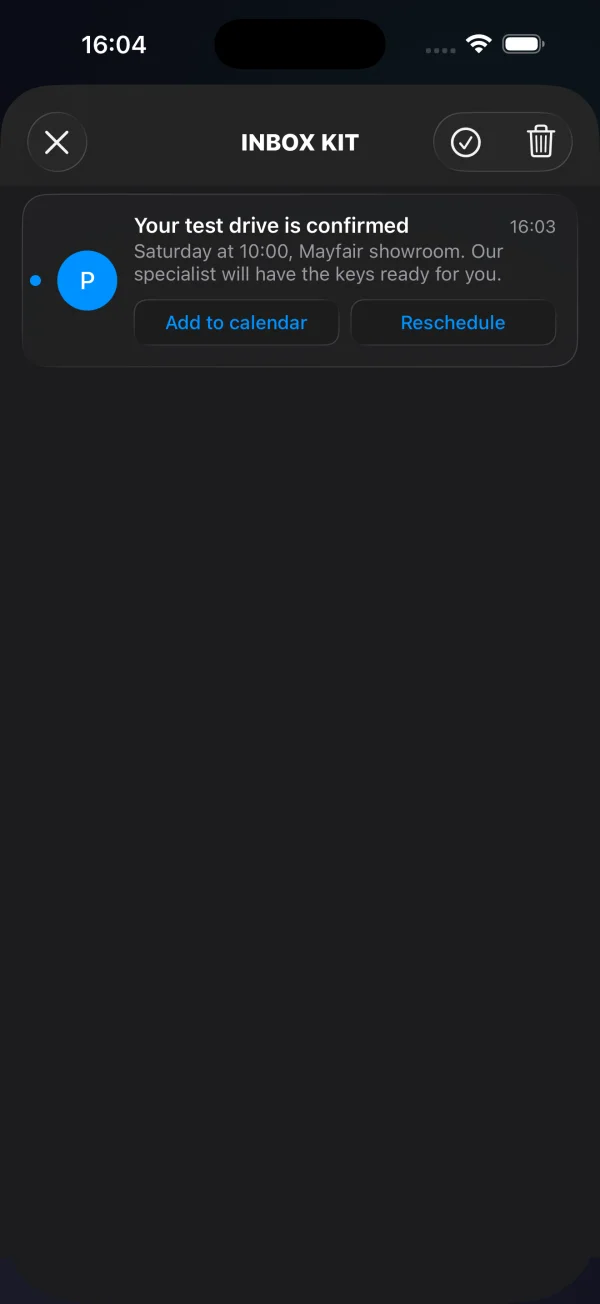
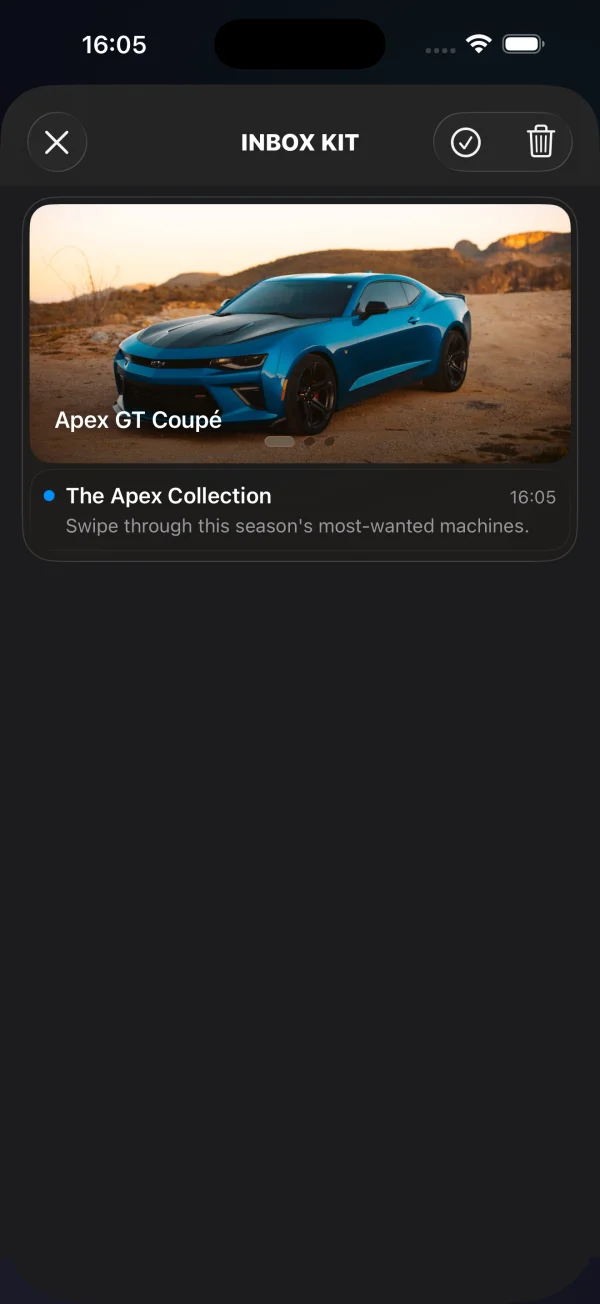
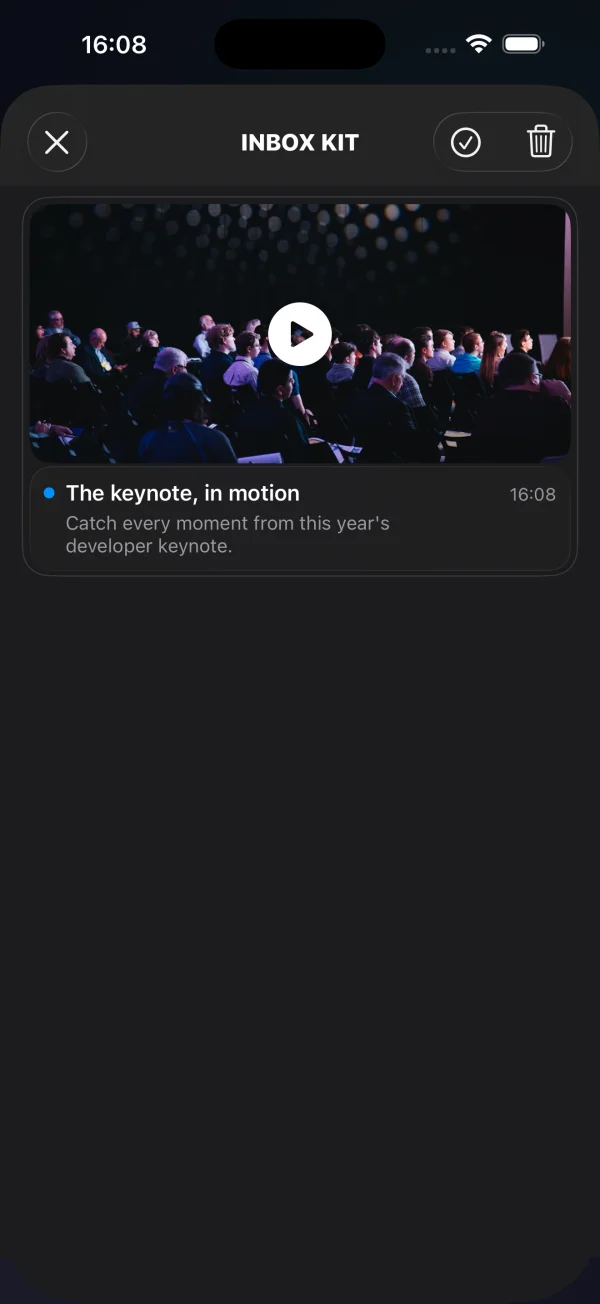
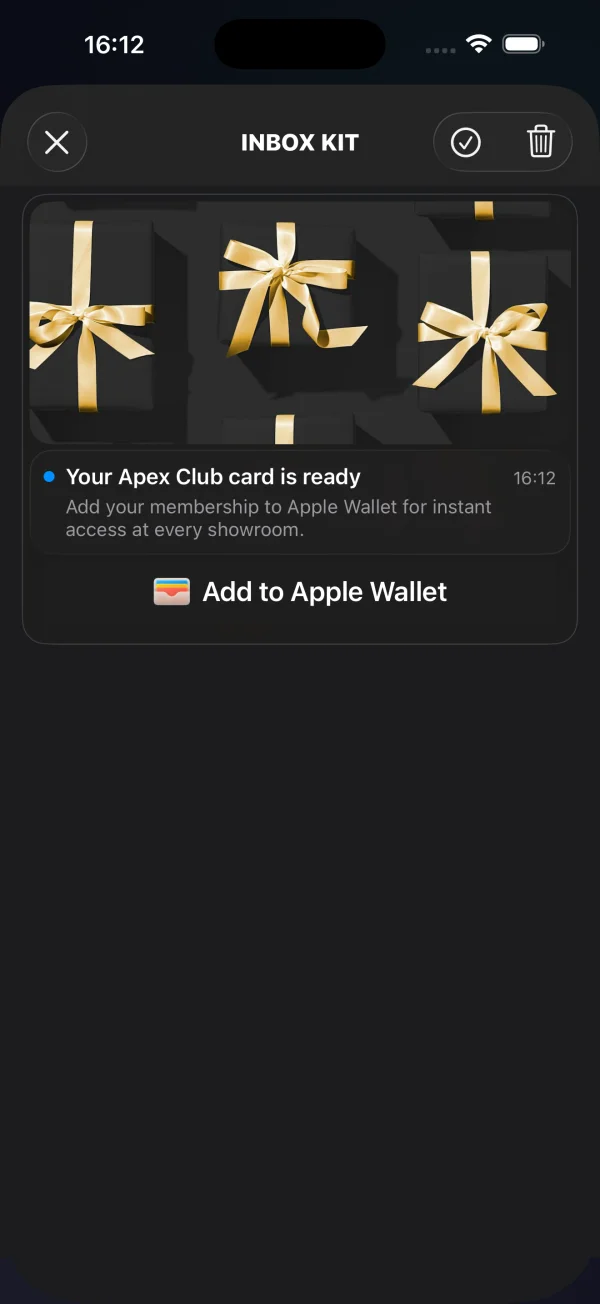
बैनर, कैप्शन्ड, और क्लासिक कार्ड मानक संदेश फ़ील्ड (छवि, शीर्षक, बॉडी) और वैकल्पिक buttons ऐरे द्वारा संचालित होते हैं — इनलाइन CTA बटन जोड़ें देखें। कैरोसेल, वीडियो, और Apple Wallet कार्ड data के अंदर अतिरिक्त संरचित डेटा ले जाते हैं, जिसे नीचे प्रलेखित किया गया है।
कैरोसेल कार्ड
Anchor link toएक कैरोसेल एक ही संदेश से कई छवियों को प्रस्तुत करता है — एक स्वाइप करने योग्य गैलरी जिसमें वैकल्पिक प्रति-स्लाइड कैप्शन और टैप गंतव्य होते हैं। स्लाइड data.carousel में रहते हैं। प्रत्येक स्लाइड को एक image की आवश्यकता होती है; title (कैप्शन ओवरले) और url (टैप पर खोला गया डीप लिंक) वैकल्पिक हैं। बिना छवि वाली स्लाइड को छोड़ दिया जाता है; बिना url वाली स्लाइड पर टैप संदेश की डिफ़ॉल्ट पंक्ति क्रिया पर वापस आ जाता है। अधिकतम 5 स्लाइड दिखाई जाती हैं — अतिरिक्त स्लाइड छोड़ दी जाती हैं (बिना छवि वाली स्लाइड एक स्थान का उपयोग नहीं करती है)। इस लेआउट के लिए संदेश title और content अनिवार्य हैं; उनके बिना कार्ड classic में डिग्रेड हो जाता है।
{ "request": { "application": "XXXXX-XXXXX", "auth": "API_TOKEN", "notifications": [{ "send_date": "now", "ios_title": "New arrivals", "content": "Swipe through this week's drops", "inbox_days": 7, "data": { "displayType": "carousel", "carousel": [ { "image": "https://cdn.example.com/inbox/1.jpg", "title": "New in", "url": "myapp://product/1" }, { "image": "https://cdn.example.com/inbox/2.jpg", "title": "On sale", "url": "myapp://product/2" }, { "image": "https://cdn.example.com/inbox/3.jpg" } ] }, "platforms": [1] }] }}वीडियो कार्ड
Anchor link toएक वीडियो कार्ड एक प्ले बैज के साथ एक पोस्टर छवि दिखाता है; इसे टैप करने पर एक फुल-स्क्रीन प्लेयर खुलता है (साइलेंट स्विच लगे होने पर भी ध्वनि चालू रहती है)। डिस्क्रिप्टर data.video में रहता है: url आवश्यक है और यह एक http/https स्ट्रीम या फ़ाइल होनी चाहिए; poster एक वैकल्पिक पूर्वावलोकन छवि है।
{ "request": { "application": "XXXXX-XXXXX", "auth": "API_TOKEN", "notifications": [{ "send_date": "now", "ios_title": "Watch the reveal", "content": "Tap to play", "inbox_days": 7, "data": { "displayType": "video", "video": { "url": "https://cdn.example.com/inbox/clip.mp4", "poster": "https://cdn.example.com/inbox/poster.jpg" } }, "platforms": [1] }] }}Apple Wallet कार्ड
Anchor link toApple Wallet कार्ड आधिकारिक Add to Apple Wallet बटन के ऊपर एक वैकल्पिक हीरो छवि, शीर्षक और बॉडी दिखाता है। बटन को टैप करने पर .pkpass डाउनलोड होता है और सिस्टम ऐड-पास शीट प्रस्तुत होती है। इसका उपयोग कूपन, लॉयल्टी कार्ड, टिकट, या बोर्डिंग पास सीधे इनबॉक्स से वितरित करने के लिए करें। यह कार्ड केवल iOS / Mac Catalyst के लिए है — अन्य प्लेटफार्मों पर संदेश एक क्लासिक कार्ड के रूप में प्रस्तुत होता है।
पास URL data.wallet में रहता है, या तो एक नंगे स्ट्रिंग के रूप में या pass फ़ील्ड वाले ऑब्जेक्ट के रूप में। एक वैकल्पिक data.image हीरो छवि जोड़ता है। जब कोई पास URL नहीं होता है या डिवाइस पास नहीं जोड़ सकता है तो बटन स्वचालित रूप से खुद को छिपा लेता है।
{ "request": { "application": "XXXXX-XXXXX", "auth": "API_TOKEN", "notifications": [{ "send_date": "now", "ios_title": "Your loyalty card is ready", "content": "Add it to Apple Wallet in one tap", "inbox_days": 7, "data": { "displayType": "wallet", "image": "https://cdn.example.com/inbox/loyalty.png", "wallet": "https://passes.example.com/v1/passes/pass.com.example.loyalty/abc123?token=…" }, "platforms": [1] }] }}परिणाम आपके डेलीगेट को सूचित किया जाता है:
extension MyInboxHost: PushwooshInboxKitDelegate {
    func inboxKit(_ vc: PushwooshInboxKitViewController,                  didAddWalletPassFor message: PWInboxMessageProtocol) {        // The pass is now in the user's Wallet — show a confirmation if you like.    }
    func inboxKit(_ vc: PushwooshInboxKitViewController,                  didFailToAddWalletPassFor message: PWInboxMessageProtocol,                  error: Error?) {        // Download failed — surface a retry, log, etc.    }}
दोनों कॉलबैक वैकल्पिक हैं (वे डिफ़ॉल्ट खाली कार्यान्वयन ले जाते हैं)। एक उपयोगकर्ता द्वारा सिस्टम शीट को रद्द करना न तो सफलता है और न ही विफलता, इसलिए उस मामले में कोई कॉलबैक फायर नहीं होता है।
एक्सेसिबिलिटी
Anchor link toInboxKit सेल बॉक्स से बाहर VoiceOver-तैयार हैं। बैनर, कैप्शन्ड, और क्लासिक कार्ड अपने शीर्षक, बॉडी और तारीख को अंतर्निहित लेबल के माध्यम से उजागर करते हैं, और इनलाइन CTA बटन अपने स्वयं के शीर्षक पढ़ते हैं। रिच कार्ड स्पष्ट सिमेंटिक्स जोड़ते हैं:
- वीडियो — पोस्टर को “Play video” लेबल वाले एकल बटन तत्व के रूप में उजागर किया गया है (विशेषताएँ
.button+.startsMediaSession), इसलिए VoiceOver इसे एक सादे छवि के बजाय एक मीडिया नियंत्रण के रूप में घोषित करता है। - कैरोसेल — प्रत्येक स्लाइड एक बटन तत्व है जिसका एक्सेसिबिलिटी लेबल स्लाइड का कैप्शन है, या जब इसमें कोई नहीं होता है तो “Slide”। पृष्ठ संकेतक वर्तमान स्थिति को “कुल में से n” के रूप में घोषित करता है।
- Apple Wallet — Add to Apple Wallet बटन Apple का मानक
PKAddPassButtonहै, जो अपना स्वयं का स्थानीयकृत VoiceOver लेबल वहन करता है।
UI परीक्षण और स्वचालन के लिए, दो स्थिर accessibilityIdentifier सेट किए गए हैं: वीडियो पोस्टर पर inboxkit.video.play और Wallet बटन पर inboxkit.wallet.add।
एक संदेश से कस्टम डेटा पढ़ें
Anchor link toएक पुश को इनबॉक्स में दिखाने के लिए, Messages API createMessage अनुरोध में inbox_image, inbox_date, या inbox_days शामिल होना चाहिए — उन फ़ील्ड में से एक के बिना पुश एक नियमित अधिसूचना के रूप में वितरित किया जाता है और कभी भी इनबॉक्स फ़ीड तक नहीं पहुंचता है। फ्री-फॉर्म कस्टम डेटा data कुंजी के तहत जाता है, जिसे SDK क्लाइंट को u पैरामीटर के रूप में वितरित करता है:
{ "request": { "application": "XXXXX-XXXXX", "auth": "API_TOKEN", "notifications": [{ "send_date": "now", "ios_title": "Summer sale", "content": "30% off everything — limited time only", "inbox_image": "https://cdn.example.com/inbox/summer.png", "inbox_days": 7, "data": { "displayType": "captioned", "promo_id": "SUMMER2026", "screen": "promo_details" }, "platforms": [1] }] }}SDK उस ऑब्जेक्ट को actionParams के माध्यम से इनबॉक्स संदेश पर उजागर करता है। जब उपयोगकर्ता पंक्ति या इनलाइन CTA पर टैप करता है तो इसे डेलीगेट से पढ़ें:
extension MyInboxHost: PushwooshInboxKitDelegate {
    func inboxKit(_ vc: PushwooshInboxKitViewController,                  didSelect message: PWInboxMessageProtocol) -> Bool {        guard let params = message.actionParams as? [String: Any] else { return true }
        // The custom `data` object arrives under the "u" key —        // either as a nested dictionary or as a JSON-encoded string,        // depending on how the payload was built upstream.        let custom: [String: Any]? = {            if let dict = params["u"] as? [String: Any] { return dict }            if let raw = params["u"] as? String,               let bytes = raw.data(using: .utf8),               let parsed = try? JSONSerialization.jsonObject(with: bytes) as? [String: Any] {                return parsed            }            return nil        }()
        if let promoId = custom?["promo_id"] as? String {            navigateToPromo(promoId)            return false   // we handled the tap; SDK should not run the default action        }        return true    }}
वही actionParams["u"] लुकअप इनलाइन CTA बटन के लिए inboxKit(_:didTapButton:onMessage:) के अंदर काम करता है। टाइप्ड CTA मामलों (openURL, dismiss, markRead) के लिए SDK पहले से ही डिफ़ॉल्ट क्रिया करता है — उस व्यवहार को बनाए रखने के लिए true लौटाएं, या इसे दबाने और अपना चलाने के लिए false लौटाएं।
इनलाइन CTA बटन जोड़ें
Anchor link toएक संदेश में तीन इनलाइन कॉल-टू-एक्शन बटन हो सकते हैं। बटन data के अंदर अन्य कस्टम डेटा के साथ buttons ऐरे के रूप में रहते हैं। SDK उन्हें कैप्शन्ड और क्लासिक सेल के अंदर स्वतः प्रस्तुत करता है:
{ "request": { "application": "XXXXX-XXXXX", "auth": "API_TOKEN", "notifications": [{ "send_date": "now", "ios_title": "New promo card", "content": "Tap a button to claim or save", "inbox_image": "https://cdn.example.com/inbox/promo.png", "inbox_days": 7, "data": { "displayType": "captioned", "promo_id": "SUMMER2026", "buttons": [ { "title": "Claim", "url": "https://example.com/promo/SUMMER2026" }, { "title": "Read", "action": "markRead" }, { "title": "Save", "action": "custom", "tag": "save_promo" } ] }, "platforms": [1] }] }}प्रत्येक बटन ऑब्जेक्ट में ये फ़ील्ड होते हैं:
| फ़ील्ड | प्रकार | कब |
|---|---|---|
title | स्ट्रिंग | आवश्यक। दृश्यमान बटन लेबल। |
url | स्ट्रिंग | एक गैर-खाली पार्स करने योग्य URL एक openURL क्रिया उत्पन्न करता है। SDK इसे UIApplication.shared.open के माध्यम से खोलता है जब तक कि आपका डेलीगेट इसे दबा न दे। |
action | स्ट्रिंग | स्पष्ट क्रिया टोकन: dismiss (संदेश को फ़ीड से हटाता है), markRead (संदेश को पढ़ा हुआ चिह्नित करता है), या custom (होस्ट-हैंडल्ड)। केस-असंवेदनशील। |
| कुछ और | कोई भी | जब action custom होता है, तो title और action को छोड़कर बटन ऑब्जेक्ट पर प्रत्येक कुंजी आपके डेलीगेट को कस्टम पेलोड के रूप में अग्रेषित की जाती है — बाज़ारिया के साथ एक कुंजी पर सहमत हों (जैसे tag) और उस पर डिस्पैच करें। |
रिज़ॉल्यूशन प्राथमिकता: पहले स्पष्ट action टोकन, फिर यदि गैर-खाली हो तो url, अन्यथा बटन custom में गिर जाता है जो पूरा पेलोड (माइनस title और action) ले जाता है।
अपने डेलीगेट से टैप को इंटरसेप्ट करें। button.action प्रॉपर्टी टाइप्ड PushwooshInboxButtonAction एनम है:
extension MyInboxHost: PushwooshInboxKitDelegate {
    func inboxKit(_ vc: PushwooshInboxKitViewController,                  didTapButton button: PushwooshInboxButton,                  onMessage message: PWInboxMessageProtocol) -> Bool {        switch button.action {        case .openURL(let url):            // Default behavior is fine — let SDK open the URL.            return true
        case .dismiss, .markRead:            // SDK handles both. Return false if you want to override.            return true
        case .custom(let payload):            // Marketer-defined custom button. Dispatch on a key you agreed on.            if let tag = payload["tag"] as? String {                switch tag {                case "save_promo":                    saveCurrentPromoLocally(message: message)                default:                    break                }            }            return true   // ignored for custom — SDK never runs a default action here        }    }}