VoIP-Pushes
In iOS 8 hat Apple PushKit und VoIP-Pushes eingeführt – eine neue Art von Push-Benachrichtigungen. Zusätzlich zur Standard-Push-Funktionalität ermöglicht ein VoIP-Push der App, Code auszuführen, bevor die Benachrichtigung dem Benutzer angezeigt wird.
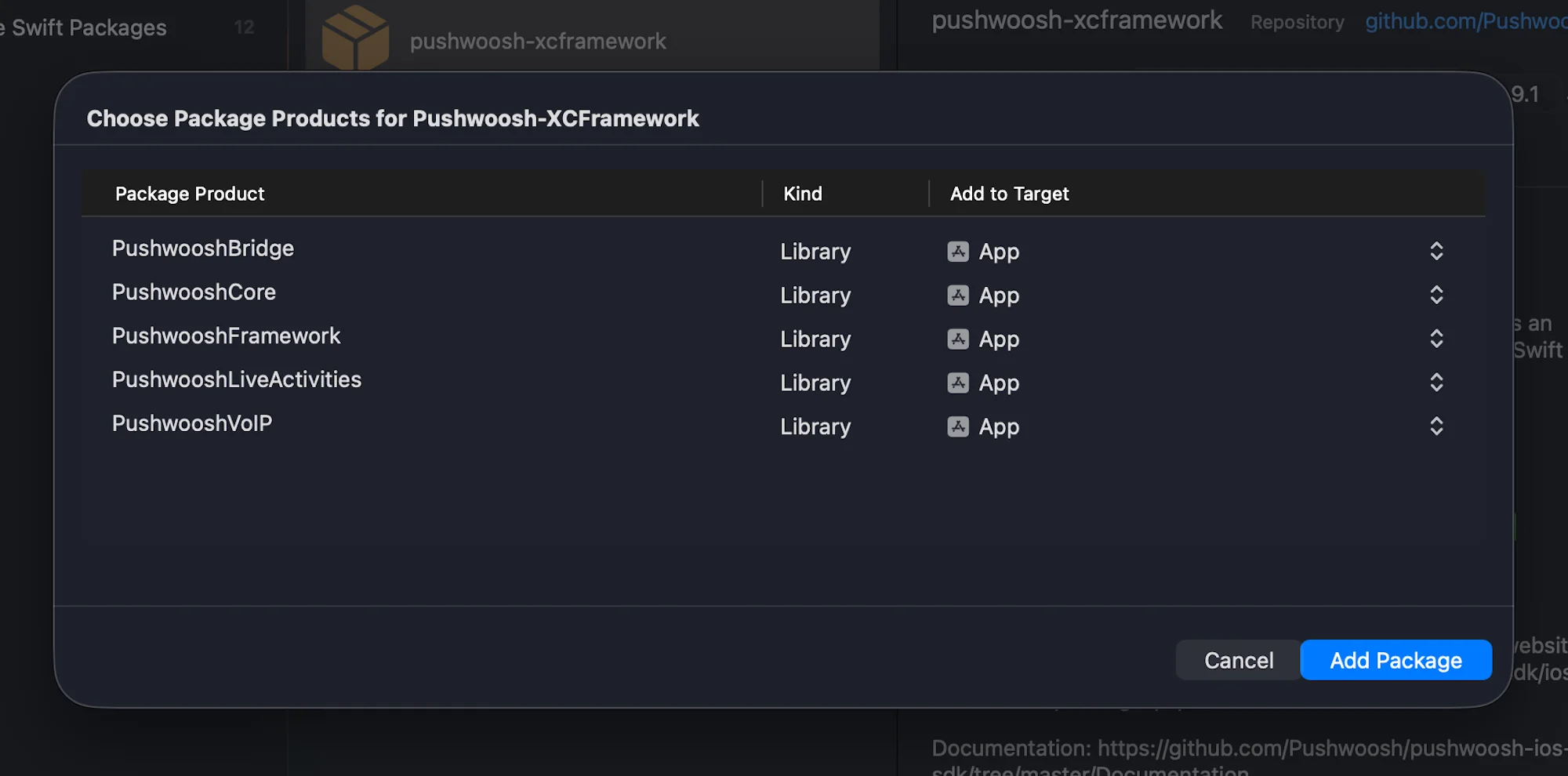
1. Fügen Sie das PushwooshVoIP-Modul zu Ihrem Projekt hinzu.
Swift Package Manager
Cocoapods
# Uncomment the next line to define a global platform for your project# platform :ios, '9.0'
target 'MyApp' do  # Comment the next line if you don't want to use dynamic frameworks  use_frameworks!
  pod 'PushwooshXCFramework'  pod 'PushwooshFramework/PushwooshVoIP'
end
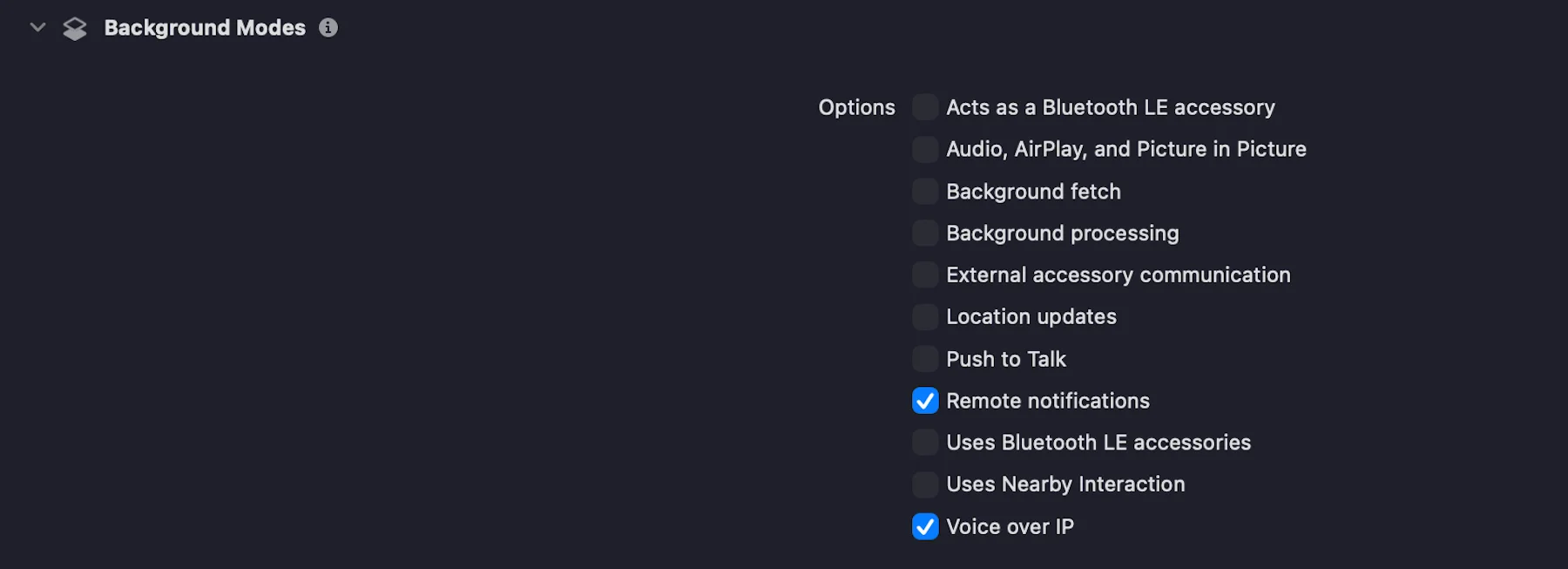
2. Fügen Sie im Tab Signing & Capabilities die Fähigkeit Voice over IP hinzu, indem Sie das Kontrollkästchen aktivieren, wie im folgenden Screenshot gezeigt:
3. Initialisieren Sie das PushwooshVoIP-Modul wie im folgenden Code gezeigt.
import UIKitimport PushwooshFrameworkimport PushwooshVoIPimport CallKitimport PushKit
@mainclass AppDelegate: UIResponder, UIApplicationDelegate, PWVoIPCallDelegate {
    func application(_ application: UIApplication,                     didFinishLaunchingWithOptions launchOptions: [UIApplication.LaunchOptionsKey: Any]?) -> Bool {
        /// Initialisiert das Pushwoosh VoIP-Modul.        ///        /// - Parameter:        ///   - supportVideo: Ein boolescher Wert, der angibt, ob Videoanrufe unterstützt werden.        ///   - ringtoneSound: Der Name der benutzerdefinierten Klingelton-Sounddatei, die für eingehende Anrufe verwendet werden soll (z. B. `"mySound.caf"`).        ///   - handleTypes: Der Typ des zu unterstützenden Anruf-Handles. Mögliche Werte:        ///     - `1` – Generisch        ///     - `2` – Telefonnummer        ///     - `3` – E-Mail-Adresse        Pushwoosh.VoIP.initializeVoIP(true, ringtoneSound: "mySound.caf", handleTypes: 1)
        // Delegat zum Empfangen von VoIP-Anrufereignissen festlegen        Pushwoosh.VoIP.delegate = self
        return true    }
    // MARK: - Erforderliche PWVoIPCallDelegate-Callbacks
    func voipDidReceiveIncomingCall(payload: PushwooshVoIP.PWVoIPMessage) {        // Eingehenden VoIP-Push behandeln    }
    func pwProviderDidReset(_ provider: CXProvider) {        // Provider-Reset behandeln    }
    func pwProviderDidBegin(_ provider: CXProvider) {        // Provider-Aktivierung behandeln    }}
4. Das PWVoIPCallDelegate-Protokoll definiert erforderliche und optionale Callbacks zur Handhabung des VoIP-Anruflebenszyklus und der CallKit-Interaktionen.
@objc public protocol PWVoIPCallDelegate: NSObjectProtocol {
    /// Wird aufgerufen, wenn ein eingehender VoIP-Push empfangen wird.    @objc func voipDidReceiveIncomingCall(payload: PushwooshVoIP.PWVoIPMessage)
    /// Optional: Wird aufgerufen, wenn der eingehende Anruf erfolgreich an CallKit gemeldet wurde.    @objc optional func voipDidReportIncomingCallSuccessfully(voipMessage: PushwooshVoIP.PWVoIPMessage)
    /// Optional: Wird aufgerufen, wenn das Melden des eingehenden Anrufs an CallKit fehlgeschlagen ist.    @objc optional func voipDidFailToReportIncomingCall(error: Error)
    /// Optional: Wird aufgerufen, wenn ein neuer ausgehender Anruf gestartet wird.    @objc optional func startCall(_ provider: CXProvider, perform action: CXStartCallAction)
    /// Optional: Wird aufgerufen, wenn ein aktiver Anruf beendet wird.    @objc optional func endCall(_ provider: CXProvider, perform action: CXEndCallAction, voipMessage: PushwooshVoIP.PWVoIPMessage?)
    /// Optional: Wird aufgerufen, wenn ein eingehender Anruf angenommen wird.    @objc optional func answerCall(_ provider: CXProvider, perform action: CXAnswerCallAction, voipMessage: PushwooshVoIP.PWVoIPMessage?)
    /// Optional: Wird aufgerufen, wenn der Anruf stummgeschaltet oder die Stummschaltung aufgehoben wird.    @objc optional func mutedCall(_ provider: CXProvider, perform action: CXSetMutedCallAction)
    /// Optional: Wird aufgerufen, wenn der Anruf gehalten oder fortgesetzt wird.    @objc optional func heldCall(_ provider: CXProvider, perform action: CXSetHeldCallAction)
    /// Optional: Wird aufgerufen, wenn ein DTMF-Ton abgespielt wird.    @objc optional func playDTMF(_ provider: CXProvider, perform action: CXPlayDTMFCallAction)
    /// Wird aufgerufen, wenn der CallKit-Provider zurückgesetzt wird.    @objc func pwProviderDidReset(_ provider: CXProvider)
    /// Wird aufgerufen, wenn der CallKit-Provider beginnt.    @objc func pwProviderDidBegin(_ provider: CXProvider)
    /// Optional: Stellt die CallKit-Anrufcontroller-Instanz bereit.    @objc optional func returnedCallController(_ controller: CXCallController)
    /// Optional: Stellt die CallKit-Provider-Instanz bereit.    @objc optional func returnedProvider(_ provider: CXProvider)
    /// Optional: Wird aufgerufen, wenn die Audiositzung aktiviert wird.    @objc optional func activatedAudioSession(_ provider: CXProvider, didActivate audioSession: AVAudioSession)
    /// Optional: Wird aufgerufen, wenn die Audiositzung deaktiviert wird.    @objc optional func deactivatedAudioSession(_ provider: CXProvider, didDeactivate audioSession: AVAudioSession)}
5. Laden Sie Ihr VoIP-Zertifikat gemäß der Anleitung zur Konfiguration von VoIP-Zertifikaten in das Pushwoosh Control Panel hoch und wählen Sie das Production-Gateway.
Das war’s!
Teilen Sie Ihr Feedback mit uns
Anchor link toIhr Feedback hilft uns, eine bessere Erfahrung zu schaffen. Daher würden wir uns freuen, von Ihnen zu hören, wenn Sie während des SDK-Integrationsprozesses auf Probleme stoßen. Sollten Sie Schwierigkeiten haben, zögern Sie bitte nicht, uns Ihre Gedanken über dieses Formular mitzuteilen.